Pet cameras that cover an apartment from one shelf
Furbo 360 Dog Camera leads for dog owners, rotating a full circle while tossing treats and flagging barks. Cat owners watching a studio do better with Petcube Cam 360. Wyze Cam Pan v3 covers the same room and records to a microSD card without any plan.
Furbo 360 Dog Camera earns the top slot for renters with a dog, since one shelf position covers an open studio. Rotation follows the dog between kitchen and sofa, and the launcher fires treats on command. Subscription is the catch, because bark and person alerts live inside Furbo Nanny.
Apartments change the maths: one camera usually watches everything, and nothing gets drilled into a landlord’s wall. We compared coverage angles, night vision modes, storage options and mounting needs against listing specifications. Owner reports about short cables and audible pan motors decided the close calls.
The top picks, ranked

Furbo 360 Dog Camera
Rotation runs a full circle from one spot, which suits an open plan studio where the dog drifts between rooms. Two way audio answers a whine before it builds into barking. Treat launcher fires small round treats across the floor, while bark and person alerts arrive through the Furbo Nanny plan.
Pros
- One unit watches an open plan studio
- Treat tossing gives a bored dog a task
- Tall body stands on a shelf with no mounting
Cons
- Smart alerts and saved clips need Furbo Nanny
- Launcher only accepts small round treats

Petcube Cam 360
Wide rotating view is the whole point, so one bookshelf position takes in a studio. Two way audio carries a voice clearly enough to call a cat off the kitchen counter. Infrared handles dark rooms without a visible glow that unsettles nervous pets.
Pros
- Single camera covers a one room apartment
- Setup runs on a standard rental Wi-Fi network
- Small base fits a crowded shelf edge
Cons
- Clip history depends on a Petcube Care plan
- No treat dispenser on this model

Wyze Cam Pan v3
Motorised pan and tilt, motion tracking and an IP65 rating arrive for far less outlay than pet specific brands. Recording to microSD keeps clips on the shelf instead of in a paid cloud. Colour night vision makes it obvious which cat pushed the plant off the sill.
Pros
- Records locally with no monthly plan
- Motion tracking follows a pet across a room
- IP65 rating survives a drafty window or balcony
Cons
- Pan motor is audible in a quiet flat
- No treat launcher or dog specific alerts

TP-Link Tapo C210
2K capture from a 3MP sensor makes small things readable on a phone, like a limp or a chewed charging cable. Pan and tilt sweep a room from one corner shelf. A microSD slot keeps footage inside the flat, which suits anyone reluctant to stream a home to a server.
Pros
- Higher resolution than the 1080p field
- Card recording works with no plan attached
- Compact body suits a shelf or a sideboard
Cons
- Notifications can lag on a congested network
- Privacy mode has to be switched on manually

eufy Indoor Cam C120
On device detection is the draw, so useful alerts land without a recurring charge. Pet and human detection separate a jumping cat from a delivery driver at the door. Its lens is fixed, meaning it watches one room rather than following movement.
Pros
- Meaningful alerts with no subscription
- Pet detection cuts false alarms from moving curtains
- Cheap enough to add in a second room
Cons
- Fixed lens cannot pan after a moving pet
- microSD card is bought separately
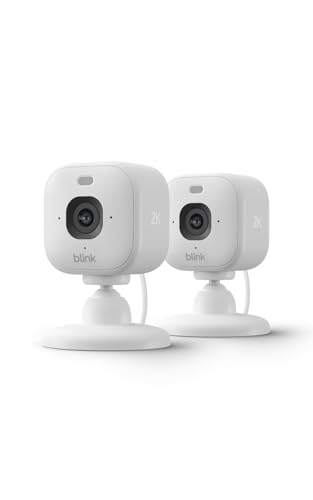
Blink Mini 2
Smallest body in this group sits palm sized on a stubby stand. USB power means an ordinary phone charger and a free socket are all it needs. Clip storage runs through a Blink plan or a Sync Module, so treat it as a live check in camera otherwise.
Pros
- Fits a windowsill or a packed bookshelf
- Runs from a standard USB charger
- Cheapest route to a second viewpoint
Cons
- Recording needs a plan or a Sync Module
- Fixed lens leaves blind spots in an L shaped room

Ring Indoor Cam 2nd Generation
Sliding cover blocks lens and microphone together, which settles arguments with flatmates and partners. One app runs this alongside Ring doorbells, so a single account covers the front door and the dog. Video history requires a Ring Home plan.
Pros
- Physical shutter ends privacy disagreements
- Shares an app with other Ring devices
- Long cable reaches an awkward socket
Cons
- Saved video sits behind a Ring Home plan
- No pan or tilt to track movement
Compared at a glance
| # | Model | Video | Best for | Score | Price |
|---|---|---|---|---|---|
| 1 | Furbo 360 Dog Camera | 1080p with 360 degree rotation | Best overall | 9.4 | Check price |
| 2 | Petcube Cam 360 | 1080p, 360 degree view | Best for whole-room coverage | 9.1 | Check price |
| 3 | Wyze Cam Pan v3 | 1080p, pan 360 degrees plus tilt | Best value | 8.9 | Check price |
| 4 | TP-Link Tapo C210 | 2K, 3MP sensor | Best for sharp detail | 8.7 | Check price |
| 5 | eufy Indoor Cam C120 | 2K resolution | Best for no monthly fees | 8.5 | Check price |
| 6 | Blink Mini 2 | 1080p with a fixed lens | Best budget | 8.3 | Check price |
| 7 | Ring Indoor Cam 2nd Generation | 1080p HDR | Best for privacy control | 8.0 | Check price |
What to look for
What matters in an apartment pet camera Space and power decide more than resolution. Check the footprint on a shelf, the cable length to the nearest socket and whether a mount needs screws a landlord would notice. Coverage angle comes next, because one room often has to be watched from one corner. Night vision range rounds it out, since most check ins happen after dark with the curtains shut. Resolution only becomes the deciding factor once those four are settled.
Fixed lens vs pan and tilt cameras Fixed models such as the eufy Indoor Cam C120 and Blink Mini 2 stay silent and cost less, which suits a single room with the pet bed in view. Pan and tilt units like the Wyze Cam Pan v3 sweep an L shaped studio from one position. Motors make a small whirring noise, and a timid cat may leave the room when it starts. Two fixed cameras sometimes beat one rotating camera for the same outlay. Corner placement helps either type, since diagonal sightlines cover more floor.
How to avoid a monthly subscription Plan costs stack up fast across a year of ownership. A microSD slot, as on the Tapo C210 and Wyze Cam Pan v3, keeps clips in the flat with no account attached. eufy pushes that further by running pet and human detection on the device itself. Furbo, Ring and Blink reserve their better alerts and clip history for paid tiers. Decide first whether you need recorded history or only a live view, then buy accordingly.
Setups for barking dogs, quiet cats and thin walls Thin walls turn barking into a tenancy problem rather than only a training problem. Bark alerts from Furbo show when it started and how long it ran, which gives a trainer real timestamps to work from. Two way audio cuts both ways: some dogs settle at a familiar voice, others get more agitated by a voice with no person attached. Cats need coverage more than treats, so a silent 2K camera on a high shelf beats a treat launcher. Anyone watching an older pet for stiffness or limping should prioritise the Tapo C210 for its sharper image.
Frequently asked questions
Which pet camera is best for a small apartment?
One rotating unit usually covers a studio, and both the Petcube Cam 360 and Wyze Cam Pan v3 manage it from a shelf. Fixed cameras work fine in a single room with a clear sightline.
Do pet cameras need Wi-Fi?
Yes. Every pick streams over the home network, and most join 2.4GHz bands only, which matters on some rental routers.
Can you use a pet camera without a subscription?
eufy Indoor Cam C120, Tapo C210 and Wyze Cam Pan v3 all record to a microSD card with no plan. Furbo, Ring and Blink keep their better alerts on paid tiers.
Do pet cameras work in the dark?
All seven switch to infrared once the light drops. Wyze adds a colour night mode, which helps when two pets look alike in grayscale.
Is a treat tossing camera worth it?
For a food motivated dog alone a few hours, it adds a small distraction and a reason to check in. It does not fix separation anxiety, which needs a behaviourist.
Can I move a pet camera between rooms?
Yes, since every pick here is plug in and freestanding. Moving one means finding a socket and re-aiming the lens, not patching drill holes.
Will a pet camera stop my dog barking when I leave?
No. It records when barking happens and for how long, which turns a neighbour complaint into something a trainer can act on.
Furbo vs Petcube: which is better for dogs?
Furbo suits dogs specifically, with bark detection and a treat launcher. Petcube Cam 360 is the stronger general room camera and cheaper to run month to month.
What is the best pet camera for cats?
Cats reward coverage and quiet over treats, so the Tapo C210 or eufy Indoor Cam C120 fit better. Pan motors on cheaper units can send a shy cat under the bed.
The verdict
Furbo 360 Dog Camera justifies its plan for renters whose dog barks or frets, because bark alerts and treat tossing target the two things neighbours actually notice. Cat owners and anyone watching a quiet flat should take the Wyze Cam Pan v3, which covers the same room and stores clips on a card for nothing. Choose the Ring Indoor Cam 2nd Generation when a housemate wants a physical lens cover more than pan and tilt.
Olivia Hartley
Olivia spent several years working at an animal shelter and a pet-supply retailer before joining the editorial team. She researches pet gear with an emphasis on safety, comfort and the fine print that owners often miss.


