Professional Optical Drives That Still Deliver
For professionals, the ASUS BW-16D1X-U leads the pack with its fast 16x burning speed and robust M-DISC support, making it ideal for archival projects, though its bulkier design may not suit ultra-portable needs.
Optical drives might seem outdated, but many professionals still rely on them for archival storage, disc duplication, and reading legacy media. Whether you’re a videographer delivering projects on Blu-ray or a data archivist preserving records on M-DISC, the right drive can save you time and protect your data.
We compared current models from top brands like ASUS, LG, and Pioneer, focusing on write speeds, format support, and durability. Here are the drives that meet professional demands.
The best picks, ranked

ASUS BW-16D1X-U External Blu-ray Writer
This external Blu-ray drive delivers 16x writing speed for BD-R, making it one of the fastest on the market. Its M-DISC support ensures long-term archival reliability, and the included software covers both Windows and macOS.
Pros
- Fast 16x BD-R writing
- M-DISC support for archival
- Includes full software suite
Cons
- Large footprint
- Requires external power
Pioneer BDR-XD07UHD External Ultra HD Blu-ray Writer
Pioneer’s slim drive offers both writing and playback of Ultra HD Blu-ray discs, a rare feature in portables. Its dust-proof design and USB power requirement make it a travel-friendly option for media professionals.
Pros
- Plays Ultra HD Blu-ray
- Slim and portable
- Dust-resistant
Cons
- Slower BD-R write speed
- Cable can be short
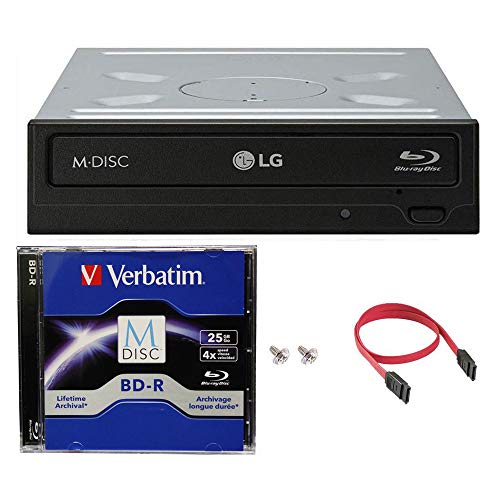
LG Electronics 16x Internal BD-R Blu-ray Burner WH16NS40
The LG WH16NS40 is a standard internal SATA drive that burns BD-R at 16x, making it a reliable choice for desktop workstations. It supports M-DISC, and its low cost makes it a value pick for professionals who don’t need portability.
Pros
- Fast 16x BD-R writing
- M-DISC support
- Cost-effective for internal use
Cons
- Requires installation
- No software included

ASUS BW-16D1HT Internal 16x Blu-ray Burner
Another internal option, the ASUS BW-16D1HT offers similar specs to the LG but includes a software suite. It also features ASUS’s Disc Encryption for added security, appealing to professionals handling sensitive data.
Pros
- Bundled software
- Disc encryption feature
- Reliable performance
Cons
- Internal only
- Noise during operation

LG Electronics 8x External USB 3.0 Blu-ray Writer BP60NB10
The LG BP60NB10 is a slim external drive that writes BD-R at 8x and supports M-DISC. Its lightweight design and bus power make it easy to carry, yet it still delivers solid performance for on-the-go burning.
Pros
- Portable and lightweight
- M-DISC support
- Bus powered
Cons
- Slower than 16x drives
- No carrying case

Pioneer BDR-XD07B External Blu-ray Writer
Pioneer’s BDR-XD07B is known for its quiet operation, a benefit in shared spaces. It offers 6x BD-R writing and supports both M-DISC and BDXL, making it versatile for various disc formats.
Pros
- Very quiet operation
- BDXL support
- Compact design
Cons
- 6x write speed is modest
- Pricey for the speed

Buffalo MediaStation 8x External USB 3.0 BD-R Blu-ray Writer
Buffalo’s drive is specifically designed for Mac users, with a sleek aluminum finish that matches Apple aesthetics. It burns at 8x and supports M-DISC, and it includes CyberLink software for macOS.
Pros
- Mac-specific design
- Bundled software for macOS
- Aluminum build
Cons
- No Windows software
- Requires extra cable for power
How they compare
| # | Model | Interface | Best for | Score | Price |
|---|---|---|---|---|---|
| 1 | ASUS BW-16D1X-U External Blu-ray Writer | USB 3.0 | High-speed professional burning | 9.4 | Check price |
| 2 | Pioneer BDR-XD07UHD External Ultra HD Blu-ray Writer | USB 3.1 Gen 1 | Ultra HD Blu-ray playback and burning | 9.1 | Check price |
| 3 | LG Electronics 16x Internal BD-R Blu-ray Burner WH16NS40 | SATA | Internal installation for desktops | 9.0 | Check price |
| 4 | ASUS BW-16D1HT Internal 16x Blu-ray Burner | SATA | Internal with software bundle | 8.8 | Check price |
| 5 | LG Electronics 8x External USB 3.0 Blu-ray Writer BP60NB10 | USB 3.0 | Portable with slim design | 8.6 | Check price |
| 6 | Pioneer BDR-XD07B External Blu-ray Writer | USB 3.1 Gen 1 | Quiet operation | 8.4 | Check price |
| 7 | Buffalo MediaStation 8x External USB 3.0 BD-R Blu-ray Writer | USB 3.0 | Mac users | 8.2 | Check price |
Before you buy
Frequently asked questions
Are optical drives still relevant for professionals?
Yes, for archival storage, producing physical media for distribution, and reading legacy discs. Many industries like film, music, and legal still require optical media.
What is M-DISC and why is it important?
M-DISC is a recordable disc format that uses a special inorganic recording layer, claimed to last up to 1000 years. It’s important for professionals who need reliable long-term data storage without degradation.
Can I play 4K Ultra HD Blu-ray movies on any Blu-ray drive?
No. Ultra HD Blu-ray playback requires a drive certified for UHD and supporting software. The Pioneer BDR-XD07UHD is one example that supports UHD playback.
What is the difference between internal and external drives?
Internal drives mount inside a desktop computer and connect via SATA. External drives connect via USB and are portable. Internal drives often offer faster speeds, while external drives offer flexibility.
Do I need a special cable for USB-C laptops?
Some external drives come with USB-C cables or adapters. If your laptop only has USB-C, ensure the drive is compatible or use a USB-A to USB-C adapter.
Can these drives burn CDs and DVDs as well as Blu-ray?
Yes, most Blu-ray drives also support DVD and CD writing and reading. They are backward compatible with all standard optical media.
How long does it take to burn a full Blu-ray disc?
At 16x speed, a 25GB BD-R can be burned in about 10 minutes. At 6x, it takes around 30 minutes. Actual time varies based on disc quality and drive performance.
Are there any software requirements for burning Blu-ray discs?
On Windows, you may need third-party software like Power2Go or Nero, as native tools often don’t support Blu-ray. macOS has built-in support for burning via Finder, but for video Blu-ray, you’ll need additional software.
What is BDXL?
BDXL is a format for Blu-ray discs with capacities up to 100GB or 128GB on triple and quadruple layer discs. Not all drives support BDXL; check specifications if you need to use these high-capacity discs.
How do I clean and maintain an optical drive?
Keep the drive free of dust, avoid using scratched discs, and use a lens cleaner occasionally. For internal drives, ensure proper airflow and avoid moving the drive while operating.
The bottom line
For most professionals, the ASUS BW-16D1X-U offers the best balance of speed, reliability, and archival features. If you need UHD playback or prefer a slim portable, consider the Pioneer BDR-XD07UHD. For a budget internal solution, the LG WH16NS40 is a solid choice. Ultimately, prioritize M-DISC support and write speed based on your workflow.
Marcus Chen
Marcus covered consumer electronics for enthusiast tech publications for six years before joining ChoiceCrest. He specializes in translating manufacturer spec sheets into plain-language buying advice, with a focus on audio, computing accessories and smart-home gear.