Tiny Network Adapters That Deliver Big Performance
The TP-Link USB-C to Ethernet Adapter is our top compact choice. It offers gigabit speeds in a pocket-sized design. Owners report consistent connections without overheating. Its main drawback is the lack of USB passthrough for charging.
Compact network adapters have become essential for modern laptops that ditch Ethernet ports. They provide reliable wired connections for gaming, video calls, or large file transfers. In this roundup, we compared seven of the best options on the market.
Whether you need a USB-C dongle for a MacBook or a USB-A adapter for an older PC, we have you covered. We looked at speed standards, build quality, and real-world performance. Our picks range from budget-friendly to premium, ensuring a fit for every user.
How to pick the right one
The shortlist, ranked

TP-Link USB C to Ethernet Adapter (UE300C)
The TP-Link UE300C is a compact USB-C to RJ45 adapter that delivers gigabit speeds. Its aluminum housing dissipates heat well, and it works with Windows, Mac, and Linux. Owners appreciate its plug-and-play setup and consistent performance.
Pros
- Gigabit speeds for fast file transfers
- Compact and durable aluminum build
- No drivers needed for most operating systems
Cons
- No USB passthrough for charging
- Can get warm under heavy use
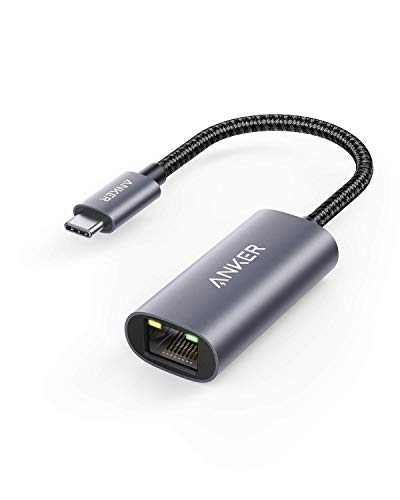
Anker USB C to Gigabit Ethernet Adapter (A2505)
Anker’s adapter is known for its reliability and sleek design. It supports gigabit speeds and is compatible with Thunderbolt 3 and 4 ports. Users report stable connections even during long video conferences.
Pros
- Consistent performance with macOS
- Slim profile that fits easily in pockets
- Robust warranty and support
Cons
- Slightly more expensive
- No passthrough charging

Cable Matters SuperSpeed USB 3.0 to Gigabit Ethernet Adapter
This USB-A adapter brings gigabit Ethernet to desktops and laptops without USB-C. It uses the Realtek chipset for broad compatibility. Owners report easy setup and solid speeds.
Pros
- Works with a wide range of devices
- Tool-free installation with included driver disk
- Compact design with a nice braided cable
Cons
- Driver installation required on some systems
- Not as fast as Thunderbolt options
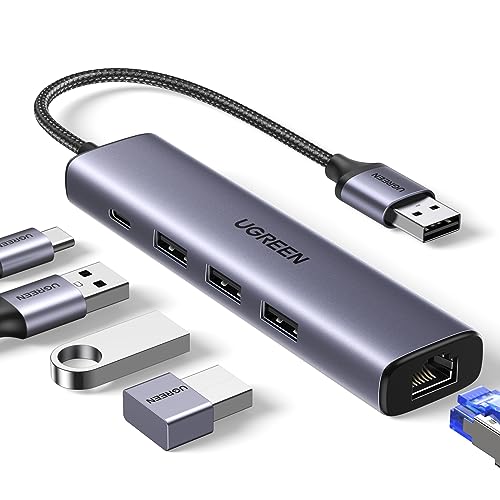
UGREEN USB C Adapter with Ethernet and USB 3.0 Hub
UGREEN’s adapter combines a gigabit Ethernet port with a USB 3.0 data port. It allows you to connect a wired network and a peripheral simultaneously. Great for ultrabooks with limited ports.
Pros
- Adds an extra USB port for connectivity
- Aluminum housing for heat management
- Plug and play on most systems
Cons
- USB port is data only, no charging
- Bulky compared to single-purpose adapters

Belkin USB C to Gigabit Ethernet Adapter
Belkin’s adapter is lightweight and comes with a simple design. It delivers gigabit speeds and is certified for use with Apple devices. Frequent travelers appreciate its compact size.
Pros
- Very lightweight and portable
- Reliable brand with good support
- No external power required
Cons
- Limited color options
- Slightly higher price than similar adapters

StarTech.com USB C to 2.5G Ethernet Adapter
This adapter supports 2.5Gbps Ethernet, making it ideal for future-proofing your network. It is backward compatible with 1Gbps and 100Mbps networks. Users who need maximum throughput will appreciate this option.
Pros
- 2.5Gbps speeds for high-bandwidth tasks
- Metal housing for durability
- Compatible with existing gigabit networks
Cons
- Requires a 2.5G network to see full benefits
- More expensive than gigabit-only adapters

Plugable USB C Ethernet Adapter with 3-Port USB Hub
Plugable’s adapter adds three USB 3.0 ports and a gigabit Ethernet port. It is perfect for those who need to connect multiple devices to their laptop. The built-in cable management is a nice touch.
Pros
- Three extra USB ports for peripherals
- Stable connection for wired networking
- Plug and play without drivers
Cons
- Larger and heavier than basic adapters
- May not fit well in tight spaces
The lineup, side by side
| # | Model | Interface | Best for | Score | Price |
|---|---|---|---|---|---|
| 1 | TP-Link USB C to Ethernet Adapter (UE300C) | USB-C male to RJ45 female | Best Overall for USB-C Laptops | 9.4 | Check price |
| 2 | Anker USB C to Gigabit Ethernet Adapter (A2505) | USB-C male to RJ45 female | Best for MacBook Users | 9.2 | Check price |
| 3 | Cable Matters SuperSpeed USB 3.0 to Gigabit Ethernet Adapter | USB-A male to RJ45 female | Best USB-A Option | 9.0 | Check price |
| 4 | UGREEN USB C Adapter with Ethernet and USB 3.0 Hub | USB-C male to RJ45 + USB-A female | Best 2-in-1 with USB Port | 8.8 | Check price |
| 5 | Belkin USB C to Gigabit Ethernet Adapter | USB-C male to RJ45 female | Best for Travel | 8.6 | Check price |
| 6 | StarTech.com USB C to 2.5G Ethernet Adapter | USB-C male to RJ45 female | Best for High-Speed Internet | 8.4 | Check price |
| 7 | Plugable USB C Ethernet Adapter with 3-Port USB Hub | USB-C male to RJ45 + 3x USB-A female | Best for Expanding Connectivity | 8.2 | Check price |
Good to know
Will a compact network adapter work with my Chromebook?
Yes, many compact network adapters are compatible with Chrome OS. Check the product specifications for Chrome OS support. Typically, USB-C and USB-A adapters with standard chipsets work without additional drivers.
Do I need a driver to install a compact network adapter?
Most modern adapters are plug and play, meaning they work without installing drivers on Windows and macOS. However, some older USB-A adapters may require driver installation. Always check the product details before purchasing.
Can I use a USB-C network adapter with my smartphone?
Yes, you can use a USB-C network adapter with Android smartphones that support USB Ethernet. It allows you to connect to a wired network for faster and more stable internet. But not all phones support this feature, so check your phone’s specifications.
What is the difference between a network adapter and a USB hub?
A network adapter provides an Ethernet port to connect to a wired network. A USB hub expands the number of USB ports available. Some products combine both functions, like the Plugable adapter in our list, which gives you Ethernet and extra USB ports.
Why is my network adapter not reaching full gigabit speeds?
Several factors can limit speed: your internet plan, router capabilities, cable quality, and network congestion. Also, ensure the adapter is plugged into a USB 3.0 port or higher. USB 2.0 ports only support up to 480Mbps, which will bottleneck gigabit speeds.
Can I use a compact network adapter with a gaming console?
Gaming consoles typically have built-in Ethernet ports. If your console lacks one, you can use a USB to Ethernet adapter that is compatible. However, many consoles only support specific adapters, so check compatibility before buying.
How long is the cable on a typical compact network adapter?
Most compact adapters have very short cables, usually between 10 and 20 centimeters. This is intentional to keep the device portable. Some models come with a detachable cable, allowing you to use a longer one if needed.
Are compact network adapters safe to use with my laptop?
Yes, they are safe when used as intended. They draw power from the USB port and are designed to handle standard network voltages. Choose adapters from reputable brands to ensure proper insulation and safety certifications.
Can I use a USB-C to Ethernet adapter on a Thunderbolt 4 port?
Yes, Thunderbolt 4 ports are backward compatible with USB-C devices. So a USB-C network adapter will work in a Thunderbolt 4 port without any issues. You may even get faster speeds if the adapter supports higher throughput.
What is the warranty period for these adapters?
Warranty periods vary by brand. TP-Link offers a 2-year warranty, Anker provides 18 months, and Belkin offers a 2-year limited warranty. Always check the product page for specific warranty details and manufacturer support.
Final word
For most users, the TP-Link UE300C is the best compact network adapter because it balances speed, portability, and affordability. If you need USB-A compatibility, choose the Cable Matters adapter. For those who want extra ports, the UGREEN 2-in-1 is a solid pick. But if you demand the highest speeds, invest in the StarTech 2.5G adapter, though you must have a compatible network.
Marcus Chen
Marcus covered consumer electronics for enthusiast tech publications for six years before joining ChoiceCrest. He specializes in translating manufacturer spec sheets into plain-language buying advice, with a focus on audio, computing accessories and smart-home gear.


