Office phones ranked by lines, screen and PoE support
Yealink SIP-T54W leads for most offices, combining 16 SIP accounts, onboard Wi-Fi and a 4.3 inch color screen. Poly VVX 450 fits reception desks that juggle twelve lines at once. Grandstream GRP2614 covers a small team for less, adding a second screen of BLF keys.
Yealink SIP-T54W fits most offices running a cloud phone service. Sixteen SIP accounts, dual Gigabit ports and onboard Wi-Fi cover a desk without new cabling, and PoE removes the power brick. Setup is the catch, since SIP credentials arrive from your provider rather than in the box.
Desk phones split into two worlds. VoIP handsets register to a provider over Ethernet or Wi-Fi. Analog and DECT sets run on a copper line or an on site base, and they keep ringing when broadband drops. We compared line capacity, display size and resolution, headset ports, PoE class and expansion modules. Recurring owner comments about speakerphone clarity and firmware updates broke the close calls.
The top picks, ranked

Yealink SIP-T54W
Ten line keys sit beside a 4.3 inch 480 by 272 color display, so transfers and parked calls stay visible without scrolling. Dual Gigabit ports let a computer share one wall jack. Wi-Fi and Bluetooth are on the board already, which matters in leased offices where new cabling is off limits.
Pros
- Wi-Fi and Bluetooth without a dongle
- PC passthrough port frees a wall jack
- Accepts EXP50 expansion modules
Cons
- SIP credentials must come from a provider
- Color screen is not a touchscreen

Poly VVX 450
Twelve line keys answer the one problem a front desk really has: seeing every call at once. Callers list in a readable font on a 4.3 inch color LCD. Poly HD Voice keeps speakerphone conversations intelligible at arm’s length, and an RJ9 jack takes a wired headset.
Pros
- Twelve keys absorb heavy transfer volume
- Speakerphone stays clear across a desk
- Registers to most major SIP platforms
Cons
- Wi-Fi requires a separate USB adapter
- Footprint is bulkier than four line sets

Grandstream GRP2614
Two screens do the work here. A 2.8 inch color LCD handles calls while a 2.4 inch side panel carries 24 virtual BLF keys across multiple pages. Four SIP accounts suit a small team, and zero touch provisioning makes a bulk rollout practical for an IT reseller.
Pros
- Side screen shows colleague presence at a glance
- Integrated Wi-Fi on a mid tier handset
- Zero touch provisioning for IT teams
Cons
- Main display is smaller than rivals
- Menu design feels dated next to Yealink
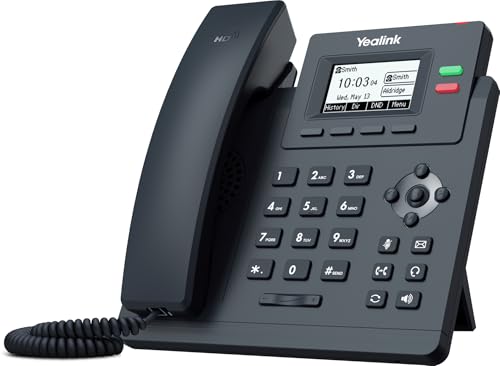
Yealink SIP-T31P
Savings come out of the screen and the radios, not the audio. Optima HD Voice still carries wideband calls through a 2.3 inch graphical display and two SIP accounts. PoE class 1 powers it over the network cable, and a wall mount option suits break rooms, stock rooms and hot desks.
Pros
- PoE powered, so no adapter is needed
- Wideband audio despite the basic screen
- Wall mountable for shared areas
Cons
- Greyscale display only
- No Bluetooth or Wi-Fi radio
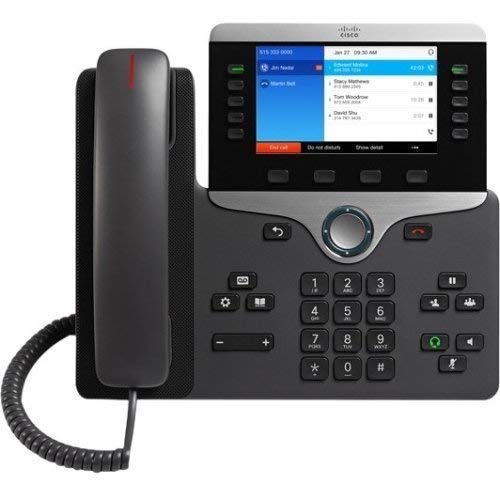
Cisco IP Phone 8841
Offices already running Cisco Unified Communications Manager get the tightest integration in this group. Five lines list on a 5 inch widescreen VGA panel at 800 by 480, the sharpest resolution here. Check the model number carefully before ordering, because the 8841 carries no Bluetooth radio and no USB ports.
Pros
- Sharpest screen resolution in this lineup
- Deep Cisco UCM and Webex integration
- Wideband audio on handset and speakerphone
Cons
- No Bluetooth or USB on the 8841
- Third party SIP support is limited

Panasonic KX-TGF574S
One corded base plus four cordless handsets covers a house sized office on a single copper line. Messages record to a built in digital answering system, so no monthly service is involved. Link2Cell pairs a mobile over Bluetooth, which rings cell calls on every handset in the set.
Pros
- Keeps working through an internet outage
- Answering system needs no subscription
- One touch blocking for nuisance numbers
Cons
- No SIP registration or VoIP features
- Cordless handsets need charging cradles

VTech CM18245
Four analog lines, per line mailboxes and a backlit caller ID display fit a clinic, salon or small shop. Staff moving between rooms can add cordless handsets, up to ten on one base. An auto attendant routes incoming callers when nobody sits at the front desk.
Pros
- Auto attendant without a cloud plan
- Grows to ten cordless handsets
- Runs on standard copper lines
Cons
- Analog only, with no upgrade path to SIP
- Monochrome display looks dated
How they stack up
| # | Model | Accounts | Best for | Score | Price |
|---|---|---|---|---|---|
| 1 | Yealink SIP-T54W | 16 SIP accounts | Best overall | 9.4 | Check price |
| 2 | Poly VVX 450 | 12 | Best for busy reception desks | 9.2 | Check price |
| 3 | Grandstream GRP2614 | 4 SIP accounts | Best value | 9.0 | Check price |
| 4 | Yealink SIP-T31P | 2 SIP accounts | Best budget | 8.7 | Check price |
| 5 | Cisco IP Phone 8841 | 5 | Best for Cisco and Webex systems | 8.5 | Check price |
| 6 | Panasonic KX-TGF574S | DECT 6.0 corded and cordless | Best for landline home offices | 8.2 | Check price |
| 7 | VTech CM18245 | 4 analog | Best for small business without VoIP | 8.0 | Check price |
How to pick the right one
What to look for in an office phone Start with how calls reach the building. VoIP handsets register to a provider over Ethernet or Wi-Fi, while analog sets need copper or an on site PBX. Count simultaneous calls rather than staff, since a five person team rarely runs past four at once. PoE class comes next, because it deletes a power brick from every desk. Check that a headset port exists in the form you use, RJ9 or Bluetooth.
VoIP desk phones vs analog and DECT sets Cloud handsets such as the Yealink SIP-T54W and Poly VVX 450 bring call parking, presence keys and directory sync. Analog kit like the Panasonic KX-TGF574S carries on ringing when broadband dies. Sites with unreliable internet often run both, keeping one cordless analog base as a fallback. DECT sits between the two, giving cordless range on a copper line without any SIP account.
Best office phone for a reception desk Front desk staff need line keys readable without scrolling. Twelve physical keys on the VVX 450 deliver that, and 24 virtual BLF keys on the Grandstream GRP2614 approach it differently. Directories past roughly 30 people justify an expansion module such as the Yealink EXP50. In that seat a wired headset beats speakerphone quality, since calls run back to back all day.
Home offices, small teams and shared extensions Remote workers on a cloud service can run the SIP-T31P, which draws power from the network cable and wall mounts in a spare room. Households on a landline do better with the Panasonic, since four cordless handsets cover a whole floor. Shops and clinics without VoIP get auto attendant routing from the VTech CM18245. Where no second Ethernet drop exists, a PC passthrough port or onboard Wi-Fi solves the cabling problem.
Questions worth asking
What is the difference between a VoIP phone and a regular office phone?
VoIP handsets carry calls as data over Ethernet or Wi-Fi and register to a provider account. Regular office phones use copper or an on site PBX. VoIP adds directory sync and call parking, while analog keeps working during an internet outage.
Do office phones need a separate power supply?
Most VoIP models here run on Power over Ethernet, so one cable carries power and data. Yealink SIP-T54W and SIP-T31P both work that way. DECT and analog sets such as the Panasonic KX-TGF574S still need a wall adapter at the base.
How many lines does a small office actually need?
Count simultaneous calls, not headcount. Four lines cover most teams under fifteen people. Reception desks that transfer constantly are the exception, and those seats benefit from the twelve keys on a Poly VVX 450.
Can you use a wireless headset with an office phone?
Yes, over Bluetooth on the SIP-T54W and GRP2614. Cisco 8841 owners pair a wireless base through the RJ9 port instead. Confirm your headset brand lists an electronic hook switch cable for that exact handset before ordering.
Which office phone is best for a home office?
Panasonic KX-TGF574S suits a home office on a landline, pairing a corded base with four cordless handsets and an answering system. Remote workers on a cloud phone service should take the Yealink SIP-T31P instead.
Is a color screen worth it on a desk phone?
Color earns its place when a phone shows presence status, contact photos or a long directory. Grandstream uses it across both GRP2614 screens for exactly that. For a break room extension, the greyscale panel on the SIP-T31P is plenty.
Do these phones work with Microsoft Teams or Zoom?
Several Yealink and Poly handsets ship in certified Teams or Zoom Phone variants under separate part numbers. Standard SIP versions register to many other providers. Confirm the exact variant on the listing before ordering.
Can office phones block spam and robocalls?
Analog sets handle blocking on the handset itself. Panasonic KX-TGF574S offers a one touch block button plus a stored list. On VoIP systems, filtering happens in the provider dashboard rather than on the phone.
What is PoE and does an office phone need it?
Power over Ethernet sends power down the same network cable as data. It removes one adapter and one outlet per desk. PoE class matters only for switch budgeting, with the SIP-T31P at class 1 and the Cisco 8841 at class 2.
Yealink vs Poly: which desk phone suits a small office?
Yealink SIP-T54W wins on account capacity, onboard Wi-Fi and Bluetooth. Poly VVX 450 wins on physical line keys and speakerphone clarity. Teams with heavy transfer traffic should lean Poly, everyone else Yealink.
The bottom line
Yealink SIP-T54W takes the overall pick for 16 accounts, onboard Wi-Fi and a passthrough port that saves a wall jack. Reception desks handling constant transfers should buy the Poly VVX 450 for its twelve physical keys. Anyone tied to copper, or working where broadband drops weekly, is better served by the Panasonic KX-TGF574S.
Marcus Chen
Marcus covered consumer electronics for enthusiast tech publications for six years before joining ChoiceCrest. He specializes in translating manufacturer spec sheets into plain-language buying advice, with a focus on audio, computing accessories and smart-home gear.


