Keypad Door Locks for Keyless Entry That Actually Works
The Schlage Encode Plus covers the widest range of entry methods and smart home platforms for most households. Apple HomeKit users should look at the same Encode Plus for its native Home Key support, while anyone wanting a simpler setup can rely on the Kwikset Halo Touch.
The Schlage Encode Plus earns the top spot for combining a keypad, fingerprint reader, Apple Home Key support and built-in Wi-Fi without needing a separate hub. Its main limitation is a higher cost than simpler keypad-only locks for buyers who do not need every entry method. Buyers who only want basic keypad entry or a specific smart home ecosystem have better-matched options below.
We compared published entry methods, battery life ratings, smart home platform compatibility and installation requirements rather than running our own long-term reliability testing.
The top picks, ranked

Schlage Encode Plus
This deadbolt combines a backlit keypad, a fingerprint sensor and Apple Home Key support, giving three distinct unlock methods without a separate smart home hub. Built-in Wi-Fi connects directly to a home network, skipping the bridge device some competing locks require. A auto-lock feature re-engages the deadbolt after a set delay, useful for anyone who forgets to lock up manually.
Pros
- Three distinct entry methods beyond just a keypad
- Built-in Wi-Fi skips the need for a separate smart hub
- Apple Home Key support appeals to iPhone-centric households
Cons
- Costs more than keypad-only locks without biometric features
- Fingerprint sensor adds a part that can wear faster than a simple keypad

Kwikset Halo Touch
Kwikset pairs a fingerprint reader with a traditional keypad on this lock, skipping the more complex ecosystem features found on the Schlage Encode Plus for a simpler overall setup. Built-in Wi-Fi still connects directly without a separate hub, matching the Encode Plus on that front. The SmartKey cylinder also allows quick rekeying without replacing the entire lock.
Pros
- Fingerprint and keypad entry without needing a hub
- SmartKey cylinder allows quick rekeying
- Simpler app and setup than multi-ecosystem locks
Cons
- No Apple Home Key support like the Schlage Encode Plus
- Fewer total entry methods than the Encode Plus

Yale Assure Lock 2 with Keypad
Yale builds this lock around swappable connectivity modules, letting buyers add Wi-Fi, Z-Wave or Matter support separately rather than paying for built-in Wi-Fi they may not need. The keypad itself uses a backlit design that stays visible at night without extra lighting. This modular approach suits buyers who may upgrade their smart home platform later without replacing the entire lock.
Pros
- Swappable connectivity module avoids paying for unused features
- Backlit keypad stays visible at night
- Future smart home platform changes do not require a new lock
Cons
- Connectivity module is a separate purchase, adding setup steps
- No fingerprint or Home Key entry option like Schlage or Kwikset
Ultraloq U-Bolt Pro
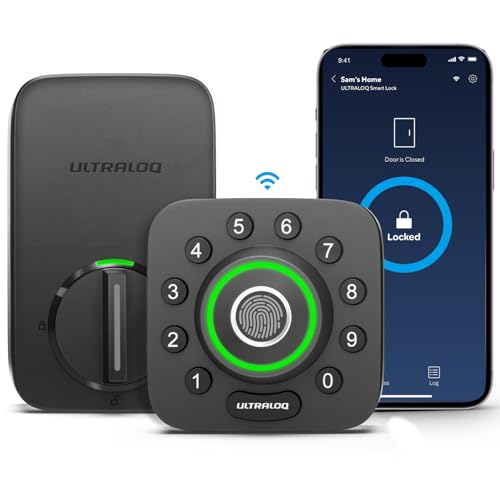
This lock covers keypad, fingerprint and Bluetooth app unlocking at a lower cost than the Schlage Encode Plus, though it requires an optional Wi-Fi bridge for remote access over the internet. A auto-unlock feature can open the door automatically as the owner’s phone approaches, a convenience feature not found on every lock in this list. Physical key backup remains available for power outages or dead batteries.
Pros
- Covers four entry methods at a lower cost than premium locks
- Auto-unlock opens the door as the owner’s phone approaches
- Physical key backup works during power or battery issues
Cons
- Remote smart home access requires a separately sold Wi-Fi bridge
- Shorter battery life than the Schlage or Kwikset locks

Eufy Security Smart Lock C220
Eufy rates this lock’s battery life well beyond most competitors here, reducing how often owners need to swap batteries. A keypad and fingerprint reader cover the main entry methods, with Bluetooth app unlocking available through the Eufy Security app. It lacks built-in Wi-Fi, relying on Bluetooth range for app-based unlocking without a bridge accessory.
Pros
- Longer battery life than most other keypad locks in this list
- Keypad and fingerprint entry included at a mid-range price
- Bluetooth app unlocking works without an extra bridge accessory
Cons
- No built-in Wi-Fi, limiting true remote access away from home
- Smart home platform support is narrower than Schlage or Kwikset

SwitchBot Lock Pro with Keypad Touch
Rather than replacing an entire deadbolt, this system attaches over an existing lock’s thumb turn, paired with a separate keypad accessory for code entry. It suits renters or buyers who want keyless entry without altering the door’s existing hardware. A separate Wi-Fi hub, sold alongside the lock, enables remote access and smart home integration.
Pros
- Retrofits onto an existing deadbolt without replacing hardware
- Suits renters who cannot permanently alter door hardware
- Keypad and fingerprint available as modular accessories
Cons
- Keypad and Wi-Fi hub are separate purchases, adding total cost
- Relies on the existing deadbolt’s mechanical condition to function well

Level Lock Plus with Keypad
Level builds its lock hardware into the edge of the door rather than a bulky exterior unit, keeping the outside nearly indistinguishable from a standard deadbolt until the included keypad accessory is mounted. Apple Home Key and built-in Wi-Fi both come standard, matching higher-end features on a smaller visual footprint. Its discreet design suits buyers who want smart functionality without an obviously modern-looking lock.
Pros
- Minimal exterior profile keeps the door’s original look
- Apple Home Key and Wi-Fi included without a separate hub
- Discreet design suits buyers avoiding an obviously modern look
Cons
- Keypad is a separate mounted accessory rather than built into the lock face
- Costs more than simpler single-unit keypad locks
How they stack up
| # | Model | Entry Methods | Best for | Score | Price |
|---|---|---|---|---|---|
| 1 | Schlage Encode Plus | Keypad, fingerprint, Apple Home Key, physical key | Best Overall | 9.3 | Check price |
| 2 | Kwikset Halo Touch | Keypad, fingerprint, physical key | Best for Simple Fingerprint and Keypad Entry | 8.9 | Check price |
| 3 | Yale Assure Lock 2 with Keypad | Keypad, physical key | Best Modular Design | 8.7 | Check price |
| 4 | Ultraloq U-Bolt Pro | Keypad, fingerprint, Bluetooth app, physical key | Best Value Multi-Entry Lock | 8.5 | Check price |
| 5 | Eufy Security Smart Lock C220 | Keypad, fingerprint, Bluetooth app, physical key | Best Longer Battery Life | 8.3 | Check price |
| 6 | SwitchBot Lock Pro with Keypad Touch | Keypad (accessory), fingerprint (accessory), Bluetooth app | Best for Retrofitting an Existing Deadbolt | 8.1 | Check price |
| 7 | Level Lock Plus with Keypad | Keypad (accessory), Apple Home Key, Bluetooth app, physical key | Best Minimal-Profile Design | 8.0 | Check price |
What matters most
What to look for in a keypad door lock Entry method variety matters first, since a keypad alone works fine for most households but a fingerprint reader or phone-based unlocking adds backup options if a code is forgotten. Connectivity determines whether remote access and smart home integration work out of the box or require an additional bridge or hub purchase. Battery life affects how often the lock needs attention, ranging from about four months to nine months across the locks in this list.
Built-in Wi-Fi versus Bluetooth with a separate hub The Schlage Encode Plus, Kwikset Halo Touch and Level Lock Plus all include Wi-Fi directly, allowing remote unlocking and notifications without extra hardware. The Ultraloq U-Bolt Pro, SwitchBot Lock Pro and Eufy Security C220 rely primarily on Bluetooth, with Wi-Fi available only through a separately sold bridge or hub. Buyers who want remote access from anywhere should prioritize built-in Wi-Fi unless they are comfortable adding a bridge accessory.
Replacing a deadbolt versus retrofitting an existing one Most locks in this list, including the Schlage, Kwikset, Yale and Ultraloq options, replace the entire deadbolt assembly during installation. The SwitchBot Lock Pro instead attaches over an existing deadbolt’s thumb turn, a better fit for renters who cannot permanently modify door hardware. Homeowners planning to stay long-term generally get more entry method options from a full deadbolt replacement.
Matching a lock to an existing smart home ecosystem Apple HomeKit households get native Home Key support from the Schlage Encode Plus or the more discreet Level Lock Plus. Households without a strong platform preference have the most flexibility with Amazon Alexa and Google Assistant support, available across most locks in this list. Buyers using Z-Wave or Matter-based systems should check the Yale Assure Lock 2’s modular connectivity option before choosing a fixed-platform lock.
Questions worth asking
Do keypad door locks work without Wi-Fi?
Yes. Locks like the Yale Assure Lock 2 and base Eufy Security C220 work with a basic keypad entry even without Wi-Fi, though remote access features need a connection of some kind.
What happens if a keypad lock’s battery dies?
Most keypad locks, including every one in this list, include a physical key backup or external battery terminals to regain entry if the internal battery dies.
Can I use a fingerprint instead of a code on a keypad lock?
Locks like the Schlage Encode Plus, Kwikset Halo Touch and Ultraloq U-Bolt Pro include a fingerprint reader as an alternative to typing a code.
Is Apple Home Key supported on keypad door locks?
Yes, the Schlage Encode Plus and Level Lock Plus both support Apple Home Key alongside their keypad and other entry methods.
Do I need a smart home hub for a keypad door lock?
Only for locks relying on Bluetooth alone, like the Ultraloq U-Bolt Pro or SwitchBot Lock Pro without their optional bridge. Locks with built-in Wi-Fi do not need one.
Can renters install a keypad lock without replacing the whole deadbolt?
Yes, the SwitchBot Lock Pro attaches over an existing deadbolt’s thumb turn instead of replacing the full assembly, making it reversible for renters.
How long do batteries last in a keypad door lock?
Battery life ranges from about four months on the Ultraloq U-Bolt Pro to around nine months on the Eufy Security C220, depending on usage frequency.
Are keypad door locks secure against hacking?
Reputable brands in this list use encrypted communication between the lock, app and any hub, though no connected device is entirely immune to risk, and physical key backup remains as a fallback.
Can multiple people have their own codes on a keypad lock?
Yes, every lock in this list supports multiple user codes, useful for family members, guests or short-term access that can be removed later.
Our take
The Schlage Encode Plus is the strongest overall pick for households wanting the most entry method flexibility without a separate hub. Apple HomeKit users on a tighter budget should consider the Level Lock Plus instead for its discreet design and native Home Key support. Renters who cannot replace their existing deadbolt should skip full replacement locks entirely and choose the SwitchBot Lock Pro.
Marcus Chen
Marcus covered consumer electronics for enthusiast tech publications for six years before joining ChoiceCrest. He specializes in translating manufacturer spec sheets into plain-language buying advice, with a focus on audio, computing accessories and smart-home gear.