9 Keyboards That Actually Feel Good to Type On
Keychron K8 Pro leads overall with hot swappable switches and multi-device wireless. Logitech MX Keys S suits quiet office typing best, and SteelSeries Apex Pro TKL Gen 3 wins for adjustable actuation in gaming.
Most people moving beyond a basic office board should look at the Keychron K8 Pro, thanks to hot swappable switches and wireless that pairs across several machines. Quiet office typists get more from the Logitech MX Keys S, while competitive gamers benefit most from the adjustable actuation on the SteelSeries Apex Pro TKL Gen 3.
Advertised specs like polling rate and lighting effects rarely matter after a week of daily use, which makes keyboard shopping confusing. Switch feel, layout size and whether the case flexes affect typing far more. We compared published switch specifications, layouts, connection options and build materials, alongside what owners report about long-term key feel, battery life and how loud each board runs in a shared room.
Before you buy
What to look for: switch type decides feel more than anything Linear switches move smoothly with no bump, suiting gaming and fast typing. Tactile switches add a noticeable bump at actuation, which many typists prefer because the keypress registers physically. Clicky switches layer on a sharp sound, satisfying alone but unwelcome in a shared room. Tactile is the safest starting point without trying switches first, and a hot swap board leaves room to change course later.
Full size, tenkeyless or 75 percent: layout trades keys for desk space Full size boards keep a number pad, which matters for spreadsheet and accounting work. Tenkeyless drops that pad and frees a surprising amount of room for mouse movement. Compact 75 percent boards keep arrow keys and a function row in a smaller shell, while 60 percent layouts push those onto a function layer. Deciding how often the number pad actually gets used comes before giving it up.
Wired, Bluetooth or 2.4 GHz: which connection for which use Wired connections remove latency and battery concerns entirely. Bluetooth offers the most flexibility switching between a laptop, tablet and desktop, though waking can lag slightly. A dedicated 2.4 GHz receiver stays the best wireless option for gaming, with latency close to wired. Triple mode boards cover every situation, explaining why that feature has become a common selling point.
Build quality details that surface after a few months Case material and mounting style shape how a keyboard sounds and how much it flexes underhand. A metal plate or gasket mount produces a deeper, less hollow sound than a bare plastic shell. Doubleshot or PBT keycaps resist the shine that develops on cheaper ABS caps within months. Stabiliser quality decides whether the spacebar and shift keys rattle, a common regret discovered only after purchase.
Our top picks

Keychron K8 Pro
Hot swap sockets sit under a tenkeyless layout, letting switches change later without soldering. Bluetooth pairs with several devices at once, and a USB-C cable removes latency entirely when plugged in. QMK and VIA support puts remapping directly on the keyboard instead of background software.
Pros
- Switches swap without soldering
- Open firmware remapping
- Works across Mac and Windows layouts
Cons
- Heavier than typical wireless boards
- Stock keycaps are unremarkable

Logitech MX Keys S
Low profile scissor switches paired with dished keycaps keep typing quiet and quick through long sessions. A single key press switches between three paired devices, and USB-C charges a battery backed by proximity-activated backlighting. Shared offices where noise matters gain the most from this design.
Pros
- Very quiet in shared spaces
- Switches between three devices instantly
- Comfortable dished keycaps
Cons
- No mechanical switch feel
- Not adjustable or repairable

SteelSeries Apex Pro TKL Gen 3
Magnetic switches let a player set exactly how far each key travels before it registers, with different points for different keys. A movement key can trigger lighter while a key hit by accident needs a deeper press. An aluminium top plate and doubleshot keycaps add a solidity most gaming boards lack.
Pros
- Per key actuation adjustment
- Very solid aluminium construction
- Fast repeated key presses
Cons
- Requires software for full features
- Sits at the premium end of the market

Razer BlackWidow V4 75%
Cutting the number pad while keeping arrow keys and a function row frees desk space for a mouse in this 75 percent layout. Hot swap sockets sit above internal foam layers that deepen the sound compared to typical gaming boards. Owners report the gasket mounted plate softens typing noticeably versus older Razer models.
Pros
- Compact layout keeps arrow keys
- Softer gasket mounted typing feel
- Switches swap easily
Cons
- Software runs in the background
- Wired only in this configuration
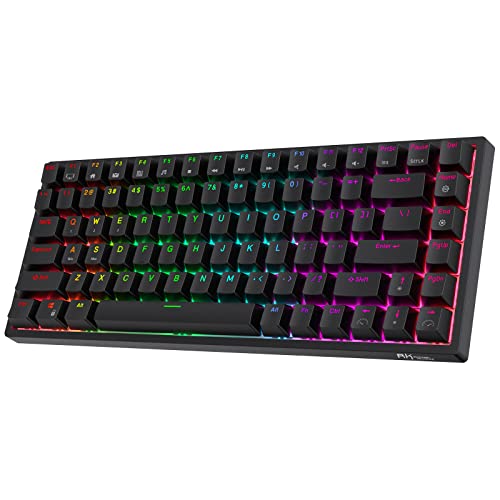
Royal Kludge RK84
Three connection modes, Bluetooth, wireless receiver and wired, plus hot swap sockets are unusual at this price point. Its 75 percent layout suits smaller desks while still including a full arrow cluster. Build quality falls short of premium boards, but the feature list is hard to match for the cost.
Pros
- Three connection modes included
- Hot swap at a low entry point
- Compact arrow key layout
Cons
- Case flexes more than premium boards
- Software is basic
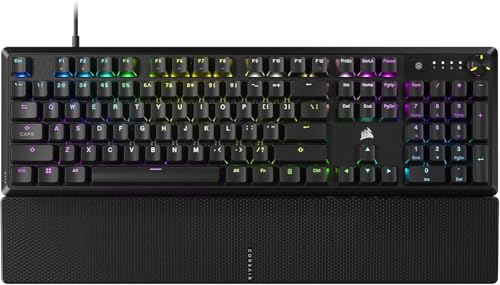
Corsair K70 CORE
A full number pad sits alongside a media wheel and internal sound-dampening foam on this full size board. Gamers who also need spreadsheet numbers get both without compromise here. Owners report a fuller sound than earlier Corsair boards thanks to the added dampening layers.
Pros
- Keeps a full number pad
- Dampened case sounds better
- Useful media wheel
Cons
- Takes up significant desk width
- Switches are not hot swappable

Redragon K552 Kumara
A metal top plate under a compact tenkeyless layout has made this the default budget mechanical pick for years. Wireless is absent and keycaps are basic, yet typing feel jumps well past a membrane board. Trying mechanical switches for the first time rarely costs less than this.
Pros
- Very affordable mechanical entry
- Sturdier than expected at this level
- Compact desk footprint
Cons
- Basic keycaps and stabilisers
- Wired only with a fixed cable
How they compare
| # | Model | Layout | Best for | Score | Price |
|---|---|---|---|---|---|
| 1 | Keychron K8 Pro | Tenkeyless, 87 keys | Best overall | 9.4 | Check price |
| 2 | Logitech MX Keys S | Full size | Best for office typing | 9.2 | Check price |
| 3 | SteelSeries Apex Pro TKL Gen 3 | Tenkeyless | Best for gaming | 9.1 | Check price |
| 4 | Razer BlackWidow V4 75% | 75 percent | Best for customisation | 8.8 | Check price |
| 5 | Royal Kludge RK84 | 75 percent | Best value wireless | 8.6 | Check price |
| 6 | Corsair K70 CORE | Full size | Best full size gaming board | 8.3 | Check price |
| 7 | Redragon K552 Kumara | Tenkeyless, 87 keys | Best budget | 8.0 | Check price |
Frequently asked questions
What keyboard switch is best for typing?
Tactile switches are the usual recommendation since the bump confirms a keypress without the noise of a clicky switch. Linear switches suit a smoother stroke preference, and many typists settle the question by trying both on a hot swap board.
Is a mechanical keyboard worth it for office work?
For typing feel and longevity, yes, but noise limits it in shared spaces. A quiet low profile board like the MX Keys S often works better for an office, saving a mechanical board for a home desk.
What does hot swappable mean on a keyboard?
Switches sit in sockets instead of being soldered in, so pulling one out and fitting a different type takes a small tool and no soldering skill. Typing feel changes without buying an entirely new keyboard.
Should I get a tenkeyless or full size keyboard?
Regular number entry favors keeping the number pad. Gaming or wanting more mouse space favors tenkeyless, which frees several inches of desk and brings the mouse closer to the body, easing shoulder strain.
Do wireless keyboards add noticeable lag?
A modern 2.4 GHz receiver runs fast enough that most people cannot tell the difference from wired. Bluetooth adds slightly more latency, better suited to typing than competitive gaming.
Why do keycaps get shiny over time?
Cheaper ABS plastic polishes where fingers rest most often. PBT and doubleshot keycaps resist this far longer, which explains why they are a common first upgrade on budget boards.
What causes a rattling spacebar?
Poorly tuned stabilisers are the usual culprit. Better boards ship with stabilisers already clipped and lubricated, and on any board a small amount of lubricant and patience fixes it.
Can one keyboard work with both Mac and Windows?
Many now do, including the Keychron K8 Pro and Logitech MX Keys S, shipping with alternate keycap sets or an operating system switch. Checking that modifier keys remap easily matters for frequent switchers.
Mechanical versus membrane keyboard: what is the real difference?
Mechanical switches use individual physical mechanisms under each key, giving distinct feel and longer lifespan. Membrane boards use a pressure pad under a rubber layer, which feels mushier but costs less.
What is the best keyboard for a small desk?
Royal Kludge RK84 and Razer BlackWidow V4 75% both drop the number pad while keeping arrow keys, freeing several inches of width compared to a full size board.
Our pick
Keychron K8 Pro remains the most flexible pick here, since switches and layouts can change as preferences develop over time. Office workers in shared spaces should choose the Logitech MX Keys S for its quiet low profile keys, and competitive gamers gain the most from the adjustable actuation of the SteelSeries Apex Pro TKL Gen 3. Redragon K552 Kumara stays the low-risk way to test whether mechanical switches suit you.
Marcus Chen
Marcus covered consumer electronics for enthusiast tech publications for six years before joining ChoiceCrest. He specializes in translating manufacturer spec sheets into plain-language buying advice, with a focus on audio, computing accessories and smart-home gear.