What Makes an Inspection Camera Worth Buying?
Teslong’s NTS300 leads this roundup for its semi rigid cable and dual lens view down pipe walls. DEPSTECH’s DS500 delivers similar coverage for less, with a large screen and card recording. RIDGID’s micro CA-150 suits daily trade use, built to survive a truck bed and gloved hands.
Most buyers do best with the Teslong NTS300, backed by the DEPSTECH DS500 for value and the RIDGID micro CA-150 for daily trade duty.
Resolution numbers rarely predict whether a probe reaches a leak or a blockage. Cable stiffness, probe diameter and lighting control that outcome far more. We compared published specifications across seven screen based and phone based models, then ranked them by how reliably each one delivers a usable image inside pipes, wall cavities, engine bays and appliance housings.
The best picks, ranked

Teslong NTS300 Dual Lens Inspection Camera
Teslong’s NTS300 pairs a 5 inch screen with a semi rigid cable that holds whatever bend you set. Side and front lenses cover both the pipe ahead and the wall beside it, cutting down blind spots. Owners report the dedicated display beats holding a phone while balanced on a ladder.
Pros
- Semi rigid cable steers around tight bends without a guide
- Dual lenses catch cracks along pipe walls, not just ahead
- Works standalone, no app or phone pairing required
Cons
- Heavier in a tool bag than a phone based probe
- Screen resolution falls short of a current smartphone display
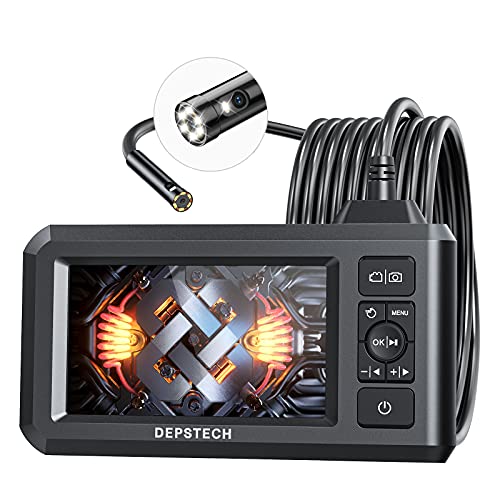
DEPSTECH DS500 Dual Lens Endoscope
DEPSTECH’s DS500 bundles a large color screen, dual cameras and a five metre cable into one kit. Recording to a memory card lets you hand a plumber photo proof instead of a description. Based on specifications, the image resolves casting marks and pipe blockages clearly enough for most household checks.
Pros
- Dual camera and long cable cover most home jobs at once
- Saves stills and video to a card for later reference
- Costs less than rival kits with similar features
Cons
- Cable is softer than rigid probes and can coil on itself
- Menu navigation takes a few minutes to learn
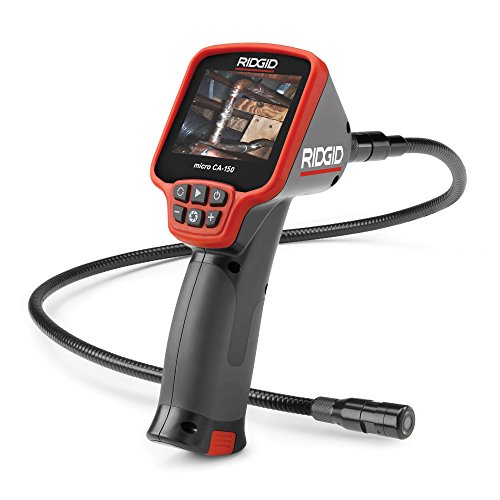
RIDGID micro CA-150 Inspection Camera
RIDGID built the CA-150 to survive drops, dust and a truck bed. Its 17 mm camera head cleans easily between jobs, and the control layout stays simple under time pressure. Owners report the wider head is the main tradeoff, since it will not fit narrow cavities a slim borescope handles.
Pros
- Handles daily job site knocks without breaking
- Simple controls operate fine with work gloves on
- Hook, magnet and mirror attachments retrieve dropped parts
Cons
- 17 mm head cannot enter narrow drilled holes
- Standard cable runs shorter than most consumer kits

Bosch GIC 120 C Inspection Camera
Bosch’s GIC 120 C rotates and flips the onscreen image, so text and orientation stay readable no matter how the cable twists. An 8.5 mm head with adjustable lighting slips into stud bays and duct runs. It also shares a battery platform with other Bosch 12V cordless tools.
Pros
- Image rotation keeps orientation clear at odd angles
- Slim 8.5 mm head fits narrow drilled holes
- Battery compatibility with existing Bosch 12V tools
Cons
- Battery pack sold separately on some listings
- Cable extensions add to the total cost of ownership

Milwaukee 2319-20 M-SPECTOR FLEX Inspection Camera
Milwaukee aimed the M-SPECTOR FLEX at electricians and HVAC installers chasing a cavity the length of a wall, not a quick peek. A pivoting display and flexible cable let you feed the probe while watching comfortably. Based on specifications, it covers longer duct and wall runs than most kits here, though it requires M12 batteries you may not already own.
Pros
- Extended cable reaches longer wall and duct runs than rivals
- Pivoting screen stays comfortable during a long feed
- Rugged housing matches other Milwaukee trade tools
Cons
- M12 battery often sold separately from the camera
- Larger and heavier than consumer grade borescopes

Anykit Endoscope Camera with Light
Anykit skips a dedicated screen and streams straight to your phone, keeping the kit small enough for a glovebox. A semi rigid cable and adjustable LEDs handle engine bays, sink drains and vent checks. Owners report sharing photos straight from the phone makes it easy to send a contractor evidence of a problem.
Pros
- Compact enough to store in a small tool bag or glovebox
- Phone screen gives a sharper image than many dedicated displays
- Slim 5.5 mm probe fits small drilled inspection holes
Cons
- Depends on app compatibility with your specific phone
- Awkward to hold the phone and feed the cable alone

SKYBASIC Wireless Endoscope Camera
SKYBASIC connects over its own WiFi signal, freeing your phone from a cable tether while the probe goes into the wall. It is among the least costly ways to get a usable image into an awkward space. Based on specifications, an IP67 rated head handles drains and sink traps, though wireless latency remains the main compromise.
Pros
- No physical tether between phone and camera probe
- IP67 rated head suits drains, traps and wet areas
- Lowest entry cost among the models compared here
Cons
- Wireless video shows noticeable lag versus wired kits
- Soft cable needs manual guiding around tight bends
Compared at a glance
| # | Model | Screen | Best for | Score | Price |
|---|---|---|---|---|---|
| 1 | Teslong NTS300 Dual Lens Inspection Camera | 5 inch IPS display | Best overall | 9.4 | Check price |
| 2 | DEPSTECH DS500 Dual Lens Endoscope | 5 inch colour display | Best value | 9.2 | Check price |
| 3 | RIDGID micro CA-150 Inspection Camera | 3.5 inch colour display | Best for tradespeople | 9.0 | Check price |
| 4 | Bosch GIC 120 C Inspection Camera | 3.5 inch display with image rotation | Best for tight cavities | 8.8 | Check price |
| 5 | Milwaukee 2319-20 M-SPECTOR FLEX Inspection Camera | Pivoting colour display | Best for long cable runs | 8.6 | Check price |
| 6 | Anykit Endoscope Camera with Light | Uses Android or iPhone via app | Best for phone use | 8.3 | Check price |
| 7 | SKYBASIC Wireless Endoscope Camera | Built in WiFi to phone app | Best budget | 8.0 | Check price |
What matters most
What decides whether a probe actually reaches the problem? Probe diameter matters more than any other spec. A 5.5 mm head passes through a hole from a common spade bit. An 8 mm probe suits most stud cavities and drains. Anything close to 17 mm needs open space, like an engine bay or crawl space. Measure your access point before buying, then choose a probe with room to spare.
How much does cable stiffness change what you can inspect? A fully flexible cable coils on itself instead of pushing around a bend. Semi rigid cable holds whatever curve you set it to, letting you steer up into a ceiling void or around a trap. Listings that skip the words semi rigid or gooseneck usually mean a soft cable that needs a guide to feed through tight spaces.
Screen based or phone based, which fits your work? Dedicated screens stay visible in bright sunlight and keep working while your phone rings. They also let you work one handed on a ladder. Phone based probes cost less, pack smaller and often show a sharper image, but they occupy the device you may need for calls or photos. Tradespeople tend to prefer a dedicated screen, occasional users usually do not need one.
Does lighting matter more than camera resolution? Adjustable LED brightness beats raw resolution for image clarity. A fixed, overly bright light bounces off nearby pipe walls and washes out detail. Dual lens models with a side camera let you scan along a surface, not just straight ahead, catching cracks a single lens would miss entirely.
Questions worth asking
What is the difference between a borescope and an inspection camera?
The terms overlap in everyday use. Borescope usually means a slim, semi rigid probe built for narrow bores. Inspection camera is the broader label, covering handheld units with their own screens. Shop by probe diameter and cable type rather than by the name on the listing.
Can an inspection camera go underwater?
Typically only the camera head and cable carry a waterproof rating, often IP67, while the handheld unit or phone stays dry sensitive. Check the specific rating in the listing before use. Never submerge the display, battery pack or connector.
Will an inspection camera work inside a wall cavity?
Yes, checking wall cavities is one of the most common uses. Drill a small hole in an inconspicuous spot, feed a semi rigid probe around 8 mm through it, then use a side lens to scan along the cavity. Switch off nearby circuits before drilling.
Do you need a dual lens camera, or is single lens enough?
Dual lenses help most when inspecting the wall of a pipe or cavity rather than the space straight ahead. A single front lens only shows what is directly in the probe’s path. That setup can mean scrolling right past a crack or blockage off to the side.
How long a cable do you actually need?
About one metre suits engine bays, appliances and short cavity checks. Three to five metres covers drains and longer wall runs. Very long cables get harder to push without a semi rigid core, so match length to stiffness rather than buying the longest option available.
Can these cameras inspect a full sewer line?
Consumer borescopes can look into a trap or a short branch line. A full sewer inspection needs a purpose built push rod camera with a locator function. Owners report frustration trying to feed a soft consumer cable more than a few metres down a drain.
Do inspection cameras record video and photos?
Most screen based models save stills and video to an internal card. Phone based models record through their companion app instead. That matters if you want to show a contractor exactly what you found before repair work begins.
Are cheap wireless endoscope cameras worth buying?
For occasional household checks, yes. The tradeoffs are video lag, a softer cable and shorter battery life, none of which matter much for a five minute look under a sink. Regular trade use calls for a wired or screen based unit instead.
Screen based versus phone based inspection camera, which is better?
Screen based units work better outdoors, in bright light and for one handed ladder work. Phone based units cost less, pack smaller and often show a sharper picture. Choose based on how often you will use it outside or with gloves on.
Final word
Teslong’s NTS300 earns the top spot because its semi rigid cable and dual lenses solve the two issues that make cheap probes frustrating. DEPSTECH’s DS500 covers similar ground for less if a softer cable does not bother you. Tradespeople who need a camera that survives a truck bed should look at the RIDGID micro CA-150 instead.
Jake Monroe
Jake worked as a residential contractor for over a decade before shifting to full-time writing. He evaluates power tools, hand tools and workshop gear through the lens of someone who has actually used them on job sites, not just read the box.