Document Scanners Fast Enough for Daily Office Piles
The Fujitsu ScanSnap iX1600 remains the easiest high-speed scanner to set up for a small office, the Brother ADS-4900W scans the fastest duplex pages per minute here, and the Epson DS-770 II suits buyers who need strong document feeder capacity without a networked model’s extra cost.
The Fujitsu ScanSnap iX1600 is the easiest high-speed scanner to recommend for a small office, pairing a simple one-button workflow with reliable duplex scanning, though it scans a few pages per minute slower than Brother’s fastest networked model.
High-speed document scanners mostly separate on pages-per-minute at actual duplex settings, feeder sheet capacity, and how well the bundled software sorts scanned pages automatically, so we compared published speed ratings, feeder size, and duplex detection features across seven current models.
What to look for
What counts as high speed for a document scanner Entry-level desktop scanners often rate below 25 pages per minute in duplex, while the models compared here start around 30 ppm and climb past 70 ppm on the fastest units. Duplex speed, not simplex speed, is the number that matters for most offices, since scanning both sides of a page in one pass saves real time over flipping sheets manually. Manufacturers sometimes advertise simplex speed alongside duplex, so checking which number applies avoids a misleading comparison. A scanner rated at 40 ppm duplex clears a typical 20-page double-sided report in about 30 seconds.
Feeder capacity and daily volume ratings A larger automatic document feeder, like the 100-sheet feeders on the Brother ADS-4900W and Epson DS-770 II, means fewer interruptions to reload paper during a big scanning job. Manufacturers also publish a recommended daily page volume, which matters more for busy offices than for someone scanning occasionally. The Kodak Alaris S2080w targets offices running thousands of pages a day, well above what a small office feeder like the Plustek PS3180U is built to sustain long term. Matching feeder size and daily volume rating to actual office habits avoids both overspending and premature wear.
Handling mixed paper, cards, and receipts Standard letter-size feeders struggle with thick business cards or short receipts unless the scanner specifically supports mixed media, which is where the Canon imageFORMULA R40 stands out. Automatic size detection crops each scanned page to its real dimensions instead of forcing everything into one template size. Offices scanning only uniform printer paper rarely need this flexibility and can prioritize speed or feeder capacity instead. Checking a scanner’s supported media list before buying avoids discovering the limitation after a batch of receipts jams the feeder.
Single-user versus networked, multi-user scanning A scanner connected only by USB, like the Epson DS-770 II or Plustek PS3180U, works best tied to one dedicated computer that handles all scan jobs. Models with Wi-Fi or Ethernet, including the Brother ADS-4900W and Xerox D70n, let multiple people on a network send jobs to the same scanner without routing through one machine. Shared network scanning adds setup time, since an administrator usually configures scan-to-folder destinations and user permissions once. Small, single-person offices rarely need that complexity and do fine with a simpler USB-only model.
Our top picks

Fujitsu ScanSnap iX1600 Document Scanner
The iX1600 scans up to 40 pages per minute in duplex mode and feeds up to 50 sheets at once, enough for most daily office batches without reloading constantly. A single physical button starts scanning directly to a chosen destination, whether that is a folder, cloud service, or searchable PDF. The companion software automatically detects blank pages and removes them from duplex scans.
Pros
- One-button scanning simplifies the daily workflow
- Automatic blank page removal saves manual cleanup
- Wi-Fi connectivity allows scanning without a direct USB link
Cons
- Feeder capacity is lower than Brother’s higher-volume models
- Touchscreen interface adds cost over simpler button-only scanners

Brother ADS-4900W Document Scanner
Brother rates the ADS-4900W at 60 pages per minute in duplex mode, among the fastest speeds in this comparison, with a 100-sheet feeder to match the higher throughput. A touchscreen lets an office set up scan-to destinations like network folders or email without a computer connection. Built-in ultrasonic sensors detect when two sheets feed at once and pause the scan automatically.
Pros
- Fastest duplex scan speed among the models compared here
- Large 100-sheet feeder reduces reloading during big batches
- Ultrasonic double-feed detection catches jams before they damage pages
Cons
- Higher price than simpler single-connection scanners
- Touchscreen setup takes longer to configure initially than a one-button model

Epson DS-770 II Document Scanner
Epson keeps the DS-770 II’s price below Brother’s networked models while still offering a 100-sheet feeder, matching the higher-end competitor’s capacity. Scan speed tops out at 45 pages per minute in duplex, slower than Brother’s fastest model but still well ahead of entry-level scanners. The included software supports scanning directly to searchable PDF without a separate OCR purchase.
Pros
- Large feeder capacity at a price below networked competitors
- Included OCR software avoids a separate purchase
- Reliable duplex scanning for standard office paper
Cons
- USB-only connection means no direct network or Wi-Fi scanning
- Slower duplex speed than Brother’s top model
Canon imageFORMULA R40 Document Scanner
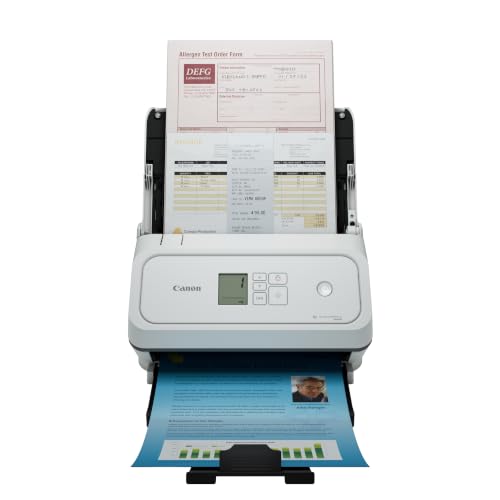
Canon designed the imageFORMULA R40 to handle mixed batches of receipts, business cards, and standard letter paper without switching feeder settings. A speed of 45 pages per minute in duplex keeps pace with similarly priced competitors, and an ultrasonic double-feed sensor pauses the scan when two sheets stick together. Automatic paper size detection crops each scanned page to its actual dimensions rather than a fixed template.
Pros
- Handles mixed paper sizes without separate feeder adjustments
- Automatic size detection crops each page accurately
- Ultrasonic double-feed sensor catches stuck sheets reliably
Cons
- Lower feeder capacity than Brother or Epson’s high-volume models
- Mixed-media flexibility matters less for offices scanning only standard paper

Kodak Alaris S2080w Document Scanner
Kodak Alaris built the S2080w for offices scanning thousands of pages daily, rating it for up to 80 pages per minute in duplex and a recommended daily volume far above typical desktop scanners. A 80-sheet feeder keeps pace with the scan speed without frequent reloading. The scanner connects over Wi-Fi as well as USB, letting it sit away from a single dedicated workstation.
Pros
- Fastest rated duplex speed among all models compared here
- Built for sustained high daily volume, not occasional use
- Wi-Fi connectivity allows flexible placement away from a single desk
Cons
- Higher price reflects its heavy-duty daily volume rating
- Overkill for a small office scanning only occasionally

Xerox D70n Document Scanner
Xerox includes built-in Ethernet networking on the D70n, letting multiple workstations send scan jobs to the same device without routing through one computer’s USB port. Scan speed reaches 70 pages per minute in duplex, and a 80-sheet feeder keeps up with that pace during longer runs. The scanner’s management software allows an administrator to set shared scan-to-folder destinations for a whole office.
Pros
- Built-in networking supports multiple users without a dedicated host computer
- Fast duplex speed suits busy shared office environments
- Large feeder reduces reloading during long scan runs
Cons
- No Wi-Fi option, requires a wired Ethernet connection
- Setup for shared network folders takes more initial configuration

Plustek SmartOffice PS3180U Document Scanner
Plustek prices the PS3180U below most competitors here while still rating it for 30 pages per minute in duplex, enough to clear a moderate daily office batch. A 50-sheet feeder and USB-only connection keep the design simple and the cost down. Bundled software includes basic OCR for searchable PDFs, though it is less refined than Epson’s or Brother’s included tools.
Pros
- Lowest price among the high-speed scanners compared here
- Still fast enough for moderate daily office volume
- Simple USB-only setup with no network configuration needed
Cons
- Slowest duplex speed among the models in this comparison
- Bundled OCR software is more basic than premium competitors’ tools
How they compare
| # | Model | Scan speed | Best for | Score | Price |
|---|---|---|---|---|---|
| 1 | Fujitsu ScanSnap iX1600 Document Scanner | 40 ppm duplex | Best overall | 9.3 | Check price |
| 2 | Brother ADS-4900W Document Scanner | 60 ppm duplex | Best scan speed | 9.2 | Check price |
| 3 | Epson DS-770 II Document Scanner | 45 ppm duplex | Best feeder capacity on a budget | 8.8 | Check price |
| 4 | Canon imageFORMULA R40 Document Scanner | 45 ppm duplex | Best for mixed paper sizes and card scanning | 8.7 | Check price |
| 5 | Kodak Alaris S2080w Document Scanner | 80 ppm duplex | Best for very high daily volume | 8.9 | Check price |
| 6 | Xerox D70n Document Scanner | 70 ppm duplex | Best for networked multi-user offices | 8.5 | Check price |
| 7 | Plustek SmartOffice PS3180U Document Scanner | 30 ppm duplex | Best budget high-speed option | 8.2 | Check price |
Good to know
What is a good pages-per-minute speed for a document scanner?
For small offices, 30 to 45 ppm in duplex handles most daily batches well, while busy multi-user offices benefit from 60 ppm or faster models like the Brother ADS-4900W or Kodak Alaris S2080w.
What is the difference between simplex and duplex scan speed?
Simplex speed scans only one side of a page per pass, while duplex speed scans both sides in a single pass, which is the number that matters most for double-sided documents.
How many sheets should a high-speed scanner’s feeder hold?
Small offices generally do fine with a 50-sheet feeder, while busier offices running long batches benefit from 80 to 100-sheet feeders like those on the Brother ADS-4900W or Epson DS-770 II.
Do high-speed scanners include OCR software?
Most do, though the quality varies. The Epson DS-770 II and Brother ADS-4900W bundle more capable OCR tools than budget models like the Plustek PS3180U.
Can a document scanner handle business cards and receipts?
Only models built for mixed media, such as the Canon imageFORMULA R40, reliably handle thick cards and short receipts alongside standard letter paper.
Is Wi-Fi scanning reliable for an office environment?
Yes, for most offices, though a wired Ethernet connection, as on the Xerox D70n, tends to be more consistent for very large shared scan jobs.
What is double-feed detection on a document scanner?
It is a sensor, usually ultrasonic, that detects when two sheets feed through at once and pauses the scan so the pages are not skipped or jammed.
How often should a document scanner’s feeder rollers be cleaned?
Most manufacturers recommend cleaning feeder rollers after every few thousand pages, or sooner if the scanner starts misfeeding or skewing pages.
Can multiple people share one document scanner over a network?
Yes, scanners with built-in Ethernet or Wi-Fi, like the Xerox D70n or Brother ADS-4900W, support shared scan-to-folder destinations for multiple users.
What daily page volume should I expect a scanner to handle long term?
Check the manufacturer’s recommended daily volume rating. Desktop models like the Plustek PS3180U suit a few hundred pages a day, while the Kodak Alaris S2080w is built for several thousand.
The bottom line
The Fujitsu ScanSnap iX1600 is the right default for most small offices, since its one-button workflow and reliable duplex scanning cover daily needs without a steep learning curve. Offices scanning large batches throughout the day should move up to the Brother ADS-4900W, where the faster duplex speed and larger feeder actually get used. Anyone running sustained high-volume scanning across a whole department is better matched to the Kodak Alaris S2080w, built specifically for that daily load.
Jake Monroe
Jake worked as a residential contractor for over a decade before shifting to full-time writing. He evaluates power tools, hand tools and workshop gear through the lens of someone who has actually used them on job sites, not just read the box.