Does a Pricier HDMI Cable Really Improve Picture?
The Zeskit Maya 8K is the HDMI cable to buy for most setups, certified for 48Gbps bandwidth across 4K and 8K. The Amazon Basics High-Speed cable covers everyday 1080p and 4K affordably. The Belkin UltraHD is a sturdy certified option for demanding 8K displays.
The Zeskit Maya 8K is the HDMI cable we recommend for most people, since its certified 48Gbps bandwidth handles 4K at high refresh rates and future 8K sources without guesswork.
Boxes rarely tell the whole story with HDMI cables, and uncertified versions can fail at high resolutions while looking identical to certified ones. We compared certification labels, published bandwidth ratings, connector build quality, and patterns in verified owner feedback to separate genuine performers from marketing claims.
What we recommend

Zeskit Maya 8K HDMI 2.1
Ultra High Speed certification backs this cable’s 48Gbps bandwidth, enough for 4K at 120Hz and 8K at 60Hz without dropouts. Slim connectors fit tight cabinet spaces where bulkier cables jam. Owners running consoles and high end TVs report a consistently solid handshake.
Pros
- Certified 48Gbps handles 4K120 and 8K60
- Reliable handshake with consoles and TVs
- Slim connectors fit tight spaces
Cons
- Shorter lengths only for full bandwidth
- Costs more than basic cables

Amazon Basics High-Speed HDMI
This cable performs dependably for 1080p and standard 4K playback on streaming boxes and older consoles. It is not built for cutting edge 8K or high refresh gaming setups. Owners like that it simply works without any setup fuss.
Pros
- Affordable and widely available
- Reliable for everyday 4K and 1080p
- Multiple lengths to choose from
Cons
- Not rated for 8K or 4K120
- Basic connector build

Belkin UltraHD High Speed HDMI 2.1
Ultra High Speed certification and noticeably sturdy build quality set this cable apart. Reinforced connectors hold up to frequent plugging and unplugging behind a TV cabinet. Owners pairing it with 8K TVs and next generation consoles report consistent performance.
Pros
- Certified for full 8K bandwidth
- Sturdy reinforced connectors
- Trusted brand support
Cons
- Premium price for the length
- Stiffer cable is harder to route
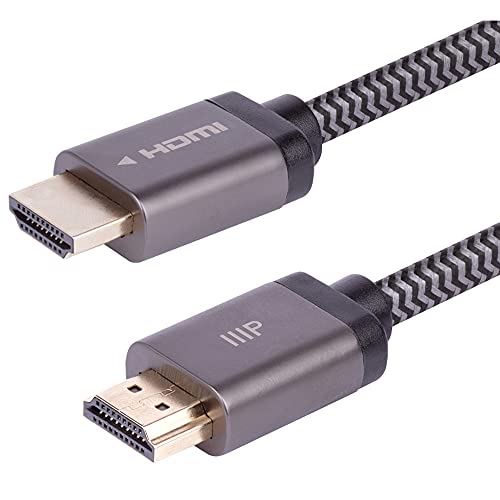
Monoprice Certified Premium High Speed HDMI
Premium High Speed certification targets reliable 4K at 60Hz with wide colour support, priced well below flagship cables. Living room streaming and Blu-ray setups run without drama on this one. Owners describe it as strong value relative to the performance delivered.
Pros
- Certified for reliable 4K60 HDR
- Strong value for the performance
- Good range of length options
Cons
- Not intended for 8K or 4K120
- No braided jacket

Cable Matters 48Gbps HDMI 2.1
Variable refresh rate and 4K at 120Hz support make this cable a fit for current gaming consoles and monitors. A braided jacket adds durability for setups that get moved often. Owners with recent hardware report smooth performance without dropped frames.
Pros
- Supports 4K120 and VRR for gaming
- Durable braided jacket
- Good value for HDMI 2.1 features
Cons
- Full bandwidth limited to shorter runs
- Thicker cable can be less flexible

UGREEN 8K HDMI 2.1 Braided
A nylon braided jacket and zinc alloy connectors wrap 48Gbps performance in a build meant to resist tangling. It handles 4K at 120Hz and 8K at 60Hz on supported devices. Owners appreciate the premium feel for cable runs left visible in a room.
Pros
- Attractive, durable braided design
- Handles 4K120 and 8K60
- Solid metal connector shells
Cons
- Stiffer than unbraided cables
- Longer runs may need active versions

Ruipro 8K Fiber Optic HDMI
Optical transmission carries this cable’s full 48Gbps signal over long distances where copper struggles. A thin, flexible design suits routing through walls to a projector. Owners note the directional connectors must be oriented correctly during installation.
Pros
- Maintains full bandwidth over long distances
- Thin and flexible for in-wall routing
- Immune to typical electrical interference
Cons
- Directional connectors must face correctly
- Higher cost than copper cables
How they compare
| # | Model | Version | Best for | Score | Price |
|---|---|---|---|---|---|
| 1 | Zeskit Maya 8K HDMI 2.1 | HDMI 2.1 | Best overall | 9.4 | Check price |
| 2 | Amazon Basics High-Speed HDMI | HDMI 2.0 | Best budget | 9.1 | Check price |
| 3 | Belkin UltraHD High Speed HDMI 2.1 | HDMI 2.1 | Best for 8K | 8.9 | Check price |
| 4 | Monoprice Certified Premium High Speed HDMI | HDMI 2.0 | Best value for 4K HDR | 8.6 | Check price |
| 5 | Cable Matters 48Gbps HDMI 2.1 | HDMI 2.1 | Best for gaming | 8.4 | Check price |
| 6 | UGREEN 8K HDMI 2.1 Braided | HDMI 2.1 | Best braided build | 8.2 | Check price |
| 7 | Ruipro 8K Fiber Optic HDMI | HDMI 2.1 | Best for long runs | 8.0 | Check price |
What matters most
How to match a cable to your resolution Not every HDMI cable carries every signal. A High Speed cable suffices for 1080p and standard 4K at 60Hz, while 4K at 120Hz or 8K needs an Ultra High Speed cable rated for 48Gbps. Extra bandwidth is harmless; too little causes dropouts.
Why HDMI certification matters Anyone can print HDMI 2.1 on a box. Certified High Speed, Premium High Speed, and Ultra High Speed labels come with testing behind them, and many include a scannable authentication code. Based on specifications, certification is the closest thing to a performance guarantee available.
How cable length changes performance Copper HDMI cables lose signal integrity as they get longer, so a short run may pass full 48Gbps while a longer version of the same cable cannot. Active or fiber optic cables hold up far better over long runs to projectors or wall mounted displays.
What build quality and connectors add Braided jackets and metal connector shells resist wear from repeated plugging, and a snug connector fit reduces intermittent dropouts. A basic jacket is fine for a cable hidden and rarely touched; sturdier construction pays off for cables handled often.
Questions worth asking
Do expensive HDMI cables improve picture quality?
No. HDMI carries a digital signal, so a certified inexpensive cable delivers the same picture as a costly one, provided both meet the bandwidth the setup needs. Spend on certification and correct length rather than premium branding.
What is the difference between HDMI 2.0 and HDMI 2.1?
HDMI 2.1 raises bandwidth to 48Gbps and adds support for 4K at 120Hz, 8K at 60Hz, variable refresh rate, and other gaming features. HDMI 2.0 tops out near 18Gbps, comfortable for 4K at 60Hz but not the newest high refresh modes.
Can any HDMI cable handle 4K?
Most High Speed cables handle 4K at 60Hz, but 4K at 120Hz needs an Ultra High Speed cable. Flicker, blank screens, or dropped signal at 4K usually trace back to an under-rated cable, and upgrading typically fixes it.
Do I need an 8K HDMI cable without an 8K TV?
Not strictly, but an Ultra High Speed 48Gbps cable future-proofs a setup and unlocks 4K at 120Hz for gaming today. Many owners buy one now to skip replacing cables when they upgrade displays later.
Are braided HDMI cables better than unbraided ones?
Braiding improves durability and resists tangling, but it does not change signal performance. Certification and bandwidth rating determine picture and sound quality; braiding mainly affects longevity and feel.
How long can an HDMI cable run before losing signal?
Passive copper cables generally stay reliable up to roughly 15 to 25 feet for high bandwidth, with shorter runs safer at 8K. Active or fiber optic HDMI cables maintain signal over longer distances where standard copper would fail.
What does Ultra High Speed HDMI certification mean?
It is the official label for cables tested to carry the full 48Gbps needed for 4K120 and 8K60. Certified cables usually include a hologram and QR code that confirms authenticity through the licensing program.
Will a new HDMI cable fix sound or handshake problems?
Sometimes. Intermittent audio dropouts, blank screens, or handshake failures at high resolutions often trace back to a marginal or damaged cable. Swapping in a properly certified cable rated for the resolution resolves many of these issues.
Does HDMI cable direction matter?
Standard copper cables are not directional, so either end can face the source or display. Active and fiber optic cables are the exception, labeled for source and display ends, and will not pass a signal if reversed.
HDMI cable vs HDMI adapter: which do I need?
A standard cable connects two HDMI ports directly. An adapter converts a different port, like USB-C or DisplayPort, into HDMI, and its bandwidth rating still needs to match the resolution being sent.
The verdict
The Zeskit Maya 8K offers the safest mix of certified bandwidth, reliable handshakes, and sensible pricing for most homes. Budget focused buyers can trust the Amazon Basics High-Speed cable for everyday 4K. Gamers chasing 4K at 120Hz should look to the Cable Matters 48Gbps instead.
Marcus Chen
Marcus covered consumer electronics for enthusiast tech publications for six years before joining ChoiceCrest. He specializes in translating manufacturer spec sheets into plain-language buying advice, with a focus on audio, computing accessories and smart-home gear.


