Top Hard Drive Enclosures for Every Setup
The Sabrent USB 3.2 10Gbps Hard Drive Enclosure is our top pick for most users. It offers fast transfer speeds, tool-free installation, and broad compatibility. Its main limitation is that it lacks advanced cooling features, but for typical use, it performs reliably.
Hard drive enclosures turn bare internal drives into portable storage. They are essential for upgrading laptops, recovering data, or expanding capacity. With many options available, choosing the right one can be challenging.
We analyzed top-rated enclosures to help you pick. Our focus is on real-world performance, durability, and user satisfaction. The list includes USB-C and USB-A models, tool-free designs, and rugged cases.
What we recommend
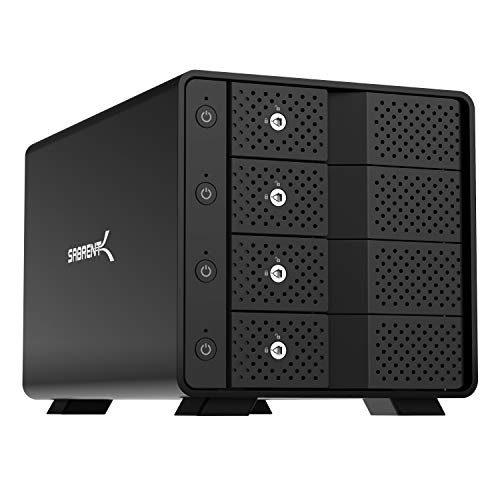
Sabrent USB 3.2 10Gbps Hard Drive Enclosure
This enclosure supports 2.5 inch SATA drives and delivers up to 10Gbps speeds. Its aluminum body acts as a heatsink, and installation is screwless. Users appreciate its plug and play simplicity.
Pros
- Fast transfer speeds
- Tool-free installation
- Slim and portable
Cons
- No USB-C cable included
- Not for 3.5 inch drives

OWC Mercury Pro
The OWC Mercury Pro is built for heavy use. It supports both 2.5 and 3.5 inch drives with USB 3.2 Gen 2 speeds. Its aluminum housing and fan keep drives cool even during long operations.
Pros
- Dual drive size support
- Active cooling for extended use
- Solid metal build
Cons
- Bulkier than others
- Requires external power
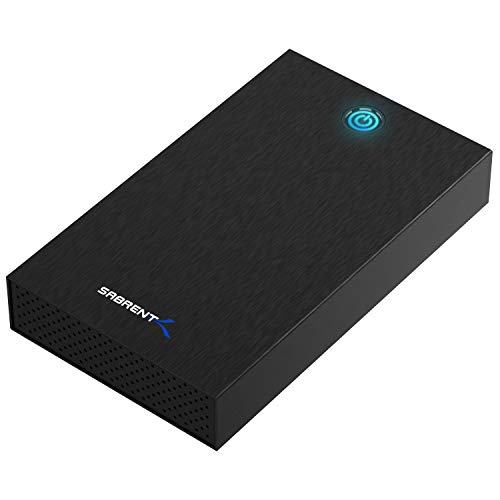
Anker USB 3.0 Hard Drive Enclosure
Anker offers a straightforward enclosure for 2.5 inch SATA drives. It uses USB 3.0 for up to 5Gbps speeds and includes a USB cable. Owners report consistent performance and a sturdy build.
Pros
- Affordable
- Reliable brand
- Includes cable
Cons
- Slower than USB 3.1/3.2
- No UASP support

ORICO Tool-Free USB 3.0 Enclosure
ORICO’s tool-free design lets you slide in a 2.5 inch drive without screws. It supports UASP for enhanced performance. The sleek casing is lightweight and comes in multiple colors.
Pros
- No tools needed
- UASP for faster data transfer
- Color options available
Cons
- Plastic build may not be as durable
- No activity LED on some models
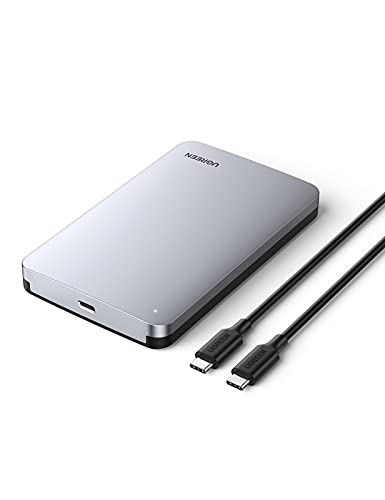
UGREEN USB C Hard Drive Enclosure
UGREEN’s enclosure features USB C connectivity and supports 2.5 inch SATA drives. It offers transfer rates up to 6Gbps and comes with both USB C and USB A cables. The aluminum casing provides good heat dissipation.
Pros
- USB C and USB A cables included
- Fast transfer speeds
- Sleek design
Cons
- Slightly more expensive than USB 3.0
- No power button

StarTech.com Dual Bay RAID Enclosure
This enclosure supports two 2.5 or 3.5 inch SATA drives and offers hardware RAID 0, 1, and JBOD modes. It connects via USB 3.2 Gen 2 for fast transfers. Users value the flexibility and data protection options.
Pros
- Hardware RAID options
- Supports large drives
- Tool-free drive bays
Cons
- Requires external power
- Heavier and larger
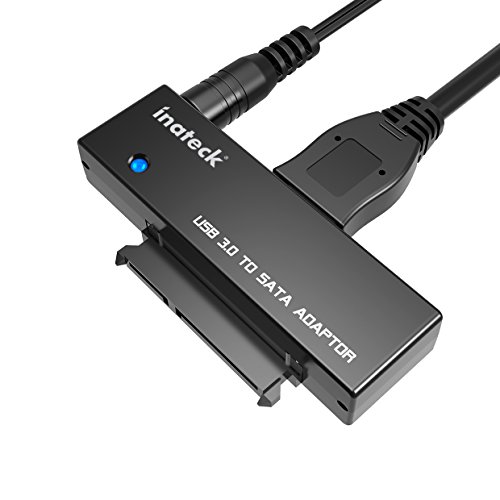
Inateck USB 3.0 to SATA Enclosure
Inateck’s enclosure is compact and powered via USB, no external adapter needed. It supports 2.5 inch SATA drives and works with Windows, Mac, and Linux. Users like its simple design and low cost.
Pros
- No external power needed
- Portable and lightweight
- Cross platform compatibility
Cons
- Plastic casing
- No UASP support
How they stack up
| # | Model | Interface | Best for | Score | Price |
|---|---|---|---|---|---|
| 1 | Sabrent USB 3.2 10Gbps Hard Drive Enclosure | USB 3.2 Gen 2 | Fast transfers and tool-free installation | 9.4 | Check price |
| 2 | OWC Mercury Pro | USB 3.2 Gen 2 | Professional workflows and high durability | 9.2 | Check price |
| 3 | Anker USB 3.0 Hard Drive Enclosure | USB 3.0 | Budget friendly reliability | 8.8 | Check price |
| 4 | ORICO Tool-Free USB 3.0 Enclosure | USB 3.0 | Quick drive swapping | 8.7 | Check price |
| 5 | UGREEN USB C Hard Drive Enclosure | USB C (USB 3.1 Gen 2) | Modern laptops with USB C | 9.0 | Check price |
| 6 | StarTech.com Dual Bay RAID Enclosure | USB 3.2 Gen 2 | RAID configurations and data redundancy | 8.9 | Check price |
| 7 | Inateck USB 3.0 to SATA Enclosure | USB 3.0 | External power free operation | 8.5 | Check price |
Before you buy
Questions worth asking
Do hard drive enclosures require external power?
Most 2.5 inch enclosures are bus powered via USB. 3.5 inch enclosures usually need an external power adapter because they require 12V power.
Can I use an enclosure with an SSD?
Yes, enclosures work with both SSDs and HDDs. SSDs benefit from higher speed interfaces like USB 3.1 Gen 2.
What is UASP and why does it matter?
UASP is a protocol that reduces latency and improves throughput. It can make transfers faster and more efficient, especially with SSDs.
Can I boot my computer from a hard drive in an enclosure?
Yes, if your computer supports booting from USB. Ensure the enclosure is recognized by BIOS/UEFI and the drive has a bootable OS.
How do I install a hard drive in an enclosure?
Typically, you open the enclosure, connect the drive to the SATA connector, slide it in, and close. Some require screws, while others are tool-free.
Will a USB 3.0 enclosure work with a USB 2.0 port?
Yes, it is backward compatible, but speeds will be limited to USB 2.0 rates (480Mbps).
What is the maximum capacity supported?
Most modern enclosures support drives up to 10TB or more. Check the product specifications for the exact limit.
Are hard drive enclosures safe for long term storage?
Yes, but ensure proper ventilation. Some enclosures have active cooling, which is beneficial for continuous operation.
Can I use an enclosure with a 3.5 inch drive on the go?
It is possible but less portable due to size and the need for an external power adapter. 2.5 inch enclosures are more travel friendly.
What is the difference between SATA I, II, and III?
SATA I has 1.5Gbps, SATA II 3Gbps, and SATA III 6Gbps transfer rates. SATA III is the most common today and is backward compatible.
The bottom line
For most users, the Sabrent USB 3.2 10Gbps Enclosure offers the best balance of speed, build, and ease of use. If you need RAID or dual drive support, the StarTech.com Dual Bay is a solid choice. Budget conscious buyers should consider the Anker USB 3.0 model. Choose based on your specific requirements, but any of these will serve you well.
Marcus Chen
Marcus covered consumer electronics for enthusiast tech publications for six years before joining ChoiceCrest. He specializes in translating manufacturer spec sheets into plain-language buying advice, with a focus on audio, computing accessories and smart-home gear.