Best Compact USB Flash Drives for Every Use
For most people, the SanDisk Ultra Luxe USB 3.2 is the top pick. It offers fast transfer speeds and a durable metal body. Its main advantage is the combination of high performance and pocket-friendly size. The main limitation is that it can get warm during large file transfers.
Compact USB flash drives are essential for quick file transfers, backups, and carrying documents. They are small enough to attach to keychains or slip into a pocket, making them perfect for on-the-go use.
The market is full of options, but not all are created equal. Some prioritize speed, others durability, and some offer the best capacity-to-size ratio. This roundup helps you find the right one for your specific needs.
The best picks, ranked

SanDisk Ultra Luxe USB 3.2 Flash Drive
The SanDisk Ultra Luxe offers a sleek metal design and USB 3.2 Gen 1 speeds up to 150 MB/s. It is available in capacities up to 512GB, making it a versatile choice for everyday use.
Pros
- Fast transfer speeds for daily tasks
- Durable metal construction
- Sleek and pocket-friendly
Cons
- Can get warm during extended use
- No USB-C option

Samsung BAR Plus USB 3.1 Flash Drive
The Samsung BAR Plus features a sturdy metal body that is waterproof, shock-proof, and magnetic-resistant. It delivers read speeds up to 300 MB/s, making it both robust and fast.
Pros
- Extremely durable build
- High read speeds
- Compact and secure
Cons
- Write speeds are slower
- Can be difficult to insert due to stiff cap

Kingston DataTraveler Micro 3.1
The Kingston DataTraveler Micro is one of the smallest USB drives on the market. It is designed to be virtually unnoticeable on a keychain and offers USB 3.1 speeds for efficient transfers.
Pros
- Extremely compact design
- Cap protects the connector
- Good for laptops with tight USB ports
Cons
- Easy to lose if not attached
- Lower storage max capacity

SanDisk iXpand Flash Drive Luxe
The SanDisk iXpand Flash Drive Luxe features a Lightning connector and a USB 3.0 connector, allowing easy file transfers between Apple devices and computers. It comes with the SanDisk iXpand app for automatic backup.
Pros
- Dual connector for Apple devices
- Automatic backup of photos
- Metal design with key loop
Cons
- Requires app for full functionality
- Not compatible with USB-C iPhones

Corsair Flash Survivor Stealth USB 3.0
The Corsair Flash Survivor Stealth is built to withstand extreme environments. It is waterproof, shockproof, and crushproof, with a military-grade aluminum housing. It offers USB 3.0 speeds and capacities up to 256GB.
Pros
- Unmatched durability
- Secure cap design
- Good speed for USB 3.0
Cons
- Bulky compared to other compact drives
- Cap can be hard to remove

PNY Elite-X Fit USB 3.0
The PNY Elite-X Fit is a tiny flash drive that protrudes only a few millimeters from the USB port. It is perfect for leaving plugged into a laptop or TV without worrying about bumps.
Pros
- Low profile fits snugly
- Large capacity options
- Fast read speeds
Cons
- No cap means connector is exposed
- Can be difficult to remove with fingers
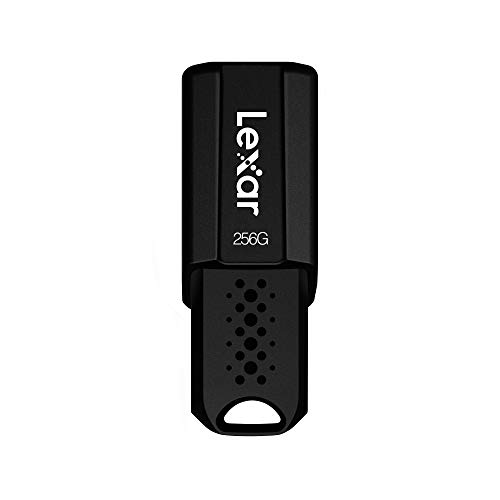
Lexar JumpDrive S45 USB 3.0
The Lexar JumpDrive S45 offers a retractable design and USB 3.0 speeds at an affordable price. It is available in capacities up to 256GB, making it a budget-friendly choice for everyday transfers.
Pros
- Affordable price point
- Retractable design protects connector
- Decent storage capacity
Cons
- Plastic build feels less premium
- Write speeds are moderate
How they compare
| # | Model | Interface | Best for | Score | Price |
|---|---|---|---|---|---|
| 1 | SanDisk Ultra Luxe USB 3.2 Flash Drive | USB 3.2 Gen 1 | Best overall for most users | 9.4 | Check price |
| 2 | Samsung BAR Plus USB 3.1 Flash Drive | USB 3.1 | Best for durability and water resistance | 9.0 | Check price |
| 3 | Kingston DataTraveler Micro 3.1 | USB 3.1 | Best for keychain carrying | 8.8 | Check price |
| 4 | SanDisk iXpand Flash Drive Luxe | Lightning + USB 3.0 | Best for iPhone and iPad users | 8.7 | Check price |
| 5 | Corsair Flash Survivor Stealth USB 3.0 | USB 3.0 | Best for extreme conditions | 8.5 | Check price |
| 6 | PNY Elite-X Fit USB 3.0 | USB 3.0 | Best low-profile design for laptops | 8.3 | Check price |
| 7 | Lexar JumpDrive S45 USB 3.0 | USB 3.0 | Best for budget-friendly storage | 8.0 | Check price |
How to pick the right one
Common questions
What is the smallest USB flash drive available?
The Kingston DataTraveler Micro is one of the smallest USB drives, measuring only about 0.4 inches long. It is designed to be virtually unnoticeable when plugged in, making it ideal for laptops.
How do I choose the right capacity for a USB flash drive?
Consider the size of files you plan to store. For documents, 16GB to 64GB is sufficient. For photos and videos, 128GB or more is recommended. If you plan to store large media libraries or backups, look for 256GB or higher.
What is the difference between USB 2.0 and USB 3.0?
USB 2.0 supports data transfer speeds up to 480 Mbps, while USB 3.0 (also known as USB 3.1 Gen 1) supports up to 5 Gbps. In practice, USB 3.0 flash drives are about 10 times faster than USB 2.0 drives when reading and writing data.
Are compact USB flash drives durable?
Durability varies by model. Many compact drives are made with metal casings and are shock-resistant. Some are waterproof. Check specifications for durability features. For harsh conditions, look for drives like the Corsair Flash Survivor Stealth.
Can I use a compact USB flash drive with my smartphone?
If your smartphone has a USB-C or micro-USB port, you can use an OTG (On-The-Go) adapter to connect a standard USB flash drive. Alternatively, some drives, like the SanDisk iXpand, come with a Lightning connector for iPhones.
Why is my USB flash drive slow?
Flash drive speed depends on the USB version and the quality of the NAND flash memory. Also, small files transfer slower than large files. Some drives have faster read speeds but slower write speeds. Check if your drive’s USB port is the bottleneck, and consider using a USB 3.0 or higher drive for better performance.
How long do USB flash drives last?
Flash drives have a finite number of write cycles, but for most users, they can last for many years with regular use. The lifespan depends on the quality of the NAND chips and how often you write data. High-quality drives from reputable brands tend to last longer.
Is it safe to remove a USB flash drive without ejecting?
It is recommended to use the ‘Safely Remove Hardware’ feature to prevent data corruption. While modern operating systems often handle removal automatically, it is still safer to eject the drive properly, especially if data is being written at the moment of removal.
Final word
After comparing these compact USB flash drives, the SanDisk Ultra Luxe is the best overall choice for most users due to its balanced speed, durability, and design. However, if you need maximum durability for outdoor or industrial use, the Corsair Flash Survivor Stealth is worth the extra bulk. For a budget-friendly option that still delivers reliable performance, the Lexar JumpDrive S45 is a solid pick. Ultimately, consider your primary use case and choose the drive that best aligns with your priorities.
Marcus Chen
Marcus covered consumer electronics for enthusiast tech publications for six years before joining ChoiceCrest. He specializes in translating manufacturer spec sheets into plain-language buying advice, with a focus on audio, computing accessories and smart-home gear.



