Which Handheld Gaming Console Fits Your Budget and Library?
The Steam Deck OLED is the strongest all-round handheld thanks to its vivid screen and huge PC library, while the Nintendo Switch OLED remains the easy pick for exclusives and family play. For raw AAA power, the ASUS ROG Ally X pulls ahead.
The Steam Deck OLED leads for most players who want an all-round handheld, the Nintendo Switch OLED wins on exclusives and simplicity, and the ASUS ROG Ally X is the pick for raw horsepower.
Two very different worlds make this choice tricky: console-style Nintendo hardware and Windows PC handhelds, each with its own library, battery behavior and setup routine. Seven models were compared on published specs and recurring owner feedback so a device can match how you actually play.
Our top picks

Valve Steam Deck OLED
A bright HDR OLED panel pairs with a mature SteamOS build and access to most of the Steam catalog. Owners report a comfortable balance of performance, battery life and price that few rivals match.
Pros
- Excellent OLED screen with HDR
- Massive Steam game library
- Strong battery gains over the LCD model
Cons
- SteamOS has an initial learning curve
- Bulkier than Nintendo handhelds

ASUS ROG Ally X
Full Windows runs on a Ryzen Z1 Extreme chip, backed by a larger battery than the original Ally. Based on specifications it targets demanding PC titles at higher settings, though that power brings heavier thermals under load.
Pros
- Very strong performance for AAA games
- Large 80Wh battery
- Runs the full Windows game ecosystem
Cons
- Windows handheld setup can feel fiddly
- Fans get loud under load

Nintendo Switch OLED
Nintendo exclusives are simplest to reach here, thanks to a vibrant 7 inch screen and effortless TV docking. Families and travelers praise how approachable it feels despite modest raw power.
Pros
- Exclusive first-party Nintendo library
- Simple pick up and play experience
- Detachable Joy-Cons and TV docking
Cons
- Weaker hardware than PC handhelds
- Only 64GB of onboard storage

Lenovo Legion Go
An 8.8 inch display and detachable controllers set this Windows handheld apart, with one controller doubling as a mouse-style FPS grip. Players who want more screen and more input options gain the most here.
Pros
- Large high-resolution 144Hz screen
- Detachable controllers with FPS mode
- Built-in kickstand
Cons
- Heavier and larger to hold
- Battery drains fast at full brightness
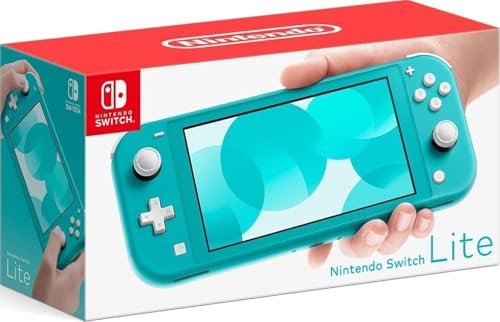
Nintendo Switch Lite
A compact, purely handheld take on the Switch sits at the lowest entry price in Nintendo’s lineup. Light weight and solid build win owners over, accepting that it cannot dock to a TV.
Pros
- Lowest cost route into Switch games
- Compact and lightweight
- Comfortable integrated controls
Cons
- No TV docking or detachable controllers
- Smaller LCD screen

Anbernic RG35XX Plus
A pocket retro handheld built for classic emulation shows up on a crisp 3.5 inch screen. Owners report strong battery life and solid value for revisiting older console libraries in a shirt pocket form factor.
Pros
- Very affordable retro focused design
- Genuinely pocketable
- Long battery life for its size
Cons
- Not meant for modern AAA titles
- Small screen limits some genres

MSI Claw 8 AI+
Intel’s newer Core Ultra platform powers this Windows handheld, paired with a roomy 8 inch screen and a large battery. Based on specifications it is a capable alternative for players who prefer Intel graphics over AMD.
Pros
- Large 8 inch high refresh display
- Big 80Wh battery
- Comfortable ergonomic grips
Cons
- Driver maturity trails AMD handhelds
- Heavier than compact models
Side by side
| # | Model | Display | Best for | Score | Price |
|---|---|---|---|---|---|
| 1 | Valve Steam Deck OLED | 7.4 inch OLED HDR | Best overall | 9.4 | Check price |
| 2 | ASUS ROG Ally X | 7 inch 1080p 120Hz | Best for AAA power | 9.1 | Check price |
| 3 | Nintendo Switch OLED | 7 inch OLED | Best value | 8.9 | Check price |
| 4 | Lenovo Legion Go | 8.8 inch 1600p 144Hz | Best for versatility | 8.6 | Check price |
| 5 | Nintendo Switch Lite | 5.5 inch LCD | Best budget | 8.3 | Check price |
| 6 | Anbernic RG35XX Plus | 3.5 inch IPS | Best for retro gaming | 8.2 | Check price |
| 7 | MSI Claw 8 AI+ | 8 inch 1080p 120Hz | Best for Intel hardware | 8.0 | Check price |
How to pick the right one
Nintendo vs Windows PC handhelds: which ecosystem fits you? Ecosystem is the first real decision to make. Nintendo devices like the Switch OLED and Lite deliver polished exclusives, instant setup and family friendly simplicity, but weaker hardware. Windows handhelds such as the ROG Ally X, Legion Go and MSI Claw run huge PC storefronts and mod support, at the cost of more setup and menu wrangling. Steam Deck sits between the two with a console-like SteamOS layer over a PC library.
How much battery life should you expect from a handheld? Battery life swings wildly with the game and its settings. Demanding PC titles on a powerful chip can drain a battery in around ninety minutes, while lighter indie or retro games run for many hours. Larger batteries like the 80Wh packs in the Ally X and Claw help, but they also add weight. When long unplugged sessions matter more than peak frame rates, a lower-power device or turned-down settings is the practical answer.
Which screen size and weight suit long play sessions? OLED panels on the Steam Deck OLED and Switch OLED deliver deeper contrast and richer color than LCD rivals. Bigger screens on the Legion Go and Claw look great but add weight during long sessions. Grip shape matters as much as resolution, since a handheld held for hours needs to stay comfortable.
How much storage do handheld consoles actually need? Modern games fill storage quickly. Nintendo hardware ships with limited onboard space but accepts microSD cards, while PC handhelds offer larger internal drives and, in most cases, microSD expansion too. Anyone keeping a big library installed should favor a higher capacity model or add a fast microSD card from the start.
Frequently asked questions
Which handheld console is best for most people?
For most players the Steam Deck OLED offers the best overall mix of screen quality, performance, battery and library. Anyone who mainly wants Nintendo exclusives and simple setup will prefer the Switch OLED.
Are Windows handhelds hard to set up?
They take more effort than Nintendo devices. Managing Windows, storefronts and drivers yourself gives flexibility but adds a learning curve. Owners often spend the first session tuning settings before things feel smooth.
How long do handheld gaming console batteries last?
It depends heavily on the game. Demanding titles on powerful chips may last around ninety minutes, while lighter indie and retro games run several hours. Larger batteries and lower graphics settings extend playtime.
Can handheld gaming consoles connect to a TV?
The Switch OLED docks to a TV out of the box, and PC handhelds can output to a display over USB-C with the right adapter or dock. The Switch Lite is the exception, since it is handheld only.
Do handheld consoles need extra storage?
Often yes. Game installs are large, so many owners add a microSD card, especially on Nintendo hardware with limited onboard space. PC handhelds with bigger internal drives give more breathing room.
Is the Steam Deck OLED worth it over the LCD model?
The OLED model brings a brighter HDR screen and improved battery life over the original LCD version. Owners generally consider those upgrades meaningful where budget allows.
What is the best budget handheld gaming console?
The Nintendo Switch Lite is the lowest cost entry into the mainstream Switch library. For classic emulation on a tighter budget, the Anbernic RG35XX Plus is a popular pocket option.
Can handheld consoles run modern AAA games?
PC handhelds like the ROG Ally X, Legion Go and Steam Deck can run many modern AAA titles, though settings often need adjusting to balance frame rate and battery. Retro focused units are not built for these games.
Handheld PC vs Nintendo Switch: which is better for travel?
The Switch OLED and Switch Lite are lighter and simpler for travel, with instant sleep and wake. Windows handhelds carry more weight and a steeper setup curve but open up a far larger game library on the go.
Final word
The Steam Deck OLED is the overall pick for its blend of screen, library and value, while the Switch OLED stays the easiest choice for Nintendo fans and families. Anyone craving the most power for modern PC games should budget extra bulk and setup time for the ASUS ROG Ally X.
Marcus Chen
Marcus covered consumer electronics for enthusiast tech publications for six years before joining ChoiceCrest. He specializes in translating manufacturer spec sheets into plain-language buying advice, with a focus on audio, computing accessories and smart-home gear.