Gaming Projectors With Low Enough Lag to Actually Play On
The BenQ X3100i is the best overall gaming projector, combining 4K resolution with input lag low enough for competitive play. The Epson LS800 suits bright rooms with its ultra short throw laser design, and the BenQ GP500 covers portable budget setups.
The BenQ X3100i is the best overall gaming projector, because its 4K resolution pairs with input lag low enough to stay responsive in fast-paced games, rather than forcing a tradeoff between picture quality and responsiveness. It needs more throw distance than an ultra short throw model, so anyone with limited room depth can get a similarly sized image from the Epson LS800 instead.
We compared input lag at 1080p and 4K, brightness in lumens, throw distance and placement requirements, and native resolution using manufacturer specifications and feedback from console and PC gamers using big-screen setups.
The best picks, ranked

BenQ X3100i
A native 4K resolution panel pairs with a dedicated gaming mode that drops input lag to levels competitive players can work with, avoiding the noticeable delay some home theater projectors introduce. HDR-PRO processing adjusts brightness and color dynamically across varied game lighting.
Pros
- 4K resolution with input lag low enough for competitive play
- HDR-PRO processing adapts to varied in-game lighting conditions
- Strong brightness handles moderately lit rooms
Cons
- Standard throw distance needs more room depth than ultra short throw models
- Price sits above basic 1080p gaming projectors

Optoma UHD35
4K resolution support reaches a lower price point than most competitors offering the same pixel count, making it a reasonable upgrade path for budget-conscious 4K gaming. A dedicated enhanced gaming mode specifically targets lower input lag for console and PC play.
Pros
- 4K resolution at a noticeably lower price than premium competitors
- Enhanced gaming mode reduces lag for responsive play
- High brightness output suits moderately lit rooms well
Cons
- Color accuracy trails pricier projectors in detailed scenes
- Fan noise is more noticeable than quieter premium models

BenQ TK700STi
A short throw lens projects a large image from a closer distance than standard projectors need, suiting rooms without much depth between the projector and screen. Low input lag carries over from BenQ’s gaming-focused lineup despite the shorter throw design.
Pros
- Short throw design suits rooms with limited depth
- Low input lag matches BenQ’s dedicated gaming projector lineup
- 4K support at a reasonable mid-range price
Cons
- Still needs more setup precision than ultra short throw models
- Brightness trails the higher-lumen options in this comparison

ViewSonic X2-4K
A noticeably smaller and lighter body than most 4K gaming projectors makes this a reasonable choice for moving between rooms or taking to a friend’s place. Built-in speakers with Harman Kardon tuning provide usable audio without a separate sound system for casual sessions.
Pros
- Compact, lightweight body suits moving between rooms or locations
- Built-in speakers skip the need for external audio for casual play
- 4K support in a smaller footprint than most competitors
Cons
- Lower brightness than larger gaming-focused projectors
- Input lag runs slightly higher than BenQ’s dedicated gaming models

Epson LS800
An ultra short throw laser design sits just inches from the wall or screen, projecting a large image without the long cable runs or ceiling mounting a standard throw projector needs. High brightness output holds up noticeably better in rooms with ambient light than most gaming-focused projectors.
Pros
- Ultra short throw placement avoids long cable runs or ceiling mounts
- High laser brightness performs well in rooms with ambient light
- Laser light source rated for a long usable lifespan
Cons
- Premium price sits above standard throw gaming projectors
- Requires a wall or screen positioned very close to the unit
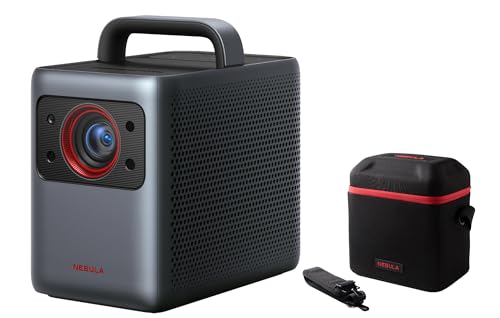
Anker Nebula Cosmos Laser 4K
A built-in smart TV platform handles streaming apps directly without a separate streaming device plugged in, which simplifies a setup used for both gaming and movie nights. Laser light source brightness holds up reasonably well against ambient light compared to standard lamp projectors.
Pros
- Built-in smart platform skips the need for a separate streaming device
- Laser light source holds up better against ambient light than lamp projectors
- Reasonable input lag for casual and moderately competitive gaming
Cons
- Lower lumen rating than the Epson LS800 or Optoma UHD35
- Input lag runs higher than BenQ’s dedicated gaming-focused models

BenQ GP500
A 1080p resolution and portable design keep cost and bulk down while still including BenQ’s gaming-focused low input lag mode. Built-in battery power allows outdoor or backyard gaming sessions without needing a nearby power outlet.
Pros
- Built-in battery enables outdoor or backyard gaming sessions
- Low input lag mode carries over from BenQ’s gaming lineup
- Lowest price among gaming projectors in this comparison
Cons
- 1080p resolution falls behind 4K competitors here
- Lower brightness limits use mostly to dim or dark rooms
What matters most
Why Input Lag Matters More Than Resolution for Gaming A projector with stunning picture quality but high input lag introduces a noticeable delay between a controller press and the on-screen action, which hurts fast-paced and competitive games far more than slightly softer image detail would. Projectors with a dedicated gaming mode, like the BenQ X3100i and Optoma UHD35, specifically reduce processing delay to keep response times tight. Casual single-player or story-focused gaming tolerates higher input lag far better than competitive multiplayer titles do.
Throw Distance and Fitting a Projector to a Room Standard throw projectors like the BenQ X3100i need meaningful distance between the unit and the screen to fill a large image, which can mean ceiling mounting or a sizeable room depth. Short throw models like the BenQ TK700STi and ultra short throw designs like the Epson LS800 project a large image from much closer, suiting rooms where a standard throw distance simply is not available. Measuring actual available room depth before buying prevents choosing a projector that cannot achieve the desired screen size.
Brightness and Dealing With Ambient Light Lumens output determines how well a projected image holds up against room lighting, with laser-based projectors like the Epson LS800 and Anker Nebula Cosmos Laser 4K generally handling ambient light better than standard lamp-based units. A dedicated dark home theater room tolerates lower brightness projectors just fine, while a living room with windows or ceiling lights needs a higher lumen rating to keep the image from washing out. Checking a room’s actual lighting conditions matters more than chasing the single highest lumen number available.
Portable and Budget Projectors for Casual Big-Screen Gaming The BenQ GP500 and ViewSonic X2-4K trade some brightness and resolution for a smaller footprint, letting a gaming setup move between rooms or travel to a backyard or friend’s place. Built-in battery power, like on the GP500, removes the need for a nearby outlet entirely for outdoor sessions. Buyers who only game in one fixed, dedicated room get more value from a larger, brighter stationary projector instead.
The lineup, side by side
| # | Model | Resolution | Best for | Score | Price |
|---|---|---|---|---|---|
| 1 | BenQ X3100i | Native 4K | Best Overall | 9.3 | Check price |
| 2 | Optoma UHD35 | 4K support | Best Value 4K Gaming | 9.0 | Check price |
| 3 | BenQ TK700STi | 4K support | Best for Short Throw and Low Latency | 8.9 | Check price |
| 4 | ViewSonic X2-4K | 4K support | Best Portable Compact Option | 8.6 | Check price |
| 5 | Epson LS800 | 4K support | Best Ultra Short Throw for Bright Rooms | 9.1 | Check price |
| 6 | Anker Nebula Cosmos Laser 4K | 4K support | Best for Smart TV Streaming Integration | 8.7 | Check price |
| 7 | BenQ GP500 | 1080p | Best Budget Portable | 8.2 | Check price |
Frequently asked questions
What input lag is acceptable for gaming on a projector?
Competitive gamers generally want input lag in the range BenQ’s dedicated gaming mode achieves, while casual or story-focused gaming tolerates noticeably higher lag without much practical impact.
Do I need a 4K projector for gaming, or is 1080p enough?
4K adds sharper detail on a large screen, but 1080p projectors like the BenQ GP500 still deliver smooth, responsive gaming at a lower price and often with less input lag.
What is the difference between short throw and ultra short throw projectors?
Short throw projectors still need some distance from the screen, while ultra short throw models like the Epson LS800 sit just inches away, both reducing the room depth needed for a large image.
How much brightness does a gaming projector need for a living room?
Rooms with windows or regular ambient light benefit from projectors rated around 3000 lumens or higher, while dedicated dark rooms can use lower brightness projectors effectively.
Can a gaming projector also work well for movies and streaming?
Yes, most gaming projectors in this comparison handle movies and streaming equally well, and some, like the Anker Nebula Cosmos Laser 4K, include a built-in smart streaming platform.
Do laser light source projectors last longer than lamp-based ones?
Generally yes, laser light sources like those in the Epson LS800 and Anker Nebula Cosmos Laser 4K are rated for a longer usable lifespan than traditional projector lamps.
Is a portable gaming projector worth it over a stationary one?
It depends on use case. Portable models like the BenQ GP500 suit outdoor or multi-room use, while stationary projectors generally offer higher brightness and resolution for a fixed setup.
Does HDR support matter for gaming projectors?
HDR, like the HDR-PRO processing on the BenQ X3100i, improves contrast and color range in supported games, though the benefit depends on the specific game and content supporting HDR.
The bottom line
The BenQ X3100i stands out overall for combining 4K resolution with input lag low enough for genuinely responsive gaming. Bright living rooms with limited placement flexibility should lean toward the Epson LS800 instead, since its ultra short throw laser design handles ambient light and tight spaces well. Budget-focused or outdoor gaming setups still get solid performance from the BenQ GP500.
Marcus Chen
Marcus covered consumer electronics for enthusiast tech publications for six years before joining ChoiceCrest. He specializes in translating manufacturer spec sheets into plain-language buying advice, with a focus on audio, computing accessories and smart-home gear.


