Capture Cards for Streaming at 1080p or True 4K
The Elgato HD60 X is the strongest all-around pick for most streamers, offering zero-lag 4K passthrough with simple USB setup. Anyone capturing a 4K source should step up to the Elgato 4K X instead, while creators recording away from a desk get more use from the battery-powered AVerMedia Live Gamer Portable 2 Plus.
The Elgato HD60 X stands out for pairing zero-lag 4K60 HDR passthrough with simple USB 3.0 setup, making it the easiest card here to start streaming with. Its main limitation is a 1080p60 capture ceiling, which cannot record a 4K source at full resolution.
We compared published capture resolutions, passthrough specifications, connection types and bundled software features across each listing rather than running our own latency tests.
The top picks, ranked
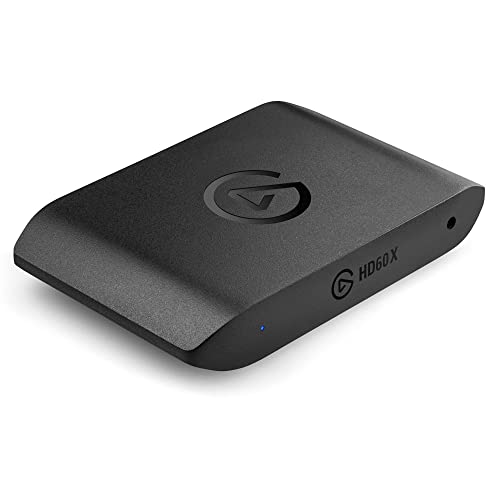
Elgato HD60 X
This USB capture card passes through 4K60 HDR video while recording and streaming at up to 1080p60, a tradeoff most streamers accept for its plug-and-play simplicity. Elgato’s 4K Capture Utility and tight integration with Stream Deck and Camera Hub make setup faster than competing software. Zero-lag passthrough means the connected display shows no added delay even while capturing.
Pros
- Zero-lag passthrough keeps gameplay responsive on the connected display
- Elgato’s software integrates cleanly with Stream Deck and OBS
- Compact external design needs no internal installation
Cons
- Capture resolution tops out at 1080p60, not full 4K
- Requires a separate PC running capture software to stream or record

Elgato 4K X
Unlike the HD60 X, this model captures and streams at full 4K60 HDR10, aimed at creators whose source console or PC already outputs 4K. A hardware H.265 encoder offloads compression work the HD60 X leaves to the host PC. USB-C connectivity keeps data transfer stable during long recording sessions.
Pros
- Captures and streams in full 4K60 HDR10, beyond the HD60 X’s 1080p cap
- Hardware H.265 encoding reduces load on the host computer
- USB-C connection stays stable during extended sessions
Cons
- Costs noticeably more than the standard HD60 X
- 4K capture files consume significantly more storage space

Elgato 4K60 Pro MK.2
Installed directly inside a desktop PC rather than connected externally, the 4K60 Pro MK.2 captures 4K60 HDR10 with lower latency than most USB alternatives. A PCIe Gen 2 x4 slot handles the bandwidth needed for high-resolution capture without bottlenecking other components. This internal design suits dedicated streaming PCs more than laptops or consoles without a free slot.
Pros
- Internal PCIe connection delivers lower latency than most USB cards
- Captures full 4K60 HDR10 without an external power supply
- Frees up desk space by living inside the PC case
Cons
- Requires a free PCIe slot and desktop case, ruling out laptops
- Installation is more involved than plugging in a USB device

AVerMedia Live Gamer Ultra 2.1 (GC571)
A built-in audio mixer lets streamers balance game audio, microphone and music without separate mixing software, a feature the Elgato lineup leaves to OBS. It captures and passes through 4K60 HDR, matching the Elgato 4K X’s resolution ceiling in a different form factor. RECentral software adds scene switching and overlay tools built into the capture card itself.
Pros
- Built-in audio mixer simplifies balancing multiple sound sources
- RECentral software bundles scene and overlay tools in one place
- Matches 4K60 HDR capture of pricier internal alternatives
Cons
- RECentral’s interface feels less polished than Elgato’s software
- Bulkier external housing than the compact HD60 X

AVerMedia Live Gamer Portable 2 Plus
A built-in battery and SD card slot let this device record gameplay directly without a connected computer, useful for capturing sessions away from a desk setup. Its small display shows recording status at a glance, a feature none of the PC-dependent cards here include. HDMI passthrough still supports up to 4K60 HDR even while recording standalone footage at 1080p.
Pros
- Records directly to an SD card without needing a connected PC
- Built-in battery allows fully portable recording sessions
- Small screen confirms recording status without extra software
Cons
- Standalone recording caps at 1080p rather than 4K
- Smaller buttons and screen are fiddlier to navigate than a PC app

Razer Ripsaw HD
This capture card records and streams at 1080p60 with 4K passthrough, a close match to the Elgato HD60 X at a lower typical cost. Razer’s software keeps setup simple, aimed at streamers moving up from a console’s built-in capture tools. A single HDMI input keeps the feature set focused rather than adding capabilities most beginners will not use.
Pros
- Lower typical cost than the Elgato HD60 X with similar 1080p capture
- Simple software suits streamers new to external capture cards
- 4K passthrough keeps the connected display sharp during capture
Cons
- Capture resolution stops at 1080p, matching but not beating the HD60 X
- Fewer software integrations than Elgato’s ecosystem
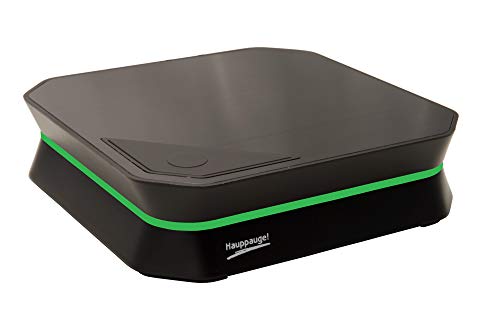
Hauppauge HD PVR 2 Gaming Edition Plus
This capture card ships with Hauppauge Capture software that opens directly to a record button, aimed at users who want the simplest possible path from unboxing to recording. It supports 1080p60 capture with HDMI passthrough up to 1080p, a more modest ceiling than every other card on this list. A physical on-device record button starts capture without opening any software at all.
Pros
- Physical record button starts capture without touching software
- Bundled software opens straight to recording with minimal setup
- Lower cost than most other cards on this list
Cons
- Passthrough and capture both cap at 1080p, below HDR 4K rivals
- Older USB 2.0 connection limits bandwidth compared to USB 3.0 cards
The lineup, side by side
| # | Model | Capture resolution | Best for | Score | Price |
|---|---|---|---|---|---|
| 1 | Elgato HD60 X | Up to 1080p60 | Best Overall | 9.2 | Check price |
| 2 | Elgato 4K X | Up to 4K60 HDR10 | Best for 4K Streaming | 9.0 | Check price |
| 3 | Elgato 4K60 Pro MK.2 | Up to 4K60 HDR10 | Best Internal PCIe for Low Latency | 8.9 | Check price |
| 4 | AVerMedia Live Gamer Ultra 2.1 (GC571) | Up to 4K60 HDR | Best External 4K with Built-In Audio Mixer | 8.7 | Check price |
| 5 | AVerMedia Live Gamer Portable 2 Plus | 1080p60 standalone recording | Best Standalone Recording Without a PC | 8.5 | Check price |
| 6 | Razer Ripsaw HD | Up to 1080p60 | Best Budget 1080p | 8.2 | Check price |
| 7 | Hauppauge HD PVR 2 Gaming Edition Plus | Up to 1080p60 | Best for Simple Plug-and-Play Setup | 7.9 | Check price |
What to look for
What a capture card actually does A capture card takes a video signal, usually from a console or second PC, and feeds it into recording or streaming software on a connected computer. Passthrough resolution describes what the connected monitor displays, while capture resolution describes what actually gets recorded or streamed, and the two numbers are not always equal. Connection type, whether USB or internal PCIe, affects both latency and how much setup the installation requires.
Matching resolution to your streaming setup Streamers broadcasting from a 1080p source gain little from the Elgato 4K X’s higher ceiling and can save money with the HD60 X or Razer Ripsaw HD instead. Anyone capturing from a console or PC that already outputs native 4K should prioritize the 4K X or Live Gamer Ultra 2.1 to avoid downscaling the source. Passthrough resolution matters separately for players who want a sharp monitor image regardless of what gets recorded.
Internal versus external capture cards External USB cards like the HD60 X and Razer Ripsaw HD install in seconds and work across multiple computers without opening a case. Internal PCIe cards like the Elgato 4K60 Pro MK.2 trade that convenience for lower latency, since the video data skips the USB controller entirely. Builders setting up a dedicated streaming PC benefit most from an internal card, while anyone switching between machines should stick with USB.
Recording without a PC The AVerMedia Live Gamer Portable 2 Plus stands apart by recording directly to an SD card, useful for travel, LAN events or any setup without a laptop nearby. Its built-in battery removes the need for a wall outlet during short recording sessions. Every other card on this list depends on a connected computer running capture software, which limits where they can realistically be used.
Frequently asked questions
Do I need a capture card if my console can stream directly?
A console’s built-in streaming works for casual use, but a dedicated card like the Elgato HD60 X adds overlays, scene switching and better encoding control most consoles lack.
What is the difference between capture resolution and passthrough resolution?
Capture resolution is what actually gets recorded or streamed, while passthrough resolution is what the connected monitor displays. The Elgato HD60 X, for example, passes through 4K but only captures at 1080p.
Is an internal PCIe capture card better than a USB one?
For latency, yes. The Elgato 4K60 Pro MK.2’s internal PCIe connection responds faster than USB cards, though it only works in a desktop with a free slot.
Can a capture card record gameplay without a PC?
Most cards here need a connected computer, but the AVerMedia Live Gamer Portable 2 Plus records directly to an SD card using its own battery and controls.
Does a capture card add input lag to gameplay?
A properly designed card like the Elgato HD60 X uses zero-lag passthrough, so the display you are looking at shows no added delay even while capturing.
What is HDR passthrough and why does it matter?
HDR passthrough preserves the wider color and brightness range of an HDR source on the connected display. Without it, a 4K HDR game would appear visually flattened on the monitor.
Do I need a separate audio mixer with a capture card?
Not with every card. The AVerMedia Live Gamer Ultra 2.1 includes a built-in hardware mixer, while Elgato cards typically rely on software mixing inside OBS.
Is 1080p capture enough for streaming in 2026?
For most platforms, yes, since many viewers still watch on connections that do not need 4K. Creators targeting a 4K-focused audience should choose the Elgato 4K X instead.
Can a budget capture card handle streaming to Twitch and YouTube at once?
Multi-platform streaming depends more on the software and encoding settings than the card itself, so even the budget Razer Ripsaw HD can handle it with the right streaming software.
Our take
The Elgato HD60 X earns the top recommendation for most streamers, since its zero-lag 4K passthrough and simple USB setup cover the needs of anyone starting out. Creators capturing from a native 4K source should choose the Elgato 4K X instead, as it records at full resolution where the HD60 X cannot. Anyone who needs to record away from a desk setup should skip both and pick the AVerMedia Live Gamer Portable 2 Plus for its battery and SD card recording.
Marcus Chen
Marcus covered consumer electronics for enthusiast tech publications for six years before joining ChoiceCrest. He specializes in translating manufacturer spec sheets into plain-language buying advice, with a focus on audio, computing accessories and smart-home gear.

