Game Controllers Made to Outlast Long Sessions
Broad platform support and a comfortable shape put the Xbox Wireless Controller on top. PlayStation owners get the most convincing haptics from the Sony DualSense, while the 8BitDo Ultimate 2 uses Hall effect sticks to dodge drift for far less money than premium pads.
One pad for nearly everything: that is the Xbox Wireless Controller. PlayStation players should reach for the Sony DualSense and its adaptive triggers, and anyone burned by stick drift should look at the 8BitDo Ultimate 2’s Hall effect sticks. All three remain current listings.
Important differences here live inside the housing, not on the box. Potentiometer sticks wear and drift, Hall effect and TMR sticks do not, and wireless protocols vary in latency more than marketing admits. Stick technology, connection methods, published battery life and platform licensing formed our comparison, weighed against owner reports of drift and grip wear.
What we recommend
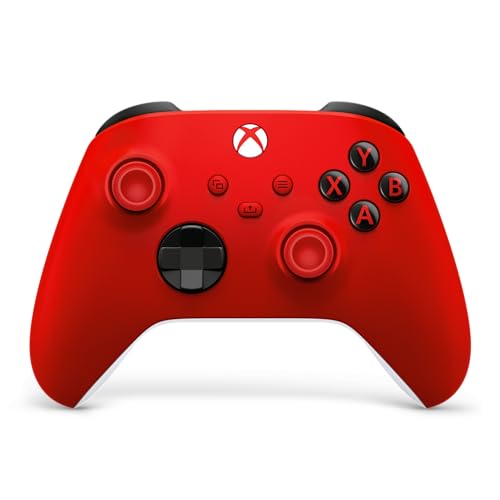
Xbox Wireless Controller
Xbox consoles, Windows, Android and most PC storefronts all accept Microsoft’s standard pad without configuration. Textured grips and triggers give reliable purchase, and a hybrid d-pad handles fighting game inputs as easily as menu navigation. AA cells power it, which owners either appreciate for instant swaps or find dated.
Pros
- Near universal platform support
- Comfortable, well textured grips
- Swappable AA power means no downtime
Cons
- AA batteries rather than built in
- Standard sticks can develop drift

Sony DualSense Wireless Controller
Adaptive triggers that vary resistance in supported games make the DualSense unique among mainstream pads, and the haptics render texture rather than plain rumble. A built in microphone and speaker handle chat without a headset. Battery life draws the most complaints, since all that hardware pulls power faster than a simpler pad.
Pros
- Adaptive triggers add real feedback
- Detailed haptics beyond simple rumble
- Built in mic and speaker
Cons
- Shorter battery life than rivals
- Full features only on PlayStation

Xbox Elite Wireless Controller Series 2
Four rear paddles, adjustable trigger stops, swappable stick tops and adjustable stick tension all ship in a hard case with the Elite Series 2. Thumbs stay on the sticks while jumping or reloading, which genuinely changes how competitive players move. Extra weight over a standard pad reads as solidity to most owners.
Pros
- Rear paddles free your thumbs
- Adjustable triggers and stick tension
- Hard case and charging dock included
Cons
- Expensive relative to standard pads
- Sticks are still potentiometer based

8BitDo Ultimate 2 Wireless Controller
Magnetic sensing replaces physical contacts in 8BitDo’s Hall effect sticks and triggers, so they do not wear into drift. Rear paddles, deep software remapping and a charging dock round out a spec sheet that undercuts premium pads. Console licensing beyond PC and Android is the trade off.
Pros
- Hall effect sticks resist drift
- Deep remapping software
- Dock included at a modest price
Cons
- No Xbox or PlayStation licensing
- Software required for full remapping

Nintendo Switch Pro Controller
A conventional pad with a proper d-pad and adult sized grips replaces the split Joy-Con format here. Weeks of casual play pass between charges, an outstanding result for battery life. Motion controls and amiibo support come built in, though conventional sticks still carry a drift risk over years of use.
Pros
- Exceptional battery life
- Comfortable full size grips
- Proper d-pad rather than split buttons
Cons
- Limited use outside Nintendo systems
- Sticks share the drift risk

GameSir T4 Kaleid Wired Controller
Wireless latency and battery management disappear entirely with a wired connection, and the T4 Kaleid pairs that with Hall effect sticks, triggers and microswitch face buttons. A transparent shell with RGB lighting is a matter of taste. Desk based PC setups get a lot of hardware for the money here.
Pros
- No wireless latency or battery worries
- Hall effect sticks and triggers
- Crisp microswitch face buttons
Cons
- Cable limits couch play
- No PlayStation or Xbox support

PowerA Enhanced Wired Controller
Local multiplayer and unexpected guests are what PowerA’s licensed wired pad covers, at the low end of the market. Two mappable rear buttons are a genuine surprise for the price. Lighter build quality than first party controllers means this works better as a secondary pad than a daily driver.
Pros
- Cheapest way to add a second pad
- Mappable rear buttons included
- Officially licensed for its platform
Cons
- Lighter build than first party pads
- Wired only
How to choose
What to look for in a game controller Stick technology, connection type, platform licensing and remapping options define most of the real differences between pads. Potentiometer sticks wear down over months of use, reporting phantom movement when centered, which is stick drift. Hall effect and TMR magnetic sensing sticks avoid that wear entirely, so heavy players should weigh that spec above paddles or lighting.
Wireless versus wired for competitive play Bluetooth is the most convenient connection and the slowest, adding a small but measurable delay. Dedicated 2.4GHz dongles run noticeably quicker and power most competitive wireless pads. Wired stays fastest and never needs charging, at the cost of a cable across the room. Story games barely notice the difference; fighting games and competitive shooters reward a wired or 2.4GHz connection.
Which controller works with which console Console makers restrict which controllers work on their hardware, so an Xbox licensed pad will not run on a PlayStation. Third party pads without console licensing are usually limited to PC, Switch and mobile. PC remains the permissive platform where nearly everything works, giving PC first players the widest and cheapest choice.
Do you need paddles or remapping software Rear paddles let you press face buttons without lifting a thumb off a stick, useful in shooters where jumping while aiming is common. They feel awkward for a few hours, then become hard to give up. Remapping software adds trigger stops, stick curves and profile switching, features a relaxed single player gamer can skip entirely.
Side by side
| # | Model | Sticks | Best for | Score | Price |
|---|---|---|---|---|---|
| 1 | Xbox Wireless Controller | Potentiometer | Best overall | 9.4 | Check price |
| 2 | Sony DualSense Wireless Controller | Potentiometer | Best for PlayStation | 9.2 | Check price |
| 3 | Xbox Elite Wireless Controller Series 2 | Adjustable tension, swappable tops | Best premium | 9.0 | Check price |
| 4 | 8BitDo Ultimate 2 Wireless Controller | Hall effect | Best value | 8.8 | Check price |
| 5 | Nintendo Switch Pro Controller | Potentiometer | Best for Switch | 8.6 | Check price |
| 6 | GameSir T4 Kaleid Wired Controller | Hall effect | Best wired | 8.3 | Check price |
| 7 | PowerA Enhanced Wired Controller | Potentiometer | Best budget | 8.0 | Check price |
Good to know
What causes stick drift and can it be fixed?
Wear and contamination inside potentiometer based sticks cause phantom movement when the stick sits centered. Compressed air around the stick base sometimes helps temporarily, but replacing the stick module or switching to a Hall effect controller is the reliable fix.
Do I need a wired controller for competitive play?
Wired removes wireless latency and eliminates mid match battery issues. A strong 2.4GHz wireless connection comes close enough that most players will not notice. Bluetooth is the one to avoid when chasing the lowest input delay.
Will an Xbox controller work on PlayStation?
No. Console licensing blocks cross use, and third party adapters behave inconsistently. Both Xbox and PlayStation pads work on PC, with Xbox controllers usually needing less setup since most games expect that button layout.
Are rear paddles worth it on a game controller?
Shooters and action games benefit once you adjust to pressing buttons without leaving the sticks. Turn based, strategy and story driven games add cost from paddles without much practical benefit.
How long should a controller battery last?
Around 40 hours is typical for efficient rechargeable pads, while feature heavy controllers with haptics and speakers run much shorter. AA powered controllers trade built in convenience for instant battery swaps.
Do game controllers work on phones and tablets?
Most modern pads connect over Bluetooth to Android and iOS, and several ship with or support a phone clip. Game support for a gamepad varies more than controller support does, so check the specific titles you play.
Hall effect versus TMR sticks: what is the difference?
Both rely on magnetic sensing rather than physical contacts, so neither develops classic drift. TMR sensors are newer, generally draw less power and can read more precisely near center. Either beats potentiometer sticks for longevity.
Is a premium controller worth it over two standard ones?
Serious single game players who want paddles and adjustability get more from the premium pad. Groups who play locally with friends or family get more actual enjoyment from two standard pads at the same total cost.
The verdict
Buy the Xbox Wireless Controller for a single pad that works across a console, a PC and a phone without fuss. PlayStation owners should stay with the Sony DualSense, since its adaptive triggers only run at full strength on that hardware. Anyone who has lost controllers to drift before should look at the 8BitDo Ultimate 2, which fixes the root cause with Hall effect sticks at a sensible price.
Marcus Chen
Marcus covered consumer electronics for enthusiast tech publications for six years before joining ChoiceCrest. He specializes in translating manufacturer spec sheets into plain-language buying advice, with a focus on audio, computing accessories and smart-home gear.