5 Fight Sticks Built for Competitive Fighting Games
Hori’s Fighting Stick Alpha leads this list with quiet Hayabusa parts and a panel that opens without tools. Qanba’s Obsidian 2 suits players who want genuine Sanwa parts in a heavier deck. Razer’s Kitsune stands out as the sharpest leverless option for fast directional inputs.
Hori’s Fighting Stick Alpha covers ranked sets, locals and casual play with quiet parts and easy panel access. Qanba’s Obsidian 2 answers for heavier builds, and Razer’s Kitsune handles leverless inputs. All three are current listings with proper tournament layouts.
Fight sticks are tricky to shop for, because the parts that matter most stay hidden inside identical-looking cases. Two sticks can share a shell yet use completely different levers, switches and wiring, and console licensing decides which games you can even use them with. We compared published component lists, panel access methods, cable handling and platform support, then weighed those against what owners report about long-term button feel and lever wear.
Our top picks
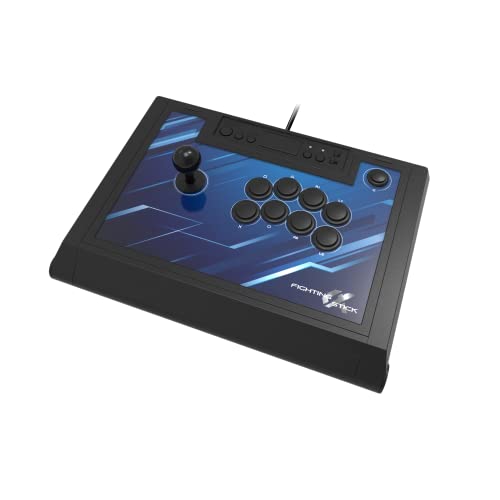
Hori Fighting Stick Alpha
Hori builds this around its own Hayabusa lever and Kuro buttons, quieter than classic clicky microswitches and more forgiving for players still learning motion inputs. A simple release lets the top panel lift off, so artwork swaps and button changes skip a full teardown. Owners report it feels stable on a lap without needing a table.
Pros
- Quiet lever and button combination
- Tool free panel access for artwork
- Wide, stable base for lap play
Cons
- Hayabusa lever feel is divisive
- No wireless option

Qanba Obsidian 2
Genuine Sanwa Denshi components ship inside the Obsidian 2, still the reference standard for arcade feel. Its chassis carries enough weight to stay planted during frantic exchanges. Roomy internal space leaves room for aftermarket PCBs if you swap the brain later.
Pros
- Genuine Sanwa parts out of the box
- Roomy interior for mods
- Heavy shell resists sliding
Cons
- Bulky to carry to events
- Louder than Hayabusa style parts

Razer Kitsune
Dropping the lever entirely, the Kitsune uses a flat button layout with Razer’s low profile optical switches, so directional inputs register with very short travel. Its slim chassis slides into a backpack far more easily than a traditional stick. Players moving over from keyboard controls adapt quickly, though the shift away from lever muscle memory still takes practice.
Pros
- Very short actuation travel
- Easy to transport
- Swappable top plate
Cons
- Steep relearning curve from a lever
- Optical switches limit third party swaps

Victrix Pro FS Arcade Fight Stick
Victrix designed this around event logistics, with a lever that stows inside the aluminium chassis and a lid that clamps over the buttons for transport. Sanwa parts handle the actual playing, and a dedicated channel tucks the link cable away. Weekly locals players will notice these packing details more than casual users do.
Pros
- Lever stows for safe transport
- Rigid aluminium body
- Tidy internal cable storage
Cons
- Heavier than plastic rivals
- Artwork swaps take longer

8BitDo Arcade Stick
Few sticks connect over 2.4GHz wireless, Bluetooth and USB the way this one does, which makes couch play on a Switch genuinely practical. Its panel unscrews for part swaps, and companion software supports macro programming. Owners describe the stock lever and buttons as serviceable rather than special, so many treat it as a modding base.
Pros
- Three connection modes
- Macro programming software
- Straightforward to mod
Cons
- Stock parts feel basic
- No PlayStation or Xbox licensing

Mayflash F500 Elite
The F500 Elite arrives with Sanwa parts already fitted and a compatibility list covering most modern and legacy consoles through a single switch. Its shell weighs less than the premium options, so it can shift on a slick desk without a mat. Players who want real arcade parts without a premium chassis get a sensible trade here.
Pros
- Sanwa parts at a low entry point
- Very wide console compatibility
- Light enough to carry daily
Cons
- Shell can slide without a mat
- Console switching needs setup

Qanba Drone 2
Smallest stick in this lineup, the Drone 2 suits someone unsure whether they will stick with arcade controls. Parts come from Qanba’s own house line rather than Sanwa, and the frame stays light. Owners report it performs best on a table, where the compact footprint becomes an advantage rather than a stability problem.
Pros
- Lowest commitment entry point
- Small enough for a crowded desk
- Light to carry
Cons
- House parts wear faster than Sanwa
- Too light for comfortable lap play
What matters most
Lever or leverless: which should you choose? A traditional lever gives your hand a physical arc to follow, which many players find easier when learning quarter circle and dragon punch motions. Leverless decks replace that arc with four direction buttons, cutting travel distance and letting fingers move independently. Neither wins on raw speed in normal play, but leverless setups suit players with keyboard backgrounds and travel far more easily. Switching between the two mid season disrupts muscle memory, so commit to one before buying.
What parts quality actually buys you A stick’s chassis is mostly a box; feel comes from the lever assembly and button switches inside it. Sanwa Denshi parts remain the reference point for arcade feel. Hori’s Hayabusa and Kuro parts trade some click for quieter operation, and house brand components on budget sticks generally wear out sooner. Because most quality sticks accept standard 30mm buttons and JLF style levers, a cheaper shell with easy panel access can be upgraded later.
Does console licensing limit which stick you can buy? Arcade sticks carry licensing per platform, so a PlayStation licensed stick will not simply work on an Xbox. Check that a listing names your exact console generation, including whether PS4 support carries into PS5 titles. Multi platform sticks handle this with a physical switch, convenient but adding a setup step at every system change. PC support runs nearly universal, so PC first players get the widest choice.
How much do panel access and weight matter day to day? Changing artwork, swapping a worn button or fitting a different lever all depend on panel access. Removable top panels make this easiest, screw off bases stay workable, and glued shells are effectively sealed. Weight cuts the opposite way depending on where you play. Heavy chassis stay planted on a lap or desk, while lighter shells are the ones that actually make it to a friend’s house or a tournament.
Side by side
| # | Model | Lever | Best for | Score | Price |
|---|---|---|---|---|---|
| 1 | Hori Fighting Stick Alpha | Hori Hayabusa | Best overall | 9.4 | Check price |
| 2 | Qanba Obsidian 2 | Sanwa JLF | Best for premium parts | 9.2 | Check price |
| 3 | Razer Kitsune | Leverless, all button | Best leverless | 9.0 | Check price |
| 4 | Victrix Pro FS Arcade Fight Stick | Sanwa, stowable | Best for travel | 8.8 | Check price |
| 5 | 8BitDo Arcade Stick | 2.4GHz, Bluetooth, USB | Best wireless | 8.6 | Check price |
| 6 | Mayflash F500 Elite | Sanwa JLF | Best value | 8.3 | Check price |
| 7 | Qanba Drone 2 | Qanba house lever | Best budget | 8.0 | Check price |
Good to know
Does a fight stick make you better at fighting games?
Not on its own. A stick changes how inputs feel, not how well you read an opponent. It does offer more consistent execution of complex motions once muscle memory forms, which usually takes several weeks of regular play.
Are Sanwa parts worth the extra cost?
For most committed players, yes. Sanwa levers and buttons carry a well documented feel and long service life, and replacements are easy to source. Casual players who play a few nights a month may not notice the difference against good house parts.
Can you use a PlayStation fight stick on Xbox?
Generally no. Console licensing blocks cross use, and adapters that promise it are inconsistent and sometimes blocked by game anti cheat. Buy for the platform you actually play on, or choose a stick that lists both explicitly.
What is a leverless or hitbox style controller?
It replaces the joystick with four directional buttons laid flat under your fingers. Inputs register with very short travel, and each direction works independently, which some players find more precise for charge characters and fast directional changes.
How hard is it to change fight stick artwork?
It depends entirely on panel design. Sticks with a removable top panel take a few minutes. Sticks that unscrew from the base take longer, since every button must be disconnected and popped out. Sealed shells are not practical to reskin at all.
Do fight sticks work on Nintendo Switch?
Some do. Support is model specific rather than universal, so check the listing carefully. Multi platform sticks and wireless models from 8BitDo are the usual choices for Switch players.
Is a wireless fight stick a bad idea for competition?
Most tournaments require wired connections, so a wireless stick may need its cable anyway. For home and couch play, wireless is genuinely convenient, and modern 2.4GHz connections stay stable enough that owners rarely report input issues.
How long do arcade buttons last?
Quality microswitches carry ratings for millions of presses, so years of normal play is typical. Levers usually loosen before buttons fail. Both are cheap to replace on a stick with accessible panels, which is why panel design matters more than it first appears.
Fight stick or controller: which wins for execution?
Neither wins outright. A stick suits players who prefer a physical lever for motion inputs, while a pad suits players who grew up on one. Consistency comes from practice on whichever input method you commit to long term.
Our take
Most players should start with the Hori Fighting Stick Alpha, since it pairs quiet, forgiving parts with a panel you can actually open. Choose the Qanba Obsidian 2 for genuine Sanwa components in a heavier deck, or the Razer Kitsune if committing to leverless inputs. Anyone testing the waters without a long-term commitment should look at the Qanba Drone 2 instead.
Marcus Chen
Marcus covered consumer electronics for enthusiast tech publications for six years before joining ChoiceCrest. He specializes in translating manufacturer spec sheets into plain-language buying advice, with a focus on audio, computing accessories and smart-home gear.