Flight Sticks for Sim Pilots: What Actually Matters
The Thrustmaster T.16000M FCS is the best all around flight stick for most sim pilots, pairing a 16 bit optical sensor with a detachable base. The Logitech X56 suits pilots who want a matched dual throttle, while the VKB Gladiator NXT EVO fits buyers chasing combat sim precision.
The Thrustmaster T.16000M FCS stands out as the best overall flight stick for most PC sim pilots. It pairs a 16 bit optical sensor with a detachable base, so upgrades stay simple later. Pilots who want a full HOTAS setup should look at the Logitech X56 instead, since it ships with its own dual throttle unit.
Flight sticks vary widely in axis precision, button count, and whether a throttle ships included, which makes direct comparison hard. We compared published specifications, sensor types, and owner feedback across combat sim and civil aviation communities to match each stick to a real use case.
How to pick the right one
What to look for in a flight stick Axis precision matters more than button count for most pilots. Hall effect and optical sensors resist the drift that cheaper potentiometer designs develop after months of use. Check whether the stick ships with a throttle or expects one bought separately, since that changes the total cost of a usable setup. Compatibility with PC software like T.A.R.G.E.T. or CH Control Manager affects how deeply you can customize button mapping.
Matching a stick to combat flight sims Combat titles reward sticks with multiple hat switches, since pilots cycle views and trim constantly mid fight. The VKB Gladiator NXT EVO and CH Products Fighterstick both suit this style through contactless or metal shaft durability under hard inputs. A detachable base, like on the Thrustmaster T.16000M FCS, lets you upgrade the grip later without replacing the whole unit.
What civil aviation sim pilots need differently Airliner simulation rewards realism over raw precision. A sidestick like the Thrustmaster TCA Airbus Edition mirrors the side mounted control found in actual Airbus cockpits, which matters more to this audience than extra programmable buttons. Pilots flying Boeing style aircraft in Microsoft Flight Simulator often prefer a center mounted yoke instead, a different accessory entirely from a sidestick.
Is a full HOTAS throttle worth the extra cost A dedicated throttle unit, like the one bundled with the Logitech X56, earns its keep for twin engine aircraft that need independent engine control. Single engine and arcade style flying rarely needs that complexity, and an integrated throttle lever, as found on the Thrustmaster T.Flight Hotas X, covers those cases for less money. Decide based on the aircraft you fly most, not on what looks most capable on a spec sheet.
The shortlist, ranked

Thrustmaster T.16000M FCS
This ambidextrous stick uses a 16 bit optical axis sensor for smooth, accurate tracking on roll and pitch. Its base detaches from the handle, so pilots can later swap grips without buying a new sensor unit. Combat and civil titles both benefit from its HOTAS compatible design when paired with the matching TWCS throttle.
Pros
- Detachable base simplifies future upgrades
- Smooth optical axis tracking at this price
- Works with Thrustmaster’s free T.A.R.G.E.T. software
Cons
- Plastic construction feels light under hard combat maneuvers
- No backlighting for dim cockpits
Logitech X56 H.O.T.A.S.
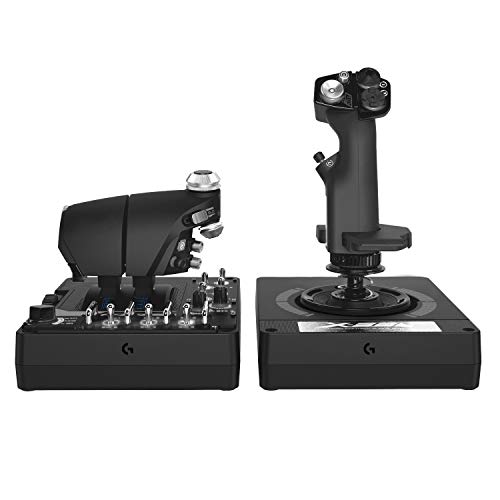
Logitech pairs this stick with a dual throttle unit, giving pilots independent engine control for twin engine aircraft. The grip includes 189 programmable commands across profiles, useful for complex combat sims. RGB backlighting helps locate buttons during night missions.
Pros
- Dedicated twin throttle for multi engine aircraft
- Extensive button and profile customization
- Backlit controls aid low light use
Cons
- Base clamp can loosen on thin desks
- Software setup has a learning curve

VKB Gladiator NXT EVO
VKB builds this stick around contactless Hall effect sensors, which resist the wear that potentiometer sticks develop over time. The modular grip system lets pilots swap handles to match different aircraft types. Adjustable spring tension changes stick resistance to suit personal preference.
Pros
- Hall effect sensors avoid long term drift
- Modular grips fit multiple aircraft styles
- Precise feel favored by competitive simmers
Cons
- Steeper learning curve for new simmers
- Extra grip options sold separately add cost

Thrustmaster T.Flight Hotas X
This compact HOTAS combo works across PC and PlayStation consoles, which suits pilots who switch platforms. An analog throttle sits alongside the stick for one handed operation. Twelve action buttons cover the basics for arcade style flight titles.
Pros
- Cross platform support for PC and PlayStation
- Compact footprint suits smaller desks
- Low price for a combined stick and throttle
Cons
- Fewer buttons than dedicated HOTAS setups
- Throttle lever feels loose at full travel

CH Products Fighterstick USB
CH Products uses a metal internal shaft, a design that has stayed largely unchanged for over a decade because it holds up to repeated hard combat maneuvers. Four hat switches give pilots quick access to views and trim without reaching for a keyboard. Control Manager software handles button mapping across profiles.
Pros
- Metal components outlast plastic stick competitors
- Four hats cover view and trim control
- Mature software with deep profile support
Cons
- Dated industrial design lacks RGB or modern styling
- Desk clamp needs a sturdy surface
VIRPIL Constellation Alpha Prime
VIRPIL’s Alpha Prime grip sits on a magnetic sensor base built for simmers who fly for hours at a time. The base accepts other VIRPIL and WarBRD style grips, so pilots can expand their setup later. Weighted construction keeps the unit stable during aggressive stick inputs.
Pros
- Magnetic base resists mechanical wear over years of use
- Accepts a range of swappable grips
- Stable base handles aggressive combat inputs
Cons
- Among the priciest sticks in this category
- Calibration takes more initial setup time

Thrustmaster TCA Sidestick Airbus Edition
This sidestick carries an official Airbus license and mimics the side mounted control found in real Airbus flight decks. Its design suits Microsoft Flight Simulator and other civil aviation titles rather than combat sims. An adjustable armrest helps match seated position to desk height.
Pros
- Authentic Airbus sidestick feel for civil sim fans
- Adjustable armrest improves long session comfort
- Officially licensed design and markings
Cons
- Not suited to combat flight sims
- Limited button count versus full HOTAS kits
The lineup, side by side
| # | Model | Sensor Type | Best for | Score | Price |
|---|---|---|---|---|---|
| 1 | Thrustmaster T.16000M FCS | 16-bit optical HERO | Best Overall | 9.4 | Check price |
| 2 | Logitech X56 H.O.T.A.S. | Dual independent levers | Best for Full HOTAS Setup | 9.1 | Check price |
| 3 | VKB Gladiator NXT EVO | Contactless Hall effect | Best for Precision Combat Sims | 9.3 | Check price |
| 4 | Thrustmaster T.Flight Hotas X | PC, PS4, PS5 | Best Budget Pick | 8.6 | Check price |
| 5 | CH Products Fighterstick USB | Metal internal shaft | Best for Durability | 8.8 | Check price |
| 6 | VIRPIL Constellation Alpha Prime | Magnetic, non-contact | Best Premium Pick | 9.5 | Check price |
| 7 | Thrustmaster TCA Sidestick Airbus Edition | Official Airbus edition | Best for Civil Flight Sim | 8.9 | Check price |
Questions worth asking
What is the difference between a flight stick and a HOTAS setup?
A flight stick covers just the handle and base, while HOTAS, short for hands on throttle and stick, adds a separate throttle unit for independent engine control.
Do flight sticks work with Microsoft Flight Simulator?
Most modern USB flight sticks, including the Thrustmaster T.16000M FCS and VKB Gladiator NXT EVO, work with Microsoft Flight Simulator through standard axis and button mapping.
Can I use a flight stick on a console?
Some models, like the Thrustmaster T.Flight Hotas X, support PlayStation consoles directly, but many premium sticks stay PC only.
Is Hall effect sensing better than optical for flight sticks?
Hall effect sensors resist long term wear since they use magnetic fields instead of physical contact, which helps sticks like the VKB Gladiator NXT EVO stay precise for years.
How many buttons does a flight stick need for combat sims?
Combat sims benefit from at least four hat switches and a dozen action buttons, a range covered by the CH Products Fighterstick and Logitech X56.
Are expensive flight sticks worth it for casual flying?
Casual pilots who fly occasionally rarely need premium sticks like the VIRPIL Constellation Alpha Prime, since a budget HOTAS combo handles arcade style titles fine.
What is a sidestick and who needs one?
A sidestick mounts to the side of the seat rather than the center, matching the layout found in real Airbus aircraft, which makes it relevant mainly to civil aviation sim fans.
Do all flight sticks need a separate throttle?
Some sticks, like the Thrustmaster T.Flight Hotas X, include an integrated throttle lever, while others, like the T.16000M FCS, expect a separate throttle unit for full HOTAS control.
Can flight stick grips be swapped between bases?
Modular systems like VKB’s and VIRPIL’s let pilots swap grips on a shared base, but this cross compatibility rarely extends across different brands.
How long do flight sticks typically last with regular use?
Sticks with contactless Hall effect or metal shaft construction, such as the VKB Gladiator NXT EVO and CH Products Fighterstick, tend to outlast plastic potentiometer designs by years of regular use.
Final word
The Thrustmaster T.16000M FCS remains the strongest all around pick for pilots who want accurate axes and room to upgrade later. Combat sim fans chasing extra precision should step up to the VKB Gladiator NXT EVO instead, while anyone flying twin engine aircraft gains the most from the Logitech X56’s dual throttle unit.
Marcus Chen
Marcus covered consumer electronics for enthusiast tech publications for six years before joining ChoiceCrest. He specializes in translating manufacturer spec sheets into plain-language buying advice, with a focus on audio, computing accessories and smart-home gear.