Top Flight Sticks for Travel: Compact and Portable Options
The Thrustmaster T-Flight HOTAS X is our top pick for travel because it offers a full HOTAS experience in a design that splits into two pieces and locks back together for easy packing. Its main advantage is the integrated throttle and rudder controls, which provide console and PC compatibility. The main limitation is its size, which is larger than some ultra-compact sticks, but it still fits in a carry-on.
Pilots and flight sim enthusiasts often want to practice on the go, but hauling a full-size joystick can be a hassle. Travel-friendly flight sticks strike a balance between functionality and portability, allowing you to enjoy realistic controls without sacrificing suitcase space.
Our roundup considers factors like collapsible designs, lightweight materials, and versatile connectivity. We focused on models that are currently available on Amazon and have proven reliable based on user reviews and specifications.
The shortlist, ranked

Thrustmaster T-Flight HOTAS X
This joystick splits into two pieces for compact storage and features a locking mechanism to keep them together. It offers a realistic throttle and rudder twist, plus 12 buttons and a 4-way hat switch. Compatible with PC and PS4, it is a favorite among travelers.
Pros
- Detachable throttle for easy packing
- Integrated rudder control via twist
- Works on PC and PS4
Cons
- Plastic build feels a bit light
- Base may slide on smooth surfaces without suction

Logitech G Extreme 3D Pro
A classic joystick with a sturdy base and comfortable grip. It has 12 programmable buttons and a throttle lever on the base. Its compact size and lightweight design make it a great travel companion for PC gamers.
Pros
- Low price
- Compact and lightweight
- Good button layout
Cons
- Throttle is on base, not separate
- No console compatibility
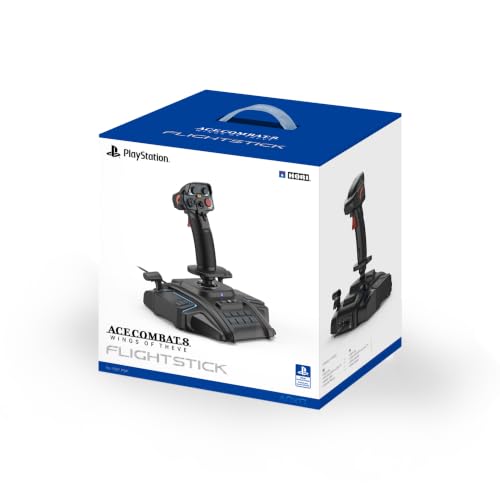
HORI Flight Stick for PS4/PC
Designed for PlayStation 4 and PC, this stick features a realistic flight stick grip with a stable base. It includes a throttle lever and 8 buttons, plus a 3-way handle switch. Its compact footprint suits travel.
Pros
- Official PS4 license
- Good build quality
- Palm rest for comfort
Cons
- Limited number of buttons
- No detachable throttle

Thrustmaster T.16000M FCS
This joystick uses HallEffect sensors for high precision and durability. It features a compact design with a sturdy base and multiple buttons. The stick is lightweight and easy to pack, though it lacks a built-in throttle.
Pros
- Accurate HallEffect sensors
- Detachable base for storage
- Programmable buttons
Cons
- No throttle included
- Requires separate throttle purchase

CH Products Flightstick Pro
A durable joystick with a traditional design. It features 3 buttons, an 8-way hat switch, and a throttle wheel on the base. Its small footprint and rugged build make it a reliable travel option for PC.
Pros
- Very durable
- Compact size
- Precise analog stick
Cons
- Few buttons
- Outdated aesthetics

PXN 2113 Flight Stick
This inexpensive flight stick offers dual vibration motors and a realistic design. It features a throttle lever and multiple buttons, compatible with PS4, PS3, and PC. Its compact size is travel-friendly.
Pros
- Very affordable
- Multi-platform support
- Vibration feedback
Cons
- Build quality is less premium
- Software setup required for PC

Saitek Pro Flight Yoke System
While not a traditional stick, this yoke offers a different flying experience. It comes with a throttle quadrant and a sturdy base. The unit is relatively compact and can be disassembled for travel, though it is heavier.
Pros
- Realistic yoke steering
- Includes throttle quadrant
- Compatible with major sims
Cons
- Heavier and bulkier
- Requires more packing space
Before you buy
How they stack up
| # | Model | Dimensions | Best for | Score | Price |
|---|---|---|---|---|---|
| 1 | Thrustmaster T-Flight HOTAS X | 17.5 x 10.5 x 10.5 inches (combined) | Best overall for travel with full HOTAS | 9.4 | Check price |
| 2 | Logitech G Extreme 3D Pro | 12 x 8 x 9 inches | Best budget-friendly compact stick | 8.8 | Check price |
| 3 | HORI Flight Stick for PS4/PC | 11.5 x 8.5 x 10 inches | Best for PS4 and PC gamers | 8.5 | Check price |
| 4 | Thrustmaster T.16000M FCS | 12.5 x 8.5 x 10.5 inches | Best precision sensor for travel | 9.0 | Check price |
| 5 | CH Products Flightstick Pro | 10.5 x 7.5 x 9 inches | Best for retro sim enthusiasts | 8.2 | Check price |
| 6 | PXN 2113 Flight Stick | 12.5 x 8 x 10 inches | Best budget for PS4/PS3/PC | 8.0 | Check price |
| 7 | Saitek Pro Flight Yoke System | 14 x 11 x 12 inches | Best for yoke steering with travel case | 8.6 | Check price |
Frequently asked questions
Can I use a flight stick with a laptop for travel?
Yes, most flight sticks connect via USB and work with gaming laptops. Just ensure your laptop meets the software requirements and has enough USB ports.
Are there wireless flight sticks for travel?
Yes, some wireless options exist, but they may have latency. For travel, a wired stick is often more reliable and doesn’t require charging.
How do I pack a flight stick in my luggage?
Detach any removable parts and place the stick in a padded compartment. Many travel sticks have a compact shape that fits easily in a carry-on.
Do all flight sticks work with Microsoft Flight Simulator?
Most PC flight sticks are compatible with Microsoft Flight Simulator. Check the product specifications or manufacturer’s website for confirmation.
What is the difference between a flight stick and a yoke?
A flight stick is a joystick that controls pitch and roll by tilting. A yoke is a U-shaped control that you push and pull. Some pilots prefer yokes for airliners, but sticks are more common for fighters and general aviation.
Are travel flight sticks less accurate than full-size ones?
Not necessarily. Many compact sticks use same sensor technology as larger models. However, they may have fewer buttons or a shorter throw, which can affect precision for some users.
Can I use a console flight stick on PC?
Sometimes. Many sticks are marketed as ‘PS4/PC’ or ‘Xbox/PC’. Check the product description for cross-platform support.
Do I need a separate throttle?
Some flight sticks include a throttle lever on the base, while others require a separate throttle unit. For travel, an integrated throttle saves space.
How much does a good travel flight stick cost?
Prices vary widely. Basic sticks can be budget-friendly, while high-end models with more features cost more. Set a budget and compare features.
What is the best way to clean a flight stick?
Use a soft, dry cloth to wipe the exterior. Avoid liquids and harsh chemicals. Periodically check for dust in crevices.
The bottom line
For most travelers, the Thrustmaster T-Flight HOTAS X is the best choice because it offers a complete HOTAS system in a manageable size. If you prioritize portability and budget, the Logitech G Extreme 3D Pro is a solid alternative. For PS4 users, the HORI Flight Stick is ideal. Choose based on your platform and need for a throttle.
Marcus Chen
Marcus covered consumer electronics for enthusiast tech publications for six years before joining ChoiceCrest. He specializes in translating manufacturer spec sheets into plain-language buying advice, with a focus on audio, computing accessories and smart-home gear.


