Film Scanners for Digitizing Old Negatives and Slides
The Plustek OpticFilm 8200i SE is the best overall film scanner, with true optical resolution that outscans most standalone units. The Kodak Scanza suits anyone who wants to skip a computer entirely, and the Magnasonic FS70 is the budget pick for basic 35mm negatives.
The Plustek OpticFilm 8200i SE is the best overall film scanner, because its true 7200 dpi optical resolution beats the interpolated numbers most standalone scanners advertise. It only supports 35mm film and needs a connected computer, so anyone with mixed film formats or no desire to learn scanning software can get faster results from a standalone unit instead.
We compared true optical resolution, supported film formats, standalone versus computer connected operation, and output method using manufacturer specification sheets and owner feedback from retail listings.
The top picks, ranked

Plustek OpticFilm 8200i SE
The OpticFilm 8200i SE scans at a genuine 7200 dpi optical resolution, higher than most standalone scanners that rely on digital interpolation to reach their stated numbers. It connects to a computer and uses SilverFast software for exposure and color correction before saving files.
Pros
- Genuine optical resolution beats most standalone scanners
- SilverFast software gives real exposure and color control
- Produces the sharpest scans in this comparison for 35mm film
Cons
- Only supports 35mm format, not other film sizes
- Needs a computer and some software learning curve

Epson Perfection V600
The V600 is a flatbed scanner that handles 35mm film strips and slides through included holders, then switches to scanning photo prints or documents on the same glass bed. That versatility suits anyone digitizing a mixed box of old prints and negatives together.
Pros
- Scans film, photo prints and documents on one machine
- Flatbed design handles mixed media in one session
- Included film holders simplify negative alignment
Cons
- Flatbed scanning is slower than dedicated film scanners
- Film resolution trails a dedicated scanner like the OpticFilm
Kodak Scanza Digital Film Scanner
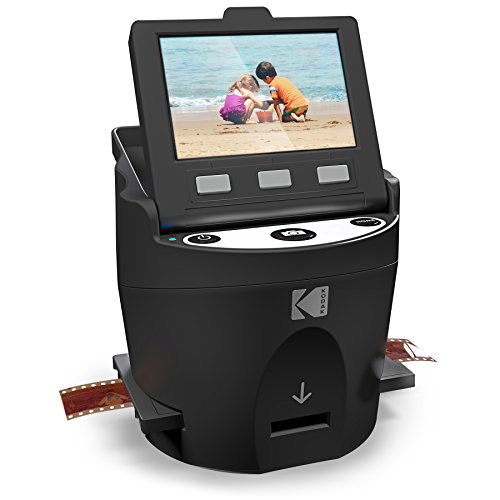
The Scanza works without a computer, using a built in 3.5 inch screen to preview and adjust each scan before saving directly to an SD card. Interchangeable film inserts cover 35mm, 126, 110 and super 8 formats in one unit.
Pros
- Screen lets you check each scan before saving it
- Covers more film formats than most standalone scanners
- No computer needed during scanning
Cons
- Interpolated resolution does not match true optical scanners
- Screen size limits how much detail you can judge before saving
Wolverine Data F2D Titan 8-in-1
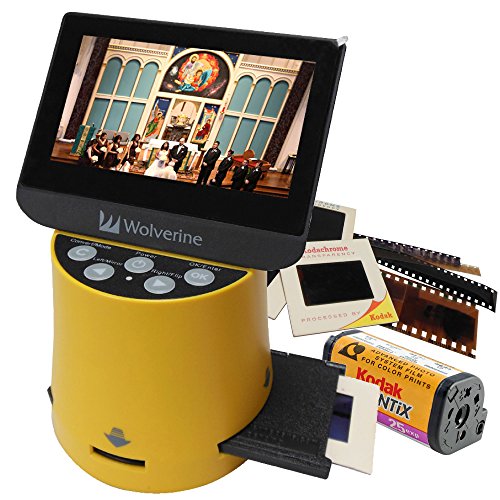
The F2D Titan accepts eight different film formats through swappable trays, including 35mm, 110, 126 and various slide mounts, useful for a family archive with mixed film types from different decades. A larger 4.3 inch screen aids framing before capture.
Pros
- Supports the widest range of film formats in this comparison
- Larger screen aids framing and focus checks
- Works without a computer connection
Cons
- Swapping trays between formats takes extra setup time
- Bulkier than simpler standalone scanners

Magnasonic All-in-One Film Scanner FS70
The FS70 keeps cost down while still scanning 35mm negatives and slides directly to an SD card without a computer. A small built in screen handles basic preview before saving each image.
Pros
- Lowest price among standalone film scanners here
- Simple one-tray operation for 35mm film
- No computer or software needed
Cons
- Limited to 35mm format only
- Smaller screen makes preview harder to judge

DIGITNOW 22MP Film and Slide Scanner
DIGITNOW’s scanner uses a sliding feed tray built for running through a large stack of negatives or slides faster than inserting them one at a time into a fixed slot. It still outputs directly to an SD card without a computer connection.
Pros
- Sliding tray speeds up scanning large negative collections
- No computer required for operation
- Straightforward button controls
Cons
- Image quality is comparable to other interpolated standalone scanners, not better
- Limited to 35mm format only

ION Film2SD
The Film2SD strips the process down to inserting a negative and pressing one button, with no menus or screen to navigate before saving to an SD card. It suits anyone who wants to digitize a shoebox of negatives without learning new software or settings.
Pros
- Simplest operation in this comparison, minimal settings
- No computer or software needed at all
- Lightweight and easy to store between uses
Cons
- No live preview screen to check framing before saving
- Lower resolution ceiling than screen-equipped standalone models
How they stack up
| # | Model | Optical Resolution | Best for | Score | Price |
|---|---|---|---|---|---|
| 1 | Plustek OpticFilm 8200i SE | 7200 dpi | Best Overall | 9.4 | Check price |
| 2 | Epson Perfection V600 | 6400 dpi | Best for Mixed Media | 9.1 | Check price |
| 3 | Kodak Scanza Digital Film Scanner | 14MP sensor, up to 22MP interpolated | Best for Standalone Scanning with Screen Preview | 8.8 | Check price |
| 4 | Wolverine Data F2D Titan 8-in-1 | 20MP sensor, up to 22MP interpolated | Best for Multiple Film Formats in One Unit | 8.6 | Check price |
| 5 | Magnasonic All-in-One Film Scanner FS70 | 14MP sensor, up to 22MP interpolated | Best Budget Pick | 8.2 | Check price |
| 6 | DIGITNOW 22MP Film and Slide Scanner | 14MP sensor, up to 22MP interpolated | Best for Large Batch Negative Digitizing | 8.1 | Check price |
| 7 | ION Film2SD | Up to 14MP interpolated | Best for Simplest One-Button Use | 7.9 | Check price |
How to pick the right one
True Optical Resolution Versus Interpolated Megapixels A scanner’s optical resolution describes what its sensor actually captures, while interpolated or ‘up to’ resolution numbers come from software filling in extra pixels afterward. The Plustek OpticFilm 8200i SE states a true optical 7200 dpi figure, while most standalone scanners here advertise an interpolated 22MP that starts from a smaller native sensor. Interpolation can still produce usable prints and digital copies, but it will not match a true optical scan for fine detail or large prints.
Computer-Connected Scanners Versus Standalone Units Scanners that connect to a computer, like the Plustek OpticFilm and Epson Perfection V600, use desktop software for exposure, color and dust correction before saving a file, which takes longer per image but gives more control. Standalone scanners like the Kodak Scanza or Wolverine F2D Titan save directly to an SD card without a computer, trading some control for speed and simplicity. Anyone digitizing a large personal archive on a deadline often prefers the standalone route despite the resolution tradeoff.
Matching a Scanner to the Film Formats You Actually Have A collection of only 35mm negatives and slides works fine with a dedicated 35mm scanner like the OpticFilm or a basic standalone unit like the Magnasonic FS70. Mixed collections with 110, 126 or super 8 formats need a multi-format scanner like the Wolverine F2D Titan or Kodak Scanza, since a 35mm-only scanner simply cannot accept those film sizes.
Screens, Preview and Why They Matter for Standalone Scanners A larger preview screen, like the 4.3 inch display on the Wolverine F2D Titan, makes it easier to check framing and focus before saving a scan permanently. Scanners with small or no preview screens, like the ION Film2SD, save faster but offer less chance to catch a crooked or out of focus negative before moving to the next one. Anyone scanning irreplaceable family negatives benefits from a larger screen, even if it slows the process slightly.
Good to know
What resolution do I need to digitize old negatives?
For most personal archives, 14 to 22MP equivalent resolution is enough for prints up to 8 by 10 inches and digital viewing. Archival quality enlargements benefit from a true optical scanner like the Plustek OpticFilm.
Do film scanners work with both negatives and slides?
Most scanners in this comparison accept both through interchangeable holders or trays, though some models limit the formats to 35mm only while others add 110, 126 or super 8.
Can I scan film without a computer?
Yes, standalone scanners like the Kodak Scanza, Wolverine F2D Titan, Magnasonic FS70 and ION Film2SD save directly to an SD card without needing a connected computer.
What does interpolated resolution mean on a film scanner?
It means software fills in extra pixels beyond what the sensor actually captured, producing a larger file size but not necessarily sharper real detail than the sensor’s native resolution.
How long does it take to scan a roll of 35mm film?
Standalone scanners typically take a few seconds per frame, so a 36 exposure roll finishes in a few minutes. Computer connected scanners with software correction take longer per frame but allow more editing before saving.
Do I need special software to use a film scanner?
Only computer connected models, like the Plustek OpticFilm or Epson Perfection V600, require scanning software. Standalone scanners operate through onboard buttons and save directly to a memory card.
Can a flatbed scanner handle film as well as a dedicated film scanner?
A flatbed like the Epson Perfection V600 can scan film using included holders, but a dedicated film scanner generally produces sharper results since its optics are built specifically for small film frames.
What film formats beyond 35mm might I need a scanner to support?
Older family collections sometimes include 110, 126 or super 8 formats, which require a multi-format scanner like the Wolverine F2D Titan rather than a 35mm-only model.
Our take
The Plustek OpticFilm 8200i SE is the right pick for anyone who wants archival quality scans of 35mm negatives and slides, since its true optical resolution outperforms every standalone scanner here. Households without a computer or patience for scanning software should choose the Kodak Scanza instead, trading some resolution for speed and simplicity. Anyone on a tight budget who only has standard 35mm film can start with the Magnasonic FS70 and still get usable digital copies.
Marcus Chen
Marcus covered consumer electronics for enthusiast tech publications for six years before joining ChoiceCrest. He specializes in translating manufacturer spec sheets into plain-language buying advice, with a focus on audio, computing accessories and smart-home gear.