Fan Controllers That Keep Your Rig Cool and Quiet
The top pick is the Lamptron FC Touch V3, a touchscreen fan controller that offers precise control for up to six fans, ideal for enthusiasts who want a sleek, modern interface. Its main advantage is the responsive touch display and robust build, but its main limitation is the higher price point compared to basic knob controllers.
Keeping your PC cool without turning it into a jet engine requires a good fan controller. Whether you’re a silent-PC builder or a performance enthusiast, the right controller lets you fine-tune fan speeds for optimal airflow and noise levels.
We’ve compared seven leading fan controllers available on Amazon, from simple manual knobs to advanced touchscreen models with software integration. Each offers distinct features to suit different needs and budgets.
The shortlist, ranked
Lamptron FC Touch V3
The Lamptron FC Touch V3 is a premium fan controller with a 4.3-inch touchscreen that controls up to six fans independently. It offers real-time temperature monitoring and manual or automatic modes, making it a favorite among modders and enthusiasts.
Pros
- Responsive touchscreen interface
- Six independent channels
- Accurate temperature sensors
Cons
- Higher price tag
- Requires a 3.5-inch drive bay
NZXT Sentry 3
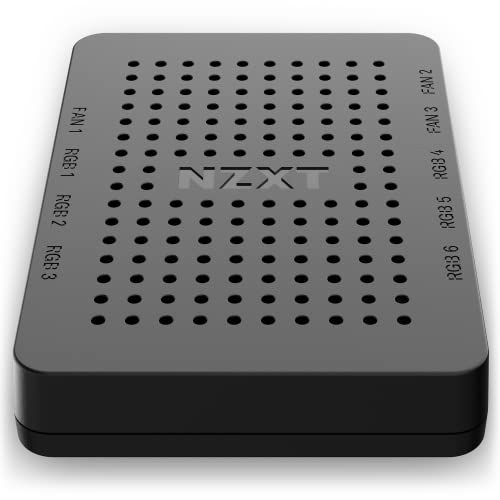
The NZXT Sentry 3 is a touchscreen fan controller that supports up to five fans. It features a sleek black design with a bright LCD, and users appreciate its simplicity and reliability. It lacks software control but offers manual and automatic modes.
Pros
- Great price for features
- Easy touch controls
- Compact bay design
Cons
- No software integration
- Touchscreen can be finicky

Thermaltake Commander FT
Thermaltake’s Commander FT is a touchscreen controller that manages up to six fans and integrates with TT RGB Plus software. It offers customizable profiles and real-time monitoring, but some users note the software can be complex.
Pros
- Software control with profiles
- Supports RGB sync
- Six channels
Cons
- Software learning curve
- Touchscreen is small
Kingwin FPX-003
The Kingwin FPX-003 is a classic manual fan controller with three knobs for controlling up to six fans (two per channel). It offers straightforward analog control and a simple LED display showing fan speeds. It’s a budget-friendly choice for those who prefer knobs.
Pros
- Inexpensive and reliable
- Simple knob control
- Handles six fans
Cons
- No temperature monitoring
- Limited to three zones

Deepcool FH-10
The Deepcool FH-10 is a fan hub that works with motherboard PWM control, allowing you to control up to ten fans through one header. It’s not a standalone controller but is perfect for expanding fan capacity with smart fan curves from BIOS or software.
Pros
- Very affordable
- Supports up to 10 fans
- Compact and easy to mount
Cons
- Requires motherboard control
- No dedicated temperature probes

Corsair Commander Pro
The Corsair Commander Pro is a sophisticated controller that manages up to six fans and four temperature sensors, plus RGB lighting strips. It integrates with Corsair iCUE software for advanced control and monitoring. Perfect for Corsair enthusiasts.
Pros
- Excellent software with custom curves
- RGB lighting control
- Multiple temp sensors
Cons
- Premium price
- Requires iCUE for full functionality

Silverstone SST-FHP141
The Silverstone SST-FHP141 is a dual-channel manual fan controller designed for high-wattage fans, delivering up to 30W per channel. It features a simple dial for each channel and an aluminum front panel. Ideal for industrial fans.
Pros
- Handles high-power fans
- Sturdy build
- Simple operation
Cons
- Only two channels
- No temperature readout
What to look for
The lineup, side by side
| # | Model | Channels | Best for | Score | Price |
|---|---|---|---|---|---|
| 1 | Lamptron FC Touch V3 | 6 | Touchscreen control and precision tuning | 9.4 | Check price |
| 2 | NZXT Sentry 3 | 5 | Value with a digital display | 9.1 | Check price |
| 3 | Thermaltake Commander FT | 6 | Touchscreen with software integration | 8.9 | Check price |
| 4 | Kingwin FPX-003 | 3 (6 fans) | Traditional knob simplicity | 8.7 | Check price |
| 5 | Deepcool FH-10 | 10 | Budget-friendly hub with PWM support | 8.5 | Check price |
| 6 | Corsair Commander Pro | 6 | Full ecosystem control with RGB | 9.0 | Check price |
| 7 | Silverstone SST-FHP141 | 2 | High-power fan control | 8.2 | Check price |
Common questions
What is a fan controller and why do I need one?
A fan controller allows you to adjust the speed of your PC fans manually or automatically. This helps balance cooling performance and noise levels, which is especially useful for systems with many fans or when you want a quieter setup.
Can I use a fan controller with PWM fans?
Yes, many fan controllers support PWM fans. However, some controllers only use voltage control, which may not give precise control over PWM fans. Check the specifications to ensure compatibility.
Do fan controllers come with temperature sensors?
Some higher-end models include temperature sensors that let the controller adjust fan speeds based on heat. Budget models often lack sensors, so you must manually adjust speeds.
How many fans can a fan controller typically handle?
Controllers vary from 2 to 10 channels. Most handle 4 to 6 fans. If you have more fans, you may need a hub instead of a controller, or use splitters.
Can I control fan speed through software instead of a physical controller?
Yes, many motherboards support fan control via BIOS or software like SpeedFan or manufacturer utilities. However, a dedicated fan controller offers more channels and often better precision.
Are fan controllers difficult to install?
Installation is generally straightforward. For bay-mounted controllers, you slide them into a 5.25-inch bay and connect power and fan cables. Internal hubs require connecting to a motherboard header and SATA power.
What is the difference between a fan controller and a fan hub?
A fan controller actively adjusts voltage or PWM signals to each fan, while a fan hub simply distributes power and signal from one motherboard header to multiple fans. Hubs rely on motherboard control.
Can I use a fan controller with RGB fans?
Yes, but the controller only manages fan speed, not RGB lighting. RGB is controlled separately via a different hub or software.
Is it better to control fans via BIOS or a dedicated controller?
BIOS control is convenient and free, but it may be limited to motherboard headers. Dedicated controllers offer more channels, physical control, and sometimes more precise tuning, which is beneficial for complex builds.
Do fan controllers consume much power?
Fan controllers draw power from the PSU, typically through a Molex or SATA connector. The power consumption is minimal, but high-power fans may require a controller that can deliver enough wattage per channel.
Our take
For most builders, the Lamptron FC Touch V3 is the best fan controller because it combines a clear touchscreen, six channels, and accurate temperature sensors, making it easy to achieve a quiet and cool system. If you prefer a budget-friendly option, the NZXT Sentry 3 offers solid performance at a lower cost. For those with high-power fans, the Silverstone SST-FHP141 is the best choice.
Marcus Chen
Marcus covered consumer electronics for enthusiast tech publications for six years before joining ChoiceCrest. He specializes in translating manufacturer spec sheets into plain-language buying advice, with a focus on audio, computing accessories and smart-home gear.
You might also need
How to Choose the Right USB Wi-Fi Adapter for Your PC
Measure Your Desk First to Get Desk Mat Sizing Right

How to Pick the Right TV Panel Type and Screen Size