Top Rated External Optical Drives for Laptops and Desktops
For most people, the LG BP60NB10 is the best external optical drive because it offers reliable Blu-ray playback, a slim design, and broad compatibility with both Windows and Mac. Its main advantage is the combination of Blu-ray reading and DVD writing in a portable package. The main limitation is that it requires an external power source for Blu-ray playback, so it is not fully bus-powered.
External optical drives are essential for playing CDs, DVDs, or Blu-rays on modern laptops that lack built-in drives. They also serve as backup tools for burning data discs. With many options on the market, choosing the right one depends on your media format needs, connection type, and portability.
In this roundup, we highlight the top external drives that balance performance, durability, and ease of use. Whether you need a basic DVD burner or a full Blu-ray writer, these picks cover a range of use cases.
The shortlist, ranked

LG BP60NB10
The LG BP60NB10 is a slim Blu-ray writer that reads and writes to Blu-ray discs at 6x speed. It supports DVD and CD burning as well. It connects via USB 3.0 (Type-A) and includes a detachable cable. Owners report quiet operation and solid build quality. It requires an AC adapter for Blu-ray writing, which adds a bit of bulk.
Pros
- Plays and burns Blu-ray discs
- Compact and lightweight
- Works with Windows and Mac
Cons
- Requires external power for Blu-ray writing
- No USB-C cable included

ASUS BW-16D1X-U
The ASUS BW-16D1X-U is a desktop Blu-ray writer that offers 16x write speed for Blu-ray discs. It has a sleek vertical or horizontal design with a premium look. It connects via USB 3.0 and includes CyberLink software for playback and authoring. Some users note that it is larger and heavier than portable options.
Pros
- Fast Blu-ray writing
- Attractive design
- Includes software suite
Cons
- Bulky for travel
- Requires AC power
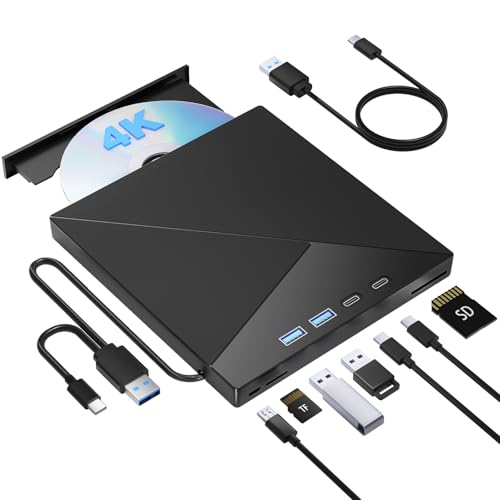
Pioneer BDR-XD07B
The Pioneer BDR-XD07B is a slim Blu-ray writer that connects via USB-C and includes an adapter for USB-A. It supports Blu-ray writing at 6x and DVD writing at 8x. It has a durable aluminum finish. Owners report that it is bus-powered for DVD and CD, but requires a USB cable with power for Blu-ray writing. The included software may have limited features.
Pros
- USB-C connectivity
- Ultra-slim profile
- Stylish aluminum body
Cons
- Blu-ray writing may need extra power
- Software can be basic

LG SP80NB80
The LG SP80NB80 is an ultra-slim DVD writer that is ideal for burning and playing CDs and DVDs. It is bus-powered via USB, so no external adapter is needed. It supports M-DISC for long-term archival. Its sleek design is only 0.5 inches thick. Some users report that the tray feels slightly flimsy.
Pros
- Extremely thin and light
- Bus-powered
- Supports M-DISC
Cons
- No Blu-ray support
- USB 2.0 only
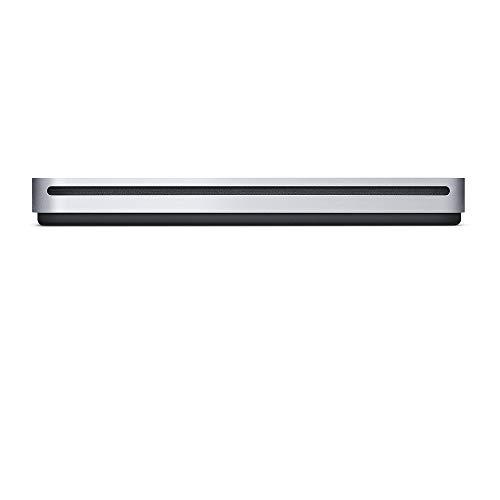
Apple USB SuperDrive
The Apple USB SuperDrive is a simple DVD/CD drive designed specifically for Macs. It works with Mac computers that have a USB-A port or a USB-C adapter. It is bus-powered and has a minimalist white design that matches Apple aesthetics. Owners report it is plug-and-play with macOS. However, it does not support Blu-ray and Windows compatibility is limited.
Pros
- Seamless with macOS
- Sleek and compact
- No power adapter needed
Cons
- No Blu-ray
- Not officially for Windows

LG GP65NB60
The LG GP65NB60 is an affordable external DVD writer that gets the job done without extras. It is slim and bus-powered, making it easy to carry. It supports DVD and CD burning at standard speeds. It has a simple design and works with both Windows and Mac. Some users note that the cable is short and it lacks a protective case.
Pros
- Very affordable
- Portable and lightweight
- No external power needed
Cons
- No Blu-ray
- Short USB cable
Buffalo MediaStation BRXL-PTV6U3V2
The Buffalo MediaStation is an external Blu-ray player that reads Blu-ray, DVD, and CD. It is designed for playback rather than high-speed writing, so it writes DVDs at 8x and CDs at 24x, but does not write Blu-ray. It has a robust design and includes CyberLink software for Windows. Some users found its software to be dated.
Pros
- Plays Blu-ray movies
- Sturdy construction
- Comes with playback software
Cons
- No Blu-ray writing
- Software interface is clunky
How they stack up
| # | Model | Interface | Best for | Score | Price |
|---|---|---|---|---|---|
| 1 | LG BP60NB10 | USB 3.0 Type-A | Best Overall Blu-ray Drive | 9.4 | Check price |
| 2 | ASUS BW-16D1X-U | USB 3.0 Type-A | Best for High-Speed Blu-ray Writing | 9.1 | Check price |
| 3 | Pioneer BDR-XD07B | USB-C and USB-A | Best Slim Blu-ray Writer with USB-C | 9.0 | Check price |
| 4 | LG SP80NB80 | USB 2.0 Type-A | Best Ultra-Slim DVD Writer | 8.9 | Check price |
| 5 | Apple USB SuperDrive | USB 2.0 Type-A | Best for Mac Users | 8.6 | Check price |
| 6 | LG GP65NB60 | USB 2.0 Type-A | Best Budget DVD Writer | 8.4 | Check price |
| 7 | Buffalo MediaStation BRXL-PTV6U3V2 | USB 3.0 Type-A | Best for Legacy Media Playback | 8.2 | Check price |
How to choose
Good to know
Can an external optical drive play Blu-ray movies on a computer?
Yes, if the drive is a Blu-ray reader and you have compatible software. Many players require a software license for Blu-ray playback, which may be included or need to be purchased separately.
Do all external drives work with Mac and Windows?
Most do, but some are optimized for one OS. Apple’s SuperDrive is meant for Macs, while others offer Windows software. Check the product description for OS compatibility.
What is the difference between USB 2.0 and USB 3.0 for optical drives?
USB 3.0 offers faster data transfer speeds, but for optical drives the difference is minimal for reading and writing typical discs. USB 3.0 is beneficial for higher-speed Blu-ray writing.
Can I use an external optical drive with a USB-C port?
Yes, if the drive supports USB-C or you use an adapter. Some drives come with a USB-C cable or a USB-A to USB-C adapter.
Do external drives require a separate power source?
Many slim DVD drives are bus-powered, drawing power from the USB port. Blu-ray writers often need an external AC adapter, especially for burning discs.
Can I burn data to a Blu-ray disc with an external drive?
Yes, if the drive is a Blu-ray writer. Look for drives that explicitly state they can write to Blu-ray media.
Are external optical drives still useful in 2025?
Yes, for playing physical media, burning backup discs, or ripping audio CDs. They are also useful for installing software from discs.
What is M-DISC support?
M-DISC is a type of optical disc designed for long-term archival, claimed to last hundreds of years. Drives that support M-DISC can write to these special discs.
Our take
For most people, the LG BP60NB10 is the best choice because it covers all bases: Blu-ray playback and writing, DVD and CD support, and a portable design. If you only need DVD capabilities and want maximum portability, the LG SP80NB80 is the pick. For Mac users, the Apple USB SuperDrive offers seamless integration, but if you need Blu-ray, the Pioneer BDR-XD07B is a better option with USB-C.
Marcus Chen
Marcus covered consumer electronics for enthusiast tech publications for six years before joining ChoiceCrest. He specializes in translating manufacturer spec sheets into plain-language buying advice, with a focus on audio, computing accessories and smart-home gear.


