Educational Games Matched to Age, Skill, and Screen Time
Osmo Genius Starter Kit blends tablet-guided play with physical letter and number tiles for reading, math, and drawing practice. ThinkFun’s Rush Hour teaches logic and spatial reasoning without any screen. Learning Resources Coding Critters introduces sequencing and cause-and-effect logic to kids as young as four through story missions.
Osmo Genius Starter Kit leads this group for families who want one system covering math, spelling, and drawing. It pairs physical tiles with tablet feedback, but only works with an iPad or Fire tablet already in the house.
Skill focus shifts fast between ages three and twelve, so a game built for counting won’t hold a nine-year-old’s attention. We grouped these seven by age range, screen dependence, and the specific skill each one builds, then ranked them within those groups.
Before you buy
What to look for in an educational game Age range and skill focus decide whether a game holds a child’s attention, not the packaging. A counting game built for a four-year-old, like Sunny Patch, won’t challenge a nine-year-old the way Rush Hour’s logic puzzles do. Screen dependence is the other major split, since some families cap tablet time and others don’t mind it.
Which games work without a screen Rush Hour, Coding Critters, and Ravensburger Labyrinth all build reasoning skills with zero screen time. Together they cover logic, early coding, and multiplayer strategy, so a screen-free household can still hit three different skill areas.
Best for tablet-based or app-connected learning Osmo and LeapPad Academy both use screens, but structure play around guided lessons instead of open-ended apps. Osmo needs a family iPad or Fire tablet already in the house. LeapPad ships as its own device, complete with built-in parental controls.
Family game night versus solo practice Labyrinth and Sunny Patch Sunny Street support several players at once, making them better picks for game night. Rush Hour and IQ Puzzler Pro are built for one child working through challenges alone, which suits quiet independent practice.
What we recommend

Osmo Genius Starter Kit
A mirror attachment lets a tablet camera read physical letter tiles, number pieces, and drawings as a child moves them. Five included games cover spelling, math, and creative drawing in one box. Families need an iPad or compatible Fire tablet already in the house, since the kit doesn’t include one.
Pros
- Combines five subjects in a single kit
- Physical tiles keep hands active during screen time
- Difficulty adjusts automatically as skills grow
Cons
- Needs an iPad or Fire tablet to function
- Setup takes longer than a standard board game

ThinkFun Rush Hour Traffic Jam Logic Game
Kids slide cars around a grid to clear a path for the red car, working through 40 challenge cards that get progressively harder. No batteries or screens are involved, so it travels well in a bag or car. Solo play limits it for siblings looking to play together.
Pros
- Sharpens spatial reasoning with zero screen time
- Small enough to pack for trips
- 40 challenge levels stretch replay value for years
Cons
- Built mainly for one player at a time
- Harder cards may need adult help for kids under 8

LeapFrog LeapPad Academy
This dedicated kids tablet ships preloaded with reading, math, and problem-solving games, plus parental controls that block outside apps. Content difficulty rises automatically as a child’s reading level improves. Its app library and battery life both trail a standard consumer tablet.
Pros
- Parental controls limit access without extra apps
- Game difficulty adjusts to reading level automatically
- Rugged casing withstands drops better than a regular tablet
Cons
- Smaller app selection than an iPad or Fire tablet
- Battery drains faster than premium tablet models
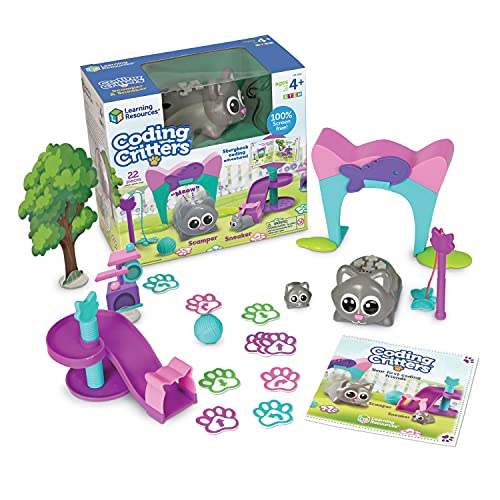
Learning Resources Coding Critters
Colored buttons let kids program a robotic pet’s movements, teaching sequencing and cause-and-effect logic before they can read code. Story-based missions turn each session into a game rather than a lesson. Most coding toys start at age 6, so this one reaches younger kids earlier.
Pros
- Teaches real coding logic without any screen
- Story missions hold attention for kids as young as four
- Button interface removes the reading barrier
Cons
- Offers less depth once a child passes age 7
- Fewer programming options than app-connected coding toys

Ravensburger Labyrinth
Two to four players shift a sliding maze wall by wall to reach hidden treasures before opponents do. Planning ahead matters more than luck, which keeps repeat games fresh. Its learning value sits closer to strategy than a specific academic subject like math or reading.
Pros
- Seats up to four players at once for family night
- Builds forward planning and strategic thinking
- Simple rules let mixed ages play together
Cons
- Doesn’t target a specific academic subject
- Four-player rounds can run past 30 minutes

SmartGames IQ Puzzler Pro
A single player fits pieces into a grid using 120 printed challenge cards that climb in difficulty. Its compact case snaps shut for travel without losing pieces. Difficulty ramps up quickly, and younger kids may need a parent nearby for the harder cards.
Pros
- Compact case travels without losing pieces
- 120 challenge cards last well beyond a year
- Costs less than most tablet-based learning kits
Cons
- Difficulty spikes faster than comparable puzzle games
- Built for one player, with no group format

Melissa & Doug Sunny Patch Sunny Street Game
Preschoolers count spaces and match colors to move around this simple board, practicing turn-taking along the way. Rounds finish in under 15 minutes, matching shorter attention spans. Kids past kindergarten age tend to outgrow the challenge within a few plays.
Pros
- Short rounds match preschool attention spans
- Teaches counting and turn-taking together
- Simple rules work for a child’s first board game
Cons
- Offers little challenge once a child turns 7
- Less long-term replay value than strategy games
How they compare
| # | Model | Age range | Best for | Score | Price |
|---|---|---|---|---|---|
| 1 | Osmo Genius Starter Kit | 5-12 years | Best overall | 9.3 | Check price |
| 2 | ThinkFun Rush Hour Traffic Jam Logic Game | 8 and up | Best value | 8.9 | Check price |
| 3 | LeapFrog LeapPad Academy | 3-9 years | Best for tablet-based learning | 8.6 | Check price |
| 4 | Learning Resources Coding Critters | 4-7 years | Best for early coding concepts | 8.7 | Check price |
| 5 | Ravensburger Labyrinth | 7 and up | Best for family game night | 8.5 | Check price |
| 6 | SmartGames IQ Puzzler Pro | 6 and up | Best budget | 8.3 | Check price |
| 7 | Melissa & Doug Sunny Patch Sunny Street Game | 3-6 years | Best for younger kids and turn-taking | 8.1 | Check price |
Questions worth asking
What age is best for educational board games?
It depends on the game’s design. Sunny Patch Sunny Street suits ages 3 to 6, while Labyrinth and Rush Hour work better from age 7 or 8 up.
Do educational games need a tablet to work?
No. Rush Hour, Coding Critters, and Ravensburger Labyrinth are fully screen-free, while Osmo needs an iPad or Fire tablet to function.
Can a coding toy teach kids without a computer?
Yes. Learning Resources Coding Critters teaches sequencing and cause-and-effect logic through colored button presses instead of screens or written code.
Is a single-player puzzle as valuable as a multiplayer game?
Each builds different skills. Rush Hour sharpens individual logic on its own, while Labyrinth adds planning and turn-taking within a group.
Which educational game works best for mixed-age siblings?
Ravensburger Labyrinth holds up across a wider age range, since younger and older kids can follow the same simple rules at once.
Is a learning tablet like LeapPad Academy better than a regular tablet for a young child?
For kids under 9, often yes, mainly because of the built-in parental controls and curated content, even though the app library stays smaller.
What’s the best educational game for building logic and spatial reasoning?
Rush Hour and SmartGames IQ Puzzler Pro both focus on spatial reasoning through single-player challenges that increase in difficulty.
How much screen time do tablet-based educational games use?
It depends on the household’s routine, though Osmo and LeapPad Academy are both built around timed learning sessions rather than open browsing.
What’s the best educational game for a preschooler just learning to take turns?
Melissa & Doug’s Sunny Patch Sunny Street keeps rounds short and rules simple, which suits a first board game experience.
The verdict
Osmo Genius Starter Kit earns the top spot for families who already own a compatible tablet and want one system covering math, spelling, and drawing. Screen-free households should start with Rush Hour for logic or Coding Critters for an early coding introduction instead. Families with siblings spanning several ages will get the most repeat use from Ravensburger Labyrinth on game nights, since its rules scale across skill levels.
Rachel Simmons
Rachel previously worked in child-product retail and brings a practical, detail-first eye to gear reviews, focusing on safety standards, ease of use and the fine print that matters most for new caregivers.


