Which Educational Game Actually Builds Real Skills?
Osmo Genius Starter Kit for iPad leads this list, pairing five subjects with instant tablet feedback for kids around six to ten. ThinkFun Zingo fits preschoolers on a tight budget, and Learning Resources Coding Critters Ranger and Zip teaches screen-free coding sequences to elementary-age kids.
Osmo Genius Starter Kit for iPad stands out as the strongest all-around pick, suited to kids around six to ten who like pairing tactile pieces with a tablet. It packs five subjects into one box, though it needs a compatible iPad sold separately.
Educational games span skills as different as early letter recognition and multi-step logic, so no single title fits every age. We compared listed age ranges, subject focus, and owner feedback across seven current Amazon listings to sort games by real decision points like screen use and player count.
The shortlist, ranked

Osmo Genius Starter Kit for iPad
Osmo’s mirror clips over an iPad camera lens, turning physical tiles and letters into on-screen gameplay. Five games ship in the box, covering math, spelling, freehand drawing, and simple physics. Kids build with real pieces while the app scores each move instantly.
Pros
- Blends physical pieces with instant on-screen feedback
- Covers five subjects, math to art, in a single box
- Add-on game packs extend play into new subjects later
Cons
- Needs a compatible iPad, purchased separately
- Some households limit tablet time even for guided apps

ThinkFun Zingo
Zingo swaps bingo cards for picture tiles, so kids who cannot read yet still play independently. A sliding Zinger dispenser reveals two tiles per turn, and players race to cover matches on their board. Short rounds fit a preschooler’s attention span.
Pros
- Playable before a child learns to read
- Short rounds hold a preschooler’s attention
- Zinger dispenser mechanism survives years of daily play
Cons
- Tiles are small enough to misplace over time
- Older siblings may find the matching format too simple
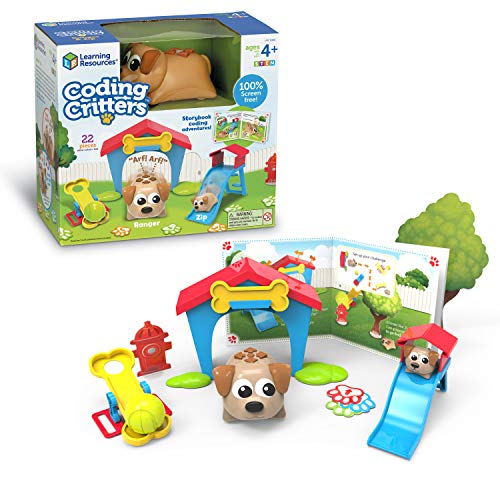
Learning Resources Coding Critters Ranger and Zip
Ranger the horse figure runs through routes kids assemble from snap-together path pieces. Pressing directional buttons on the Zip stable programs a sequence, and lights plus sound confirm each successful run. No app or screen is involved at any step.
Pros
- Teaches sequencing logic without a screen or app
- Lights and sound give immediate feedback on each try
- Interchangeable path pieces support several route layouts
Cons
- Three AAA batteries are required but not included
- Sequencing stays basic next to app-based coding kits
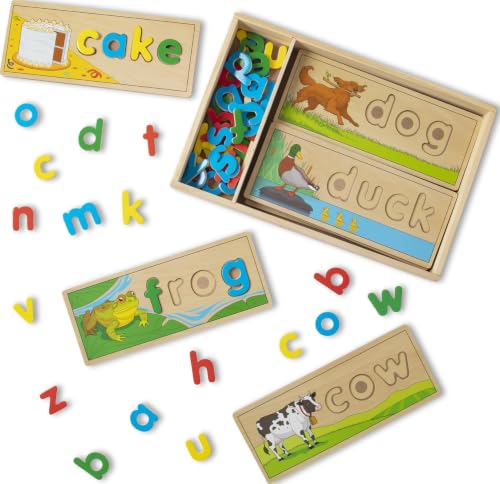
Melissa & Doug See & Spell Wooden Puzzle
Eight double sided wooden boards are cut so only the correct letter peg fits each slot. Kids match pegs to pictures, building letter recognition before moving to open-ended spelling. Solid wood construction skips batteries and screens entirely.
Pros
- Wood boards hold up through years of repeated play
- Slot shapes self-correct, guiding kids to the right letter
- No batteries or charging needed to start playing
Cons
- Covers spelling only, with no math or logic content
- Small pegs suit ages 3 and up, not younger toddlers

Hasbro Scrabble Junior
One side of the board matches picture cards to word spaces for beginning readers. Flipping to side B drops the pictures for standard word building and scoring. Letter tiles and racks mirror the format kids will use in classic Scrabble later.
Pros
- Two-sided board adjusts difficulty as reading improves
- Picture cues help early readers succeed right away
- Introduces real tile scoring for future Scrabble play
Cons
- Requires a second player for a full round
- Younger end of the age range may need adult help

ThinkFun Rush Hour
A red car sits gridlocked among plastic trucks and cars on a molded grid, and only one sequence of moves clears its exit. Challenge cards range from beginner to expert, each with a single solution. The compact case doubles as a travel puzzle.
Pros
- Works solo, with no partner needed to play
- Compact case travels well for car rides
- Difficulty escalates from beginner to expert cards
Cons
- Built for one player, not group activity
- Younger kids may need help reading challenge diagrams at first

Educational Insights Kanoodle
Twelve interlocking pegs snap into a molded case sized for a jacket pocket. A challenge booklet steps up from two-piece layouts to full-board arrangements. The case seals shut, so pieces stay together between waiting rooms and car rides.
Pros
- Built-in storage keeps every peg together while traveling
- Plays solo, with no partner required
- Booklet progresses from easy to advanced layouts
Cons
- Offers no head-to-head or family game mode
- Early diagrams often need adult explanation for younger kids
How they compare
| # | Model | Age range | Best for | Score | Price |
|---|---|---|---|---|---|
| 1 | Osmo Genius Starter Kit for iPad | 6 to 10 years | Best overall | 9.4 | Check price |
| 2 | ThinkFun Zingo | 4 and up | Best budget | 9.1 | Check price |
| 3 | Learning Resources Coding Critters Ranger and Zip | 4 to 8 years | Best for early coding skills | 8.8 | Check price |
| 4 | Melissa & Doug See & Spell Wooden Puzzle | 3 to 6 years | Best for toddlers | 8.5 | Check price |
| 5 | Hasbro Scrabble Junior | 5 to 8 years | Best for reading practice | 8.2 | Check price |
| 6 | ThinkFun Rush Hour | 8 and up | Best for logic and problem-solving | 8.1 | Check price |
| 7 | Educational Insights Kanoodle | 7 and up | Best for travel and portability | 8.0 | Check price |
What to look for
What to look for in an educational game for kids Age printed on the box is a starting point, not a guarantee of fit. Compare the listed skill focus, math, reading, coding logic, or spatial reasoning, against what a child already struggles with at school. Wood and thick plastic pieces typically survive years of play better than thin cardboard. Battery-powered toys add an extra cost, since batteries rarely ship in the box.
Screen-based kits vs traditional board and puzzle games Osmo’s mirror-and-base system limits screen time to a physical activity the tablet camera scores, rather than open browsing. Board games such as Scrabble Junior or See & Spell need no device and travel without a charger. Parents avoiding extra screen time often start with wood or card based sets. Coding Critters splits the difference, teaching sequencing through buttons instead of an app.
Which game fits which age group? Toddlers around three to five do well with self-correcting puzzles like See & Spell, since pieces only fit one way. Four-year-olds lean toward fast matching games such as Zingo, which reward quick recognition over reading skill. Kids seven and up handle multi-step puzzles like Rush Hour or Kanoodle, since these require planning several moves ahead. Coding Critters sits between these groups, aimed at four to eight year olds building early sequencing skills.
Best for solo play vs family game night Rush Hour and Kanoodle are single-player by design, suiting an only child or a sibling waiting for a turn. Zingo and Scrabble Junior need two or more players, which fits family game night or a classroom group. Coding Critters plays solo but benefits from an adult explaining the first few button sequences. Whether a game needs to travel alone or entertain several kids at once often decides between these formats.
Good to know
What age should kids start playing educational games?
Matching and puzzle games often list a minimum age of 3, while multi-step logic games like Rush Hour or Kanoodle target ages 7 and up. Check the skill focus printed on the box instead of relying on age alone.
Are screen-based educational games better than board games for learning?
Neither format wins outright. Osmo adds instant feedback and covers several subjects, while wooden and board games like See & Spell need no charging and travel anywhere.
Which educational game teaches reading best?
Scrabble Junior and Zingo both target early reading. Zingo focuses on picture matching for non-readers, and Scrabble Junior scales up to spelling and tile scoring as skills grow.
Do educational games really improve a child’s skills?
Owners often report gains in the specific skill a game targets, such as letter recognition or sequencing logic, when the game matches a child’s current level.
Can one game work for siblings of different ages?
Scrabble Junior handles mixed ages well, since its two-sided board offers picture matching for younger readers and standard word building for older siblings.
How is Osmo different from a regular learning app?
A regular app stays entirely on screen. Osmo’s base and mirror let the iPad camera read physical tiles a child moves by hand, keeping play tactile rather than tap-only.
Is Kanoodle good for beginners, or only advanced kids?
The booklet starts with simple two-piece arrangements before moving to harder multi-piece layouts, so a beginner around age 7 can start easy and progress at their own pace.
Do coding toys for kids need a screen?
Not always. Coding Critters Ranger and Zip teaches button-based sequencing entirely offline, while some competing coding toys pair with a companion app for extra challenges.
What is the best educational game for a preschooler on a budget?
Zingo covers early matching and recognition skills for preschoolers, at a lower price than tablet-based kits like Osmo.
The bottom line
Osmo Genius Starter Kit for iPad remains the strongest all-around pick for families with a spare compatible tablet, since it covers five subjects with instant feedback in one box. Parents wanting a screen-free option, or with a toddler under 5, should choose the Melissa & Doug See & Spell Wooden Puzzle, since its self-correcting boards suit early letter recognition better than a tablet kit.
Rachel Simmons
Rachel previously worked in child-product retail and brings a practical, detail-first eye to gear reviews, focusing on safety standards, ease of use and the fine print that matters most for new caregivers.


