DisplayPort Cables That Deliver Crisp, Stable Video
The Ivanky 8K DisplayPort Cable is our top pick for most users, offering full 8K support and robust build quality at a reasonable price, but it lacks the locking latch that some prefer for secure connections.
Finding the right DisplayPort cable can be confusing with different versions and claims. We compared popular models to see which ones actually deliver on their promises.
Whether you are gaming at high refresh rates or editing 4K video, a solid cable makes a difference. Here are the top contenders that owners report working flawlessly.
The top picks, ranked

Ivanky 8K DisplayPort Cable
This cable supports 8K@60Hz and 4K@144Hz, with a braided nylon exterior and gold-plated connectors. Owners praise its sturdy build and consistent signal transmission.
Pros
- Supports high bandwidth for demanding setups
- Durable braided cable reduces tangling
- VESA certified for reliability
Cons
- No locking latch on connectors
- Stiffer than some other cables

Cable Matters DisplayPort Cable
A certified DP 1.4 cable that handles 4K@120Hz and 8K@30Hz. Users like the affordable price and solid performance for everyday use.
Pros
- Affordable without compromising quality
- Wide range of lengths
- Good shielding against interference
Cons
- Not as flexible as premium cables
- Some users report tight connector fit

Silkland DisplayPort Cable
Engineered for esports, this cable supports up to 8K@60Hz and 4K@165Hz. Features a nylon braid and gold-plated connectors for stable performance.
Pros
- Handles high refresh rates without artifacts
- Flexible cable for easy routing
- Reinforced stress relief points
Cons
- Shorter maximum length compared to others
- Premium price for the brand
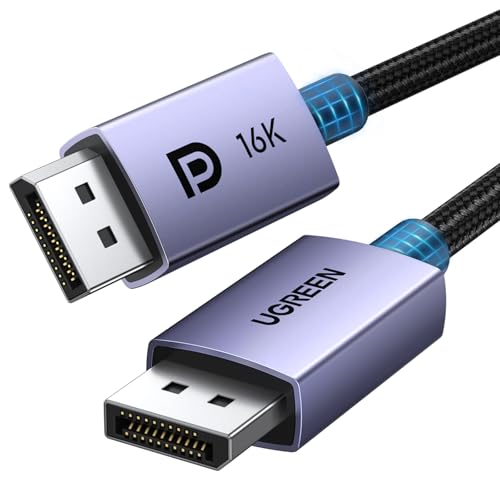
UGREEN DisplayPort Cable
Available up to 50 feet, this cable uses thicker gauge wires and triple shielding to maintain signal integrity over long distances. Owners report stable 4K at extended lengths.
Pros
- Exceptional build quality for long runs
- Triple shielding prevents interference
- Latching connectors secure in place
Cons
- Heavy and bulky cable
- May be overkill for short setups

Amazon Basics DisplayPort Cable
A no-frills cable that supports 4K@60Hz and is VESA certified. Ideal for office work or connecting a secondary monitor without breaking the bank.
Pros
- Very inexpensive
- Does the job for standard monitors
- Reliable brand with easy returns
Cons
- Limited to DP 1.2, not future-proof
- Basic PVC jacket feels less durable

Monoprice DisplayPort Cable
This cable features a latching connector that clicks securely, preventing accidental disconnects. Supports 4K@60Hz and is well-shielded for clean signal.
Pros
- Locking latch ensures secure connection
- Good value for the price
- Thin and flexible
Cons
- Only DP 1.2, not for 8K
- Some users find latch hard to release

Rankie DisplayPort Cable
Offers 8K@60Hz support at a lower price point. Users appreciate the braided cord and reliable performance for 4K gaming.
Pros
- 8K support for future upgrades
- Braided cable adds durability
- Good price for the specs
Cons
- Not VESA certified (some units)
- Mixed reviews on long-term durability
Compared at a glance
| # | Model | Version | Best for | Score | Price |
|---|---|---|---|---|---|
| 1 | Ivanky 8K DisplayPort Cable | DP 1.4 | Best overall for most users | 9.4 | Check price |
| 2 | Cable Matters DisplayPort Cable | DP 1.4 | Best value for 4K monitors | 9.1 | Check price |
| 3 | Silkland DisplayPort Cable | DP 1.4 | Best for gaming with high refresh rates | 9.0 | Check price |
| 4 | UGREEN DisplayPort Cable | DP 1.4 | Best for long runs without signal loss | 8.9 | Check price |
| 5 | Amazon Basics DisplayPort Cable | DP 1.2 | Best budget option for basic needs | 8.7 | Check price |
| 6 | Monoprice DisplayPort Cable | DP 1.2 | Best for professional use with locking connectors | 8.8 | Check price |
| 7 | Rankie DisplayPort Cable | DP 1.4 | Best for 8K readiness on a budget | 8.5 | Check price |
How to choose
Good to know
What is the difference between DisplayPort 1.2 and 1.4?
DisplayPort 1.4 supports higher resolutions and refresh rates, including 8K@60Hz and 4K@144Hz, while 1.2 is limited to 4K@60Hz. If you have a high-refresh monitor, choose a 1.4 cable.
Can I use a DisplayPort cable with a HDMI monitor?
No, you need an adapter or a cable with different connectors. For example, a DisplayPort to HDMI cable can connect a DisplayPort source to an HDMI monitor. However, the adapter must support the resolution you need.
Do all DisplayPort cables support audio?
Yes, DisplayPort carries audio as well as video. Most cables transmit audio signals, but you might need to select the correct audio output in your operating system.
How long can a DisplayPort cable be without losing signal?
For standard cables, lengths up to 10 feet are safe for 4K@60Hz. Beyond that, you may need a cable with better shielding or an active cable. Some high-quality cables can go up to 50 feet, but it’s risky.
Is a VESA certified cable necessary?
VESA certification ensures the cable meets performance and quality standards. While not required, it reduces the chance of compatibility issues or signal problems. Many budget cables are not certified but still work fine.
Can a DisplayPort cable be used for daisy chaining?
Yes, DisplayPort 1.2 and later support Multi-Stream Transport (MST) for daisy chaining monitors. However, your monitor must support MST, and the cable must be capable of carrying the combined bandwidth.
Why is my DisplayPort cable not working?
First, check that both ends are securely connected. Try a different port on your GPU or monitor. If the cable is damaged or too long, you may experience issues. Also, ensure your GPU driver is updated.
Does cable quality affect gaming performance?
A poor quality cable can cause flickering, black screens, or reduced refresh rates. For competitive gaming, a reliable cable is essential to avoid disruptions. High-quality cables ensure stable signal transmission.
Can I use a DisplayPort 1.4 cable with a DisplayPort 1.2 device?
Yes, cables are backward compatible. The cable will operate at the lower version’s speed, so it will work fine with older devices.
What is the maximum resolution supported by DisplayPort 1.4?
DisplayPort 1.4 can support 8K at 60Hz using Display Stream Compression (DSC). Without DSC, it handles 4K at 120Hz. With DSC, it can do 4K at 144Hz or higher.
The verdict
For most users, the Ivanky 8K DisplayPort Cable offers the best combination of performance, build quality, and price. If you need a long cable, go with the UGREEN for its superior shielding. For a budget pick, the Amazon Basics cable is sufficient for standard 4K monitors. Choose the Silkland if you are a gamer who demands high refresh rates without compromise.
Marcus Chen
Marcus covered consumer electronics for enthusiast tech publications for six years before joining ChoiceCrest. He specializes in translating manufacturer spec sheets into plain-language buying advice, with a focus on audio, computing accessories and smart-home gear.


