The Gear That Makes a Digital Planner Worth Using
The reMarkable 2 suits distraction free planning with a paper like e-ink screen. Note takers already on an iPad get the most from an Apple Pencil paired with a Paperlike screen protector. For color e-ink at a lower price, the Boox Note Air3 C stands out.
A digital planner is really software, so the experience lives or dies on the tablet and stylus you run it on. The reMarkable 2 gives the most paper like feel for pure planning, with an e-ink screen and no apps to distract you. Anyone already using an iPad gets a huge upgrade from an Apple Pencil plus a Paperlike screen protector, which adds the drag of paper under the tip. For color notes on a budget, the Boox Note Air3 C fits.
Shoppers searching for a digital planner often want the hardware that makes one usable, not just a file. We looked at how each device handles handwriting, whether it supports layered planning apps like GoodNotes or Notability, the writing feel of its stylus, and battery life, then weighed owner feedback on lag, glare and how paper like the surface really feels day to day.
What matters most
What you actually need to run a digital planner A digital planner is a file you open in an app, so three things decide the experience: the tablet, the stylus and the app. A dedicated e-ink device like the reMarkable feels most like paper and removes distractions. A general tablet such as an iPad runs richer apps like GoodNotes in color but tempts you with notifications. The stylus matters as much as the screen, since latency and grip shape every stroke.
E-ink tablets versus an iPad E-ink devices win on writing feel, battery and focus, because the matte surface drags like paper and lasts days per charge with nothing pinging you. An iPad wins on color, speed and app choice, letting you use layered planners, stickers and audio notes. Choose e-ink if planning is the main goal and distraction is the enemy, and an iPad if you want one device that also handles media and browsing.
Making an iPad feel like paper The common complaint about planning on an iPad is the slippery glass. A matte film like the Paperlike adds friction so the tip grips the way pen meets paper, and it cuts glare under lights. Pair it with a responsive stylus, and long writing sessions stop feeling like sliding on ice. Budget stylus shoppers can skip the Apple Pencil for the Logitech Crayon and lose little for basic planning.
When paper still beats a screen Not everyone needs a tablet to plan digitally. The Rocketbook Fusion lets you write on real reusable paper, then scan each page to the cloud for a searchable backup, wiping the sheet clean afterward. It suits people who think better with pen on paper but still want digital copies. Consider it if screen fatigue or the cost of a tablet is holding you back from going fully digital.
The shortlist, ranked

reMarkable 2 Paper Tablet
The reMarkable 2 is a thin e-ink tablet built for writing rather than apps, so a planner feels like a notebook with no notifications. Its matte screen has a natural friction that mimics pen on paper closely. Templates cover calendars and planners out of the box, and the battery stretches for days since e-ink draws almost no power.
Pros
- Closest paper feel for handwriting
- No apps means no distractions
- Battery lasts days on e-ink
Cons
- Monochrome only, no color
- Marker with eraser costs extra

Apple Pencil 2nd Generation
For anyone planning in GoodNotes or Notability on a compatible iPad, the second generation Apple Pencil is the tool that makes handwriting feel natural. It snaps to the side of the tablet to charge and pair, with pressure sensitivity and low latency that keep strokes tight. A double tap switches tools without opening a menu.
Pros
- Low latency handwriting on iPad
- Magnetic charge and pairing
- Double tap swaps tools quickly
Cons
- Works only with select iPads
- No paper texture without a film

Boox Note Air3 C Tablet
The Note Air3 C runs Android on a color e-ink screen, so you can install planning apps and view color coded schedules without a backlit LCD. Handwriting on its matte surface feels close to paper, and it works with its included stylus. It bridges the gap between a pure e-reader and a full tablet for planners.
Pros
- Color e-ink for coded planners
- Runs standard Android planning apps
- Included stylus needs no charging
Cons
- Color e-ink looks muted
- Refresh slower than an LCD tablet
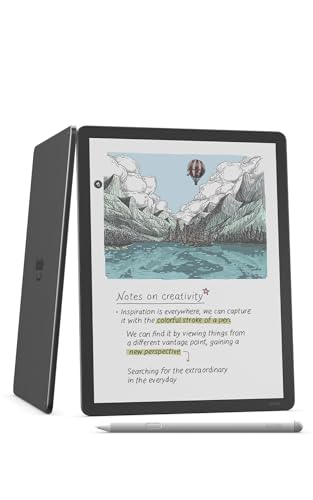
Amazon Kindle Scribe
The Kindle Scribe pairs a large e-ink reading screen with handwriting, so it doubles as an e-reader and a notebook. Built in templates include planners and lined pages, and the included pen never needs charging. Its front light lets you write in the dark, a feature the reMarkable lacks, making it a fit for readers who also plan.
Pros
- Doubles as an e-reader
- Front light for writing in the dark
- Included pen needs no charging
Cons
- Note tools less flexible than apps
- Monochrome display only
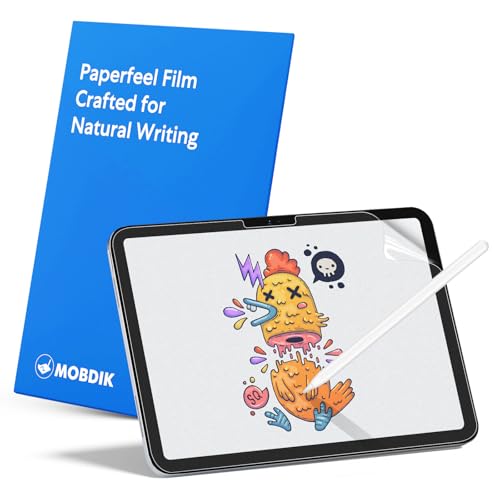
Paperlike Screen Protector for iPad
This matte film sticks over an iPad screen and adds the subtle drag of paper under a stylus tip, fixing the slippery glass feel that bothers planner users. It also cuts glare and fingerprints. Owners who plan or sketch on an iPad call it a small change that makes long handwriting sessions far more comfortable.
Pros
- Adds real paper drag to glass
- Cuts glare and fingerprints
- Makes long writing sessions easier
Cons
- Softens screen sharpness slightly
- Wears the stylus tip faster

Rocketbook Fusion Smart Notebook
The Rocketbook Fusion is a reusable notebook you write in with a Pilot FriXion pen, then scan pages to the cloud with its app before wiping them clean with a damp cloth. It mixes planner, calendar and note templates. For people who love writing on real paper but want digital backups, it bridges both without a tablet.
Pros
- Real paper writing with digital backup
- Reusable pages wipe clean
- No tablet or charging needed
Cons
- Must scan pages to save them
- Ink needs a minute to set
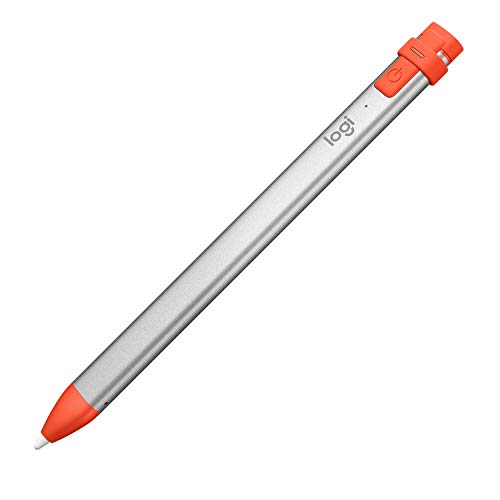
Logitech Crayon Digital Pencil
The Logitech Crayon is a lower cost stylus for compatible iPads that skips pressure sensitivity but keeps tilt shading and low latency. It powers on with a button and works instantly without Bluetooth pairing. Students and casual planners who do not need the full Apple Pencil feature set find it a practical, cheaper alternative.
Pros
- Cheaper than the Apple Pencil
- Works without Bluetooth pairing
- Low latency for handwriting
Cons
- No pressure sensitivity
- Flat shape rolls less but grips oddly
The lineup, side by side
| # | Model | Display | Best for | Score | Price |
|---|---|---|---|---|---|
| 1 | reMarkable 2 Paper Tablet | 10.3 inch monochrome e-ink | Best for distraction free planning | 9.3 | Check price |
| 2 | Apple Pencil 2nd Generation | Active stylus for iPad | Best stylus for iPad planners | 9.2 | Check price |
| 3 | Boox Note Air3 C Tablet | 10.3 inch color e-ink | Best color e-ink | 8.9 | Check price |
| 4 | Amazon Kindle Scribe | 10.2 inch monochrome e-ink | Best for readers who plan | 8.7 | Check price |
| 5 | Paperlike Screen Protector for iPad | Matte screen protector | Best paper feel upgrade | 8.5 | Check price |
| 6 | Rocketbook Fusion Smart Notebook | Reusable smart notebook | Best hybrid paper to digital | 8.3 | Check price |
| 7 | Logitech Crayon Digital Pencil | Active stylus for iPad | Best value iPad stylus | 8.1 | Check price |
Frequently asked questions
What do I need to use a digital planner?
You need a tablet, a stylus and a planning app. A dedicated e-ink device like the reMarkable includes planner templates, while on an iPad you run apps such as GoodNotes or Notability with an Apple Pencil.
Is an iPad or an e-ink tablet better for planning?
An iPad offers color, speed and rich apps but invites distraction. E-ink devices like the reMarkable feel more like paper, last days per charge and keep you focused. Choose by whether you want focus or flexibility.
Which apps work best for digital planning?
On an iPad, GoodNotes and Notability are the common choices for layered planners with tabs and stickers. E-ink tablets use their own built in note and planner tools or, on the Boox, standard Android apps.
Does the Apple Pencil work with any iPad?
No. The second generation Apple Pencil works only with select iPad Pro, Air and mini models. Check compatibility for your exact iPad, or consider the Logitech Crayon as a cheaper alternative for supported models.
What is a paper feel screen protector?
It is a matte film, like the Paperlike, that adds friction to a tablet’s glass so a stylus drags the way a pen does on paper. It also reduces glare, at the cost of slightly softening the display.
Can I use a digital planner on real paper?
Yes, with a reusable notebook like the Rocketbook Fusion. You write with an erasable pen, scan pages to the cloud through its app, then wipe them clean and start over, blending paper and digital.
Do e-ink tablets show color?
Most are monochrome, but the Boox Note Air3 C uses a color e-ink screen, useful for color coded planners. Color e-ink looks muted compared to an LCD and refreshes more slowly.
How long do these devices hold a charge?
E-ink tablets like the reMarkable and Kindle Scribe last days because the screen sips power. An iPad lasts roughly a day of active use. Styluses like the Apple Pencil recharge in minutes when attached.
Do I need pressure sensitivity for planning?
For plain writing and checking off tasks, no. Pressure sensitivity mainly helps sketching and calligraphy. The Logitech Crayon skips it and still works well for everyday planning, saving money over the Apple Pencil.
Our take
For focused, paper like planning with no distractions, the reMarkable 2 is the pick, and its multi day battery makes it easy to live with. Anyone already invested in an iPad should skip a new device and buy an Apple Pencil plus a Paperlike film, which together transform the tablet you own. Budget minded planners who want color e-ink get the best of both worlds from the Boox Note Air3 C.
Marcus Chen
Marcus covered consumer electronics for enthusiast tech publications for six years before joining ChoiceCrest. He specializes in translating manufacturer spec sheets into plain-language buying advice, with a focus on audio, computing accessories and smart-home gear.