Digital photo frames ranked by how photos arrive
Aura Carver Luxe suits most families, bundling unlimited storage with a matte 10.1 inch panel and no monthly fee. Skylight Frame 10 Inch fits relatives who will not install an app, since photos arrive by email. Pix-Star 15 Inch offers the largest screen and automatic album syncing.
Aura Carver Luxe is the frame most households should buy. Unlimited storage ships with the hardware, so no monthly fee gates the useful features. Its matte 10.1 inch panel stays readable in a lit room. Landscape-only orientation is the catch, and vertical phone shots end up with bars on both sides.
Delivery method decides whether a frame still runs in month two. Apps suit families comfortable installing software. A plain email address suits everyone else. Cloud album syncing asks nobody to send anything at all. We compared published resolutions, aspect ratios, storage terms and paid-tier boundaries, then weighed owner reports on setup and night dimming.
The shortlist, ranked

Aura Carver Luxe
Resolution sits at 1280 by 800 across 10.1 inches, which reads sharp from a sofa. Matte glass removes the mirror effect glossy panels show in a bright room, and unlimited storage comes bundled rather than sold as a plan. An ambient light sensor dims the display at dusk and sleeps it in a dark room.
Pros
- Unlimited storage with no monthly fee
- Matte glass stays readable under lamps and windows
- Several relatives add photos through one shared app
Cons
- Landscape-only panel pillarboxes vertical phone shots
- Nothing arrives without a Wi-Fi connection

Skylight Frame 10 Inch
Each frame receives its own email address, so a sender needs no app and no account. That single choice removes most of the support calls app-based frames generate. Touch controls handle deleting and favouriting at the frame itself, while captions and video sit inside the optional Skylight Plus plan.
Pros
- Senders need nothing beyond an email client
- Touch controls suit less technical owners
- Quickest setup of the seven frames here
Cons
- Video and captions require the Plus plan
- Attachment limits cap how many photos send at once

Nixplay Smart Photo Frame 10.1 Inch Touch
Playlists group images by event or person, then push to several frames at once. Households running a frame in two houses gain the most from that. A motion sensor wakes the 1280 by 800 touchscreen when someone enters and sleeps it when the room empties, and photos can arrive by app or by email.
Pros
- Playlists decide what shows and when
- Motion sensor saves power in quiet rooms
- One account manages frames in several homes
Cons
- Larger cloud allowances sit behind a paid plan
- App depth goes past what casual users want

Pix-Star 15 Inch Wi-Fi Cloud Digital Photo Frame
Fifteen inches makes this the only pick here readable across a living room. Its 4 by 3 panel matches the shape of most phone photos better than widescreen rivals do. Web album syncing pulls new images from services such as Google Photos and Flickr, though 1024 by 768 over that diagonal looks best from a few feet back.
Pros
- Largest screen in this comparison
- Shared cloud albums update the frame automatically
- 4 by 3 shape wastes less of a phone photo
Cons
- Pixel density is low for a 15 inch panel
- Bezel styling looks plainer than Aura or Skylight

Dragon Touch Classic 10 Digital Picture Frame
An IPS touchscreen at 1280 by 800 holds colour when viewed from below, which helps on a high shelf. Photos arrive through the Frameo app, and an SD card or USB drive loads a batch with no network involved. Two delivery routes make this a sensible gift for a house with patchy broadband.
Pros
- Runs with or without Wi-Fi
- Stands upright for vertical photos
- IPS panel holds colour off-axis
Cons
- Frameo app feels rougher than Aura or Nixplay
- Internal storage fills faster than cloud-backed frames

Aeezo Portrait 01 Wi-Fi Digital Picture Frame
Frameo again handles sending, making this the least expensive route here into app-based delivery. Auto-rotation reads how the frame is standing and reorients the image, so a vertical shot fills the 10.1 inch IPS screen. Housing plastics feel lighter in the hand than Aura or Skylight, which shows whenever you move it.
Pros
- Auto-rotation fills the screen with vertical shots
- No subscription attached to any feature
- Card slot extends the internal memory
Cons
- Plastic housing feels less substantial
- Shared Frameo platform means generic support
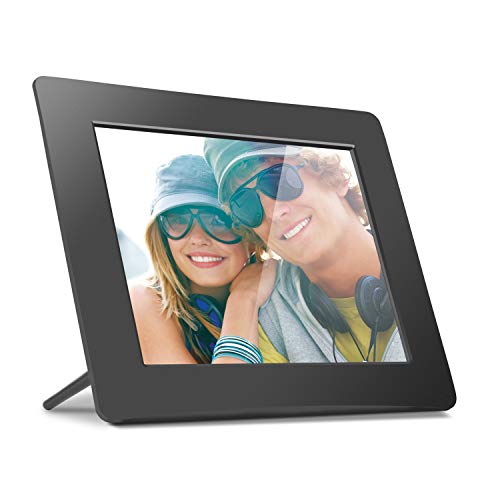
Aluratek 8 Inch Digital Photo Frame
No network, no app, no account: images load from an SD card or USB drive and play on a loop. Care homes, office desks and anyone wary of putting a display online are the natural buyers. Eight inches is small and the slideshow controls stay basic, which is precisely the appeal.
Pros
- Nothing to configure and no account to create
- Images never leave the device
- Runs in buildings with no usable Wi-Fi
Cons
- Updating photos means visiting in person
- Smallest and lowest-resolution screen here
The lineup, side by side
| # | Model | Display | Best for | Score | Price |
|---|---|---|---|---|---|
| 1 | Aura Carver Luxe | 10.1 inch, 1280 by 800 | Best overall | 9.4 | Check price |
| 2 | Skylight Frame 10 Inch | 10 inch touchscreen | Best for grandparents | 9.2 | Check price |
| 3 | Nixplay Smart Photo Frame 10.1 Inch Touch | 10.1 inch, 1280 by 800 touchscreen | Best app control | 9.0 | Check price |
| 4 | Pix-Star 15 Inch Wi-Fi Cloud Digital Photo Frame | 15 inch, 1024 by 768 | Best large screen | 8.8 | Check price |
| 5 | Dragon Touch Classic 10 Digital Picture Frame | 10.1 inch IPS, 1280 by 800 | Best value | 8.6 | Check price |
| 6 | Aeezo Portrait 01 Wi-Fi Digital Picture Frame | 10.1 inch IPS touchscreen | Best budget Wi-Fi frame | 8.3 | Check price |
| 7 | Aluratek 8 Inch Digital Photo Frame | 8 inch | Best without Wi-Fi | 8.0 | Check price |
Before you buy
What to look for in a digital photo frame Start with delivery, because that decides whether the frame still runs in month two. App frames such as Aura and Nixplay work when the family will install software. Skylight’s per-frame email address removes that requirement completely. Pix-Star asks even less: update a shared cloud album and the frame follows on its own. Resolution matters less than buyers expect. At 10 inches, 1280 by 800 reads sharp from a few feet away, and a matte finish does more in a lit room than extra pixels ever will.
Why vertical phone photos get side bars Phones shoot roughly 4 by 3 and get held upright. Most frames use a 16 by 10 landscape panel, so a vertical image shrinks and sits between bars, sometimes filled with a blurred copy of itself. Three fixes exist. Pick a 4 by 3 panel like the Pix-Star. Choose a frame that stands on its short edge, such as the Dragon Touch Classic 10 or the Aeezo Portrait 01. Or accept the bars: Aura Carver Luxe is landscape only and pairs two vertical photos side by side instead.
Subscriptions, storage and privacy terms Read the storage terms before the spec sheet. Aura bundles unlimited storage and charges nothing monthly. Skylight keeps email delivery free but moves video and captions into its Plus plan. Nixplay reserves bigger cloud allowances for paid tiers. Every Wi-Fi frame routes images through a company server on the way to the display, which matters when the photos are private. Offline models such as the Aluratek keep everything on a card you can hold.
Best digital photo frame to give as a gift A gift frame should need no configuration from whoever opens the box. Connect it to your own Wi-Fi first and load 50 or so photos. Reconnect it to their network during the handover, so familiar faces appear within seconds. Email delivery wins when the wider family is scattered and not app-inclined, since anyone can forward a picture from any device. Check dimming behaviour too. Frames that glow all night in a bedroom get unplugged and forgotten by week two.
Good to know
Do digital photo frames need Wi-Fi?
Only to receive photos remotely. Aluratek’s 8 Inch frame plays from an SD card or USB drive with no network, and the Dragon Touch Classic 10 accepts both routes. Wi-Fi affects delivery, never image quality.
Can family send photos to a digital frame from anywhere?
Yes. Aura, Nixplay, Dragon Touch and Aeezo use apps, Skylight uses a per-frame email address, and Pix-Star syncs a shared cloud album automatically whenever someone adds an image to it.
Do digital photo frames require a subscription?
Basic use stays free on all seven. Aura includes unlimited storage outright. Skylight charges for video and captions through Plus, and Nixplay gates larger cloud allowances. Read what the free tier covers before ordering.
What resolution should a digital photo frame have?
For a 10 inch panel, 1280 by 800 is the practical standard and looks clean from a few feet away. Bigger screens need more pixels to match, which is why the 15 inch Pix-Star at 1024 by 768 reads better from across a room.
Which digital photo frame is best for elderly parents?
Skylight Frame 10 Inch. Relatives email a photo and it appears, with no menus for the owner to learn. Set it up on your network and load images before wrapping, so it works the moment it is plugged in.
Can digital photo frames play videos?
Some do. Skylight supports video through Plus and Nixplay handles short clips. Aluratek is still images only. Check accepted file formats and clip length, since most frames limit both.
Do digital photo frames turn off at night?
Sleep schedules are common, and sensors go further. Aura’s ambient light sensor dims then sleeps the panel in a dark room, while Nixplay’s motion sensor wakes the screen only when somebody is present.
Portrait or landscape: which orientation works better?
Landscape favours group shots and scenery, the use case Aura Carver Luxe is built around. Mostly vertical phone snaps argue for a rotating frame such as the Dragon Touch Classic 10 or Aeezo Portrait 01, stood upright.
Is a digital photo frame worth it as a gift?
It works when someone keeps sending images. Choose email delivery for scattered families, load photos before handing it over, and agree who will add more. Frames that arrive empty tend to stay empty.
How many photos can a digital photo frame hold?
Cloud-backed models decide this by plan, and Aura’s allowance is unlimited. Offline frames depend on card size, so a 32 GB SD card holds thousands of typical phone images at full resolution.
Final word
Buy the Aura Carver Luxe for a household that wants photos flowing in without a monthly fee, since unlimited storage ships with the frame and matte glass survives a sunlit room. Gifting one to a less technical relative changes the answer to Skylight Frame 10 Inch, because emailing a photo beats coaching someone through an app by phone. Anyone whose library is mostly vertical shots should take the rotating Dragon Touch Classic 10 and skip the side bars completely.
Dana Whitfield
Dana spent eight years buying and merchandising for a regional kitchenware retailer before moving into editorial work. She has handled thousands of SKUs across cookware, small appliances and kitchen organization, and focuses on the practical differences that matter once a product is actually in daily use.
You might also need

Which Home Coffee Maker Actually Fits How You Brew?
French Door Fridges Ranked for Space, Style, and Smart Features
How Often Should an Office Chair’s Gas Cylinder Need Replacing?