Top Dash Cams for Road Trips: Capture Every Mile
For most travelers, the VIOFO A119 V3 is the top pick. It delivers sharp 1440p video, has a compact body that hides behind the mirror, and offers reliable buffered parking mode. Its main limitation is the lack of built-in Wi-Fi, so you must remove the SD card to view footage.
A dash cam is a wise investment for any traveler, offering peace of mind and evidence in case of accidents or disputes. With so many models on the market, finding the right one for your road trips can be overwhelming. We have compared top-rated models to simplify your decision.
This roundup focuses on dash cams that excel in travel scenarios. We considered factors like video clarity, wide-angle lenses, durability in heat, and convenient features like loop recording and parking mode. Whether you drive daily or take long cross-country adventures, there is a perfect dash cam for you.
What matters most
The top picks, ranked

VIOFO A119 V3
The VIOFO A119 V3 is a front-only dash cam that delivers exceptional 1440p video quality at 60 frames per second. Its compact design mounts discreetly behind the rearview mirror, and its supercapacitor handles extreme temperatures better than lithium-ion battery models. Drivers appreciate the clear night vision and the adjustable wide-angle lens that reduces blind spots.
Pros
- Excellent video clarity even at night
- Supercapacitor withstands hot climates
- Compact and easy to install
Cons
- No built-in Wi-Fi for easy file transfer
- Requires separate GPS mount for full GPS function

Thinkware U1000
The Thinkware U1000 is a premium 4K dash cam that captures ultra-detailed footage with a wide 150-degree field of view. It offers advanced driver assistance systems like lane departure warnings and forward collision alerts. Its built-in Wi-Fi and cloud capabilities allow remote viewing and file management via a smartphone app. The camera supports front and rear channels for complete coverage.
Pros
- Superb 4K image quality
- Extensive safety features
- Cloud connectivity for remote access
Cons
- Higher price point
- Requires hardwiring for parking mode features

Garmin Dash Cam 66W
The Garmin Dash Cam 66W is a small but powerful dash cam that records in 1440p at 60fps. Its 180-degree field of view captures everything in front of your car. It features voice control, allowing drivers to save clips, take photos, or stop audio recording hands-free. With built-in Wi-Fi, you can transfer clips to your smartphone and share them easily.
Pros
- Extremely wide angle reduces blind spots
- Hands-free voice commands
- Small footprint for discreet mounting
Cons
- No rear camera option
- Video quality at night is good but not top-tier
Rexing V1P Max
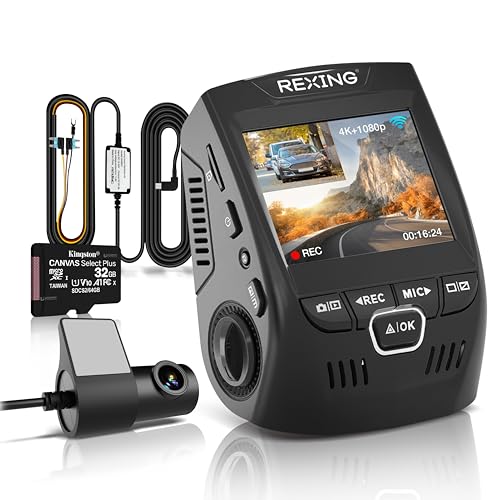
The Rexing V1P Max offers a front and rear camera setup at an affordable price. It records 1080p Full HD from both lenses, ensuring that incidents from the front and back are captured. The camera includes a 3-inch LCD screen for easy playback and menu navigation. Its compact size makes it simple to install, and it has an internal battery for parking mode when wired.
Pros
- Affordable dual-camera solution
- Good video quality for the price
- Easy to use and install
Cons
- No Wi-Fi or GPS built-in
- Battery may not handle extreme heat as well as supercapacitors

BLACKVUE DR900X-2CH
The BlackVue DR900X-2CH is a sleek 4K dash cam with front and rear cameras. It features a compact, cylindrical design that looks modern in any vehicle. Its cloud service allows you to view live footage remotely, receive push notifications, and share videos from anywhere. With built-in Wi-Fi and GPS, it offers comprehensive recording and tracking capabilities.
Pros
- High-quality 4K footage
- Cloud features for remote monitoring
- Sleek and compact design
Cons
- Cloud features require a paid subscription for full access
- Higher price compared to other models
Nextbase 622GW
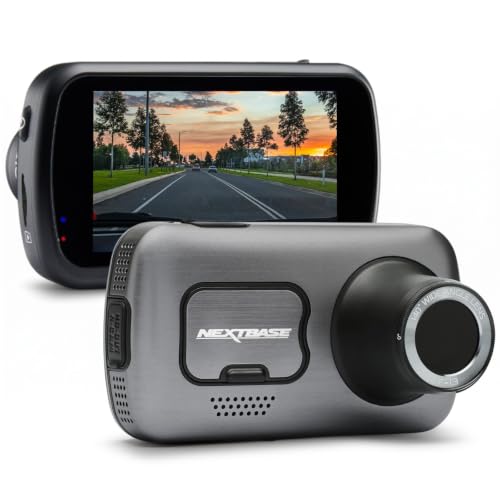
The Nextbase 622GW is a front-facing dash cam that records in 4K at 30fps or 1440p at 60fps. It has a touchscreen interface and built-in Wi-Fi for easy control and file sharing. The camera includes advanced driver assistance features and an optional rear camera module. Its polarizing filter reduces glare and enhances image clarity.
Pros
- High-resolution video with smooth 60fps option
- User-friendly touchscreen interface
- Included polarizing filter improves clarity
Cons
- Bulky design compared to others
- Some users report occasional connectivity issues with the app

YI Smart Dash Cam
The YI Smart Dash Cam is an entry-level option that still records in 1080p Full HD with a 165-degree wide-angle lens. It features built-in Wi-Fi and a companion app for live viewing, video download, and settings adjustment. The camera supports loop recording and G-sensor to protect important clips. Its affordable price makes it an accessible choice for basic travel needs.
Pros
- Very budget-friendly
- Compact and straightforward design
- Wi-Fi connectivity for easy access
Cons
- No GPS or parking mode
- Video quality is decent but not exceptional in low light
How they stack up
| # | Model | Video Resolution | Best for | Score | Price |
|---|---|---|---|---|---|
| 1 | VIOFO A119 V3 | 1440p at 60fps | Best Overall for Travel | 9.4 | Check price |
| 2 | Thinkware U1000 | 4K UHD front, 1080p rear | Best for 4K Clarity and Safety Features | 9.2 | Check price |
| 3 | Garmin Dash Cam 66W | 1440p at 60fps | Best for Compact Size and Voice Control | 9.0 | Check price |
| 4 | Rexing V1P Max | 1080p front and rear | Best Budget Dual Camera System | 8.8 | Check price |
| 5 | BLACKVUE DR900X-2CH | 4K front, 1080p rear | Best for Cloud Connectivity and Sleek Design | 8.7 | Check price |
| 6 | Nextbase 622GW | 4K at 30fps or 1440p at 60fps | Best for Smart Features and Image Quality | 8.6 | Check price |
| 7 | YI Smart Dash Cam | 1080p at 30fps | Best Value for Essential Features | 8.0 | Check price |
Frequently asked questions
How do I choose the right dash cam for long road trips?
For long trips, prioritize video quality, reliability in heat, and sufficient storage. A 1440p or 4K camera gives clearer footage. Look for a model with a supercapacitor rather than a battery to withstand high cabin temperatures. Ensure it supports large microSD cards or has a reliable loop recording feature so you don’t run out of space during a long journey.
Is a dual-channel dash cam worth it for travel?
A dual-channel setup captures both front and rear views, which can be beneficial for road trips where you may be parked in unfamiliar areas. It provides evidence if someone hits your car from behind. However, it increases cost and complexity. If you often travel with a camper or trailer, a rear camera is particularly useful.
Can I leave my dash cam in the car in extreme temperatures?
It depends on the type of power source. Dash cams with lithium-ion batteries can swell or fail in extreme heat. Models with supercapacitors are more tolerant to high temperatures. Still, it’s wise to remove the camera if you park in scorching sun for extended periods, as the plastic and lens may degrade over time.
How much storage do I need for a dash cam?
The storage requirement depends on resolution and frame rate. A 1080p camera at 30fps uses about 1 GB per hour. A 4K camera at 30fps can use 10 GB per hour. For a day of driving, you may need 32-64GB. Consider a card with 128GB or more if you record long trips without frequent downloads. Many dash cams support up to 256GB or 512GB.
Do dash cams record while the car is parked?
Many dash cams have a parking mode that records when motion is detected or impact is sensed. This requires a constant power source, typically through a hardwire kit or an external battery. Some models have a built-in battery, but it will deplete quickly. Parking mode is useful for security, but not all models offer it, so check the specifications.
What is the difference between a 1080p and a 4K dash cam?
4K resolution offers four times the pixels of 1080p, resulting in sharper details like license plates and road signs. However, 4K files are larger and require more storage and a faster microSD card. For most travel needs, 1440p provides a good balance of clarity and file size. If you want the best evidence quality, 4K is worth the investment.
Are dash cams legal for travel?
Dash cams are generally legal in most regions, but there are restrictions on mounting locations and recording laws. In some countries, you cannot obstruct your view, and in others, audio recording without consent is prohibited. Check local regulations before using a dash cam, especially when traveling internationally.
How do I install a dash cam without damaging my car?
You can use a suction cup mount that attaches to the windshield without leaving residue. For cable routing, tuck wires along the headliner and door pillars using trim tools. Avoid placing the camera where it blocks airbags. If you prefer a clean installation, consider professional hardwiring, which connects the camera to your fuse box and hides cables behind panels.
Can I use my dash cam as a regular camera for travel photos?
Most dash cams are designed for continuous recording and do not have a photo mode, or the photo quality is poor. They are not suitable for taking scenic pictures. For photography, you would need a separate camera or smartphone.
What should I do if my dash cam overheats?
If your dash cam overheats, it may shut down to protect itself. To prevent this, choose a model with a supercapacitor, park in shaded areas, or remove the camera when not in use. Some models have a high-temperature cutoff feature. Always check the manufacturer’s operating temperature range.
Final word
After comparing specs and owner feedback, we recommend the VIOFO A119 V3 for most travelers because it offers outstanding video quality, reliable performance in heat, and a compact design, all at a reasonable price. If you want 4K clarity and are willing to pay more, the Thinkware U1000 is an excellent premium choice. For budget-conscious travelers who need rear coverage, the Rexing V1P Max provides dual cameras without breaking the bank.
Marcus Chen
Marcus covered consumer electronics for enthusiast tech publications for six years before joining ChoiceCrest. He specializes in translating manufacturer spec sheets into plain-language buying advice, with a focus on audio, computing accessories and smart-home gear.