Cordless Switch Picks for Smart Home Upgrades
The Philips Hue Smart Dimmer Switch V2 is a top pick for smart home enthusiasts because it works without a hub and offers flexible mounting. Its main limitation is that it requires Hue bulbs to function.
Cordless switches eliminate the need for wiring, making them ideal for renters, temporary setups, or adding control where traditional wiring isn’t possible. They use batteries or energy harvesting, and many integrate with smart home systems.
In this roundup, we evaluated popular cordless switches, considering factors like range, mounting options, and whether they work with existing smart ecosystems. Whether you want a basic remote for a lamp or a full scene controller, there’s a switch for you.
Our top picks

Philips Hue Smart Dimmer Switch V2
This battery-powered switch pairs directly with Hue lights via Bluetooth or Zigbee, offering four buttons for on/off and brightness control. It attaches magnetically to its wall plate, so you can use it as a remote or mount it anywhere.
Pros
- No hub required for basic control
- Portable design with magnetic back
- Four programmable buttons
Cons
- Requires Hue bulbs
- Limited to Philips ecosystem

GE CYNC Smart Switch Portable
A simple, battery-powered switch that works with Cync Direct Connect lights and Matter-enabled devices. It has an on/off button and a dimmer slider, and it mounts easily with adhesive.
Pros
- Very affordable
- Simple setup with Cync app
- Works with Matter
Cons
- Limited to Cync ecosystem
- No scene control

Lutron Aurora Smart Bulb Dimmer
Twist and press this switch to control Philips Hue bulbs without wiring. It fits over existing toggle switches, making it perfect for renters. It uses energy harvesting, so no batteries needed.
Pros
- No batteries required
- Easy install over existing switch
- Preserves original switch function
Cons
- Only works with Hue bulbs
- Not suitable for rocker switches

SwitchBot Remote
This compact remote with six buttons can control up to 15 devices individually or in groups. It works with SwitchBot devices and Amazon Alexa, and it mounts on walls with adhesive.
Pros
- Controls many devices
- Customizable button actions
- Works with Alexa
Cons
- Requires SwitchBot hub for automation
- Limited range without hub

Aqara Wireless Remote Switch
A sleek wireless switch that connects to Aqara hubs via Zigbee. It features a single button that can trigger multiple actions with single, double, and long presses. Its minimalist design blends into any decor.
Pros
- Multiple press actions
- Low battery consumption
- HomeKit compatible via hub
Cons
- Requires Aqara hub
- No physical dimming
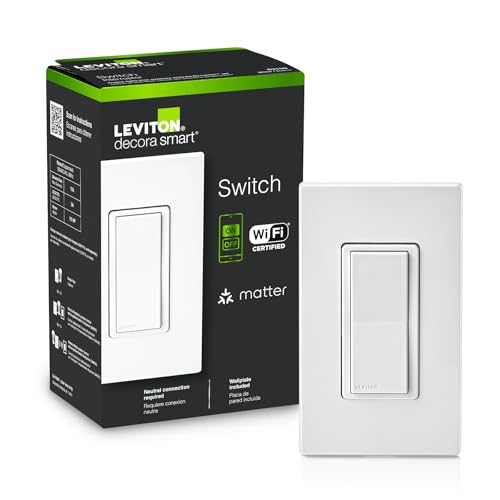
Leviton Decora Smart Wireless Switch
This wireless switch is designed to work with Leviton’s Decora Smart products and Matter over Wi-Fi. It offers scene control and can be used as a remote for other smart devices, though it needs a Leviton hub for advanced features.
Pros
- Matter support
- Scene control
- Easy pairing with Leviton app
Cons
- Requires Leviton hub for full features
- Bulkier design
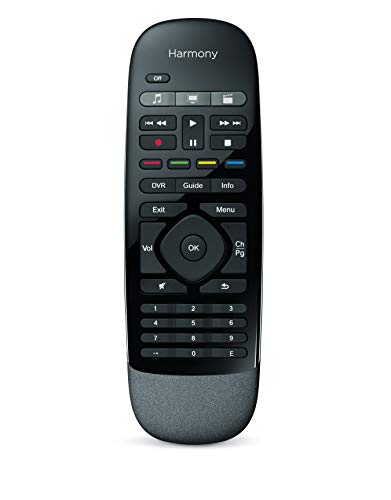
Logitech Harmony Smart Control
While primarily a remote, this device can control lights and other smart home devices via its hub. It offers activity-based control, such as ‘Watch a Movie’ that dims lights and turns on the TV. It works with Alexa and has a mobile app.
Pros
- Activity-based control
- Controls up to 15 devices
- Works with Alexa
Cons
- Requires hub for smart home control
- Setup can be complex
Before you buy
Compared at a glance
| # | Model | Compatibility | Best for | Score | Price |
|---|---|---|---|---|---|
| 1 | Philips Hue Smart Dimmer Switch V2 | Hue lights only | Smart home integration | 9.4 | Check price |
| 2 | GE CYNC Smart Switch Portable | Cync Direct Connect, Matter | Affordable basic control | 8.7 | Check price |
| 3 | Lutron Aurora Smart Bulb Dimmer | Philips Hue bulbs | Replacing traditional switches | 9.1 | Check price |
| 4 | SwitchBot Remote | SwitchBot devices, Alexa | Controlling multiple devices | 8.9 | Check price |
| 5 | Aqara Wireless Remote Switch | Aqara hubs, HomeKit | Smart home hubs | 8.8 | Check price |
| 6 | Leviton Decora Smart Wireless Switch | Leviton Decora Smart, Matter | Full smart home setups | 8.6 | Check price |
| 7 | Logitech Harmony Smart Control | Broad smart home support | Home theater automation | 8.4 | Check price |
Questions worth asking
Do cordless switches require a hub?
Some cordless switches work directly with lights via Bluetooth or Zigbee, like the Philips Hue Dimmer, while others need a hub, such as the Aqara Wireless Remote. Check the product specifications to see if a hub is required for your setup.
Can I use a cordless switch with any light fixture?
No. Cordless switches often work only with specific smart bulbs or devices. For example, the Lutron Aurora only works with Philips Hue bulbs. If you want to control standard fixtures, you may need to replace the bulbs or use smart plugs.
How long do batteries last in cordless switches?
Battery life varies. Most switches use CR2032 or CR2450 batteries that can last from one to two years, depending on usage. Some switches, like the Lutron Aurora, are battery-free and use energy harvesting, so they never need battery replacement.
Are cordless switches easy to install?
Yes, most cordless switches are designed for easy installation. They typically mount with adhesive strips or screws, and no wiring is needed. Some, like the Lutron Aurora, simply twist over an existing switch, making installation a matter of seconds.
Can I control a cordless switch with my voice assistant?
Many cordless switches work with Amazon Alexa or Google Assistant, but often through a smart home hub or bridge. For example, the SwitchBot Remote works with Alexa only when paired with a SwitchBot hub. Check compatibility before purchasing.
What is the difference between a cordless switch and a smart switch?
A cordless switch is a battery-powered remote control that communicates wirelessly with smart devices. A smart switch is wired into your home’s electrical system and controls power to the fixture. Cordless switches are more flexible and easier to install, but they may not work with all types of lighting.
Can cordless switches control multiple lights at once?
Some cordless switches can control multiple lights or devices. For instance, the SwitchBot Remote can control up to 15 devices. Others, like the GE CYNC, might only control one light or group depending on the setup. Check the product’s capabilities.
Are cordless switches safe to use?
Yes, cordless switches are safe because they operate at low voltage and don’t involve direct wiring. They use batteries or energy harvesting, so there is no risk of electric shock during installation. Always follow the manufacturer’s instructions for mounting and use.
The verdict
For most smart home users, the Philips Hue Smart Dimmer Switch V2 is the best cordless switch because it works without a hub and offers a portable, versatile design. If you need a budget-friendly option that works with Matter, the GE CYNC Smart Switch Portable is a solid choice. For renters who want to control Hue bulbs without altering existing switches, the Lutron Aurora is excellent. Choose based on your ecosystem and control needs.
Jake Monroe
Jake worked as a residential contractor for over a decade before shifting to full-time writing. He evaluates power tools, hand tools and workshop gear through the lens of someone who has actually used them on job sites, not just read the box.