Top Computer Keyboards for Typing, Gaming, and Comfort
For most people, the Logitech MX Keys S stands out as the top pick. It offers a comfortable typing experience, quiet keys, and seamless multi-device connectivity. Its main advantage is the excellent build quality and smart backlighting, but it lacks wrist support, which some users may need.
Choosing a keyboard can be overwhelming with so many options. Whether you type all day, game at night, or just want a reliable daily driver, the right keyboard boosts productivity and comfort.
We analyzed specifications and user feedback to bring you seven top contenders. Our list covers membrane, mechanical, low-profile, and ergonomic designs to suit different preferences and budgets.
Our top picks

Logitech MX Keys S Wireless Keyboard
The Logitech MX Keys S is a full-size wireless keyboard with low-profile keys that are quiet and comfortable. It features smart backlighting that adjusts to lighting conditions and can connect to three devices via Bluetooth or the USB receiver. The build is solid with a sleek design.
Pros
- Excellent typing comfort
- Multi-device switching easy
- Quiet keys
Cons
- No wrist rest included
- Expensive

Keychron V1 QMK Custom Mechanical Keyboard
The Keychron V1 is a hot-swappable mechanical keyboard that lets you change switches without soldering. It supports QMK/VIA for remapping keys and macros. The aluminum frame adds durability, and it comes in various switch options like red, blue, and brown.
Pros
- Highly customizable
- Great build quality
- Satisfying typing feel
Cons
- Wired only
- No wireless option
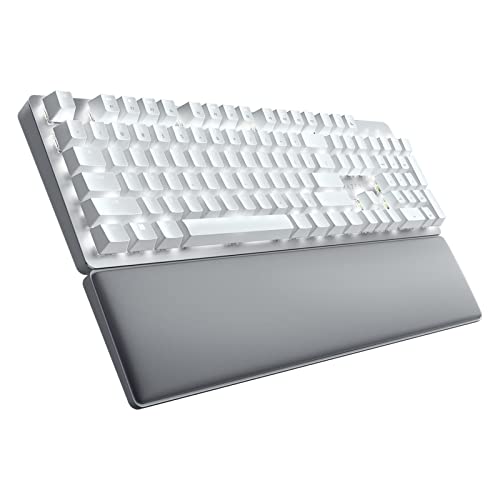
Razer Pro Type Ultra Wireless Mechanical Keyboard
The Razer Pro Type Ultra is a wireless mechanical keyboard with linear yellow switches that are quiet. It offers a comfortable typing experience with a padded wrist rest and can connect via Bluetooth or 2.4GHz. The keys are durable and rated for 80 million keystrokes.
Pros
- Quiet mechanical keys
- Includes wrist rest
- Multi-device pairing
Cons
- Backlight is white only
- Plastic body feels less premium

Microsoft Sculpt Ergonomic Keyboard
The Microsoft Sculpt Ergonomic Keyboard features a split key layout and a cushioned palm rest to promote a natural wrist position. It includes a separate number pad and navigation keys. The keys are soft and quiet, and the design is curved to reduce strain.
Pros
- Promotes natural wrist alignment
- Comfortable palm rest
- Separate numpad can be placed left or right
Cons
- Keys have shallow travel
- Not suitable for gaming

Logitech K380 Bluetooth Keyboard
The Logitech K380 is a compact wireless keyboard that connects to up to three devices and switches with a button. It has rounded keys with a comfortable typing feel and works with Windows, macOS, iOS, Android, and more. Batteries last up to two years.
Pros
- Small and lightweight
- Multi-device pairing
- Long battery life
Cons
- No backlight
- Limited key travel

Razer BlackWidow V4 75% Mechanical Gaming Keyboard
The Razer BlackWidow V4 75% is a compact gaming keyboard with hot-swappable switches and per-key RGB lighting. It features a gasket-mounted design for a softer feel and includes a magnetic wrist rest. The switches are Razer Orange tactile, which are quiet.
Pros
- Compact size saves desk space
- Hot-swappable for customization
- Per-key RGB lighting
Cons
- Wired only
- No dedicated media keys

Apple Magic Keyboard with Touch ID and Numeric Keypad
The Apple Magic Keyboard with Touch ID and Numeric Keypad is designed for Mac users. It features a scissor mechanism with low profile keys and includes Touch ID for secure authentication. It pairs instantly with Mac and charges via Lightning.
Pros
- Touch ID convenience
- Slim and durable design
- Works seamlessly with Mac
Cons
- Expensive
- Only for Mac users
Compared at a glance
| # | Model | Connectivity | Best for | Score | Price |
|---|---|---|---|---|---|
| 1 | Logitech MX Keys S Wireless Keyboard | Bluetooth, USB receiver | Productivity and multi-device users | 9.4 | Check price |
| 2 | Keychron V1 QMK Custom Mechanical Keyboard | Mechanical (hot-swappable) | Customization and enthusiast typing | 9.1 | Check price |
| 3 | Razer Pro Type Ultra Wireless Mechanical Keyboard | Razer Yellow (linear, quiet) | Typists who want a quiet mechanical feel | 8.9 | Check price |
| 4 | Microsoft Sculpt Ergonomic Keyboard | Membrane (scissor mechanism) | Ergonomic support and reducing strain | 8.7 | Check price |
| 5 | Logitech K380 Bluetooth Keyboard | Bluetooth | Compact and portable use | 8.5 | Check price |
| 6 | Razer BlackWidow V4 75% Mechanical Gaming Keyboard | Mechanical (hot-swappable) | Gamers who want a compact high-performance keyboard | 9.0 | Check price |
| 7 | Apple Magic Keyboard with Touch ID and Numeric Keypad | Scissor mechanism (low profile) | Mac users who want seamless integration | 8.6 | Check price |
Before you buy
Frequently asked questions
What is the best keyboard for typing all day?
The Logitech MX Keys S is a top choice for typing comfort with its low-profile keys and quiet operation. It also offers excellent wireless connectivity.
Are mechanical keyboards better for typing?
Mechanical keyboards provide tactile feedback and durability, which many typists prefer. However, it depends on the switch type. Linear switches are smooth, tactile ones have a bump, and clicky ones produce sound. Try different switches to find what feels best.
What is the difference between membrane and mechanical keyboards?
Membrane keyboards use a rubber dome layer and are quieter and cheaper. Mechanical keyboards use individual switches under each key, offering better feedback and a longer lifespan, but are often louder and more expensive.
How do I clean my keyboard?
Turn off and unplug the keyboard. Use compressed air to remove debris. Wipe keys with a damp cloth. For deeper cleaning, remove keycaps if possible and clean them in warm soapy water.
Can I use a keyboard designed for Mac with Windows?
Some keyboards are compatible with both, but the Windows key placement may differ. Check the product specifications. The Apple Magic Keyboard is exclusively for Mac, while others like Logitech offer cross-platform compatibility.
What is hot-swappable?
Hot-swappable means you can remove and replace switches without soldering. This allows you to customize the feel of your keyboard by installing different switches easily.
Do wireless keyboards have lag?
Modern wireless keyboards, especially those using 2.4GHz receivers, have minimal latency. Bluetooth may have slightly more lag but is still suitable for most tasks. For competitive gaming, a wired connection is safest.
How long do keyboard batteries last?
Battery life varies. The Logitech MX Keys S lasts up to 10 days with backlighting and 5 months without. The Logitech K380 lasts up to 2 years with two AAA batteries. Backlighting and RGB reduce battery life significantly.
Our take
If you want one keyboard that does everything well, the Logitech MX Keys S is the clear winner for its comfort and connectivity. For an ergonomic option, the Microsoft Sculpt is a solid choice. Gamers should consider the Razer BlackWidow V4 75% for its performance and customization. Choose based on your primary use, but the MX Keys S is the most versatile.
Marcus Chen
Marcus covered consumer electronics for enthusiast tech publications for six years before joining ChoiceCrest. He specializes in translating manufacturer spec sheets into plain-language buying advice, with a focus on audio, computing accessories and smart-home gear.


