Compact Wireless OBD2 Scanners That Fit in Your Pocket
The BlueDriver Pro is our top pick for most drivers. It offers professional grade diagnostics in a compact size. Its main advantage is detailed repair reports with live data graphing. The main limitation is its higher price compared to basic code readers.
A compact wireless OBD2 scanner turns your smartphone into a powerful diagnostic tool. These devices plug into your car’s port and connect via Bluetooth. They can read and clear engine codes, monitor live data, and even help with smog checks.
We compared popular models that are small enough to leave in your glove box. Each offers different features, from basic code reading to advanced diagnostics. Read on to find one that matches your skill level and budget.
Before you buy
The top picks, ranked
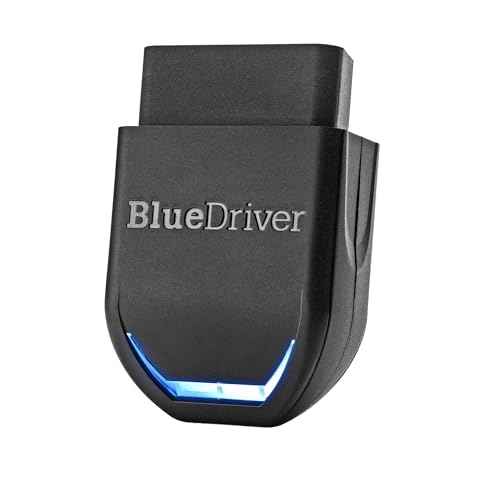
BlueDriver Pro OBD2 Scanner
The BlueDriver Pro is a compact Bluetooth scanner that works with iOS and Android. It reads and clears all OBD2 codes and provides enhanced diagnostic data for Ford, GM, Chrysler, Toyota, and Nissan. Owners report that the app is intuitive and the repair reports are very helpful.
Pros
- Clear and detailed live data
- Free app with no subscription
- Built in repair videos
Cons
- More expensive than basic readers
- Enhanced data not available for all car brands

FIXD OBD2 Scanner
FIXD is a compact scanner that pairs with a user friendly app. It translates error codes into plain English and offers maintenance alerts. Many users appreciate the subscription service for advanced features, but the basic functions are free.
Pros
- Simple, clear explanations
- Maintenance reminders
- Very compact design
Cons
- Subscription required for full features
- No live data graphing

ANCEL BD310 OBD2 Bluetooth Scanner
The ANCEL BD310 is a small and affordable Bluetooth scanner. It reads and clears engine codes, displays live data, and includes a free app. It works with both iOS and Android. Some owners note the app interface is a bit basic but reliable.
Pros
- Very affordable
- Compact size
- Smooth app connection
Cons
- No enhanced diagnostics
- App design could be more modern

Veepeak OBDCheck BLE+
Veepeak OBDCheck BLE+ is a popular budget friendly scanner. It uses Bluetooth Low Energy and works with many OBD2 apps. It reads and clears codes, shows live data, and supports both iOS and Android. Users praise its stable connection and small footprint.
Pros
- Low price point
- Wide app compatibility
- Reliable connection
Cons
- No enhanced manufacturer codes
- Plastic build feels less durable
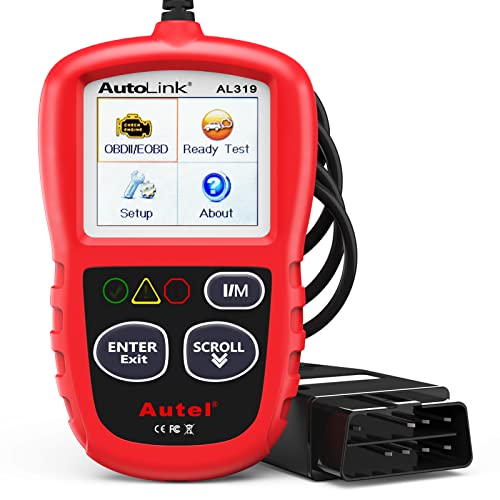
Autel AutoLink AL319 OBD2 Scanner
The Autel AL319 is a pocket sized handheld scanner with a built in display. It reads and clears engine codes and displays them on a small screen. It does not require a phone or app. It is simple and effective for basic checks.
Pros
- No smartphone needed
- Built in screen
- Easy one button operation
Cons
- Limited to code reading, no live data
- No Bluetooth connectivity

OBDLink CX
OBDLink CX is a compact Bluetooth 5.0 scanner that offers fast data rates and supports advanced diagnostics. It works with the OBDLink app and other third party apps. It is known for its reliability and deep data logging capabilities.
Pros
- Very fast and accurate data
- Wide app support
- Small and rugged design
Cons
- Higher price
- App interface may be complex for novices

Bafx Products OBD2 Bluetooth Scanner
The Bafx Products scanner is a classic Bluetooth adapter that works with Android, Windows, and some iOS devices. It uses the ELM327 chipset and is compatible with many diagnostic apps. It is compact and reliable, though it may require manual setup.
Pros
- Works with many apps
- Affordable
- Supports Windows
Cons
- Older Bluetooth version
- May need manual pairing
The lineup, side by side
| # | Model | Connectivity | Best for | Score | Price |
|---|---|---|---|---|---|
| 1 | BlueDriver Pro OBD2 Scanner | Bluetooth 4.0 | Most drivers seeking professional level diagnostics | 9.4 | Check price |
| 2 | FIXD OBD2 Scanner | Bluetooth 4.0 | Beginners who want simple code explanations | 8.8 | Check price |
| 3 | ANCEL BD310 OBD2 Bluetooth Scanner | Bluetooth 4.0 | Budget conscious buyers needing essential diagnostics | 8.5 | Check price |
| 4 | Veepeak OBDCheck BLE+ | Bluetooth 4.0 BLE | Smartphone users who want a highly rated budget option | 8.7 | Check price |
| 5 | Autel AutoLink AL319 OBD2 Scanner | 2.4 inch LCD | DIYers who prefer a standalone device without smartphone | 8.3 | Check price |
| 6 | OBDLink CX | Bluetooth 5.0 | Advanced users wanting high speed data and customization | 9.0 | Check price |
| 7 | Bafx Products OBD2 Bluetooth Scanner | Bluetooth 2.1 | Car enthusiasts who use Android or Windows devices | 8.1 | Check price |
Common questions
Are all OBD2 scanners compatible with any car?
Most scanners work with cars that are OBD2 compliant, which includes most gasoline vehicles sold in the US since 1996 and many diesel vehicles since 2008. However, enhanced diagnostics may only be available for specific makes and models.
Can I leave the scanner plugged in all the time?
It is generally safe to leave a scanner plugged in, but it may draw a small amount of power from the battery. To avoid draining your battery, it is best to unplug the scanner when not in use, especially if your car is not driven frequently.
Will a wireless scanner work with my iPhone?
Most modern wireless scanners are compatible with both iOS and Android. Check the product specifications to ensure it supports iOS. Some older models may only work with Android or Windows.
What is the difference between reading and clearing codes?
Reading codes retrieves the diagnostic trouble codes (DTCs) stored in your car’s computer. Clearing codes erases those codes and turns off the check engine light. Clearing codes does not fix the underlying problem, so you should diagnose and repair the issue first.
Can a compact scanner show live data?
Many compact wireless scanners can display live data such as engine RPM, coolant temperature, and oxygen sensor readings. However, some basic handheld models only show codes. Check the product description to see if live data is supported.
Do I need a subscription to use these scanners?
Some scanners offer basic functions for free, while advanced features like detailed repair reports or manufacturer specific diagnostics may require a subscription. For example, FIXD requires a subscription for full features. BlueDriver and OBDLink offer free apps with no subscription.
How accurate are these scanners?
These scanners are generally accurate for reading diagnostic trouble codes and live data. However, they are not a substitute for professional diagnostic equipment. They are best used for basic troubleshooting and to help you decide if you need a mechanic.
What is the Bluetooth range of these scanners?
Bluetooth range is typically around 30 feet, but it can be affected by interference from the car’s electronics. In practice, you will be within a few feet of the scanner when using it, so range is not a major concern.
Can these scanners work with diesel vehicles?
Many scanners support OBD2 protocols used by diesel vehicles, but not all. Check the product specifications for diesel compatibility. Some scanners may have limitations on enhanced diagnostics for diesels.
Are there any safety concerns with using a scanner?
Using a scanner is safe. It simply reads data from your car’s computer. Do not unplug the scanner while the engine is running or while performing certain operations that require the ignition on. Always follow the instructions provided.
Our pick
For most car owners, the BlueDriver Pro is the best investment. It offers comprehensive diagnostics and a free app, saving you money in the long run. If you are on a tight budget, the Veepeak OBDCheck BLE+ delivers excellent value for basic needs. Enthusiasts who want maximum control should choose the OBDLink CX.
Tony Russo
Tony trained as an automotive technician and spent years in service and parts retail before moving into writing. He focuses on garage tools, car care products and accessories from a hands-on maintenance perspective.

