Chromebooks That Handle More Than Just Browsing
The Acer Chromebook Plus 515 is the strongest all-around pick, pairing a 15.6 inch display with Chromebook Plus hardware requirements that noticeably speed up everyday multitasking. The Lenovo IdeaPad Flex 5i Chromebook Plus suits buyers who want a convertible touchscreen, while the ASUS Chromebook CX1 fits anyone shopping on a tight budget.
The Acer Chromebook Plus 515 stands out because it meets Google’s Chromebook Plus hardware baseline, which guarantees a faster processor and sharper display than standard budget Chromebooks. Its main limitation is a larger, less portable 15.6 inch chassis compared to smaller 14 inch convertibles.
We compared processor performance, display quality, battery life and build quality across each listing rather than running our own classroom or office deployment tests.
The shortlist, ranked

Acer Chromebook Plus 515
Meeting Google’s Chromebook Plus certification requirements, this model includes a faster processor and higher resolution display than budget Chromebooks lacking that label. A 15.6 inch full HD screen gives more working space than the 14 inch panels common on smaller Chromebooks. Battery life extends through a full workday under typical web and document use.
Pros
- Chromebook Plus certification guarantees a faster baseline processor
- Larger 15.6 inch display gives more working space
- Full workday battery life for typical use
Cons
- Larger chassis is less portable than 14 inch convertibles
- Lacks a touchscreen or convertible hinge

ASUS Chromebook Plus CX34
A 2.8K OLED display sets this Chromebook apart from the Full HD panels standard on most competitors in this category. Chromebook Plus certification ensures a capable processor pairs with that sharper screen rather than bottlenecking it. An aluminum chassis adds a more premium feel than the plastic bodies common on budget Chromebooks.
Pros
- OLED display is sharper than most Chromebooks at this price
- Aluminum build feels more premium than plastic competitors
- Chromebook Plus certification ensures balanced processor performance
Cons
- Higher price than non-certified Chromebooks with similar specs
- OLED panel is more costly to repair if damaged
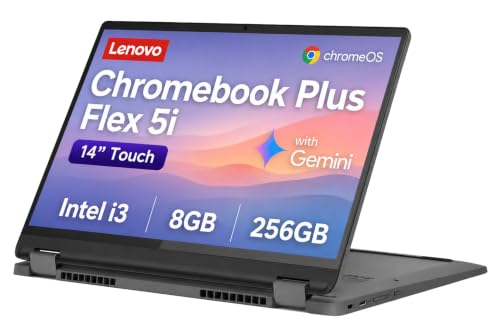
Lenovo IdeaPad Flex 5i Chromebook Plus
A 360 degree hinge and touchscreen let this Chromebook fold into tablet mode, a feature most Chromebooks in this price range skip entirely. Chromebook Plus certification covers the processor and display quality baseline alongside the convertible hardware. Google’s on-device AI features, including enhanced video call backgrounds, run more smoothly thanks to the certified hardware tier.
Pros
- 360 degree hinge adds tablet mode most competing Chromebooks lack
- Chromebook Plus certification supports smoother on-device AI features
- Touchscreen adds input flexibility beyond keyboard and trackpad
Cons
- Convertible hinge adds weight compared to fixed-clamshell Chromebooks
- Touchscreen glare can be noticeable in bright rooms
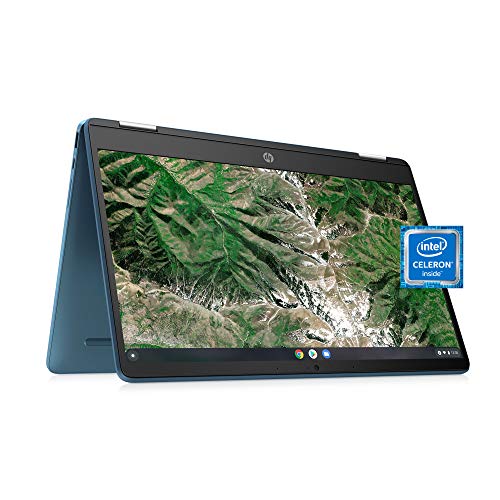
HP Chromebook x360 14a
A spill-resistant keyboard and reinforced hinge target everyday wear and tear better than Chromebooks built with lighter-duty materials. A 360 degree hinge adds tablet and tent modes without the premium price of Chromebook Plus certified convertibles. Battery life covers a typical school or office day without needing a midday charge.
Pros
- Spill-resistant keyboard adds durability for everyday accidents
- Convertible hinge adds flexibility without a Chromebook Plus price tag
- Full day battery life suits school or office schedules
Cons
- Lower resolution display than Chromebook Plus certified competitors
- Processor handles fewer simultaneous browser tabs smoothly

Acer Chromebook Spin 714
A higher tier Intel Core processor and larger RAM configuration handle more simultaneous browser tabs and Android apps than entry-level Chromebooks. A 360 degree hinge and 14 inch touchscreen support both laptop and tablet use for business travel. An aluminum chassis with a numeric keypad area suits office and spreadsheet-heavy work better than compact 13 inch Chromebooks.
Pros
- Higher tier processor handles heavier multitasking than entry Chromebooks
- Aluminum build suits frequent business travel
- Sharper 2.2K display than standard HD Chromebook panels
Cons
- Higher price than entry-level and mid-range Chromebooks
- Larger battery drain under heavy multitasking than lighter-use Chromebooks

Samsung Galaxy Chromebook Go
A lightweight plastic chassis keeps this Chromebook easy to carry daily, prioritizing portability over premium materials or a convertible hinge. An integrated LTE option, available on select configurations, adds mobile data connectivity without relying on Wi-Fi. Entry-level specs keep the focus on basic browsing, documents and video calls rather than heavy multitasking.
Pros
- Lightweight build makes daily carrying easy
- Optional LTE connectivity works without relying on Wi-Fi
- Lower price than convertible or Chromebook Plus certified models
Cons
- No touchscreen or convertible hinge
- Entry-level specs struggle with heavier multitasking

ASUS Chromebook CX1
A simple clamshell design keeps this Chromebook’s price well below convertible or Chromebook Plus certified models, aimed at basic computing needs. An Intel processor handles browsing, documents and streaming video without added AI or convertible features. A durable chassis with spill-resistant keyboard design suits student use despite the lower price point.
Pros
- Lowest price point among Chromebooks on this list
- Durable, spill-resistant keyboard suits student use
- Simple clamshell design keeps weight low
Cons
- No touchscreen or convertible functionality
- Entry-level processor limits heavier multitasking
The lineup, side by side
| # | Model | Display | Best for | Score | Price |
|---|---|---|---|---|---|
| 1 | Acer Chromebook Plus 515 | 15.6 inch Full HD | Best Overall | 8.9 | Check price |
| 2 | ASUS Chromebook Plus CX34 | 14 inch 2.8K OLED | Best for Display Sharpness | 8.7 | Check price |
| 3 | Lenovo IdeaPad Flex 5i Chromebook Plus | 360 degree convertible | Best Convertible Touchscreen | 8.6 | Check price |
| 4 | HP Chromebook x360 14a | 360 degree convertible | Best for Everyday Durability | 8.3 | Check price |
| 5 | Acer Chromebook Spin 714 | Intel Core i5 | Best for Business and Heavy Multitasking | 8.5 | Check price |
| 6 | Samsung Galaxy Chromebook Go | 14 inch HD | Best for Simplicity and Portability | 8.1 | Check price |
| 7 | ASUS Chromebook CX1 | 14 inch HD | Best Budget Pick | 8.0 | Check price |
What to look for
What Chromebook Plus certification actually means Chromebook Plus is Google’s certification label for Chromebooks meeting a minimum processor, RAM, storage and display quality bar, found on the Acer Chromebook Plus 515, ASUS Chromebook Plus CX34 and Lenovo IdeaPad Flex 5i Chromebook Plus. Non-certified Chromebooks, like the Samsung Galaxy Chromebook Go and ASUS Chromebook CX1, cost less but skip the guaranteed performance and display baseline that certification provides. Display quality ranges from basic HD panels to sharper 2.8K OLED screens, with the difference most noticeable when viewing photos or video. Battery life varies less dramatically across this category than processor performance does, since ChromeOS itself runs efficiently on most hardware tiers.
Touchscreen and convertible hinges on Chromebooks A 360 degree hinge, used on the Lenovo IdeaPad Flex 5i Chromebook Plus, HP Chromebook x360 14a and Acer Chromebook Spin 714, lets the device fold into tablet or tent mode for watching video or using Android apps. Clamshell Chromebooks without a touchscreen, like the Samsung Galaxy Chromebook Go and ASUS Chromebook CX1, skip that flexibility to keep weight and price lower. A touchscreen matters most for anyone using Android apps from the Google Play Store, since many are designed around touch input first.
Matching a Chromebook to school, business or everyday use Students and budget-conscious buyers get solid everyday value from the ASUS Chromebook CX1 or Samsung Galaxy Chromebook Go, both built around basic browsing and document work rather than heavy multitasking. Business users juggling many browser tabs and Android apps benefit more from the Acer Chromebook Spin 714’s higher tier processor and larger RAM configuration. Anyone wanting Chromebook Plus certification without paying for a convertible hinge should look at the Acer Chromebook Plus 515, which keeps a traditional clamshell design at that certified performance tier.
Processor, RAM and multitasking limits Entry-level Chromebooks, like the ASUS Chromebook CX1, handle a handful of browser tabs and basic apps smoothly but slow down noticeably once many tabs or Android apps run at once. Chromebook Plus certified models guarantee a stronger baseline, which is why the Acer Chromebook Plus 515 and ASUS Chromebook Plus CX34 handle more simultaneous tabs without the stutter entry-level Chromebooks show. The Acer Chromebook Spin 714 goes a step further with its higher tier processor, aimed at business users who regularly run many apps and tabs together.
Common questions
What does Chromebook Plus certification mean?
It is Google’s label for Chromebooks meeting a minimum processor, RAM, storage and display quality bar, found on models like the Acer Chromebook Plus 515 and ASUS Chromebook Plus CX34.
Can a Chromebook run Android apps?
Yes, most current Chromebooks support Android apps from the Google Play Store, though a touchscreen model like the Lenovo IdeaPad Flex 5i Chromebook Plus suits touch-based apps better than a clamshell design.
Is a Chromebook good enough for schoolwork?
Yes, for typical schoolwork like documents, research and video calls, a budget option like the ASUS Chromebook CX1 handles the task well.
Do Chromebooks need antivirus software?
ChromeOS includes built-in security features and does not generally require separate antivirus software, regardless of which Chromebook model is used.
What is the benefit of a convertible Chromebook over a clamshell?
A convertible, like the HP Chromebook x360 14a, adds tablet and tent modes for video and touch-based apps, while a clamshell like the ASUS Chromebook CX1 stays lighter and less expensive.
Can a Chromebook replace a Windows laptop for business use?
For many cloud-based workflows, yes. The Acer Chromebook Spin 714’s higher tier processor and RAM are built specifically for heavier business multitasking.
Do Chromebooks come with LTE connectivity?
Some do. The Samsung Galaxy Chromebook Go offers an optional integrated LTE configuration for mobile data without relying on Wi-Fi.
Is an OLED display worth it on a Chromebook?
For photo and video viewing, yes. The ASUS Chromebook Plus CX34’s 2.8K OLED panel shows noticeably more contrast and color than standard HD Chromebook screens.
What processor is best for a multitasking-heavy Chromebook?
A higher tier Intel Core processor, like the one in the Acer Chromebook Spin 714, handles more simultaneous browser tabs and apps than entry-level Chromebook processors.
Final word
The Acer Chromebook Plus 515 earns the top recommendation for most buyers, since its Chromebook Plus certification guarantees a faster processor and sharper display than standard budget models. Anyone who wants a convertible touchscreen for tablet or tent mode should choose the Lenovo IdeaPad Flex 5i Chromebook Plus instead. Buyers who only need basic browsing and documents on a tight budget should skip certification entirely and pick the ASUS Chromebook CX1.
Marcus Chen
Marcus covered consumer electronics for enthusiast tech publications for six years before joining ChoiceCrest. He specializes in translating manufacturer spec sheets into plain-language buying advice, with a focus on audio, computing accessories and smart-home gear.

