Tablets Worth Buying for Browsing, Work, or Creative Use
The Apple iPad (11th generation) is the best overall tablet for most people, balancing a smooth display with everyday app performance at an approachable price. Creative professionals get more from the Apple iPad Pro with M4, while anyone wanting a true laptop replacement should consider the Microsoft Surface Pro instead.
The Apple iPad (11th generation) suits the widest range of everyday use well, handling streaming, browsing, and light productivity on a smooth display without a premium price tag. Creative professionals editing photos or video get real benefit from the Apple iPad Pro’s faster chip and better display, and anyone who needs full desktop software should pick the Microsoft Surface Pro instead, since no iPad or Android tablet runs traditional desktop applications.
Tablets split clearly by operating system and intended use, which matters more than raw spec sheets suggest. We compared chip performance, display quality, accessory support, and software ecosystem to match each tablet to the kind of work or entertainment it actually handles best.
How to pick the right one
What to look for in a tablet Operating system sets the ceiling for what a tablet can actually do, since iPadOS, Android, and Windows each support a different range of apps and accessories. Chip performance matters most for anyone editing photos, video, or running demanding games rather than casual browsing. Display quality, particularly OLED versus LCD, affects contrast and color noticeably during video playback. Accessory support, like stylus and keyboard compatibility, decides whether a tablet can grow into more than a browsing device later.
Choosing a tablet for creative or professional work Photo and video editing benefit directly from a faster chip, which is why the Apple iPad Pro’s M4 processor and OLED display suit that work better than a base iPad. Samsung’s Galaxy Tab S10+ offers a similar creative-friendly package for Android users, complete with an included S Pen. Anyone who needs to run actual desktop software, not just mobile app versions, should look at the Microsoft Surface Pro instead, since it runs full Windows rather than a mobile operating system.
What budget shoppers should prioritize A budget tablet is usually meant for streaming, browsing, and light reading rather than demanding apps, which is where the Amazon Fire HD 10 and Samsung Galaxy Tab A9+ fit well. The Fire HD 10 leans toward Amazon’s own content ecosystem, while the Tab A9+ stays closer to a standard Android experience with access to Google Play. Neither is built for heavy multitasking or demanding games, so set expectations accordingly.
Deciding between a tablet and a true laptop replacement A tablet running iPadOS or Android, even a high-end one like the iPad Pro, still runs mobile versions of apps rather than full desktop software. The Microsoft Surface Pro closes that gap by running genuine Windows 11, supporting the same programs as a traditional laptop. This matters most for professionals who need specific desktop-only software, while most casual and creative users do fine with an iPad or Android tablet.
The best picks, ranked

Apple iPad (11th generation)
This base iPad runs on Apple’s A16 chip, which comfortably handles streaming, browsing, and most apps from the App Store without slowdown. An 11-inch Liquid Retina display stays sharp for reading and video at a price well below the Pro and Air lines. A USB-C port supports both charging and accessory connections, including the USB-C Apple Pencil.
Pros
- Strong everyday performance at an approachable price
- Sharp display suits reading, video, and browsing
- USB-C port simplifies charging and accessories
Cons
- Display lacks the ProMotion smoothness of pricier iPads
- Base storage fills quickly with photos and apps

Apple iPad Pro (M4)
An M4 chip puts desktop-class performance behind demanding apps like video editing and 3D design software built for iPad. The tandem OLED display, which Apple calls Ultra Retina XDR, delivers deeper contrast than the LCD panels on cheaper iPads. A Thunderbolt and USB4 port allows faster external storage transfers than standard USB-C.
Pros
- M4 chip handles demanding creative software smoothly
- OLED display delivers superior contrast and black levels
- Thunderbolt port enables fast external storage transfers
Cons
- Premium price well above the standard iPad
- Overkill for users who only browse and stream

Apple iPad Air (M3)
The M3 chip in this iPad Air delivers performance close to the Pro line for tasks like photo editing and multitasking, at a noticeably lower price. Buyers can choose between an 11-inch and 13-inch display depending on how much screen real estate they need. Apple Pencil Pro support brings hover and squeeze gestures that the base iPad does not offer.
Pros
- M3 performance rivals the Pro for most everyday creative tasks
- Choice of two display sizes fits different needs
- Lighter build than the Pro for easier handheld use
Cons
- Display lacks the OLED contrast of the iPad Pro
- No Thunderbolt port for faster external transfers

Samsung Galaxy Tab S10+
An AMOLED display on this Android flagship delivers deep blacks and vivid color well suited to video and gaming. An included S Pen covers note-taking and sketching without a separate accessory purchase. Samsung DeX mode turns the tablet into a desktop-style interface when connected to a monitor, keyboard, and mouse.
Pros
- Included S Pen avoids an extra accessory purchase
- AMOLED display excels for video and gaming
- DeX mode adds genuine desktop-style flexibility
Cons
- App optimization for large Android tablets trails iPadOS
- Premium price similar to Apple’s iPad Air tier
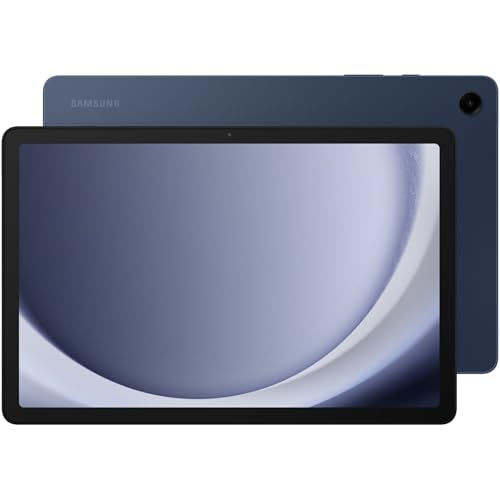
Samsung Galaxy Tab A9+
This budget Android tablet offers a larger display than many competitors at this price, suited to streaming and casual browsing. Quad speakers spread sound output for a noticeably fuller audio experience during video playback. Performance handles everyday apps fine, though it is not built for demanding games or heavy multitasking.
Pros
- Large display for the price point
- Quad speakers improve video and music playback
- Affordable entry into the Samsung Android ecosystem
Cons
- Performance struggles with demanding games or heavy multitasking
- Build materials feel less premium than flagship tablets

Amazon Fire HD 10
Amazon tunes this tablet around its own content ecosystem, making Prime Video, Kindle books, and Audible especially smooth to access. Built-in Alexa support allows voice commands without a separate smart speaker nearby. The lower price comes with a tradeoff, since the tablet relies on the Amazon Appstore rather than Google Play by default.
Pros
- Low price for a tablet built around media consumption
- Built-in Alexa adds voice control convenience
- Solid battery life for extended reading or video sessions
Cons
- Lacks native Google Play access out of the box
- Performance is modest outside of media playback

Microsoft Surface Pro (11th Edition)
Running full Windows 11 rather than a mobile operating system, this tablet installs traditional desktop software that iPads and Android tablets cannot run. A built-in kickstand and optional Type Cover keyboard turn it into a laptop-style setup on demand. The optional Slim Pen adds precise input for note-taking and sketching alongside standard desktop multitasking.
Pros
- Runs genuine desktop software unavailable on iPadOS or Android
- Kickstand and keyboard combo suit true laptop-style use
- Slim Pen support adds precise handwriting and sketching
Cons
- Keyboard and pen sold separately, raising total cost
- Battery life trails dedicated tablets running mobile operating systems
Compared at a glance
| # | Model | Chip | Best for | Score | Price |
|---|---|---|---|---|---|
| 1 | Apple iPad (11th generation) | Apple A16 | Best Overall | 9.2 | Check price |
| 2 | Apple iPad Pro (M4) | Apple M4 | Best for Creative Professional Work | 9.5 | Check price |
| 3 | Apple iPad Air (M3) | Apple M3 | Best Price-to-Performance Apple Pick | 9.1 | Check price |
| 4 | Samsung Galaxy Tab S10+ | AMOLED | Best for Android Power Users | 9.0 | Check price |
| 5 | Samsung Galaxy Tab A9+ | Large budget-tier display | Best Budget Android Pick | 8.3 | Check price |
| 6 | Amazon Fire HD 10 | Prime Video, Kindle, Audible | Best Budget Pick for Media Consumption | 8.2 | Check price |
| 7 | Microsoft Surface Pro (11th Edition) | Windows 11 | Best for Laptop Replacement | 9.0 | Check price |
Good to know
Is an iPad better than an Android tablet?
Neither is universally better, since iPadOS tends to have stronger tablet-optimized apps while Android tablets like the Samsung Galaxy Tab S10+ offer more customization and an included stylus at some price points.
Can a tablet replace a laptop for work?
A true desktop replacement, like the Microsoft Surface Pro, can since it runs full Windows software, while iPadOS and Android tablets run mobile app versions that may lack some desktop features.
Do budget tablets support video calls and streaming well?
Yes, budget tablets like the Amazon Fire HD 10 and Samsung Galaxy Tab A9+ handle streaming and video calls fine, though they struggle more with demanding games or heavy multitasking.
Is the Apple Pencil compatible with every iPad?
No, Pencil compatibility depends on the iPad model and generation, with the base iPad supporting the USB-C Apple Pencil and the Pro and Air models supporting Apple Pencil Pro.
What is Samsung DeX mode on a Galaxy tablet?
DeX mode turns a Samsung Galaxy tablet into a desktop-style interface when connected to an external monitor, keyboard, and mouse, closer to a computer experience.
Does the Amazon Fire HD 10 have access to Google Play?
Not by default, since it relies on the Amazon Appstore, though some users install Google Play through additional workarounds.
How much does chip performance matter for casual tablet use?
For browsing and streaming, even a base chip like the Apple A16 is more than sufficient, with performance mattering much more for editing or gaming.
Is OLED display better than LCD on a tablet?
OLED, found on the iPad Pro and Samsung Galaxy Tab S10+, delivers deeper contrast and better dark scenes than the LCD panels on more affordable tablets.
Do all tablets support a keyboard accessory?
Most tablets support some keyboard accessory, but only the Microsoft Surface Pro runs full desktop software once a keyboard is attached, unlike iPadOS or Android keyboard cases.
Which tablet is best for kids or casual home use?
A budget option like the Amazon Fire HD 10 or Samsung Galaxy Tab A9+ covers casual streaming and browsing well without the cost of a flagship tablet.
Final word
The Apple iPad (11th generation) is the strongest overall pick for most buyers, balancing everyday performance with an approachable price. Creative professionals should step up to the Apple iPad Pro with M4 instead, while anyone who needs genuine desktop software is better served by the Microsoft Surface Pro.
Marcus Chen
Marcus covered consumer electronics for enthusiast tech publications for six years before joining ChoiceCrest. He specializes in translating manufacturer spec sheets into plain-language buying advice, with a focus on audio, computing accessories and smart-home gear.


