Dedicated Car GPS Units Still Beat Phone Navigation
Garmin’s DriveSmart 66 leads for its bright six inch screen, usable voice control and free lifetime map updates. The DriveSmart 76 suits drivers who want a bigger display, and the Drive 53 covers the essentials at a lower entry point. Truck and RV drivers need the dezl OTR700 or RV 795 instead.
Garmin’s DriveSmart 66 is the car GPS most drivers should buy, with the larger DriveSmart 76 for anyone wanting a bigger screen and the Drive 53 as the straightforward budget pick. Truck and RV drivers need the routing profiles built into the dezl OTR700 or RV 795 instead.
Justifying a dedicated device is harder than it sounds, since a navigator competes directly with a phone already sitting in the cupholder. Offline maps, sunlight readable screens and routing profiles phones lack are the real case. We compared display sizes, map update terms, traffic sources, voice control, driver alerts and mount design across all seven units.
The top picks, ranked
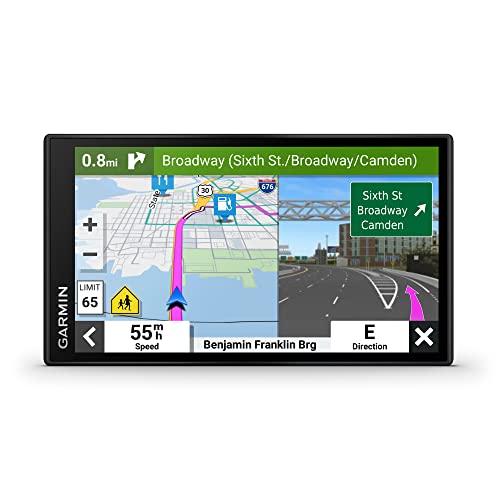
Garmin DriveSmart 66
A six inch edge to edge display stays readable in daylight, and voice control handles destination entry without touching the screen. Maps live on the device itself, so routing continues where mobile signal does not. Pairing with a phone adds live traffic and hands free calls on top.
Pros
- Bright screen readable in direct sun
- Works with no mobile signal at all
- Voice destination entry is genuinely usable
Cons
- Live traffic needs a paired phone
- Suction mount can mark a hot windscreen
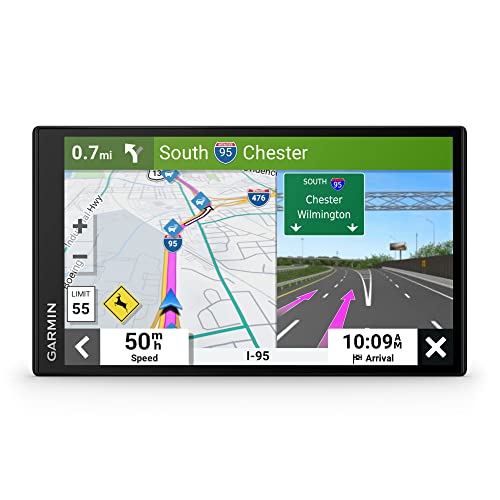
Garmin DriveSmart 76
The same platform as the DriveSmart 66 runs here on a seven inch screen, making junction views and lane guidance easier to read at a glance. Taller vehicles and drivers who prefer glancing over squinting benefit most from the size. Owners report the larger display as the upgrade they notice first.
Pros
- Large clear display for junction views
- Same reliable Garmin routing
- Easier to read from a high seating position
Cons
- Takes up more windscreen space
- Costs more than the six inch model for the same features

Garmin Drive 53
Voice control and smart notifications are gone, but accurate offline routing on a clear five inch screen remains, which is what a navigator is for. Driver alerts for sharp curves and school zones still work as expected. A second car or an occasional long trip is where this makes the most sense.
Pros
- Lowest cost route into a real navigator
- Offline maps with no subscription
- Simple interface with less to learn
Cons
- No voice control
- Smaller screen than the DriveSmart models

Garmin DriveCam 76
Combining navigation and a dash cam clears one device and one cable off a cluttered windscreen. Continuous recording saves footage automatically when incident detection triggers, while seven inch navigation runs the same routing as the DriveSmart 76. Owners cite the shared mount as the main practical benefit over running two separate devices.
Pros
- One mount instead of two
- Automatic incident recording
- Adds forward collision warnings
Cons
- Needs a memory card that is not always included
- Camera quality trails a dedicated dash cam

Garmin dezl OTR700
Height, weight and hazardous cargo restrictions shape truck routing, details consumer navigation ignores entirely. A saved vehicle profile builds routes around those limits, and the directory adds truck parking, weigh stations and service listings. Seven inch screen sizing suits the higher seating position of a cab.
Pros
- Routes around bridge and weight restrictions
- Truck specific points of interest
- Built in trip and hours logging
Cons
- Features are wasted on a normal car
- Higher price than consumer models

Garmin RV 795
Towing changes what a safe route looks like, and rig dimensions get factored in to avoid low bridges and tight turns. Campground directories and a setup checklist tool come built in for packing down without forgetting a step. According to the listing, it also supports an optional wireless reversing camera.
Pros
- Routes suited to rig height and length
- Campground and service listings included
- Setup checklists reduce forgotten steps
Cons
- Overspecified for daily commuting
- Camera accessory sold separately
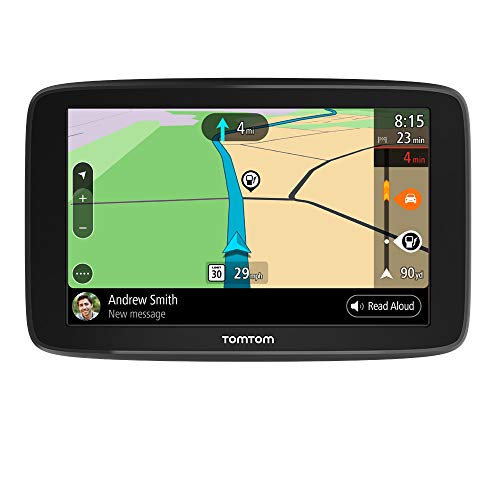
TomTom GO Comfort
Traffic prediction has always been TomTom’s strength, and routing here adapts to congestion patterns as they build. Maps live on the device and update over WiFi without needing a computer. Owners describe the interface as cleaner than rivals, though the points of interest database runs thinner.
Pros
- Strong traffic prediction and rerouting
- Updates over WiFi with no computer needed
- Clean, uncluttered interface
Cons
- Smaller points of interest database
- Some live services depend on a subscription
What to look for
Why a dedicated navigator still makes sense next to a phone Offline reliability is the strongest argument for buying one. Maps stored on the device keep routing working through tunnels, mountain passes and rural stretches where a phone loses signal and the route collapses mid journey. A fixed mounting height also keeps the phone free for calls and music without draining its battery.
What screen size is right for your vehicle Five inch screens work fine in a small car where the mount sits close to the driver. Six inches is the practical sweet spot for most cars, and seven suits SUVs, vans and anyone who finds smaller text a strain. Brightness and anti glare coating matter as much as size, since a dim screen at midday is unreadable regardless of measurement.
How map updates and live traffic actually work Checking the update policy before buying matters, since outdated maps send drivers down roads that have since changed. Most current Garmin units include free lifetime map updates delivered over WiFi. Live traffic runs through either a paired phone or a built in service, and confirming which method a model uses affects arrival time accuracy in cities.
Best GPS for trucks, RVs and towing Vehicle specific routing is where dedicated devices beat phones outright. Truck models route around bridge heights, weight limits and restricted roads using a saved profile, and RV models do the same for length and towing. A wrong turn under a low bridge costs real money, which alone justifies the device for anything larger than a car.
The lineup, side by side
| # | Model | Screen | Best for | Score | Price |
|---|---|---|---|---|---|
| 1 | Garmin DriveSmart 66 | 6 inch touchscreen | Best overall | 9.4 | Check price |
| 2 | Garmin DriveSmart 76 | 7 inch touchscreen | Best large screen | 9.2 | Check price |
| 3 | Garmin Drive 53 | 5 inch touchscreen | Best value | 9.0 | Check price |
| 4 | Garmin DriveCam 76 | 7 inch touchscreen | Best with a built in dash cam | 8.8 | Check price |
| 5 | Garmin dezl OTR700 | 7 inch touchscreen | Best for trucks | 8.6 | Check price |
| 6 | Garmin RV 795 | 7 inch touchscreen | Best for RVs and towing | 8.3 | Check price |
| 7 | TomTom GO Comfort | 6 inch touchscreen | Best alternative to Garmin | 8.0 | Check price |
Frequently asked questions
Is a car GPS better than Google Maps?
For live traffic and searching businesses, a phone usually stays ahead. For offline reliability, sunlight readable screens and vehicle specific routing, a dedicated navigator wins. Many drivers run both, treating the navigator as the one that never drops out.
Do car GPS units need a data connection to work?
Not for navigation itself, since maps live on the device. A connection through a paired phone or WiFi is only needed for live traffic and periodic map updates.
Are map updates free on a Garmin GPS?
On most current Garmin models, yes, with lifetime map updates delivered over WiFi. Always check the specific listing, since older or entry level units sometimes cap the number of updates.
Can I use a car GPS in a rental car or a second vehicle?
Yes. These are self contained devices that move between vehicles using the suction mount and a power lead, one of their practical advantages over a built in system.
What is the best screen size for a car GPS?
Six inches suits most cars well. Choose five inches in a compact car with a close mount, and seven inches for SUVs, trucks and RVs where the device sits further from the driver.
Do car GPS units warn about speed cameras?
Some models include alerts where local law permits them. Rules vary by country and region, so check what is legal where you drive before relying on the feature.
How long does a car GPS run on battery alone?
Internal batteries typically last under an hour and exist for setup rather than driving. Plan to keep the unit powered from the vehicle for any real journey.
Is a combined GPS and dash cam worth buying?
It saves a mount and a cable, a real benefit on a cluttered windscreen. A dedicated dash cam still records better footage, so the combo suits convenience over evidence quality.
Garmin versus TomTom, which brand should I choose?
Garmin covers a wider range of screen sizes and vehicle profiles, including truck and RV specific models. TomTom leans on stronger traffic prediction and a simpler interface, which suits drivers who mostly navigate cities.
The bottom line
Garmin’s DriveSmart 66 makes the clearest case against relying on a phone, combining offline maps, a screen that stays legible in sunlight and voice control that works while driving. Step up to the DriveSmart 76 for a larger display, or save with the Drive 53 for reliable routing without the extras. Anyone driving a truck or towing should skip consumer models entirely for the dezl OTR700 or RV 795.
Tony Russo
Tony trained as an automotive technician and spent years in service and parts retail before moving into writing. He focuses on garage tools, car care products and accessories from a hands-on maintenance perspective.