Budget Gaming Monitors With Real Refresh Rate Gains
For most budget shoppers, the ASUS TUF Gaming VG249Q1A wins on its 165Hz IPS panel and dual sync certification. Tighter budgets do well with the KOORUI 24E4 curved monitor at the same 165Hz. The Acer Nitro KG241Y S3 costs least, with FreeSync and a 100Hz panel.
Players who want one well-rounded 1080p monitor should look at the ASUS TUF Gaming VG249Q1A, which pairs a 165Hz IPS panel with dual sync certification, though it trails the QHD options here on resolution.
Refresh rate, panel type, and resolution trade off against each other at this price range, so buyers usually accept one limitation. We compared listed specifications, owner feedback on stands and connectivity, and fit across competitive shooters, console play, and cramped desks.
What we recommend

ASUS TUF Gaming VG249Q1A
A 23.8-inch IPS panel drives 1920×1080 at 165Hz with a 1ms MPRT response time. Both AMD FreeSync Premium and NVIDIA G-Sync compatible certification apply, so either graphics card brand gets variable refresh rate. Height, tilt, swivel, and pivot adjustment on the stand help on desks shared between work and gaming.
Pros
- Wide viewing angles typical of IPS panels
- Height, tilt, swivel, and pivot adjustable stand
- Certified for both AMD FreeSync Premium and NVIDIA G-Sync compatible
Cons
- 1080p resolution limits pixel density compared to QHD options here
- No built-in speakers

KOORUI 24E4 Curved Gaming Monitor
A 1500R curve wraps this 24-inch VA panel, which runs 1920×1080 at 165Hz with a 1ms MPRT response time. AMD FreeSync support smooths frame pacing on compatible graphics cards. According to the listing, the stand only tilts, without height or swivel adjustment.
Pros
- 1500R curve adds immersion at a compact 24-inch size
- 165Hz refresh rate at a low price point
- AMD FreeSync support smooths frame pacing
Cons
- Tilt-only stand with no height adjustment
- VA panel shows more smearing in dark, fast scenes than IPS
Acer Nitro KG241Y S3
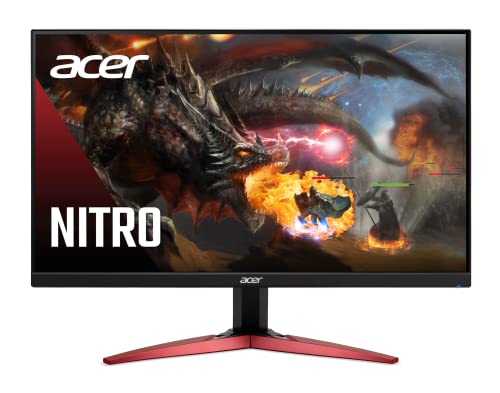
Costing the least in this lineup, this 23.8-inch VA panel runs 1920×1080 at 100Hz with a 1ms VRB response time. AMD FreeSync reduces tearing on supported AMD graphics cards. A frameless bezel design keeps the footprint compact, and the included stand tilts but does not adjust for height.
Pros
- Lowest price point in this roundup
- AMD FreeSync reduces tearing on compatible graphics cards
- Compact frameless bezel design
Cons
- 100Hz refresh rate trails the 165Hz and faster options here
- Stand only tilts, with no height or swivel adjustment

Dell S2721DGF
Fast IPS technology on this 27-inch panel pushes 2560×1440 at 165Hz with a 1ms gray-to-gray response time. FreeSync Premium Pro and NVIDIA G-Sync compatible certification both apply, and a built-in USB 3.0 hub adds connectivity. Height, tilt, swivel, and pivot adjustment come standard on the stand.
Pros
- 2560×1440 resolution at a 165Hz refresh rate
- Full height, tilt, swivel, and pivot stand adjustment
- Dual certification for AMD FreeSync Premium Pro and NVIDIA G-Sync compatible
Cons
- No built-in speakers
- HDR400 certification offers limited contrast versus higher HDR tiers

ASUS TUF Gaming VG259QM
Overclocking pushes this 24.5-inch IPS panel to 280Hz at 1920×1080 with a 1ms gray-to-gray response time. ELMB Sync cuts motion blur for fast-moving targets, though it cannot run at the same time as variable refresh rate. NVIDIA lists it as G-Sync compatible alongside native AMD FreeSync Premium support.
Pros
- 280Hz overclocked refresh rate among the fastest here
- ELMB Sync reduces motion blur for fast-moving targets
- Height, tilt, swivel, and pivot adjustable stand
Cons
- 1080p resolution caps pixel density for non-competitive use
- ELMB Sync cannot run at the same time as variable refresh rate

LG UltraGear 27GP850-B
Nano IPS technology on this 27-inch panel runs 2560×1440 at 165Hz natively, with a PC overclock option to 180Hz. Two HDMI 2.1 ports support 1440p at up to 120Hz or 4K at 60Hz from a PS5 or Xbox Series X. VESA DisplayHDR 400 certification adds basic HDR highlights.
Pros
- Two HDMI 2.1 ports support 1440p at up to 120Hz on PS5 and Xbox Series X
- Nano IPS panel covers a wide color gamut
- Height, tilt, swivel, and pivot adjustable stand
Cons
- IPS glow is visible in dark scenes compared to VA panels
- HDR400 certification offers limited contrast versus higher HDR tiers
MSI Optix G241
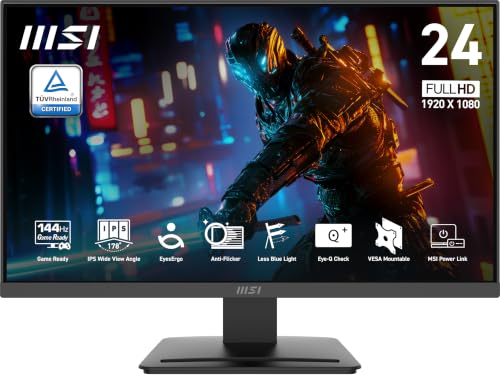
Slim bezels on three sides mark this 23.8-inch IPS panel, built for side-by-side multi-monitor setups on compact desks. It runs 1920×1080 at 144Hz with a 1ms MPRT response time. AMD FreeSync keeps frame pacing smooth on supported graphics cards.
Pros
- Compact 23.8-inch flat panel fits tight desks
- Slim bezels support side-by-side multi-monitor setups
- 144Hz refresh rate on an IPS panel
Cons
- Tilt-only stand limits ergonomic adjustment
- 1080p resolution shows lower pixel density than the QHD options here
The lineup, side by side
| # | Model | Panel type | Best for | Score | Price |
|---|---|---|---|---|---|
| 1 | ASUS TUF Gaming VG249Q1A | IPS | Best overall | 9.4 | Check price |
| 2 | KOORUI 24E4 Curved Gaming Monitor | VA | Best value | 9.1 | Check price |
| 3 | Acer Nitro KG241Y S3 | VA | Best budget | 8.8 | Check price |
| 4 | Dell S2721DGF | IPS | Best for 1440p | 8.6 | Check price |
| 5 | ASUS TUF Gaming VG259QM | IPS | Best for competitive FPS | 8.3 | Check price |
| 6 | LG UltraGear 27GP850-B | Nano IPS | Best for console gaming | 8.1 | Check price |
| 7 | MSI Optix G241 | IPS | Best for small desks | 8.0 | Check price |
What to look for
Panel type and refresh rate basics IPS panels, like the one in the ASUS TUF Gaming VG249Q1A, hold color and viewing angle better off-axis, useful when two people share a screen. VA panels, used in the KOORUI 24E4 and Acer Nitro KG241Y S3, produce deeper black levels but smear more during fast motion. Refresh rates in this roundup span 100Hz to 280Hz, and anything above 144Hz visibly smooths fast camera movement. A high refresh number still shows ghosting if pixel response time lags behind it.
How to match resolution to your graphics card Less GPU horsepower is needed to hit high frame rates on 1080p panels like the VG249Q1A and KG241Y S3. QHD models such as the Dell S2721DGF and LG UltraGear 27GP850-B need a mid-range or better card to sustain 165Hz. Lower-end GPUs paired with a 1440p panel often settle for 100 to 120 frames per second instead of the full rate. Matching resolution to existing hardware avoids paying for refresh a graphics card cannot deliver.
What competitive players and console gamers should prioritize Fast target tracking favors the ASUS TUF Gaming VG259QM’s 280Hz overclock and ELMB Sync motion blur reduction. Console players get more from HDMI 2.1, since the LG UltraGear 27GP850-B accepts 1440p at up to 120Hz from a PS5 or Xbox Series X. Older HDMI 2.0 ports, found on several budget monitors here, cap console output at 1080p 120Hz or 1440p 60Hz. Checking HDMI version on both the monitor and console avoids a mismatch after purchase.
Desk space and stand adjustability for small setups A flat 23.8-inch panel like the MSI Optix G241 suits smaller desks better than a wider 27-inch curved screen. Stand adjustability varies widely at this price point; the Dell S2721DGF offers height, tilt, swivel, and pivot, while the KOORUI 24E4 and Acer Nitro KG241Y S3 only tilt. VESA mount compatibility, listed on most of these monitors, lets buyers add a monitor arm if the included stand falls short. Curved panels also need more desk depth to sit at the correct viewing distance.
Questions worth asking
What refresh rate do I need for a budget gaming monitor?
Most budget gaming monitors now start around 100Hz to 144Hz, enough to notice smoother motion over a standard 60Hz screen. Competitive players benefit from 240Hz or higher, like the 280Hz overclock on the ASUS TUF Gaming VG259QM.
Is a VA panel or IPS panel better for gaming?
VA panels, like the one in the Acer Nitro KG241Y S3, produce deeper blacks but smear more in dark, fast scenes. IPS panels, like the ASUS TUF Gaming VG249Q1A, hold color accuracy and viewing angle better for shared or angled desks.
Can budget gaming monitors run at 1440p?
Yes, models such as the Dell S2721DGF and LG UltraGear 27GP850-B run native 2560×1440 at up to 165Hz. Hitting that refresh rate at 1440p still requires a capable graphics card.
Which budget gaming monitor works best for console gaming?
Two HDMI 2.1 ports on the LG UltraGear 27GP850-B let a PS5 or Xbox Series X output 1440p at up to 120Hz. Monitors with only HDMI 2.0 ports cap console frame rates lower at the same resolution.
How much does response time matter for competitive FPS games?
Faster response time reduces ghosting behind fast-moving objects, and that matters more as refresh rate climbs. The ASUS TUF Gaming VG259QM pairs a 1ms gray-to-gray response with ELMB Sync specifically for this reason.
Are curved gaming monitors worth it on a small desk?
A 1500R curve, like the KOORUI 24E4’s, adds immersion but needs proper viewing distance to look right. Flat panels such as the MSI Optix G241 fit tighter desks without that distance requirement.
FreeSync vs G-Sync compatible: which do budget monitors support?
Several monitors here, including the ASUS TUF Gaming VG249Q1A and Dell S2721DGF, list both AMD FreeSync Premium and NVIDIA G-Sync compatible certification. Dual support means either brand of graphics card gets variable refresh rate at no extra cost.
What size gaming monitor fits a small desk?
23.8-inch flat panels, like the MSI Optix G241, take up less desk depth than 27-inch or curved alternatives. Pairing a smaller panel with a VESA monitor arm frees up further desk space.
Do budget gaming monitors support HDR?
Several models here, including the Dell S2721DGF and LG UltraGear 27GP850-B, list VESA DisplayHDR 400 certification. That tier adds basic highlight brightness but stops short of the contrast seen on higher HDR tiers.
Final word
The ASUS TUF Gaming VG249Q1A stands out as the strongest all-around pick, combining a 165Hz IPS panel, dual sync certification, and a fully adjustable stand at a genuinely budget price. Players chasing faster pixel response should choose the ASUS TUF Gaming VG259QM instead, since its 280Hz overclock and ELMB Sync target fast-paced shooters directly. Console owners chasing 120Hz gameplay get more value from the LG UltraGear 27GP850-B and its dual HDMI 2.1 ports.
Marcus Chen
Marcus covered consumer electronics for enthusiast tech publications for six years before joining ChoiceCrest. He specializes in translating manufacturer spec sheets into plain-language buying advice, with a focus on audio, computing accessories and smart-home gear.