All-in-One Desktops Worth Clearing Desk Space For
The Apple iMac 24-inch fits most buyers wanting a clean design with a sharp display. The Dell Inspiron 27 7000 suits buyers who want a larger screen with more ports for productivity. The Lenovo IdeaCentre AIO 3i fits budget conscious buyers needing basic computing.
The Apple iMac 24-inch is the best overall pick here, pairing a sharp 4.5K Retina display with the efficient M3 chip in a design thin enough to mount flush against a wall. Its main limitation is limited upgrade options after purchase, since storage and memory are fixed or difficult to access after the fact.
All-in-one computers trade some upgrade flexibility for a cleaner desk setup, and the right model depends on display size needs, port selection, and whether an owner wants to upgrade memory or storage down the line. This comparison weighs published display specs, port counts, and owner feedback on performance across both Windows and macOS options.
What matters most
What You Give Up With an All-in-One Design Packing a computer and display into a single chassis saves desk space and cable clutter but limits future upgrades compared to a separate desktop tower. The Apple iMac 24-inch locks storage and memory at purchase, while the Dell Inspiron 27 7000 and ASUS Zen AiO 24 at least allow memory upgrades through an access panel. Anyone who expects to need more storage or memory down the line should prioritize a model with documented upgrade access over one with none.
Best for Everyday Productivity and Browsing Most buyers use an all-in-one for browsing, email, video calls, and office documents rather than demanding creative or gaming workloads, which is where the Lenovo IdeaCentre AIO 3i and Acer Aspire C24-1800 fit well. A larger display, like the Dell Inspiron 27’s 27 inch panel, helps more with spreadsheet and multitasking work than raw processor power does for these everyday tasks.
Best for Creative and Design Work Digital artists and designers need more than a sharp screen, since pen input and color accuracy both matter for creative software. The Microsoft Surface Studio 2+ stands apart here with its folding hinge and pressure sensitive pen support, built specifically for drafting and illustration work. The Apple iMac’s wide color gamut display also suits photo editing well, even without the Surface Studio’s folding mechanism.
Best for a Secondary or Family Computer A second computer for a kid’s room, guest space, or simple household tasks rarely needs flagship specs. The Lenovo IdeaCentre AIO 3i and Acer Aspire C24-1800 both keep cost down while covering basic browsing and schoolwork needs. A tilt adjustable stand, found on both models, matters more for comfort in a shared space than raw processing power most of these computers will rarely use fully.
The shortlist, ranked
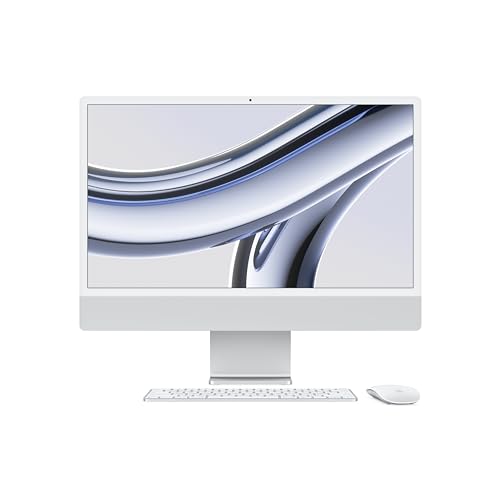
Apple iMac 24-inch (M3)
Apple’s M3 chip runs cool and quiet inside a chassis thin enough to mount flush on a wall mount arm. The 4.5K Retina display covers a wide color gamut that suits photo editing and everyday browsing equally well. Owners cite the combination of silence, color accuracy, and build quality as the reason it remains a reference point for the category.
Pros
- Sharp, color accurate 4.5K display
- Silent operation even under sustained load
- Thin, clean design with minimal desk footprint
Cons
- Storage and memory are not user upgradeable
- Limited port selection compared to Windows rivals

Dell Inspiron 27 7000
Dell’s Inspiron 27 steps up to a larger 27 inch QHD display while keeping a wide range of ports that the iMac skips, including a full size HDMI input for an external game console or laptop. A tool free access panel lets an owner add memory after purchase without professional help. Owners doing spreadsheet heavy work cite the extra screen real estate as the main draw over a 24 inch display.
Pros
- Larger 27 inch display suits spreadsheet and multitasking work
- Broader port selection including HDMI input
- User upgradeable memory through a tool free panel
Cons
- Bulkier chassis than the slim iMac design
- Touch screen option adds cost over the standard panel

HP Envy All-in-One 34
HP’s Envy 34 wraps a curved WQHD display around the user, aiming more at entertainment and multitasking than a traditional flat panel all-in-one. A detachable speaker bar handles audio separately from the display housing. Owners using it as both a home office and media setup cite the curved screen as a genuine upgrade over flat panel alternatives at this size.
Pros
- Immersive curved display at a large 34 inch size
- Detachable premium speaker bar improves audio
- Thunderbolt 4 support for fast external storage
Cons
- Large curved footprint needs significant desk depth
- Higher cost than flat panel alternatives at similar specs

Lenovo IdeaCentre AIO 3i
Lenovo keeps the IdeaCentre AIO 3i priced for basic computing needs like browsing, email, and video calls rather than demanding workloads. A tilt adjustable stand helps with ergonomics despite the lower price point. Owners use it mainly as a family computer or a simple home office setup rather than a creative workstation.
Pros
- Lowest cost all-in-one in this comparison
- Tilt adjustable stand aids ergonomics
- Compact size suits a smaller desk
Cons
- Full HD resolution looks less sharp on a larger screen
- Processor handles basic tasks but struggles with heavy workloads

Microsoft Surface Studio 2+
Microsoft’s Zero Gravity Hinge lets the entire display fold down to a drafting table angle, pairing with the Surface Pen for digital art and design work that a fixed vertical screen cannot replicate. A 28 inch PixelSense touch display responds accurately to pen pressure and tilt. Creative professionals cite the hinge and pen combination as the reason to pay more than a standard all-in-one.
Pros
- Unique folding hinge suits drafting and digital art
- Accurate pen pressure and tilt response
- Discrete graphics handle creative software well
Cons
- Significantly higher cost than standard all-in-ones
- Heavy display assembly makes repositioning less convenient

ASUS Zen AiO 24 (M5401)
ASUS trims bezels down on the Zen AiO 24 to maximize screen area within a compact overall footprint. A detachable wireless keyboard and mouse come included rather than sold separately. Owners setting up a small home office cite the included peripherals and slim design as good value at this price point.
Pros
- Slim bezel design maximizes usable screen area
- Included wireless keyboard and mouse add value
- AMD Ryzen processor handles everyday multitasking well
Cons
- Full HD resolution limits sharpness on detailed work
- Build materials feel less premium than the iMac or Surface Studio

Acer Aspire C24-1800
Acer’s Aspire C24 packs its components into a slim base beneath the display rather than behind it, keeping desk depth shallow. A basic tilt stand covers ergonomic adjustment without the cost of a fully articulating arm. Owners use it as a secondary computer for a kid’s room or guest space rather than a primary workstation.
Pros
- Shallow desk depth suits smaller rooms
- Affordable pricing for a secondary household computer
- Simple tilt stand covers basic ergonomic needs
Cons
- Entry level processor options struggle with demanding tasks
- Full HD display resolution trails pricier competitors
Compared at a glance
| # | Model | Display | Best for | Score | Price |
|---|---|---|---|---|---|
| 1 | Apple iMac 24-inch (M3) | 24 inch 4.5K Retina | Best overall for most users | 9.3 | Check price |
| 2 | Dell Inspiron 27 7000 | 27 inch QHD touch option available | Best for a larger screen and more ports | 8.8 | Check price |
| 3 | HP Envy All-in-One 34 | 34 inch curved WQHD | Best for a curved immersive display | 8.7 | Check price |
| 4 | Lenovo IdeaCentre AIO 3i | 23.8 inch Full HD | Best budget | 8.0 | Check price |
| 5 | Microsoft Surface Studio 2+ | 28 inch PixelSense touch | Best for digital art and drafting | 9.0 | Check price |
| 6 | ASUS Zen AiO 24 (M5401) | 23.8 inch Full HD | Best for a compact home office | 8.4 | Check price |
| 7 | Acer Aspire C24-1800 | 23.8 inch Full HD | Best for a second household computer | 8.2 | Check price |
Frequently asked questions
Can I upgrade the memory in an all-in-one computer?
It depends on the model. The Dell Inspiron 27 7000 and ASUS Zen AiO 24 both allow memory upgrades through an access panel, while the Apple iMac 24-inch ships with memory fixed at purchase and no user access.
Are all-in-one computers good for gaming?
Most all-in-ones use integrated graphics suited to light gaming at best. The Microsoft Surface Studio 2+ is an exception with discrete Nvidia graphics, though it is built more for creative work than competitive gaming.
How do all-in-one computers handle cooling compared to a tower?
All-in-ones pack components behind or beneath a thin display, which limits airflow compared to a full tower case. The Apple iMac manages this well with an efficient M3 chip that generates less heat than comparable Intel or AMD processors.
Can I connect an external monitor to an all-in-one computer?
Most models support this through a USB-C or Thunderbolt port that can output video, though not every all-in-one supports using the external display as a true second monitor rather than just a mirror.
Do all-in-one computers come with a keyboard and mouse included?
Many do, though it varies by brand. The ASUS Zen AiO 24 includes a wireless keyboard and mouse, while some configurations of other models sell these as separate accessories.
Is a touch screen worth it on an all-in-one computer?
Touch adds convenience for quick navigation and works well with pen input models like the Surface Studio 2+, but it is less essential for buyers focused mainly on typing and mouse based work.
How much desk space does an all-in-one computer actually save?
An all-in-one removes the need for a separate tower, typically freeing up floor or desk space equal to a small tower case, though the display itself still needs the same footprint as a standalone monitor would.
Which all-in-one computer is best for video editing?
The Microsoft Surface Studio 2+ with its discrete graphics handles video editing more comfortably than integrated graphics models, though serious video editors may still prefer a dedicated tower with more powerful cooling.
Our take
The Apple iMac 24-inch remains the best overall pick for most buyers who want a clean design and a sharp display without worrying about upgrades later. Anyone who wants a larger screen and more ports for spreadsheet heavy work should choose the Dell Inspiron 27 7000 instead. Buyers furnishing a second household computer on a budget get solid value from the Lenovo IdeaCentre AIO 3i.
Marcus Chen
Marcus covered consumer electronics for enthusiast tech publications for six years before joining ChoiceCrest. He specializes in translating manufacturer spec sheets into plain-language buying advice, with a focus on audio, computing accessories and smart-home gear.


