Choosing an All-in-One Computer for a Clutter-Free Desk
Apple iMac 24-inch with M4 leads on a 4480 by 2520 Retina panel and near silent running from a single cable. HP All-in-One 24-cb1370 adds a touch screen and upgradeable memory for family use. Dell Inspiron 24 5420 pairs an anti glare IPS panel with a pop-up webcam.
Apple iMac 24-inch with M4 tops this list on screen clarity and quiet operation. HP All-in-One 24-cb1370 covers family use for far less and leaves the memory accessible. Dell Inspiron 24 5420 suits a home office desk with its anti glare panel and retractable camera.
Screen size tells you almost nothing here. Two 23.8 inch machines can differ by millions of pixels, a whole processor tier, and whether memory is soldered or socketed. That last detail decides if the machine survives a refresh in three years. We compared published specifications, panel type and resolution, memory and storage options, port layouts, and the upgrade paths owners report actually working.
Our top picks

Apple iMac 24-inch (M4)
A 4480 by 2520 Retina panel wraps around Apple silicon in a chassis barely thicker than a monitor, powered by one slim cable. Owners report it stays silent through photo editing and heavy browsing, which few desktops this thin manage. Memory and storage are fixed at purchase, so specify carefully at the checkout.
Pros
- Highest resolution panel in this roundup
- Runs quietly and sips power
- One cable handles power and setup
Cons
- Memory and storage cannot be changed later
- Few ports without adding a hub
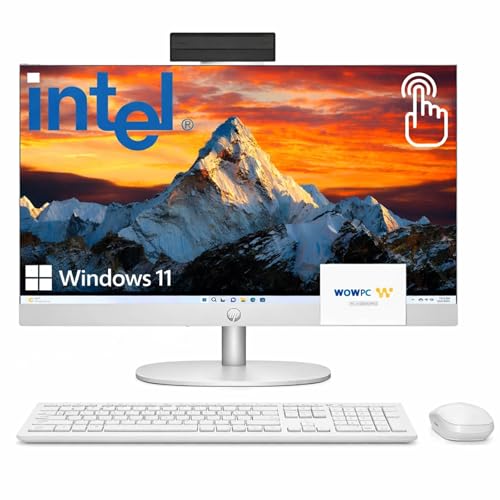
HP All-in-One 24-cb1370
A 23.8 inch full HD touch panel sits on a wide, stable stand, which makes this easy to share between household members. HP fits a sliding physical shutter over the webcam, a detail owners mention repeatedly. Storage is a 512GB solid state drive, and the DDR4 memory can be increased later.
Pros
- Touch input at a mainstream configuration
- Physical webcam shutter, not a software toggle
- Memory sockets accept a later upgrade
Cons
- 1080p looks soft beside higher resolution rivals
- Integrated graphics rule out modern gaming

Dell Inspiron 24 5420 All-in-One
Dell fits a bright anti glare IPS panel and hides the camera in a pop-up module that drops away between calls. Narrow bezels make the 23.8 inch screen feel bigger than the footprint suggests. With 16GB of memory it handles spreadsheets, browser tabs and conferencing comfortably rather than heavy rendering.
Pros
- Pop-up camera gives genuine privacy
- 16GB handles heavy tab use
- Anti glare coating helps in a bright room
Cons
- Speakers are merely adequate
- Stand offers little height adjustment

Lenovo IdeaCentre AIO 3 24
Lenovo ships this mostly assembled, with the stand attached and a three sided narrow bezel around a 23.8 inch IPS panel. Browsing, streaming, homework and light office work are its natural range. Owners report the built in speakers outperform expectations at this level, and a wired keyboard and mouse come in the box.
Pros
- Out of the box and running in minutes
- Clear IPS panel with slim bezels
- Keyboard and mouse supplied
Cons
- 8GB fills quickly with many tabs open
- Touch is unavailable on most configurations

ASUS Zen AiO 24 (A5402)
ASUS tunes the 23.8 inch IPS panel for colour consistency, which matters for photo edits and layout work. Its chassis is thin enough to pass for a monitor at a glance. Ports run along the rear and side, including USB-C, USB-A and an HDMI output that can drive a second display.
Pros
- Colour holds up without calibration
- HDMI output adds a second screen
- Slim profile with a small stand footprint
Cons
- No discrete graphics option
- Fans become audible under sustained load

Acer Aspire C24-1700 All-in-One
A compact stand leaves room for papers and a keyboard on a shallow desk, which suits kitchens, reception counters and study corners. Acer pairs a 23.8 inch full HD IPS panel with a Core i5 processor and a 512GB solid state drive. Integrated graphics cover streaming and office work, not modern games.
Pros
- Small stand footprint for tight desks
- Stays quiet during everyday tasks
- Wireless keyboard and mouse included
Cons
- Webcam quality is mediocre
- Only one solid state drive slot inside

MSI Modern AM272P
MSI stretches to a 27 inch IPS panel with an anti flicker backlight and a stand that tilts through a genuinely useful range. That extra width fits two documents side by side without scaling either down. Memory and storage are serviceable, so a later bump is possible. Measure your desk first, since this is the largest machine here.
Pros
- 27 inches fits two windows side by side
- Anti flicker backlight suits long sessions
- Memory and storage can be serviced
Cons
- 1080p across 27 inches looks coarse up close
- Needs more desk depth than the 24 inch models
Compared at a glance
| # | Model | Display | Best for | Score | Price |
|---|---|---|---|---|---|
| 1 | Apple iMac 24-inch (M4) | 23.5 inch 4480 by 2520 Retina | Best overall | 9.4 | Check price |
| 2 | HP All-in-One 24-cb1370 | 23.8 inch 1920 by 1080 touch | Best value | 9.2 | Check price |
| 3 | Dell Inspiron 24 5420 All-in-One | 23.8 inch 1920 by 1080 IPS | Best for home office | 9.0 | Check price |
| 4 | Lenovo IdeaCentre AIO 3 24 | 23.8 inch 1920 by 1080 IPS | Best budget | 8.8 | Check price |
| 5 | ASUS Zen AiO 24 (A5402) | 23.8 inch 1920 by 1080 IPS | Best for creative work | 8.6 | Check price |
| 6 | Acer Aspire C24-1700 All-in-One | 23.8 inch 1920 by 1080 IPS | Best for shared spaces | 8.3 | Check price |
| 7 | MSI Modern AM272P | 27 inch 1920 by 1080 IPS | Best for long work sessions | 8.0 | Check price |
How to choose
What to check before buying an all in one desktop Four specifications matter more than the badge. Panel resolution decides how text looks after two hours. Processor tier sets how many browser tabs and video calls run together. Memory capacity and whether it is socketed determine the useful life. Port count decides how many adapters end up on the desk. Everything else, from stand design to bundled keyboard, is easily fixed later.
Which screen size works on a small desk? A 23.8 inch model suits desks under about 120cm wide, because the stand needs depth as well as width. Six of the seven machines here use that size. The 27 inch MSI Modern AM272P wants a deeper desk so you can sit far enough back to take in the whole panel. Resolution matters alongside size: 1080p spread across 27 inches shows its pixels, while the same count across 23.8 inches looks fine at arm’s length.
Can you upgrade the memory in an all in one? Sometimes. HP, Lenovo and MSI models here provide an access panel for memory and storage, so a refresh takes a screwdriver. Apple solders unified memory to the M4 package, which makes the configuration you buy permanent. Where upgrades are impossible, order more memory than feels necessary, since tab heavy browsing and video calls eat 8GB quickly. Check the service manual for your exact configuration rather than the marketing page.
Which all in one suits daily video calls? Camera and microphone carry real weight once a machine replaces a laptop. Higher resolution sensors help most in dim rooms, which is where the iMac’s 12MP Center Stage camera pulls ahead. Privacy hardware differs too: HP uses a sliding shutter, Dell uses a pop-up module that physically retracts. Speakers vary widely across this group, though a cheap pair of desk speakers fixes weak audio for very little.
Common questions
Is an all in one computer powerful enough for everyday work?
For browsing, office documents, streaming, video calls and photo editing, yes. Current models use the same processor families as mainstream laptops. Heavy 3D rendering, long video timelines and modern gaming still want a tower with discrete graphics.
Can I upgrade the memory in an all in one?
It depends on the model. Several Windows machines here have an access panel for memory and storage. The iMac has both fixed at manufacture. Check the service documentation for your exact configuration before assuming an upgrade is possible.
How long does an all in one computer last?
Owners commonly report five to seven years when the machine started with adequate memory and a solid state drive. Panels usually outlive the internals, which is why socketed memory extends useful life.
Do all in ones come with a keyboard and mouse?
Most do, wired or wireless. Bundled sets are functional rather than premium, and many owners swap them within a year for a mechanical keyboard or a larger mouse.
Can I use an all in one as a second monitor?
Only where the maker fits a video input, which is uncommon. Several models here offer HDMI out instead, which drives an extra screen rather than receiving one. Confirm whether the port is labelled in or out.
Is a touch screen worth it on a desktop?
Useful for scrolling, signing documents and quick sketches, tiring for anything sustained, since your arm is unsupported. Treat it as a convenience and prioritise panel quality if forced to choose.
What screen size suits a small desk?
23.8 inches is the practical sweet spot for desks under 120cm wide. Allow depth for the stand as well as width. A 27 inch panel needs you to sit further back to read the corners comfortably.
Do all in ones need a surge protector?
Using one is sensible. Display and computer share a single power supply, so a surge damages both at once. A basic protected strip is cheap insurance for a machine that cannot be repaired piece by piece.
iMac or a Windows all in one: which should I buy?
Choose the iMac for panel quality, silence and a tidy single cable, accepting fixed memory. Choose a Windows model such as the HP 24-cb1370 for touch input, more ports, upgradeable memory and a lower outlay.
Can an all in one computer be wall mounted?
Several Windows models include a VESA compatible mount point or an adapter kit, and the MSI Modern AM272P is among them. Apple sells the iMac in a separate VESA variant, so the mount has to be chosen at purchase.
Final word
Apple iMac 24-inch with M4 takes the top spot on display clarity, quiet running and a single cable to the wall, provided you buy enough memory upfront. Prefer Windows or a lower outlay? HP All-in-One 24-cb1370 covers family use and keeps the memory upgradeable. Dell Inspiron 24 5420 is the pick for daily video calls and home office work.
Marcus Chen
Marcus covered consumer electronics for enthusiast tech publications for six years before joining ChoiceCrest. He specializes in translating manufacturer spec sheets into plain-language buying advice, with a focus on audio, computing accessories and smart-home gear.
You might also need

Recycled Pen Holders That Actually Organize Your Desk

What’s the Right NAS for Home or Small Office Backup?
