Top 2 in 1 Laptops for Professionals in 2025
For professionals seeking power and portability, the Microsoft Surface Pro 9 stands out as the top pick. It offers a stunning display, robust performance, and a versatile design perfect for on-the-go productivity. Its main limitation is the need to purchase the keyboard separately, adding to the cost.
The best 2 in 1 laptops for professionals combine the productivity of a traditional laptop with the flexibility of a tablet. Whether you’re in meetings, traveling, or presenting, these convertibles adapt to your workflow. We’ve gathered top models that excel in build quality, performance, and battery endurance.
From the sleek Surface Pro 9 to the powerful Lenovo ThinkPad X1 Yoga, this roundup covers a range of options. Each laptop is chosen for its ability to handle demanding tasks while offering the versatility of touch and pen input. Read on to find the perfect match for your professional needs.
The top picks, ranked

Microsoft Surface Pro 9
The Surface Pro 9 is a premium 2-in-1 that impresses with its vibrant 13-inch PixelSense display and powerful Intel Evo performance. Its detachable keyboard and slim pen make it a dream for note-takers and presenters. However, the keyboard and pen are sold separately, which increases the total cost.
Pros
- Stunning 120Hz display
- Lightweight and portable design
- Excellent performance for demanding tasks
Cons
- Keyboard and pen sold separately
- Limited ports: only 2 Thunderbolt 4

Lenovo ThinkPad X1 Yoga Gen 7
The ThinkPad X1 Yoga Gen 7 is a business powerhouse with a robust build, legendary keyboard, and advanced security features like fingerprint reader and IR camera. Its 14-inch OLED display delivers vivid colors, making it ideal for presentations and detailed work. It is heavier than some rivals but justifies it with durability.
Pros
- Top-tier keyboard and trackpoint
- Military-grade durability
- Comprehensive security options
Cons
- Heavier than other 2-in-1s
- Battery life is average
HP Spectre x360 14
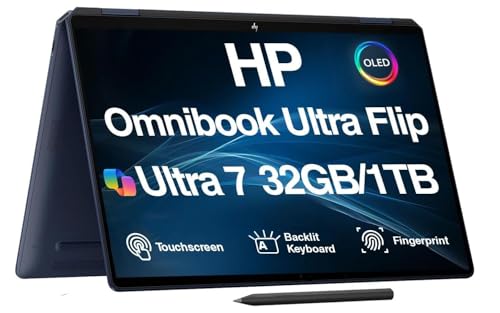
The HP Spectre x360 14 features a stunning 3K2K OLED display with excellent color accuracy, perfect for photo editing and design. Its gem-cut design is sleek, and the included active pen adds value. Performance is strong with Intel Evo, but the fan can be audible under load.
Pros
- Exceptional OLED display with touch
- Sleek and premium design
- Includes active pen in box
Cons
- Can run warm under heavy load
- Port selection limited to USB-C

Dell XPS 13 2-in-1
The Dell XPS 13 2-in-1 is incredibly thin and light, making it a superb travel companion. Its 13.4-inch FHD+ display is bright and sharp, and the laptop’s build quality is excellent. However, the battery life is not as long as some competitors, and the keyboard is slightly shallow.
Pros
- Ultra-portable at just 1.7 kg
- Premium aluminum build
- Responsive touchscreen
Cons
- Battery life below average
- Limited to 16GB RAM

Lenovo Yoga 9i 14
The Lenovo Yoga 9i 14 combines a gorgeous 4K OLED touchscreen with a rotating soundbar, delivering immersive audio that sets it apart. Its Intel Core i7 processor and 16GB RAM handle multitasking smoothly. The design is elegant, but the webcam quality is mediocre.
Pros
- Outstanding 4K OLED display
- Unique rotating soundbar with great audio
- Slim and attractive design
Cons
- Average webcam quality
- No HDMI port

Asus ROG Flow Z13
The Asus ROG Flow Z13 is a gaming tablet that doubles as a professional laptop. It packs an Intel Core i9 processor and NVIDIA GeForce RTX 3050 Ti graphics, making it capable of handling intensive workloads and gaming. However, it runs hot and loud under pressure, and battery life is short.
Pros
- Powerful discrete GPU
- High refresh rate display
- Detachable keyboard for gaming or typing
Cons
- Loud fans under load
- Battery drains quickly

Acer Chromebook Spin 714
The Acer Chromebook Spin 714 offers solid performance for the price, featuring a 14-inch Full HD touchscreen and a robust Intel Core i5 processor. It runs Chrome OS, which is great for cloud-based work, but it may not run all professional software. Build quality is decent, and battery life is good.
Pros
- Affordable price point
- Good performance for Chrome OS
- Lightweight and durable
Cons
- Chrome OS limitations
- Average display brightness
How they stack up
| # | Model | Display | Best for | Score | Price |
|---|---|---|---|---|---|
| 1 | Microsoft Surface Pro 9 | 13 inch PixelSense, 2880×1920, 120Hz | Best overall for versatility and portability | 9.4 | Check price |
| 2 | Lenovo ThinkPad X1 Yoga Gen 7 | 14 inch OLED, 2880×1800, 60Hz | Best for business users who need durability and security | 9.2 | Check price |
| 3 | HP Spectre x360 14 | 13.5 inch OLED, 3000×2000, 60Hz | Best for creative professionals who value display quality | 9.0 | Check price |
| 4 | Dell XPS 13 2-in-1 | 13.4 inch FHD+, 1920×1200, 60Hz | Best for portability and sleek design | 8.8 | Check price |
| 5 | Lenovo Yoga 9i 14 | 14 inch 4K OLED, 3840×2400, 60Hz | Best for multimedia and entertainment with powerful audio | 8.7 | Check price |
| 6 | Asus ROG Flow Z13 | 13.4 inch FHD+, 1920×1200, 120Hz | Best for gaming and high-performance tasks in a tablet | 8.5 | Check price |
| 7 | Acer Chromebook Spin 714 | 14 inch FHD, 1920×1080, 60Hz | Best budget-friendly option for Chrome OS users | 8.3 | Check price |
How to pick the right one
Consider operating system and software compatibility Professionals often rely on Windows or MacOS exclusive software. Chromebooks run Chrome OS, which is limited to web apps and Android apps. If you need full desktop applications like Adobe Creative Suite, choose a Windows laptop. For a seamless ecosystem, consider a Mac, but note that MacOS 2-in-1s are not common. Most 2-in-1s are Windows-based, offering broad compatibility.
Evaluate portability and build quality If you travel frequently, a lighter device like the Surface Pro 9 or Dell XPS 13 2-in-1 is ideal. Business laptops like the ThinkPad X1 Yoga offer military-grade durability for rough handling. Look for magnesium or aluminum chassis, and check the weight and dimensions to ensure it fits your bag.
Look for performance specs that match your tasks For heavy multitasking, video editing, or data analysis, choose a laptop with at least an Intel Core i7 processor and 16GB RAM. Creative work benefits from a high-resolution display with good color accuracy, like OLED panels. If you need GPU acceleration for 3D rendering, consider a model with discrete graphics like the Asus ROG Flow Z13.
Check battery life and connectivity options Professional work often requires all-day battery life. Look for laptops that offer at least 8 hours of real-world usage. Also consider the ports you need: USB-C/Thunderbolt for fast data transfer and external displays, USB-A for legacy devices, and an HDMI port for presentations. Some 2-in-1s have limited ports, so you may need adapters.
Frequently asked questions
What is a 2-in-1 laptop?
A 2-in-1 laptop, also known as a convertible or detachable, combines a laptop’s keyboard and trackpad with a tablet’s touchscreen. It can be used in laptop mode for typing and tablet mode for touch input, often supporting a stylus. There are two types: convertible (hinge that flips 360 degrees) and detachable (keyboard separates).
Are 2-in-1 laptops good for professional use?
Yes. Modern 2-in-1s offer powerful processors, ample RAM, and high-resolution displays that handle productivity tasks, creative work, and even light programming. Their flexibility allows you to use them as a laptop for typing or as a tablet for presentations and note-taking. However, if you need maximum performance or specific ports, ensure the model meets your requirements.
What is the difference between a convertible and a detachable 2-in-1?
A convertible 2-in-1 has a screen that rotates 360 degrees, allowing it to fold into a tent or tablet mode. It always has a keyboard attached. A detachable 2-in-1 has a screen that can be completely removed from the keyboard, functioning as a standalone tablet. Detachables tend to be lighter and more portable, but may have shorter battery life and less sturdy keyboards.
Can I run professional software on a 2-in-1?
Absolutely. Most 2-in-1s run Windows 11, which supports all major professional software like Microsoft Office, Adobe Creative Cloud, and development tools. Some specialized software may require a dedicated GPU, so consider a model with discrete graphics if needed. Chromebooks run Chrome OS, so they are limited to web-based applications unless you enable Linux or Android apps.
How important is a stylus for professional work?
A stylus is crucial for designers, architects, and note-takers. It allows precise drawing, sketching, and handwritten annotations. Many 2-in-1s support active pens with pressure sensitivity. If your profession relies on such tasks, look for a laptop with a high-quality stylus that is included or supported, like the Surface Pro 9 with Slim Pen 2 or the Lenovo Yoga 9i with its included pen.
What is the average battery life of a 2-in-1 laptop?
Battery life varies by model and usage. Typically, you can expect between 8 to 12 hours of light to moderate use. High-performance tasks like video editing or gaming will reduce battery life significantly. Look for laptops with efficient processors like Intel Evo or AMD Ryzen, and check reviews for real-world battery estimates.
Are 2-in-1 laptops durable enough for travel?
Many 2-in-1s are built with premium materials and undergo durability testing. For business travel, the Lenovo ThinkPad X1 Yoga is known for its MIL-SPEC rating, meaning it can withstand drops and extreme temperatures. The Surface Pro 9 and Dell XPS 13 2-in-1 are also sturdy, but you should always use a protective sleeve or case.
Which 2-in-1 has the best display for creative work?
For creative professionals, display quality is paramount. The HP Spectre x360 14 offers a 3K2K OLED with 100% DCI-P3 color gamut and factory calibration, making it excellent for photo and video editing. The Lenovo Yoga 9i 14 also has a 4K OLED with impressive color accuracy. The Surface Pro 9’s PixelSense display is also highly regarded.
Can I upgrade RAM or storage on a 2-in-1?
Most 2-in-1 laptops have soldered RAM, meaning it cannot be upgraded after purchase. Storage is often a replaceable M.2 SSD, but on some ultra-portable models it is also soldered. If you foresee needing more RAM or storage, buy a model with the maximum configuration you can afford, as upgrading later may be impossible.
Are 2-in-1 laptops good for gaming?
Most 2-in-1s are not designed for gaming, but some models like the Asus ROG Flow Z13 feature discrete GPUs capable of running many games at medium settings. If gaming is a priority, look for a 2-in-1 with a dedicated NVIDIA or AMD graphics card. Otherwise, consider cloud gaming or a separate gaming laptop.
Our pick
If you want the best all-around 2-in-1 for professional use, get the Microsoft Surface Pro 9. It delivers a superb display, strong performance, and unmatched versatility. For business users who need durability and a great keyboard, the Lenovo ThinkPad X1 Yoga is the clear choice. Creative pros will appreciate the HP Spectre x360 14’s exceptional OLED screen. Ultimately, the right laptop depends on your specific workflow, but these top picks will not disappoint.
Marcus Chen
Marcus covered consumer electronics for enthusiast tech publications for six years before joining ChoiceCrest. He specializes in translating manufacturer spec sheets into plain-language buying advice, with a focus on audio, computing accessories and smart-home gear.