Top Workstations for Professionals: Power and Precision
The Dell Precision 3680 Tower leads our list for professional workstations, offering exceptional multi-core performance, ISV certifications, and extensive expandability, though its size may be a limitation for cramped offices.
Professional workstations are more than just powerful computers. They are precision tools engineered for demanding tasks like 3D rendering, scientific simulations, and complex data analysis. Unlike consumer PCs, they offer ISV certifications, ECC memory, and robust build quality for 24/7 reliability.
Choosing the right workstation can be overwhelming. We compared top models from Dell, HP, Lenovo, and Apple, focusing on performance, upgradeability, and suitability for specific professional fields. Our goal is to help you invest wisely in hardware that boosts productivity.
Before you buy
Our top picks

Dell Precision 3680 Tower Workstation
The Dell Precision 3680 Tower is a workhorse for professionals needing raw power. It supports Intel Core i9 and Xeon processors, up to 128GB ECC memory, and multiple GPUs. Owners report excellent stability during long renders and simulations.
Pros
- ISV certified for major CAD and DCC apps
- Exceptional expandability with multiple PCIe slots
- Reliable ECC memory for data integrity
Cons
- Large tower footprint
- Higher price for top configurations
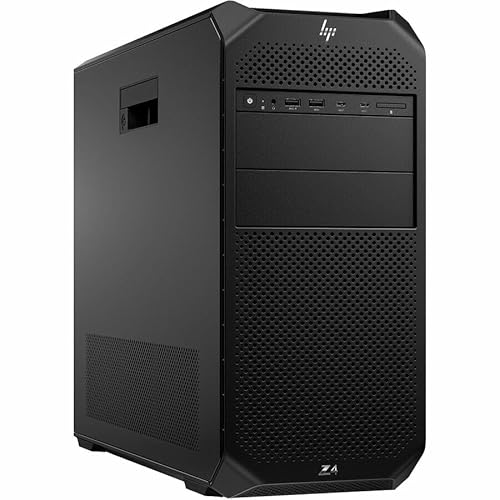
HP Z4 G5 Workstation
The HP Z4 G5 is a flexible single-socket workstation. It supports Intel Xeon W processors, offers extensive front I/O, and tool-less access. Users note the quiet operation and strong build quality, making it a favorite for engineers.
Pros
- Tool-less chassis for easy upgrades
- High memory capacity for large datasets
- Quiet acoustics under load
Cons
- Single processor only
- Some configuration options are pricey

Lenovo ThinkStation P360 Ultra
The Lenovo ThinkStation P360 Ultra packs workstation power into a small form factor. It features Intel Core i9 or Xeon processors, up to 128GB memory, and can drive four 4K displays. Its tiny footprint is ideal for desks where space is at a premium.
Pros
- Ultra-compact size, easy to mount
- Supports up to 4 displays
- Solid performance for CAD and video editing
Cons
- Limited internal expansion
- May throttle under sustained extreme loads

Apple Mac Studio (M2 Ultra)
The Apple Mac Studio with M2 Ultra chip delivers phenomenal performance for video editors, 3D artists, and developers. Its unified memory architecture accelerates workflows, and the silent operation is a bonus. Owners praise its efficiency and speed.
Pros
- Blazing fast for creative applications
- Ultra-quiet even under heavy load
- Excellent energy efficiency
Cons
- Limited to macOS ecosystem
- No user-upgradeable memory or storage
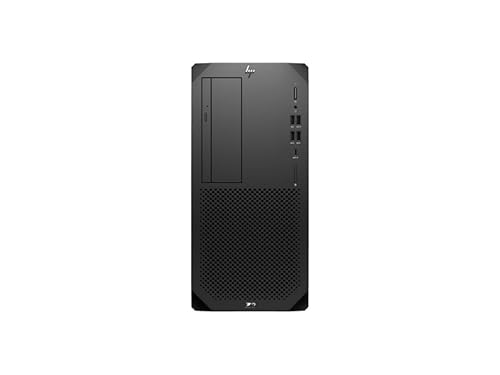
HP Z2 Tower G9 Workstation
The HP Z2 Tower G9 offers a balance of performance and price for professionals starting with 3D modeling or video editing. It supports Intel Core i9 and Xeon processors, ECC memory, and professional GPUs. It is a reliable choice without breaking the bank.
Pros
- Affordable compared to higher-end models
- Compact tower design
- Flexible configuration options
Cons
- Not as expandable as larger towers
- Only single processor support

Dell Precision 3480 Mobile Workstation
For professionals who travel, the Dell Precision 3480 is a 14-inch mobile workstation. It offers Intel Core i7 or Xeon processors, NVIDIA RTX professional graphics, and a durable build. Users appreciate its performance and portability.
Pros
- Lightweight and portable
- ISV certified for CAD software
- Good battery life for a workstation
Cons
- Smaller screen may be limiting
- Performance lower than desktop models

Lenovo ThinkStation P620
The Lenovo ThinkStation P620 is the first workstation with AMD Threadripper Pro processors. It supports massive memory (up to 1TB) and multiple GPUs, making it a powerhouse for scientific computing and high-end 3D rendering.
Pros
- Incredible multi-core performance
- Massive memory capacity
- Supports multiple professional GPUs
Cons
- Very expensive
- Large and heavy tower
The lineup, side by side
| # | Model | Processor | Best for | Score | Price |
|---|---|---|---|---|---|
| 1 | Dell Precision 3680 Tower Workstation | Intel Core i9 or Xeon up to 5.8 GHz | Best Overall for Heavy Multithreaded Workloads | 9.4 | Check price |
| 2 | HP Z4 G5 Workstation | Intel Xeon W up to 4.7 GHz | Best for Customization and Upgradeability | 9.2 | Check price |
| 3 | Lenovo ThinkStation P360 Ultra | Intel Core i9 or Xeon up to 5.0 GHz | Best Compact Design for Space-Constrained Offices | 9.0 | Check price |
| 4 | Apple Mac Studio (M2 Ultra) | Apple M2 Ultra with 24-core CPU | Best for Creative Professionals on macOS | 9.1 | Check price |
| 5 | HP Z2 Tower G9 Workstation | Intel Core i9 or Xeon up to 5.0 GHz | Best Value for Entry-Level Professional Needs | 8.8 | Check price |
| 6 | Dell Precision 3480 Mobile Workstation | Intel Core i7 or Xeon up to 4.7 GHz | Best Mobile Workstation for On-the-Go Professionals | 8.7 | Check price |
| 7 | Lenovo ThinkStation P620 | AMD Ryzen Threadripper Pro up to 64 cores | Best for AMD Enthusiasts and Multi-GPU Setups | 9.3 | Check price |
Frequently asked questions
What is the difference between a workstation and a regular PC?
Workstations are designed for reliability and performance in professional applications. They typically feature ECC memory, ISV-certified components, and support for professional GPUs. They also undergo more rigorous testing to ensure stability under heavy loads.
Do I need a workstation for CAD and 3D modeling?
Yes, for professional CAD and 3D modeling, a workstation is recommended. ISV certifications ensure compatibility with software like AutoCAD and SolidWorks, and professional GPUs offer optimized performance and stability. Consumer PCs may work but can lack reliability and support.
Can I use a gaming PC for professional work?
A gaming PC can handle some professional tasks, but it lacks ECC memory and ISV certifications. For critical work, errors can creep in. Workstations also offer better support and longer warranties, making them a safer investment for professionals.
What is ECC memory and why is it important?
ECC (Error-Correcting Code) memory detects and corrects data corruption that can occur due to electrical interference. This is crucial for long-running simulations and financial modeling where a single bit error can ruin results. Workstations use ECC memory to ensure data integrity.
How much RAM do I need for video editing?
For 4K video editing, at least 32GB is recommended. For 8K or complex effects, 64GB or more is beneficial. Workstations can support up to 128GB or even more, allowing you to work with large timelines without slowdowns.
Are mobile workstations as powerful as desktop ones?
Mobile workstations are less powerful than desktops due to thermal and power constraints. However, they offer good performance for on-the-go work. If you need absolute maximum performance, a desktop is better, but a mobile workstation offers portability without sacrificing too much.
What is ISV certification?
ISV (Independent Software Vendor) certification means the hardware has been tested by the software maker to work reliably with their applications. Examples include Autodesk, Dassault Systèmes, and Adobe. It reduces the risk of crashes and improves compatibility.
Can I upgrade a workstation later?
Most tower workstations are upgradeable, allowing you to add more memory, storage, or GPUs. Some compact or mobile models have limited upgrade options. Check the specifications before purchase to ensure future expansion is possible.
The verdict
For most professionals, the Dell Precision 3680 Tower offers the best combination of performance, reliability, and expansion. Its ISV certifications and ECC memory support make it a solid choice for CAD, video editing, and scientific computing. If you need a compact footprint, the Lenovo P360 Ultra is a great alternative. For creative professionals on macOS, the Mac Studio M2 Ultra is unmatched. Ultimately, choose based on your software, workflow, and space requirements.
Marcus Chen
Marcus covered consumer electronics for enthusiast tech publications for six years before joining ChoiceCrest. He specializes in translating manufacturer spec sheets into plain-language buying advice, with a focus on audio, computing accessories and smart-home gear.
You might also need

Top Portable Power Supplies for Camping, Work, and Emergencies

Top Rated Laptop Chargers for Professionals in 2025

Bulk Mailing Tubes: Top Picks for Shipping Posters and Documents
