Is a Dual Monitor Setup Better Than an Ultrawide?
Neither setup is universally better, they trade different strengths. Dual monitors give you a hard physical break between screens that makes window snapping and taskbar management simpler, while a single ultrawide gives you one continuous canvas with no bezel in the middle, which matters more for gaming and video editing than for general office multitasking.
What dual monitors actually give you
Two separate monitors each run their own resolution and refresh rate, so you can mix a tall vertical screen for coding with a wide one for spreadsheets. Windows and macOS both treat each monitor as a distinct display, which makes maximizing a single app to fill exactly one screen trivial without snapping logic guessing where the divide should be.
What an ultrawide actually gives you
A 34 or 38 inch ultrawide panel, usually in a 21:9 or 32:9 ratio, presents as one display to the operating system. Snap layouts can split it into thirds or quarters without a visible seam running through the middle of a window, which is the main complaint people have about working across two separate monitors.
Where the bezel gap actually matters
A game, a video timeline, or a wide spreadsheet that spans the gap between two monitors will visibly break at the bezel, and some games render a thin dead zone where the frame overlaps. An ultrawide has no physical break, so content that needs to flow continuously across the width of the screen looks and plays better on one panel.
Where dual monitors still win
Mixed orientation setups, like a vertical monitor for reading long documents next to a horizontal one for a browser, are only possible with two separate physical monitors, since a single ultrawide panel cannot be split into different orientations. Dual setups are also usually cheaper for the same total pixel count, because two mid range monitors often cost less combined than one high end ultrawide panel.
Desk space and viewing distance
An ultrawide needs more desk depth to sit at a comfortable viewing distance without the edges curving out of your peripheral vision, which is why most ultrawide monitors are curved rather than flat. Dual monitors can be angled inward toward you, which some people find more comfortable for scanning both screens without turning their head as far.
Graphics card and cable considerations
Running dual monitors splits the workload across two separate video outputs, which is usually easier for older or integrated graphics to handle. A high resolution ultrawide, especially one with a high refresh rate, pushes more pixels through a single cable and can demand a more capable graphics card or a specific cable type to run at full resolution and refresh rate together.

Dell UltraSharp U3423WE 34-Inch Curved Ultrawide Monitor
A 3440×1440 curved ultrawide often used as a single screen alternative to a two monitor desk setup.
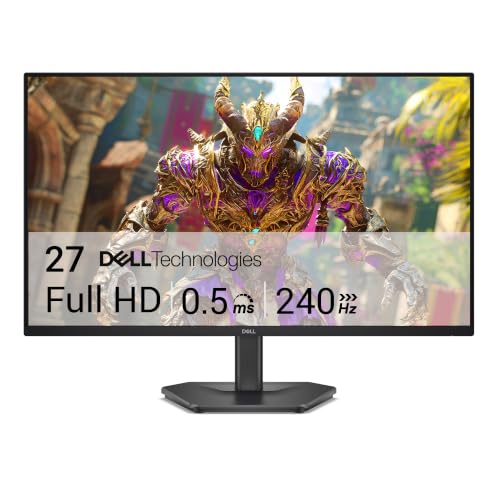
Dell S2721DGF 27-Inch Gaming Monitor
A common choice for a matched dual monitor pair since two units at this size produce a wide, side by side setup at a lower total cost than an equivalent ultrawide panel.
Questions worth asking
Can you run an ultrawide and still use split screen like dual monitors?
Yes, Windows Snap Layouts and macOS Stage Manager can divide a single ultrawide into two, three or four working zones, though there is no physical gap and the dividing lines are software defined rather than fixed.
Is an ultrawide better for gaming than dual monitors?
For most games, yes, because competitive and story driven titles render across one continuous frame instead of stretching or duplicating across a bezel gap, which is why ultrawide support is now common in game settings menus while true dual monitor gaming support is rare.
Do dual monitors need to be the same brand or size?
No, but matching size and resolution makes window dragging and color consistency easier. Mismatched monitors still work, you just notice a visible jump in scale or color when a window crosses from one to the other.
Why do some people see a dead zone in the middle when gaming across two monitors?
Multi monitor gaming stretches the image across the actual bezels, so a strip of the scene is hidden behind the physical monitor frames, which is one of the main reasons ultrawide displays replaced true multi monitor gaming setups.
Does an ultrawide monitor need a more powerful graphics card?
A high resolution ultrawide at a high refresh rate pushes more pixels per second than a single 1080p monitor, so yes, a mid range or better graphics card gets more out of the panel, especially for gaming rather than office work.
Can a laptop run dual external monitors?
It depends on the laptop’s video outputs and chipset. Many modern laptops support two external displays through Thunderbolt or USB-C with DisplayPort alt mode, though some budget laptops are limited to a single external display.
Is 32:9 or 21:9 the better ultrawide ratio?
21:9 at 34 inches is the most common size for productivity and gaming and fits most desks comfortably. 32:9 panels, often 49 inches, are closer to two 27 inch monitors fused together and suit people who already wanted a dual monitor amount of space on one panel.
Do ultrawide monitors curve for a reason or just for looks?
The curve is functional, not cosmetic. At 34 inches and wider, a flat panel puts the edges farther from your eyes than the center, and the curve keeps the whole screen at a more even viewing distance.
Which setup is better for video editing?
An ultrawide generally works better for timeline heavy editing since the timeline can stretch across the full width without a bezel interrupting it, while dual monitors suit editors who want a dedicated second screen purely for a preview window or reference footage.
Can you mix monitor orientations with dual monitors?
Yes, this is one of dual monitor’s clearest advantages. You can mount one monitor vertically for reading code or long documents and keep the other horizontal, which is not possible on a single ultrawide panel.
Is it cheaper to buy one ultrawide or two monitors?
Usually two mid range monitors cost less combined than one high end ultrawide with a similar total pixel count and refresh rate, though pricing shifts often enough that it is worth comparing current listings rather than assuming either option is always cheaper.
Do you need a monitor arm for an ultrawide?
Most ultrawide monitors are heavier than a single standard monitor, so a VESA compatible monitor arm rated for the panel’s weight is worth checking before buying one, especially for curved models that sit farther back on a desk.
Does window snapping work the same on both setups?
The logic differs. Dual monitors snap windows to fill one full physical screen at a time, while an ultrawide’s snap layout divides a single display into custom zones, which some people find more flexible once they learn the keyboard shortcuts.
Can you watch two full videos side by side more easily on dual monitors or an ultrawide?
Dual monitors make this slightly easier since each video gets its own full screen without a shared bezel cutting through either one, though an ultrawide can still show two videos side by side in a slightly reduced width.
Is response time different between ultrawide and standard dual monitors?
Response time depends on the panel technology, not the aspect ratio, so an ultrawide and a standard monitor using the same panel type will have comparable response times. Gaming focused ultrawides now commonly match the refresh rates of standard gaming monitors.
Do ultrawide monitors work well for spreadsheets?
Yes, a wide spreadsheet with many columns benefits from the extra horizontal space without needing to scroll, and the lack of a bezel means long rows of data stay visually continuous.
Can you use a KVM switch with dual monitors for two computers?
Yes, dual monitor KVM switches are common and let two computers share the same pair of monitors, keyboard and mouse, switching between them with a hotkey or button, something single ultrawide setups can also do but with a single shared display instead of two.
Our take
If your work genuinely spans two separate contexts, like a vertical reading screen next to a horizontal browser, dual monitors fit that better. If your work and gaming happen inside one continuous view, like a timeline, a wide spreadsheet, or an open world game, an ultrawide removes the one obstacle, the bezel, that dual monitors cannot avoid.
Marcus Chen
Marcus covered consumer electronics for enthusiast tech publications for six years before joining ChoiceCrest. He specializes in translating manufacturer spec sheets into plain-language buying advice, with a focus on audio, computing accessories and smart-home gear.