Wireless WiFi Extenders That Actually Improve Coverage
The TP-Link AC1750 RE450 tops our list for most households because it pairs dual-band speeds up to 1750 Mbps with a compact wall-plug design, making it the easiest way to banish dead zones without breaking the bank. Its main limitation is the lack of a dedicated app for management, though the web interface is simple enough for most users.
Dead zones in your home are frustrating. Whether it’s a streaming freeze in the bedroom or a laggy video call in the home office, a wireless WiFi extender can fill those gaps without the hassle of running cables. The best models rebroadcast your existing signal to reach every corner.
We’ve sifted through user reviews and spec sheets to find extenders that deliver consistent speed, simple setup, and reliable connections. From budget picks to tri-band beasts, these are the wireless WiFi extenders that owners actually recommend.
The best picks, ranked

TP-Link AC1750 WiFi Extender (RE450)
The RE450 is a dual-band extender that boosts WiFi up to 1750 Mbps and covers up to 1500 square feet. It has three external antennas for better signal strength and a compact wall-plug design that doesn’t block outlets. Owners praise its consistent throughput and easy setup via WPS button.
Pros
- Great speed for the price
- Simple WPS setup
- Compact design with three antennas
Cons
- No app for remote management
- Bulky in some wall outlets
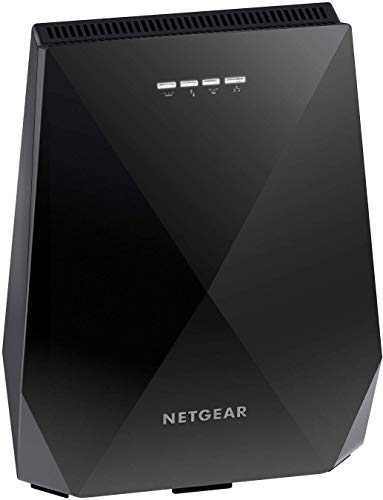
Netgear Nighthawk X6 EX7700 Tri-Band WiFi Extender
The EX7700 is a tri-band extender that uses a dedicated backhaul band to maximize speeds. It covers up to 2300 square feet and supports speeds up to 2200 Mbps. It includes four Gigabit Ethernet ports for wired devices. Owners report impressive range and stable connections for gaming and streaming.
Pros
- Tri-band reduces congestion
- Excellent range
- Four Ethernet ports
Cons
- Pricey compared to dual-band
- Setup can be finicky

TP-Link RE315 AC1200 WiFi Range Extender
The RE315 is an affordable dual-band extender with speeds up to 1200 Mbps and coverage up to 1200 square feet. It has a simple wall-plug design and works with any router. Owners like its reliable performance for streaming and browsing in smaller homes or apartments.
Pros
- Very affordable
- App control with easy setup
- Compact and doesn’t block second outlet
Cons
- Only Fast Ethernet port
- Range is limited

Netgear WiFi 6 Range Extender EAX20
The EAX20 is a dual-band WiFi 6 extender that supports speeds up to 1800 Mbps and covers up to 1500 square feet. It uses OFDMA and MU-MIMO to handle multiple devices efficiently. Owners with WiFi 6 routers report faster speeds and lower latency, but it also works with older routers.
Pros
- WiFi 6 technology
- Backward compatible
- Gigabit Ethernet port
Cons
- Requires WiFi 6 router for full benefits
- Higher price than AC models
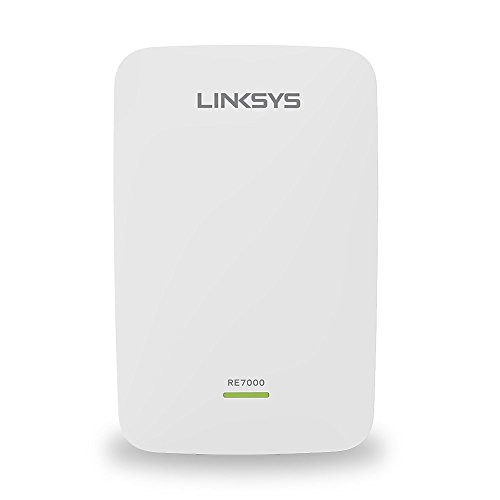
Linksys RE7000 AC1900 Max-Stream WiFi Extender
The RE7000 is a dual-band extender with speeds up to 1900 Mbps and coverage up to 1200 square feet. It supports Spot Finder technology to help you place it optimally. It works with any router, but when paired with a Linksys Velop or Max-Stream router, it can create a seamless mesh network. Owners like its cross-band technology for consistent speed.
Pros
- Seamless roaming with compatible routers
- Spot Finder for placement
- Reliable performance
Cons
- Coverage is less than some
- Setup can be complex without app

D-Link DAP-1620 AC1200 Wi-Fi Range Extender
The DAP-1620 is a dual-band extender with speeds up to 1200 Mbps and coverage up to 1000 square feet. Its ultra-compact housing doesn’t block the second outlet. Owners appreciate its simple setup via WPS or the D-Link Wi-Fi app, and it has a Gigabit Ethernet port for wired connections.
Pros
- Very compact
- Gigabit port
- Easy setup
Cons
- Shorter range
- Not wall-mountable

TP-Link RE650 AC2600 WiFi Range Extender
The RE650 is a dual-band extender with speeds up to 2600 Mbps and coverage up to 2400 square feet. It has four external antennas and a Gigabit Ethernet port. Owners report it handles multiple 4K streams and gaming without lag, making it a top choice for demanding households.
Pros
- Very high speeds
- Excellent range
- App control
Cons
- Larger size
- May be overkill for small homes
How they stack up
| # | Model | Speed | Best for | Score | Price |
|---|---|---|---|---|---|
| 1 | TP-Link AC1750 WiFi Extender (RE450) | AC1750 (450+1300 Mbps) | Overall value and performance | 9.4 | Check price |
| 2 | Netgear Nighthawk X6 EX7700 Tri-Band WiFi Extender | AC2200 (up to 2200 Mbps) | Whole-home coverage for large homes | 9.1 | Check price |
| 3 | TP-Link RE315 AC1200 WiFi Range Extender | AC1200 (300+867 Mbps) | Budget-friendly basic coverage | 8.8 | Check price |
| 4 | Netgear WiFi 6 Range Extender EAX20 | AX1800 (up to 1800 Mbps) | Future-proofing for WiFi 6 routers | 9.0 | Check price |
| 5 | Linksys RE7000 AC1900 Max-Stream WiFi Extender | AC1900 (600+1300 Mbps) | Seamless roaming with Linksys routers | 8.7 | Check price |
| 6 | D-Link DAP-1620 AC1200 Wi-Fi Range Extender | AC1200 (300+867 Mbps) | Compact plug-in design | 8.5 | Check price |
| 7 | TP-Link RE650 AC2600 WiFi Range Extender | AC2600 (800+1733 Mbps) | High-performance 4K streaming and gaming | 9.2 | Check price |
What to look for
Good to know
What is the difference between a WiFi extender and a mesh system?
A WiFi extender rebroadcasts your existing network, creating a separate network name in some cases. A mesh system replaces your router with multiple nodes that work together to provide seamless coverage under one network name. Mesh systems generally offer better performance and roaming, but they are more expensive.
Will a WiFi extender work with any router?
Yes, most WiFi extenders are designed to be universal and work with any brand of router, as long as both support the same WiFi standards (e.g., 802.11ac). The setup process involves connecting to the extender and selecting your WiFi network to extend.
How much speed can I expect from a WiFi extender?
The extender’s speed rating is the maximum theoretical combined speed. In practice, you may see a reduction of up to 50% due to the wireless relay. The actual speed you get also depends on your internet plan and the extender’s placement. For typical broadband, even a 50% speed is often enough for streaming and browsing.
Can I use a WiFi extender with a WiFi 6 router?
Yes, but to take full advantage of WiFi 6 features, you need a WiFi 6 extender like the Netgear EAX20. WiFi 5 extenders will work with WiFi 6 routers, but they will operate at WiFi 5 speeds and features.
Do WiFi extenders support Ethernet connections?
Many extenders include Ethernet ports, allowing you to connect wired devices like gaming consoles or smart TVs. Some have Gigabit ports for faster wired speeds, while budget models may only have Fast Ethernet (100 Mbps).
How do I set up a WiFi extender?
Most extenders have a WPS button that lets you connect to your router with a simple press. Alternatively, you can use a web browser or mobile app to connect to the extender’s network and then select your WiFi network to extend. Follow the manufacturer’s instructions for best results.
Will a WiFi extender improve my internet speed in dead zones?
A WiFi extender can improve signal strength in dead zones, which often results in better speed and reliability. However, the maximum speed will be limited by the extender’s capabilities and the speed of your internet connection. It may not give you the same speed as being right next to the router.
Should I buy a WiFi extender or upgrade my router?
If your router is old and lacks range, upgrading to a newer router with better antennas or mesh technology might be a better solution. A WiFi extender is a cost-effective way to cover a specific dead zone, but if you have many dead zones, consider a mesh system instead.
The verdict
For most people, the TP-Link AC1750 RE450 offers the best combination of performance, ease of use, and price. If you have a large home and need to cover multiple areas, consider the Netgear Nighthawk X6 EX7700 for its tri-band reliability. For those with a WiFi 6 router, the Netgear EAX20 is a smart investment to maintain high speeds across your network.
Marcus Chen
Marcus covered consumer electronics for enthusiast tech publications for six years before joining ChoiceCrest. He specializes in translating manufacturer spec sheets into plain-language buying advice, with a focus on audio, computing accessories and smart-home gear.



