Top Wireless Access Points for Whole-Home and Office Coverage
The TP-Link EAP670 stands out as the top overall wireless access point for most homes and small offices. It offers Wi-Fi 6 speeds up to 6.0 Gbps, a 2.5G Ethernet port, and PoE+ support, providing excellent performance and value. Its main limitation is that it lacks a built-in mesh system, so you’ll need a controller for advanced roaming.
A strong wireless network is the backbone of modern homes and businesses. Many routers struggle to provide consistent coverage and speed across larger spaces or multiple floors. Wireless access points (APs) solve this by extending your network and providing seamless connectivity.
This guide compares the best access points available today. We considered performance, features, and ease of use. Whether you need to cover a large house, support many devices in an office, or simply upgrade your home network, there’s an AP here for you.
The shortlist, ranked

TP-Link EAP670
The TP-Link EAP670 is a Wi-Fi 6 access point that delivers impressive throughput and coverage. It supports 1024-QAM and OFDMA for efficient data transmission. With a 2.5G Ethernet port, it can handle multi-gig internet plans. It’s ceiling mountable and designed for business use but works well in large homes.
Pros
- Fast Wi-Fi 6 speeds with 2.5G uplink
- Supports PoE+ for easy installation
- Can be managed via cloud or local controller
Cons
- No built-in mesh, requires controller for seamless roaming
- Power adapter not included (PoE required)
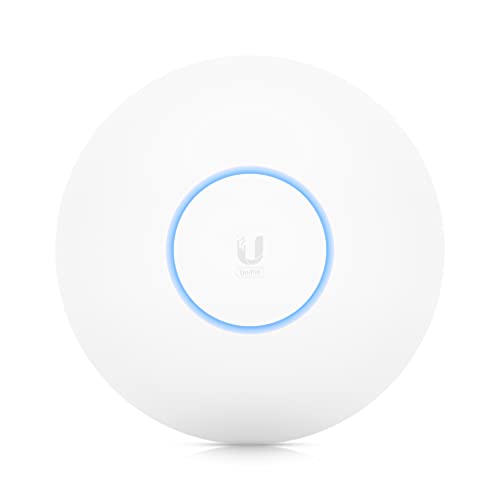
Ubiquiti UniFi U6-LR
The Ubiquiti UniFi U6-LR is a long-range Wi-Fi 6 access point designed for broad coverage. It uses advanced RF technology and a high-gain antenna to penetrate walls and extend signals. It’s ideal for large homes or open office spaces. It integrates seamlessly with the UniFi ecosystem.
Pros
- Excellent range and coverage for large areas
- Supports 500+ connected devices
- Works with UniFi network management
Cons
- Requires separate PoE injector or switch
- No 2.5G port, limited to 1G uplink

Netgear WAX630E
The Netgear WAX630E is a tri-band Wi-Fi 6E access point designed for high-density environments like offices and conference rooms. It offers a dedicated 6GHz band for low interference and high capacity. With multiple Ethernet ports, it supports versatile deployment. It comes with a 1-year Insight subscription for remote management.
Pros
- Tri-band with 6GHz support for less congestion
- Dual 2.5G ports for flexible wired connections
- Handles many simultaneous clients easily
Cons
- Requires PoE++ (power over Ethernet plus)
- No web interface, management only via Insight

Asus ZenWiFi XT9 (2-pack)
The Asus ZenWiFi XT9 is a dual-band Wi-Fi 6 mesh system that includes two access points. It offers seamless roaming and easy setup via the Asus app. With AiMesh technology, you can expand coverage by adding more Asus routers. It’s a great choice for large homes needing reliable whole-home coverage without complex management.
Pros
- Mesh technology for seamless roaming
- Easy setup and management via app
- Can be used as router or AP mode
Cons
- No PoE support, requires power outlet
- Limited Ethernet ports on each node

Aruba Instant On AP22
The Aruba Instant On AP22 is a Wi-Fi 6 access point tailored for small businesses. It offers simple setup through the Instant On mobile app. With a built-in controller, it provides automatic channel selection and band steering. It supports PoE and comes in a pack of four, making it cost-effective for offices.
Pros
- Simple setup with app, no controller needed
- Built-in security features
- Can be managed remotely
Cons
- Limited to 1G uplink
- No 6GHz band support

Cisco Business 140AC (CBW140AC)
The Cisco Business 140AC is a compact, dual-band Wi-Fi 5 access point. It offers reliable performance at an affordable price. It’s easy to deploy with a mesh capability and can be managed through the Cisco Business dashboard. Ideal for small offices or homes looking for a budget-friendly solution.
Pros
- Affordable price point
- Mesh support for multiple APs
- Trusted Cisco reliability
Cons
- Older Wi-Fi 5 technology
- Lower throughput compared to Wi-Fi 6

EnGenius ECW230
The EnGenius ECW230 is a Wi-Fi 6 access point with a sleek design. It features a 2.5G PoE port and supports cloud management through the EnGenius Cloud platform. It offers robust security and analytics. This AP is suitable for businesses that want centralized control without an on-premises controller.
Pros
- Cloud management with no extra cost
- Dual 2.5G ports for high-speed uplink
- Sleek design that blends in
Cons
- No built-in controller, cloud dependency
- Setup may be complex for non-tech users
Compared at a glance
| # | Model | Wi-Fi Standard | Best for | Score | Price |
|---|---|---|---|---|---|
| 1 | TP-Link EAP670 | Wi-Fi 6 (802.11ax) | Overall Performance and Value | 9.4 | Check price |
| 2 | Ubiquiti UniFi U6-LR | Wi-Fi 6 (802.11ax) | Long Range Coverage | 9.0 | Check price |
| 3 | Netgear WAX630E | Wi-Fi 6E (802.11ax) | High-Density Environments | 8.8 | Check price |
| 4 | Asus ZenWiFi XT9 (2-pack) | Wi-Fi 6 (802.11ax) | Whole-Home Mesh Coverage | 8.7 | Check price |
| 5 | Aruba Instant On AP22 | Wi-Fi 6 (802.11ax) | Small Business and Remote Work | 8.6 | Check price |
| 6 | Cisco Business 140AC (CBW140AC) | Wi-Fi 5 (802.11ac) | Budget-Friendly Reliable AP | 8.2 | Check price |
| 7 | EnGenius ECW230 | Wi-Fi 6 (802.11ax) | Cloud Managed Deployment | 8.4 | Check price |
What matters most
Common questions
What is the difference between a wireless access point and a router?
A router connects your network to the internet and routes data. An access point extends the wireless signal and allows more devices to connect. Routers often include built-in APs, but dedicated APs provide better coverage and performance.
Can I use a wireless access point with any router?
Yes, most access points work with any router via Ethernet. They act as a bridge, broadcasting a Wi-Fi signal. Your router handles DHCP and network management. Some APs can operate in mesh mode if compatible.
How many devices can a typical access point handle?
It depends on the model and Wi-Fi standard. High-end APs like the TP-Link EAP670 can support over 200 devices. Budget models may handle fewer. Consider your device count when choosing.
Do I need a PoE switch to power an access point?
Many access points support Power over Ethernet (PoE), allowing them to receive power via the Ethernet cable. If your switch doesn’t provide PoE, you’ll need a PoE injector or use the included power adapter if available.
What is a mesh network?
A mesh network uses multiple nodes that communicate wirelessly to create a single seamless network. This eliminates dead zones and allows roaming. Some access points can form a mesh, but others require wired connections.
How do I set up a wireless access point?
Connect the AP to your router with an Ethernet cable. Power it on via PoE or adapter. Access its management interface via a web browser or app. Configure the SSID and security settings. Some APs have quick setup wizards.
Can I use multiple access points to extend Wi-Fi?
Yes, multiple APs can extend coverage. For seamless roaming, they should be configured with the same SSID and password. Managed systems automatically handle channel selection and handoff.
What is the ideal placement for an access point?
For best coverage, mount the AP on a ceiling in a central location. Avoid placing it near metal objects or thick walls. Elevate it to reduce obstruction. Use mounting brackets if available.
Our take
For most users, the TP-Link EAP670 is the best choice due to its excellent performance, value, and ease of integration. If you need extensive range, go with the Ubiquiti U6-LR. For small businesses, the Aruba Instant On AP22 offers simplicity and reliability. Invest in a mesh system like the Asus ZenWiFi XT9 for whole-home coverage without complex wiring.
Marcus Chen
Marcus covered consumer electronics for enthusiast tech publications for six years before joining ChoiceCrest. He specializes in translating manufacturer spec sheets into plain-language buying advice, with a focus on audio, computing accessories and smart-home gear.
You might also need

Top Drive Docking Stations for Fast Cloning and Data Access
Setting Up Dual Monitors for a Home Office Desk
What Does an Ergonomic Home Office Desk Setup Look Like?
