Wifi Extenders That Actually Reach the Dead Zone
The TP-Link RE605X is the best overall wifi extender for most homes, bringing Wi-Fi 6 speeds to a dead zone without a complicated setup. Budget shoppers do well with the TP-Link RE220, while anyone wanting one seamless network name should look at the Netgear EAX20 instead.
The TP-Link RE605X handles most dead zone problems well, carrying Wi-Fi 6 speeds into rooms the main router cannot reach alone. Buyers on a tighter budget get solid coverage from the TP-Link RE220, and anyone annoyed by having two separate network names should choose the Netgear EAX20, which merges with a compatible router into one seamless signal.
Extenders differ in how much they slow down speed at range, whether they create a second network name, and how they handle roaming as you move through the house. We compared published speed classes, mesh-style roaming support, and setup process to match each extender to a real coverage problem.
What to look for
What to look for in a wifi extender Wi-Fi standard matters since a Wi-Fi 6 extender like the TP-Link RE605X holds speed better than older AC-class models at the same distance. Check whether the extender creates a separate network name or merges seamlessly with your router, since switching networks manually while walking through a house gets old fast. An Ethernet port on the extender lets you wire a nearby device, like a smart TV, directly for a more stable connection. Placement affects performance more than any spec, so a signal indicator LED, as on the D-Link DAP-1620, helps during setup.
Choosing an extender based on home size A single compact extender like the TP-Link RE220 fits a small apartment or one isolated dead zone well. Larger homes with multiple weak spots benefit more from a tri-band, high-power model like the Netgear Nighthawk EAX80, or from a multi-node system like the Amped Wireless ALLY Plus. Measure where the signal actually drops before assuming you need the biggest extender available.
Why seamless roaming matters for multi-device households Older extenders create a second network name, which forces a phone or laptop to manually switch networks as you move through the house. The Netgear EAX20 avoids this by merging into one roaming network name when paired with a compatible router, so devices switch automatically. This matters most in homes with several connected devices moving between rooms throughout the day.
When a wired backhaul connection is worth the extra cable Running an Ethernet cable from the router to the extender, supported on models like the Netgear Nighthawk EAX80, avoids the speed loss that comes from relaying a wireless signal twice. This matters most for a home office or media room that needs consistent speed rather than just basic coverage. For a quick fix to a single weak spot, a standard wireless extender setup is usually good enough.
The best picks, ranked

TP-Link RE605X
This dual-band extender supports Wi-Fi 6 at AX1800 class speeds, which keeps streaming and video calls smooth even at the edge of coverage. A Gigabit Ethernet port lets a wired device, like a smart TV, connect directly through the extender. OneMesh compatibility with TP-Link routers allows a single roaming network name instead of a separate extender signal.
Pros
- Wi-Fi 6 speeds hold up well at extended range
- Gigabit port supports a wired device at the extension point
- OneMesh keeps one network name with compatible routers
Cons
- OneMesh benefits require a TP-Link router
- Larger plug design can block an adjacent outlet
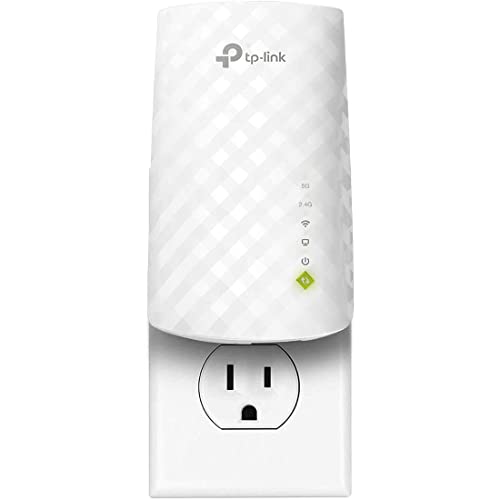
TP-Link RE220
The RE220 keeps things simple with AC750 class dual-band speeds, enough for browsing and standard video streaming in a nearby room. A compact wall-plug design avoids blocking a second outlet on most sockets. Setup runs through the Tether app in a few short steps.
Pros
- Low price for a reliable basic extender
- Compact plug design fits most outlets
- Simple setup through the Tether app
Cons
- Speed drops noticeably for multiple simultaneous devices
- No mesh-style roaming with a single network name

Netgear EAX20
Netgear built this Wi-Fi 6 extender to merge into one roaming network when paired with a compatible Netgear router, avoiding the awkward second network name common on older extenders. FastLane3 technology uses a dedicated connection between extender and router to preserve speed. A four-stream design helps multiple devices stay connected without major slowdown.
Pros
- Seamless roaming avoids a confusing second network name
- FastLane3 helps preserve speed over the extended connection
- Handles multiple connected devices reasonably well
Cons
- Full roaming benefit needs a compatible Netgear router
- Setup is more involved than basic plug-in extenders
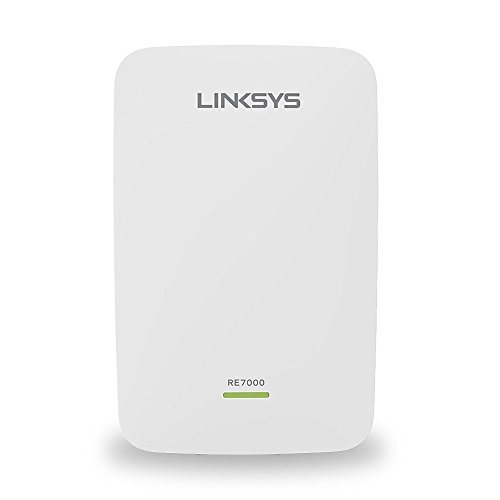
Linksys RE7000
MU-MIMO support on this AC1900 extender lets it serve several devices at once without forcing them to share bandwidth in turn. Beamforming focuses the signal toward connected devices rather than broadcasting evenly in all directions. Spot Finder Technology uses an LED indicator to help find the best outlet location during setup.
Pros
- MU-MIMO helps multiple streaming devices stay smooth
- Spot Finder LED simplifies finding the right outlet
- Beamforming improves signal reach to specific devices
Cons
- Lacks Wi-Fi 6 found on newer competitors
- Case is larger than some compact plug-in extenders

Netgear Nighthawk EAX80
This tri-band Wi-Fi 6 extender targets larger homes where a single extender needs to cover significant extra square footage. High-power antennas push signal further than compact plug-in models. Two Ethernet ports allow a wired backhaul connection for more stable performance when run that way.
Pros
- Tri-band design covers more square footage effectively
- Wired backhaul option via dual Ethernet ports
- High-power antennas reach further than compact extenders
Cons
- Larger footprint takes up more space near the outlet
- Overkill for a small apartment or single dead zone
Amped Wireless ALLY Plus
This system pairs a main unit with extender nodes, all managed through the Amped Wireless app for a consistent whole-home view. Device prioritization settings in the app let a household favor certain devices, like a work laptop, during busy hours. Parental control features are built into the same app without extra hardware.
Pros
- App-based management covers the whole system in one place
- Device prioritization helps during high-demand hours
- Built-in parental controls need no extra subscription
Cons
- Smaller brand means less community troubleshooting support
- Costs more than a single standalone extender

D-Link DAP-1620
D-Link keeps this AC1900 extender straightforward with a compact wall-plug design and minimal setup steps. A smart signal indicator LED shows whether the current outlet gives a strong enough connection to the main router. A single Gigabit Ethernet port supports one wired device at the extension point.
Pros
- Signal LED simplifies finding a good outlet
- Straightforward setup with minimal steps
- Gigabit port supports a wired device if needed
Cons
- No Wi-Fi 6 support on this model
- Fewer advanced features than app-managed systems
Side by side
| # | Model | Wi-Fi Standard | Best for | Score | Price |
|---|---|---|---|---|---|
| 1 | TP-Link RE605X | Wi-Fi 6, AX1800 class | Best Overall | 9.1 | Check price |
| 2 | TP-Link RE220 | AC750 dual-band | Best Budget Pick | 8.2 | Check price |
| 3 | Netgear EAX20 | Wi-Fi 6, 4-stream | Best for Seamless Network Roaming | 8.9 | Check price |
| 4 | Linksys RE7000 | AC1900 dual-band | Best for Streaming and Multiple Devices | 8.8 | Check price |
| 5 | Netgear Nighthawk EAX80 | Wi-Fi 6, tri-band | Best for Large Homes | 9.0 | Check price |
| 6 | Amped Wireless ALLY Plus | Router plus extender nodes | Best for App-Based Whole-Home Management | 8.7 | Check price |
| 7 | D-Link DAP-1620 | AC1900 dual-band | Best for Simple Plug-In Setup | 8.3 | Check price |
Common questions
Do wifi extenders slow down my internet speed?
Some speed loss is normal because wireless extenders relay the signal rather than wiring it directly, though Wi-Fi 6 models like the TP-Link RE605X minimize that loss.
Should I buy a wifi extender or a mesh system instead?
A single extender works well for one dead zone, while a full mesh system suits homes with multiple weak areas needing consistent coverage.
Will a wifi extender create a separate network name?
Older models typically do, but roaming-capable extenders like the Netgear EAX20 can merge into one network name when paired with a compatible router.
Where should I plug in a wifi extender for the best signal?
Halfway between the router and the dead zone usually works best, and a signal indicator LED, found on models like the D-Link DAP-1620, helps confirm the spot.
Can I connect a wired device, like a smart TV, through an extender?
Yes, extenders with a built-in Ethernet port, such as the TP-Link RE605X, let you connect one wired device at the extension point.
Is Wi-Fi 6 worth it on a wifi extender?
Wi-Fi 6 extenders hold speed better at range and handle multiple connected devices more efficiently than older AC-class extenders.
Do all wifi extenders work with any router brand?
Basic extension works across brands, but seamless roaming features usually require an extender and router from the same manufacturer.
How many devices can one wifi extender support well?
It depends on the model, but MU-MIMO equipped extenders like the Linksys RE7000 handle multiple streaming devices better than basic single-stream models.
Is a wired backhaul connection better than a fully wireless extender setup?
Yes, running an Ethernet cable to the extender avoids the speed loss that comes from relaying a wireless signal twice.
Do app-managed extender systems need a subscription?
Core features on systems like the Amped Wireless ALLY Plus typically work without a subscription, though check current terms before buying.
Final word
The TP-Link RE605X is the strongest overall choice for most homes dealing with a single dead zone, thanks to solid Wi-Fi 6 speed and simple setup. Budget-focused buyers should pick the TP-Link RE220 instead, while households wanting one seamless network name are better served by the Netgear EAX20.
Marcus Chen
Marcus covered consumer electronics for enthusiast tech publications for six years before joining ChoiceCrest. He specializes in translating manufacturer spec sheets into plain-language buying advice, with a focus on audio, computing accessories and smart-home gear.


