Smart Whiteboards That Keep Your Team in Sync
The Vibe Smart Board Pro S1 is our top pick for most teams, offering a 55-inch 4K display with built-in Android and wireless screen sharing. It excels in interactive collaboration but has limited third-party app integration compared to some rivals.
Smart whiteboards have transformed meetings and lessons by merging traditional brainstorming with digital flexibility. They let you write, draw, and share content in real time, whether your team is in the room or remote.
With many models on the market, choosing the right one can be overwhelming. This roundup breaks down the top options to help you find the best fit for your workspace.
What we recommend

Vibe Smart Board Pro S1 55″
The Vibe Smart Board Pro S1 combines a crisp 4K display with a responsive touch interface. It runs on Android, giving access to popular apps like Zoom and Microsoft Teams. Wireless screen sharing works with laptops and mobile devices. Owners praise its smooth writing experience and easy setup.
Pros
- Excellent 4K clarity
- Fast touch response
- Built-in Android apps
Cons
- Limited third-party app store
- Pricey for small budgets

Samsung Interactive Display Flip Pro WM55B
Samsung’s Flip Pro is a premium smart whiteboard with a sleek design and powerful features. It offers a 55-inch 4K display with anti-glare coating. The interface is intuitive, and it supports up to 20 touch points. It integrates well with enterprise software like Office 365 and Google Workspace.
Pros
- High build quality
- Excellent software integration
- Great for large teams
Cons
- Expensive
- Limited storage capacity

Newline Interactive Q Series 55″
The Newline Q Series is designed with classrooms in mind. It features a 55-inch 4K display with ultra-durable glass. The built-in Android system provides access to educational apps. Teachers appreciate the simple annotation tools and multi-user collaboration features.
Pros
- Durable screen
- Easy to use for teachers
- Affordable for schools
Cons
- Speakers are average
- No built-in camera

Microsoft Surface Hub 2S 50″
The Surface Hub 2S is a collaboration device that integrates seamlessly with Microsoft 365. It offers a 50-inch PixelSense display with 4K resolution. The built-in camera and mics are designed for Teams meetings. Users report that it works flawlessly with Windows devices.
Pros
- Deep Microsoft integration
- High-quality camera
- Great for remote teams
Cons
- Very expensive
- Limited app compatibility
Jamboard by Google 55″
Google Jamboard is a 55-inch 4K smart whiteboard that works seamlessly with Google Workspace. It includes a stylus and eraser, and you can share your board with remote participants via the cloud. The interface is clean and easy to navigate.
Pros
- Excellent with Google apps
- Cloud-based sharing
- Included stylus
Cons
- Requires subscription for full features
- Hardware is getting dated
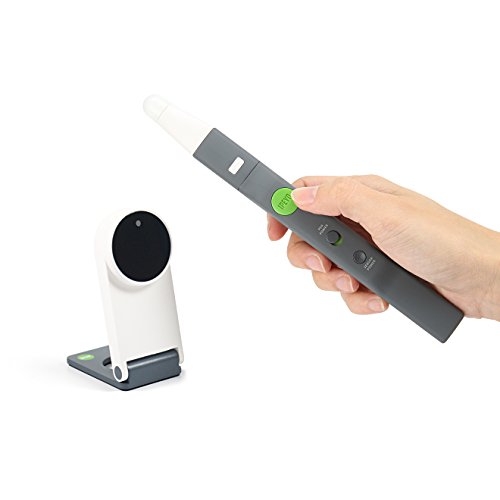
IPEVO IW2 Wireless Interactive Whiteboard System
The IPEVO IW2 is an affordable way to turn any wall or surface into a smart whiteboard. It works with a camera and pen that track your writing. You can connect it to a computer or projector. It is perfect for small offices or home setups.
Pros
- Very affordable
- Portable and easy to set up
- No screen size limit
Cons
- Requires external projector
- Accuracy can be affected by lighting

InFocus JTouch 65″ Interactive Whiteboard
The InFocus JTouch 65 offers a massive 65-inch 4K display that is ideal for large conference rooms. It has built-in Android and supports wireless screen mirroring. The touch screen is highly responsive, and it includes a slot for an optional PC module.
Pros
- Huge screen
- Great for big groups
- Flexible mounting options
Cons
- Bulky and heavy
- Higher price point
What matters most
The lineup, side by side
| # | Model | Display Size | Best for | Score | Price |
|---|---|---|---|---|---|
| 1 | Vibe Smart Board Pro S1 55″ | 55 inches | Best Overall for Teams | 9.4 | Check price |
| 2 | Samsung Interactive Display Flip Pro WM55B | 55 inches | Best for Enterprise | 9.2 | Check price |
| 3 | Newline Interactive Q Series 55″ | 55 inches | Best for Education | 9.0 | Check price |
| 4 | Microsoft Surface Hub 2S 50″ | 50 inches | Best for Microsoft Users | 8.9 | Check price |
| 5 | Jamboard by Google 55″ | 55 inches | Best for Google Workspace | 8.7 | Check price |
| 6 | IPEVO IW2 Wireless Interactive Whiteboard System | N/A (uses projection) | Best Budget Option | 8.5 | Check price |
| 7 | InFocus JTouch 65″ Interactive Whiteboard | 65 inches | Best Large Screen | 8.3 | Check price |
Questions worth asking
What is a smart whiteboard?
A smart whiteboard is an interactive display that combines traditional whiteboard writing with digital features. You can write with a stylus or finger, save your notes, and share them digitally. Many include apps for video conferencing and collaboration.
Can I use a smart whiteboard without a computer?
Most smart whiteboards are standalone devices with built-in operating systems like Android or Windows. They can run apps and connect to the internet without a separate computer. Some models, like the IPEVO IW2, require a computer or projector to function.
How do I share my whiteboard content with remote participants?
Smart whiteboards often have built-in cloud sharing or integration with video conferencing tools. For example, Jamboard integrates with Google Meet, and Surface Hub works with Microsoft Teams. You can also export your notes as PDFs or images and send them via email.
Are smart whiteboards compatible with existing software?
Compatibility depends on the model. Many Android-based boards can install third-party apps from the Play Store. Others have limited app stores. If you rely on specific software, check the board’s compatibility list before purchasing.
Do I need a stylus for a smart whiteboard?
Most smart whiteboards come with a stylus or support finger touch. Using a stylus gives you more precision for writing and drawing. Some boards also support palm rejection, so you can rest your hand on the screen while writing.
Can I use a smart whiteboard for distance learning?
Yes, smart whiteboards are excellent for distance learning. They allow teachers to present lessons interactively and share content with students in real time. Models with built-in cameras and microphones, like the Surface Hub, are particularly well-suited.
What is the average lifespan of a smart whiteboard?
Smart whiteboards are designed for heavy use and typically last 5 to 10 years. The LED backlight may dim over time, but the display itself is durable. Regular software updates can extend the useful life of the device.
Can I mount a smart whiteboard on the wall?
Yes, most smart whiteboards come with VESA mount compatibility. You can purchase a wall mount or use a mobile stand. Make sure the wall can support the weight of the board, which can be significant for larger models.
Do smart whiteboards require a subscription?
Some smart whiteboards offer basic features for free, but advanced cloud services may require a subscription. For example, Jamboard requires a Google Workspace subscription for full functionality. Always check the pricing details before buying.
Are there any privacy concerns with smart whiteboards?
Smart whiteboards can store data locally or in the cloud. If you handle sensitive information, look for boards that offer encryption and on-premise storage options. Also, check the manufacturer’s privacy policy regarding data collection.
Our pick
If you want the best combination of performance and value, choose the Vibe Smart Board Pro S1. It offers a large 4K display, smooth writing experience, and built-in Android apps at a competitive price. For Microsoft-centric organizations, the Surface Hub 2S is worth the investment despite its higher cost. Budget-conscious users should consider the IPEVO IW2, which provides smart whiteboard functionality without the hefty price tag.
Marcus Chen
Marcus covered consumer electronics for enthusiast tech publications for six years before joining ChoiceCrest. He specializes in translating manufacturer spec sheets into plain-language buying advice, with a focus on audio, computing accessories and smart-home gear.


