Cricut vs Silhouette vs Brother: Picking a Vinyl Cutter
For most home crafters, the Cricut Maker 3 leads this list because its adaptive tool system swaps between rotary, knife and scoring tools on one machine. The Silhouette Cameo 5 suits anyone who wants offline design software, while the Cricut Joy Xtra covers small labels and cards in a fraction of the desk space.
The Cricut Maker 3 fits the broadest project list here, since its adaptive tool head swaps between rotary, knife and scoring blades on one carriage. Want software that works without Wifi? The Silhouette Cameo 5 runs Studio locally on your computer. Short on bench space, the Cricut Joy Xtra handles labels, cards and small decals in a much smaller footprint.
Picking a cutter is harder than picking a printer, because the software ecosystem locks you into a workflow long after the hardware pays for itself. Blade systems, mat width and matless material support all shape what you can actually make. We compared published cutting force ratings, supported material lists, mat widths and tool compatibility, and cross checked what owners report about each software workflow.
The best picks, ranked

Cricut Maker 3
The Maker 3 pairs a 4,000 gram class cutting force with an adaptive tool head that accepts rotary, knife, engraving and scoring tools. That range turns one machine into a fabric cutter, a light engraver and a vinyl cutter. Smart Materials feed through without a mat, so long banners and decal runs cut in one continuous pass.
Pros
- Widest material range of the machines compared here
- Rotary blade cuts unbacked fabric without a stabiliser
- Matless Smart Material cutting suits long banners and decals
Cons
- Design Space needs an internet connection for full functionality
- Extra blades and tool heads raise the total cost over time

Silhouette Cameo 5
Silhouette Studio installs on your computer and works without a live connection, which sets the Cameo 5 apart from Cricut’s cloud first workflow. A dual carriage holds a blade and a pen at once, so switching tools mid project takes no extra steps. Cutting force reaches 5,000 grams, enough for thicker chipboard and dense cardstock.
Pros
- Studio software runs offline with no subscription required
- Dual carriage keeps a blade and pen loaded at once
- 5,000 gram cutting force handles thicker craft materials
Cons
- Studio has a steeper learning curve than Design Space
- Some advanced file formats require the paid Studio upgrade

Cricut Explore 3
Explore 3 shares the Maker 3’s matless Smart Material speed but drops the adaptive tool head, so it sticks to vinyl, iron on and cardstock. That narrower scope suits anyone whose projects are decals, shirts and paper crafts. It runs the same Design Space app as the rest of the Cricut lineup, so switching between machines feels familiar.
Pros
- Matless Smart Material cutting runs as fast as the Maker 3
- Fewer tool purchases needed since the tool set stays simple
- Covers vinyl and heat transfer work most buyers actually do
Cons
- No rotary or knife blade support for fabric or wood
- Not built for thick leather, balsa or unbacked fabric

Brother ScanNCut DX SDX125e
A built in 300 dpi scanner sets the ScanNCut DX apart, letting you scan a hand drawn shape or printed sheet and cut it straight from the touchscreen. No computer or app is required for basic projects. An auto blade reads material thickness and adjusts depth, cutting down on wasted test cuts.
Pros
- Runs entirely standalone from its colour touchscreen
- Built in scanner turns hand drawings into cut files directly
- Auto blade depth sensing reduces wasted material on test cuts
Cons
- Cut file library is smaller than the Cricut ecosystem
- Bulkier on a desk than rivals with the same cutting width

Silhouette Portrait 3
Portrait 3 shrinks the Cameo down to an 8 inch cutting width while keeping full Silhouette Studio software and PixScan print and cut support. Bluetooth handles wireless jobs, and USB covers wired setups. At this size it stores easily on a shelf between card making or sticker sessions.
Pros
- Full Studio software fits inside a much smaller machine
- Bluetooth connectivity keeps cables off the desk
- Light enough to store on a shelf between projects
Cons
- 8 inch width rules out most shirt sized transfers
- Lower cutting force than the full size Cameo line

Cricut Joy Xtra
Joy Xtra sits between the original Joy and the full size Explore, cutting up to 8.5 inches wide. Print then cut support, missing from the first Joy, opens up sticker and label work here. Its small footprint suits a kitchen table setup where a full size cutter would not fit.
Pros
- Small enough to leave set up on a shared table permanently
- Print then cut support opens up sticker and label projects
- Matless Smart Material cutting handles long label runs
Cons
- Narrower cutting width limits larger apparel designs
- Uses its own smaller material and mat sizes
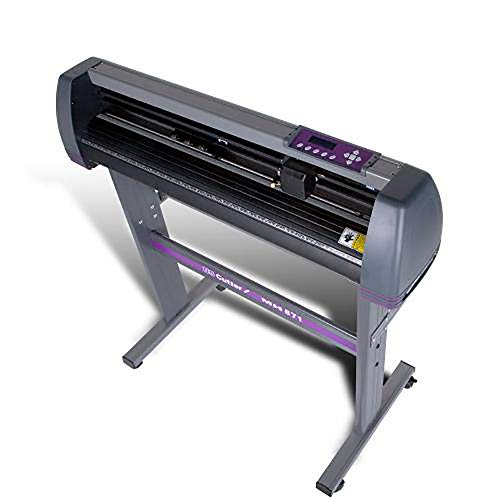
USCutter MH 871-MK2 Vinyl Cutter
This roll fed 34 inch plotter targets sign shops and vehicle graphics rather than card tables. A servo motor drives the blade, and VinylMaster Cut software handles the layout work, closer to professional signage than craft software. Banners, window graphics and large decals fit here in ways no craft machine can match.
Pros
- 34 inch roll feed is the widest cutting capacity compared here
- Roll feeding suits long continuous signage runs without reloading
- Servo motor runs quieter and more precisely than stepper rivals
Cons
- No print then cut or fabric cutting capability
- Software and setup target sign trade users, not beginners
How they compare
| # | Model | Cutting force | Best for | Score | Price |
|---|---|---|---|---|---|
| 1 | Cricut Maker 3 | Up to 4,000 grams class | Best overall | 9.4 | Check price |
| 2 | Silhouette Cameo 5 | Up to 5,000 grams class | Best for offline design control | 9.2 | Check price |
| 3 | Cricut Explore 3 | Up to 400 grams class | Best value | 9.0 | Check price |
| 4 | Brother ScanNCut DX SDX125e | 12 inch | Best for cutting without a computer | 8.8 | Check price |
| 5 | Silhouette Portrait 3 | 8 inch | Best compact Silhouette | 8.6 | Check price |
| 6 | Cricut Joy Xtra | Up to 8.5 inch | Best for small projects | 8.3 | Check price |
| 7 | USCutter MH 871-MK2 Vinyl Cutter | 34 inch roll fed | Best for sign making | 8.0 | Check price |
How to choose
What should you check before buying a vinyl cutting machine? Start with the material list, not the price tag or the brand name. Vinyl decals, iron on transfers and cardstock cut cleanly on nearly every machine here, so width and software become the deciding factors. Unbacked fabric, thin balsa, leather and chipboard need real cutting force. That narrows the field to the Maker 3 and, for some materials, the higher force Cameo 5. Pushing a light duty machine into thick material tears mats and dulls blades fast.
Cricut vs Silhouette: which software fits how you work? Cricut machines run through Design Space, a polished app that needs an internet connection for full functionality and nudges you toward a subscription for its image library. Silhouette Studio installs locally and works fully offline, trading some polish for manual control and a steeper learning curve. Brother’s ScanNCut DX skips computer software entirely, running projects from its own touchscreen. Match the software to how you actually want to work, since you will spend more hours there than on the hardware itself.
Mat cutting vs matless cutting vs roll feeding: what’s the difference? A 12 inch machine cuts 12 inch wide material, enough for most shirt transfers and single decals. Matless cutting, available on newer Cricut machines with Smart Materials, feeds long pieces through without a mat at all, which suits banners and long label runs. Roll feeding on a plotter like the USCutter goes a step further, built for continuous signage rather than single sheets. Match your largest realistic project to the format, not the biggest number on the spec sheet.
How much should you budget for blades, mats and materials? The machine purchase is only the starting cost. Cutting mats lose their tack after a few dozen projects and need replacing. Blades dull faster on glitter vinyl and cardstock than on standard adhesive vinyl, and specialist tools like rotary and knife blades sell separately from the base machine. A weeding tool, a scraper and a brayer improve results more than any hardware upgrade, so factor consumables into the plan from day one.
Frequently asked questions
Do Cricut machines need a paid subscription?
No. Design Space works free for uploading your own SVG and image files. Cricut Access, the paid tier, unlocks their built in image and font library plus a few convenience features. Owners report running for years on free uploaded designs alone, though Design Space still needs an internet connection to operate fully.
Which vinyl cutter is best for a beginner?
The Cricut Explore 3 or Joy Xtra guide new users through material settings inside Design Space, and both handle vinyl, iron on and cardstock with minimal setup. Anyone who wants to skip computer software entirely can scan and cut straight from the Brother ScanNCut DX touchscreen.
Can a vinyl cutter cut fabric?
The Cricut Maker 3 cuts unbacked fabric using its rotary blade, no stabiliser needed. Other machines on this list cut fabric only after you apply a fusible backing or stabiliser first, which adds a step and stiffens the result. Sewing focused buyers should look at the Maker 3 first.
What is matless cutting on a Cricut machine?
Matless cutting uses Smart Material backing stiff enough to feed through the machine on its own, so long banners and label runs cut without a mat. It works on the Maker 3, Explore 3 and Joy Xtra, and Smart Materials are sold in specific widths for each machine. Standard vinyl and cardstock still need a mat.
How long do cutting mats last?
Owners commonly report several dozen projects before a mat loses its grip. Glitter vinyl, cardstock dust and fabric lint shorten that lifespan noticeably. Scraping the mat clean and covering it with its clear sheet between sessions extends its useful life.
Can you use third party vinyl in a Cricut or Silhouette machine?
Yes, standard adhesive vinyl and heat transfer vinyl from any brand works in these cutters. A test cut helps find the right blade pressure, since factory presets are calibrated to the maker’s own material. The one exception is matless cutting on Cricut, which requires their Smart Material backing specifically.
Do you need a heat press for shirt projects?
A household iron works for a handful of small transfers. A dedicated heat press, such as Cricut’s EasyPress, holds even temperature across the full design and improves wash durability. Anyone planning more than a few garments should budget for a press.
Is a wide format vinyl plotter worth it for home use?
Only if the projects are signage, vehicle graphics or window sized decals. The USCutter MH 871-MK2 needs floor space, runs trade software and skips print then cut and fabric cutting entirely. Shirt sized or smaller projects are better served by a craft machine.
Cricut Maker 3 vs Explore 3: what’s the real difference?
The Maker 3 adds an adaptive tool head that accepts rotary, knife, engraving and scoring tools, so it cuts fabric and light wood in addition to vinyl. The Explore 3 shares the same matless cutting speed but sticks to vinyl, iron on and cardstock. Buyers who only need decals and shirts save money going with the Explore 3.
What size cutting machine fits a small craft space?
The Silhouette Portrait 3 cuts an 8 inch width while running the full Studio software the larger Cameo uses. The Cricut Joy Xtra covers up to 8.5 inches and adds print then cut support. Either stores on a shelf and sets up on a small table.
The bottom line
The Cricut Maker 3 stays the most flexible pick on this list, since its adaptive tool head covers fabric, wood and vinyl from a single carriage. Choose the Silhouette Cameo 5 for offline software and file ownership, the Cricut Explore 3 for decal and shirt work on a tighter budget, and the Cricut Joy Xtra when desk space is the real constraint.
Jake Monroe
Jake worked as a residential contractor for over a decade before shifting to full-time writing. He evaluates power tools, hand tools and workshop gear through the lens of someone who has actually used them on job sites, not just read the box.

