USB Flash Drives for Speed, Phones or Durability
The SanDisk Extreme PRO USB 3.2 is the strongest all-around pick for its fast 420MB/s read speed and durable metal casing. Buyers who regularly transfer files between a phone and computer should choose the SanDisk Ultra Dual Drive Luxe instead, while anyone on a tight budget still gets reliable everyday performance from the PNY Elite-X Fit.
The SanDisk Extreme PRO USB 3.2 stands out for a 420MB/s read speed that ranks among the fastest standard USB-A drives, paired with a metal casing that holds up to daily carrying better than plastic alternatives. Its main limitation is the USB-A-only connector, which needs an adapter on USB-C-only devices.
We compared published read speeds, connector types and capacity options across each listing rather than running our own transfer benchmarks.
How to pick the right one
What to look for in a USB flash drive Read speed decides how quickly files transfer, ranging from the SanDisk iXpand’s 90MB/s up to the Kingston DataTraveler Max’s 1000MB/s over USB-C. Connector type matters for compatibility, since USB-A still dominates older computers while USB-C has become standard on newer laptops and some phones. Capacity should match actual use, since a drive meant for documents needs far less space than one storing video libraries.
Matching a drive to your devices A standard computer with USB-A ports pairs fine with the SanDisk Extreme PRO or Samsung BAR Plus without needing an adapter. Newer laptops and Android phones with USB-C benefit from the Kingston DataTraveler Max or the dual-connector SanDisk Ultra Dual Drive Luxe. iPhone and iPad owners specifically need a Lightning connector, which only the SanDisk iXpand on this list provides for direct phone backup.
Speed versus capacity tradeoffs The fastest drives here, the Kingston DataTraveler Max and SanDisk Extreme PRO, also carry some of the highest capacity options, suited to large video files. Budget options like the PNY Elite-X Fit trade top speed for a lower cost, reasonable for everyday documents and photos rather than large media libraries. Compact drives like the Samsung FIT Plus show that small size does not always mean slower speed, since it still reaches 400MB/s despite its low profile.
Build quality and durability Metal-bodied drives, including the SanDisk Extreme PRO and Samsung BAR Plus, resist bending and general wear better than plastic alternatives carried loose in a bag or pocket. The Samsung BAR Plus adds water resistance specifically, a detail aimed at buyers who do not keep the drive in a protective case. Low-profile designs, like the Samsung FIT Plus and PNY Elite-X Fit, prioritize avoiding snags over maximum physical toughness.
The best picks, ranked
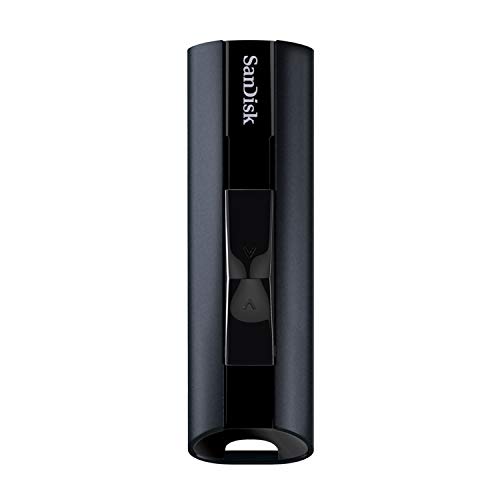
SanDisk Extreme PRO USB 3.2
Read speeds up to 420MB/s put this drive among the fastest standard USB-A flash drives available, useful for quickly moving large video files. A durable metal casing resists the wear that plastic drives show after frequent pocket or bag carrying. SanDisk includes a loop for attaching it to a keychain or lanyard without needing a separate case.
Pros
- 420MB/s read speed ranks among the fastest standard USB-A drives
- Metal casing holds up better to daily carrying than plastic drives
- Built-in keychain loop skips the need for a separate case
Cons
- Costs more per gigabyte than basic USB flash drives
- USB-A only, requiring an adapter for USB-C-only devices

SanDisk Ultra Dual Drive Luxe
A dual connector design puts USB-C on one end and USB-A on the other, letting the same drive plug directly into a phone or a computer without a separate adapter. A metal body on the Luxe version feels more durable than the plastic-bodied standard Ultra Dual Drive. SanDisk’s companion app simplifies backing up photos directly from a phone onto the drive.
Pros
- Dual USB-C and USB-A connectors skip the need for adapters
- Companion app simplifies backing up phone photos directly
- Metal body feels sturdier than the standard plastic Ultra Dual Drive
Cons
- Dual-connector design is bulkier than a single-connector drive
- Costs more than the standard SanDisk Ultra Dual Drive

Samsung FIT Plus
This drive sits nearly flush with a USB port once inserted, a design built specifically to avoid snagging in a laptop bag or getting bumped while plugged in. Despite the small size, it still reaches read speeds up to 400MB/s, matching larger drives on raw performance. A small loop hole allows attaching a lanyard despite the compact body.
Pros
- Low-profile design avoids snagging or bumping while plugged in
- 400MB/s read speed matches larger drives despite the small size
- Small loop hole still allows lanyard attachment
Cons
- Lower maximum capacity than larger-bodied drives on this list
- Compact size makes it easier to lose track of without a lanyard
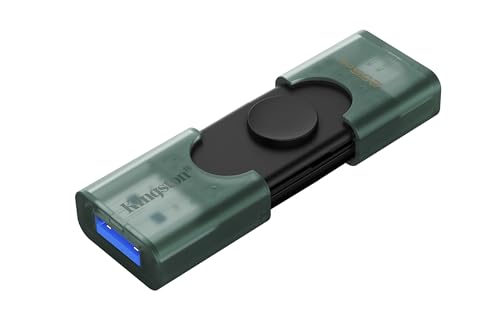
Kingston DataTraveler Max USB-C
A USB-C connector matches the port type on most current laptops and some phones, skipping the need for a USB-A adapter. Read speeds up to 1000MB/s take advantage of USB 3.2 Gen 2’s higher bandwidth, noticeably faster than standard USB-A drives on this list. High capacity options up to 1TB suit users consolidating large media libraries onto a single drive.
Pros
- USB-C connector matches most current laptop and phone ports directly
- 1000MB/s read speed outperforms standard USB-A drives on this list
- High capacity options suit large media libraries
Cons
- No USB-A connector, so older devices need a separate adapter
- Capless design slightly increases the risk of pocket lint reaching the connector

PNY Elite-X Fit
This drive covers everyday file transfer needs at a lower cost than premium high-speed options, reasonable for buyers who do not need maximum transfer speed. A low-profile plastic body keeps it compact, similar in concept to the Samsung FIT Plus but at a more accessible price point. Capacity options stay more modest, better suited to documents and photos than large video libraries.
Pros
- Lower cost than premium high-speed USB-A drives on this list
- Low-profile body avoids sticking out awkwardly from a laptop port
- Reasonable capacity options for documents and photos
Cons
- 200MB/s read speed trails premium drives like the SanDisk Extreme PRO
- Plastic body feels less durable than metal-bodied alternatives

Samsung BAR Plus
A solid metal unibody construction makes this drive notably more resistant to drops, water and bending than plastic-bodied alternatives. Samsung rates it for water resistance and a measure of shock resistance, details aimed at buyers who carry the drive loose rather than in a protective case. Read speeds up to 400MB/s keep performance competitive despite the focus on physical durability.
Pros
- Metal unibody construction resists drops and bending better than plastic drives
- Water resistance adds protection for drives carried loose in a bag
- 400MB/s read speed keeps pace with faster plastic-bodied drives
Cons
- Maximum capacity trails higher-end drives like the Kingston DataTraveler Max
- Metal body can feel slippery when handling with wet hands

SanDisk iXpand Flash Drive
A Lightning connector on one end lets this drive plug directly into compatible iPhone and iPad models, backing up photos and videos without a computer. SanDisk’s iXpand app manages transfers and can automatically back up a camera roll to free up phone storage. The other end uses USB-A, so the same drive still works with a standard computer for transferring files afterward.
Pros
- Lightning connector backs up iPhone and iPad photos without a computer
- Companion app can automate camera roll backups
- USB-A end still works with a standard computer afterward
Cons
- 90MB/s read speed trails every USB-C and USB-A-only drive on this list
- Limited to Lightning-equipped Apple devices for direct connection
How they stack up
| # | Model | Interface | Best for | Score | Price |
|---|---|---|---|---|---|
| 1 | SanDisk Extreme PRO USB 3.2 | USB 3.2 Gen 1 | Best Overall Speed | 9.2 | Check price |
| 2 | SanDisk Ultra Dual Drive Luxe | USB-C and USB-A dual connector | Best for Phone-to-Computer Transfers | 8.9 | Check price |
| 3 | Samsung FIT Plus | USB 3.1 | Best Compact Low-Profile | 8.6 | Check price |
| 4 | Kingston DataTraveler Max USB-C | USB-C, USB 3.2 Gen 2 | Best USB-C High Capacity | 9.0 | Check price |
| 5 | PNY Elite-X Fit | USB 3.1 | Best Budget | 8.0 | Check price |
| 6 | Samsung BAR Plus | USB 3.1 | Best Durable Metal Build | 8.7 | Check price |
| 7 | SanDisk iXpand Flash Drive | Lightning and USB-A | Best for iPhone and iPad | 8.3 | Check price |
Frequently asked questions
What is the difference between USB-A and USB-C flash drives?
USB-A, used on the SanDisk Extreme PRO, fits the older rectangular port found on many computers. USB-C, used on the Kingston DataTraveler Max, is the newer oval connector standard on current laptops and some phones.
Does a higher read speed actually matter for everyday use?
For large files like video, yes, since a 1000MB/s drive like the Kingston DataTraveler Max transfers much faster than a 200MB/s drive like the PNY Elite-X Fit. For small documents, the difference is barely noticeable.
Can a USB flash drive back up photos directly from a phone?
Yes, with the right connector and app. The SanDisk Ultra Dual Drive Luxe and SanDisk iXpand both include companion apps for backing up phone photos directly.
Is a metal flash drive actually more durable than plastic?
Generally yes. The Samsung BAR Plus and SanDisk Extreme PRO’s metal bodies resist bending and wear better than the plastic bodies on the PNY Elite-X Fit or Samsung FIT Plus.
How much capacity do I need for a flash drive?
Documents and photos rarely need more than 128GB, while video libraries benefit from the 1TB options available on the SanDisk Extreme PRO or Kingston DataTraveler Max.
Do dual-connector flash drives work on all phones?
They work with phones that have either USB-C or USB-A ports, but the SanDisk Ultra Dual Drive Luxe specifically does not include a Lightning connector for iPhone.
What is the difference between read speed and write speed?
Read speed measures how fast data comes off the drive, while write speed measures how fast data saves onto it. Manufacturers usually advertise read speed, as seen in all the specifications listed here.
Can an iPhone use a USB flash drive directly?
Only with a Lightning connector, as found on the SanDisk iXpand. Standard USB-A or USB-C-only drives need an adapter to work with an iPhone.
Is a low-profile flash drive worth it over a standard one?
For laptop users who carry the drive while plugged in, yes. The Samsung FIT Plus avoids snagging in a bag in a way a longer, standard-sized drive cannot.
The bottom line
The SanDisk Extreme PRO USB 3.2 earns the top recommendation for most buyers, since its fast read speed and metal build cover everyday and demanding file transfers reliably. Anyone who regularly moves files between a phone and computer should choose the SanDisk Ultra Dual Drive Luxe instead, as its dual connector skips the need for adapters. Buyers on a tighter budget should skip premium speed entirely and pick the PNY Elite-X Fit, which still handles documents and photos without issue.
Marcus Chen
Marcus covered consumer electronics for enthusiast tech publications for six years before joining ChoiceCrest. He specializes in translating manufacturer spec sheets into plain-language buying advice, with a focus on audio, computing accessories and smart-home gear.