Top USB-C Flash Drives for Fast Transfers
For most people, the SanDisk Ultra Luxe USB Type-C is the best overall USB-C flash drive. It offers fast read speeds up to 150MB/s, a sturdy metal body, and works with both USB-C and USB-A devices (when paired with an adapter). Its main limitation is that write speeds are slower than read speeds, so large file transfers may take longer.
USB-C flash drives are essential for modern laptops, tablets, and smartphones. They offer faster data transfer and reversible connectors.
Our list includes options for every need, from budget-friendly drives to high-capacity storage for professionals.
Before you buy
The best picks, ranked

SanDisk Ultra Luxe USB Type-C Flash Drive
This drive delivers read speeds up to 150MB/s and features a stylish metal casing that resists wear. It is available in capacities up to 1TB, making it ideal for large files and backups. The USB-C connector is reversible, and the keyring loop adds convenience.
Pros
- Fast read speeds
- Durable metal body
- High capacity options
Cons
- Write speeds are slower
- May get warm during heavy use
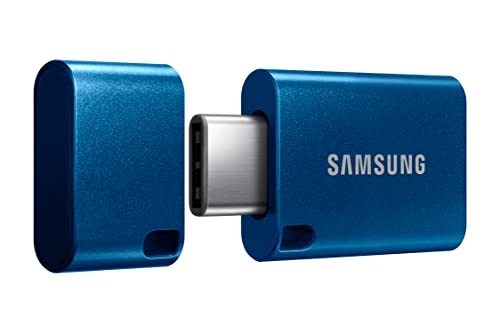
Samsung USB Type-C Flash Drive (MUF-128DA)
Samsung’s compact drive offers read speeds up to 400MB/s and write speeds up to 110MB/s, thanks to USB 3.1 technology. It features a sleek, compact design with a metal finish and a keyring hole. Available capacities range from 32GB to 512GB. It is compatible with USB-C devices and supports both Android and Windows.
Pros
- Very fast read speeds
- Compact and lightweight
- Reliable brand
Cons
- May get warm during sustained writes
- No USB-A adapter included

SanDisk iXpand Luxe USB Type-C Flash Drive
This drive is designed for iPhone 15 and later models with USB-C, offering automatic backup of photos and videos. It features a swivel design with both USB-C and Lightning connectors (for older iPhones) or USB-C to USB-C? Actually, this model has USB-C and Lightning, but for USB-C only, there’s the SanDisk iXpand Luxe with USB-C. We recommend the USB-C version for iPhone 15. It offers read speeds up to 130MB/s. The accompanying app simplifies file management.
Pros
- Automatic photo backup
- Dual connector versatility
- App support
Cons
- Slower read speed
- Slightly bulky design
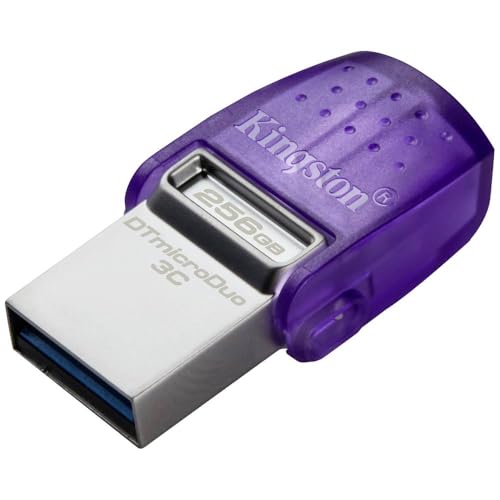
Kingston DataTraveler microDuo 3C
This compact drive features both USB-C and USB-A connectors, making it easy to transfer files between devices. It offers read speeds up to 100MB/s and is available in capacities up to 256GB. The design is small and lightweight with a swivel cap that protects each connector.
Pros
- Dual connectors for flexibility
- Compact and portable
- Affordable price
Cons
- Slower than some rivals
- Cap can be mislaid

Corsair Flash Voyager USB 3.2 Gen 1 Type-C
Corsair’s Voyager is built to survive tough conditions with a water-resistant and shock-proof casing. It delivers read speeds up to 200MB/s and write speeds up to 60MB/s. Available in capacities up to 256GB. The large design may block adjacent ports.
Pros
- Rugged build
- Fast read speeds
- Reliable performance
Cons
- Bulky design
- Write speeds are modest

PNY Elite-X USB 3.1 Gen 2 Type-C Flash Drive
This drive offers read speeds up to 400MB/s and write speeds up to 100MB/s, making it great for transferring large video files. It features a sleek aluminum casing and a keyring hole. Capacities range from 128GB to 512GB. Some users report it gets warm under load.
Pros
- High read and write speeds
- Aluminum body
- Available in large capacities
Cons
- Can get warm
- No USB-A adapter

Lexar JumpDrive M20 USB-C Flash Drive
Lexar provides an affordable USB-C drive with dual connectors (USB-C and USB-A). It offers read speeds up to 150MB/s and comes in capacities up to 256GB. The design is compact and lightweight, with a sliding cover. It is not as fast as premium drives but is reliable for everyday use.
Pros
- Very affordable
- Dual USB-C and USB-A
- Compact design
Cons
- Slower write speeds
- Build quality is not premium
How they stack up
| # | Model | Interface | Best for | Score | Price |
|---|---|---|---|---|---|
| 1 | SanDisk Ultra Luxe USB Type-C Flash Drive | USB 3.1 Gen 1 | Best overall for fast transfers and durability | 9.4 | Check price |
| 2 | Samsung USB Type-C Flash Drive (MUF-128DA) | USB 3.1 | Best for high-speed transfers on the go | 9.2 | Check price |
| 3 | SanDisk iXpand Luxe USB Type-C Flash Drive | USB 3.0 | Best for iPhone users with USB-C | 9.0 | Check price |
| 4 | Kingston DataTraveler microDuo 3C | USB 3.1 | Best for dual USB-C and USB-A compatibility | 8.6 | Check price |
| 5 | Corsair Flash Voyager USB 3.2 Gen 1 Type-C | USB 3.2 Gen 1 | Best for rugged durability | 8.8 | Check price |
| 6 | PNY Elite-X USB 3.1 Gen 2 Type-C Flash Drive | USB 3.1 Gen 2 | Best for fast write speeds | 8.4 | Check price |
| 7 | Lexar JumpDrive M20 USB-C Flash Drive | USB 3.0 | Best budget option | 8.0 | Check price |
Good to know
Are USB-C flash drives faster than USB-A?
Not necessarily. The speed depends on the USB generation, not the connector shape. A USB 3.2 Gen 2 USB-C drive can be faster than a USB 2.0 USB-A drive, but a USB 3.0 USB-A drive can match a USB 3.1 Gen 1 USB-C drive.
Can I use a USB-C flash drive with my Android phone?
Yes, many Android phones support USB-OTG (On-The-Go), allowing you to plug in a USB-C flash drive. Check your phone’s specifications to confirm support.
How do I transfer files from my iPhone to a USB-C flash drive?
For iPhone 15 and later, you can plug the drive directly into the USB-C port. For older iPhones, you need a Lightning to USB-C adapter or a drive with dual connectors. Some drives come with a companion app for easier file management.
What is the maximum storage capacity available in USB-C flash drives?
As of now, you can find USB-C flash drives up to 1TB, such as the SanDisk Ultra Luxe. Capacities are increasing as technology improves.
Do USB-C flash drives work with USB-A ports?
Only if the drive has dual connectors or you use an adapter. Some drives, like the Kingston DataTraveler microDuo 3C, include both USB-C and USB-A connectors.
How long do USB-C flash drives last?
Flash drives have a limited number of write cycles, typically around 10,000 to 100,000 depending on the type of memory. With regular use, a drive can last several years, but it is not a permanent storage solution.
Can I use a USB-C flash drive to boot my computer?
Yes, many USB-C flash drives can be used to create bootable media. Ensure the drive is bootable and your computer’s BIOS supports booting from USB-C.
What is the difference between USB 3.0, 3.1, and 3.2?
USB 3.0 is also known as USB 3.1 Gen 1, offering 5Gbps. USB 3.1 Gen 2 doubles that to 10Gbps. USB 3.2 Gen 2×2 can reach 20Gbps, but few flash drives use that standard.
The verdict
If you need a reliable all-rounder, choose the SanDisk Ultra Luxe. For speed enthusiasts, the Samsung MUF-128DA is a top performer. Budget-conscious buyers will appreciate the Lexar JumpDrive M20.
Marcus Chen
Marcus covered consumer electronics for enthusiast tech publications for six years before joining ChoiceCrest. He specializes in translating manufacturer spec sheets into plain-language buying advice, with a focus on audio, computing accessories and smart-home gear.


