Which USB Flash Drive Handles Big File Transfers Best
For repeated large transfers, the SanDisk Extreme PRO USB 3.2 leads because its SSD controller sustains write speed under load. Kingston’s DataTraveler Max reaches the highest peak throughput on a Gen 2 port, while the Samsung FIT Plus fits flush in a laptop port for permanent use.
Large repeated transfers favor the SanDisk Extreme PRO USB 3.2. Its internal SSD controller keeps write speed steady instead of collapsing mid copy. Samsung’s FIT Plus suits a laptop that never gets unplugged, since it sits nearly flush with the port. Kingston’s DataTraveler Max posts the highest peak numbers when paired with a USB 3.2 Gen 2 port.
Flash drive listings quote a read speed and rarely mention write speed, which is where budget drives stall on a big copy. We compared published read and write figures, connector types, and what owners report about heat and slowdown to rank the seven drives below.
How to pick the right one
How to tell if a flash drive is actually fast Listings advertise read speed because it is the bigger number, but copying files onto a drive is a write operation. Cheap drives use a small cache that fills after a few gigabytes, then write speed collapses to a fraction of the headline figure. SSD based drives, like the SanDisk Extreme PRO, hold speed steady through the whole transfer. Check the sustained write figure before buying if you move large files often.
USB 3.2 Gen 1 vs Gen 2: what the numbers mean USB 3.2 Gen 1 is the renamed USB 3.0 standard and tops out near 5 Gbps, roughly 400 to 450 MB/s in practice. Gen 2 doubles that ceiling to 10 Gbps, which is how drives like the Kingston DataTraveler Max reach 1000 MB/s. Both the drive and the host port need to support Gen 2, since a fast drive in a Gen 1 port runs at Gen 1 speed. Older USB 2.0 ports cap every drive near 40 MB/s regardless of its rating.
Type-A or Type-C: which connector fits your devices Type-A remains the rectangular connector found on desktops, cars and older laptops. Type-C now ships on most new laptops, tablets and phones. Dual ended drives such as the SanDisk Ultra Dual Drive Luxe carry both, a practical choice for moving files between a phone and a computer. A single connector drive means checking every device it needs to plug into first.
Why a flash drive should not be your only backup A single flash drive is convenient, not a backup plan, since it can be lost, stolen or fail without warning. Flash cells wear out gradually and give little notice before they stop holding data reliably. Treat it as one copy among several and keep the original stored elsewhere. Encryption is also worth enabling on any drive that leaves the house.
The shortlist, ranked

SanDisk Extreme PRO USB 3.2 Solid State Flash Drive
An SSD controller lives inside this drive’s aluminium shell, not a standard flash chip pair. Write speed holds near 380 MB/s through long transfers instead of dropping once a cache fills. The metal body doubles as a heatsink, and owners report predictable performance with large video files.
Pros
- Sustains write speed through long transfers
- Aluminium body manages heat during use
- Retractable connector needs no cap to lose
Cons
- Runs warm during sustained writes
- Type-A connector needs an adapter for USB-C laptops
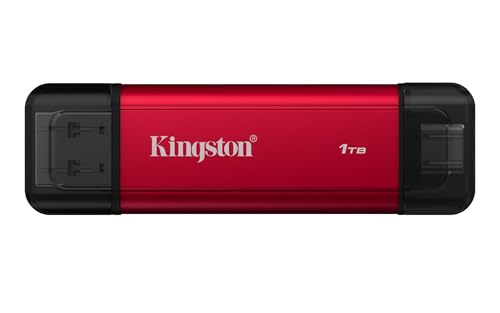
Kingston DataTraveler Max USB 3.2 Gen 2
Read speeds near 1000 MB/s put this drive roughly twice as fast as typical Gen 1 models. Reaching that figure requires a USB 3.2 Gen 2 port on the host machine. Owners report it runs hot under sustained load but stays the fastest option here on modern hardware.
Pros
- Highest quoted throughput in this lineup
- Sliding cap design leaves nothing to lose
- Available in large capacity options
Cons
- Needs a Gen 2 host port for full speed
- Heat builds up during long write sessions

Samsung FIT Plus USB 3.1 Flash Drive
This drive sits almost flush with the port, short enough to leave permanently in a laptop or car stereo. Metal housing resists water, heat, magnets and X-rays. Owners describe it as the default pick for expanding storage on a machine that stays plugged in.
Pros
- Small enough to leave installed permanently
- Durability ratings cover water, heat and magnets
- Strong read speed for its size
Cons
- Write speed trails its read speed by a wide margin
- Compact size makes it easy to lose once removed

SanDisk Ultra Dual Drive Luxe USB Type-C
Type-C sits on one end and Type-A on the other, so files move between a phone and a laptop without an adapter. A metal swivel body protects both connectors when not in use. Owners report it as the practical answer for backing up phone photos and video.
Pros
- Works with phones and computers without adapters
- Metal swivel body protects both connectors
- Convenient for offloading phone photos and video
Cons
- Write speed trails SSD based drives in this group
- Swivel mechanism loosens after heavy daily use
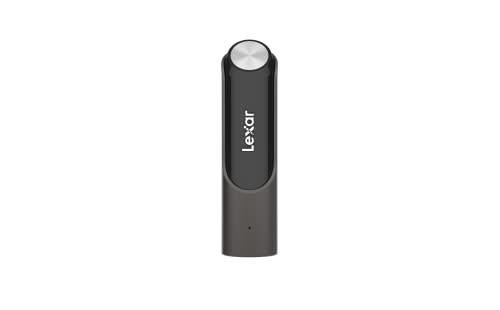
Lexar JumpDrive P30
Capacities climb to a full terabyte, territory usually reserved for external SSDs. Read and write speeds both sit near 450 MB/s, a balanced figure rather than a peak number. Owners report it works well as a portable media library where capacity matters more than raw speed.
Pros
- Large capacity options in a flash drive form
- Balanced read and write figures
- Sliding connector leaves no cap to lose
Cons
- Physically larger than most drives in this group
- Sustained writes slow down on the biggest transfers
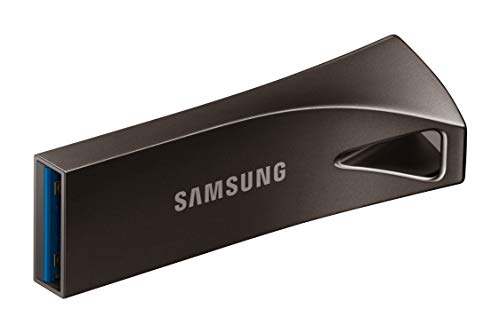
Corsair Flash Survivor Stealth
An anodised aircraft grade aluminium shell wraps this drive, sealed with a screw down cap and an EPDM gasket. Depth and shock ratings target job sites and outdoor use rather than desk duty. Owners report it survives drops and dunks that would destroy a plastic drive.
Pros
- Genuinely rugged rather than merely sturdy
- Screw cap and seal keep out water and dust
- Survives drops that disable plastic drives
Cons
- Bulky and heavy to carry on a keyring
- Transfer speeds trail current fast drives

PNY Pro Elite V2 USB 3.2
Read speeds near 600 MB/s beat typical everyday drives without the cost of an SSD based model. A capless sliding connector handles daily file transfer and backup duty. Owners report write speed drops on very large continuous copies but holds up fine for normal use.
Pros
- Strong read speed relative to typical pricing
- Capless sliding design leaves nothing to misplace
- Wide range of capacity options available
Cons
- Write speed falls away on long continuous transfers
- Plastic body is less durable than metal rivals
How they stack up
| # | Model | Interface | Best for | Score | Price |
|---|---|---|---|---|---|
| 1 | SanDisk Extreme PRO USB 3.2 Solid State Flash Drive | USB 3.2 Gen 1 Type-A | Best overall | 9.4 | Check price |
| 2 | Kingston DataTraveler Max USB 3.2 Gen 2 | USB 3.2 Gen 2 | Best for peak speed | 9.2 | Check price |
| 3 | Samsung FIT Plus USB 3.1 Flash Drive | USB 3.1 Type-A | Best compact drive | 9.0 | Check price |
| 4 | SanDisk Ultra Dual Drive Luxe USB Type-C | USB 3.1 Type-C and Type-A | Best for phones and tablets | 8.8 | Check price |
| 5 | Lexar JumpDrive P30 | USB 3.2 Gen 1 Type-A | Best for large capacities | 8.6 | Check price |
| 6 | Corsair Flash Survivor Stealth | USB 3.0 Type-A | Best for rough conditions | 8.3 | Check price |
| 7 | PNY Pro Elite V2 USB 3.2 | USB 3.2 Gen 2 | Best value | 8.0 | Check price |
Good to know
Why is my flash drive slower than the advertised speed?
A USB 2.0 port on the host is the most common cause, since it caps every drive near 40 MB/s. A Gen 1 port also limits a Gen 2 drive to Gen 1 speed. Copying many small files is inherently slower than one large file, regardless of the drive.
Which format works best, exFAT, NTFS or FAT32?
exFAT suits most people because it works on Windows, macOS and most modern devices, and handles files over 4 GB. NTFS fits Windows only use. FAT32 caps files at 4 GB but remains the most compatible choice for older devices, cars and TVs.
How long does data last on a flash drive?
Unpowered flash storage generally holds data reliably for several years. It is not an archival medium, and retention degrades over long stretches without power. Anyone keeping files for a decade should plug the drive in periodically and keep a second copy elsewhere.
Do flash drives wear out over time?
Yes, flash cells have a finite number of write cycles. A normal user rarely comes close to exhausting them. Drives used for constant rewriting, like running software or a database, wear out far faster than drives used for occasional transfers.
Can I use a flash drive with my phone?
Android phones with USB Type-C generally support USB On-The-Go and read a Type-C drive directly. iPhones with a USB-C port can do the same through the Files app. Dual connector drives make moving files between a phone and a computer easier.
What capacity should I buy?
64 GB or 128 GB covers documents and general file transfer. Video work and media libraries justify 256 GB or more. A portable SSD usually beats a flash drive on speed and reliability above roughly 500 GB.
Is it safe to just pull the drive out without ejecting?
Modern operating systems use a write policy that makes this reasonably safe once a transfer finishes. The eject step still exists because a write can be pending in the background. Ejecting properly costs a few seconds and avoids a corrupted file system.
Do I need an encrypted flash drive?
Yes, if the drive carries sensitive files and leaves your home or office. A hardware encrypted model is not strictly necessary. BitLocker To Go on Windows and encrypted disk images on macOS both work well with a standard drive.
Which is faster, USB 3.2 Gen 1 or Gen 2?
Gen 2 doubles the bandwidth ceiling of Gen 1, moving from roughly 5 Gbps to 10 Gbps. That difference shows up as read speeds near 1000 MB/s on Gen 2 drives like the Kingston DataTraveler Max, versus 400 to 450 MB/s on Gen 1 models. Reaching Gen 2 speed still requires a matching port on the host.
The bottom line
The SanDisk Extreme PRO USB 3.2 is worth the extra outlay for anyone who moves large files regularly, since it behaves like an SSD rather than a flash drive under sustained load. Samsung’s FIT Plus fits better for permanently expanding a laptop’s storage. For moving files between a phone and a computer, the SanDisk Ultra Dual Drive Luxe solves that problem more cleanly than any adapter.
Marcus Chen
Marcus covered consumer electronics for enthusiast tech publications for six years before joining ChoiceCrest. He specializes in translating manufacturer spec sheets into plain-language buying advice, with a focus on audio, computing accessories and smart-home gear.

