Top USB Fans for Desks, Travel, and Warm Nights
The OPOLAR USB Desk Fan stands out for its powerful airflow and whisper-quiet operation, making it a top pick for office and home use. It offers three speed settings, a 90 degree pivoting head, and runs off any USB port. Its main limitation is that it lacks a built-in battery, so it requires a continuous power source.
USB fans have become essential gadgets for staying cool in stuffy offices, dorm rooms, and during travel. They plug into any USB port, laptop, power bank, or wall adapter, making them incredibly versatile. With countless options on the market, choosing the right one can be overwhelming.
This roundup highlights seven of the best USB fans available on Amazon, each suited for different needs. From compact travel models to powerful desktop blowers, we break down their specs, pros, and cons to help you make an informed choice.
Before you buy
What we recommend

OPOLAR USB Desk Fan
The OPOLAR USB Desk Fan delivers powerful airflow with a brushless motor that stays quiet. It features a 90 degree adjustable head and three speed settings. Its compact design fits neatly on desks, and the base is sturdy to prevent tipping.
Pros
- Strong airflow for its size
- Very quiet at low speeds
- Stable base
Cons
- No battery, requires USB power
- Not portable without a power bank

VersionTECH USB Fan
The VersionTECH USB Fan is a flexible clip-on fan that can attach to desks, strollers, or bed frames. Its gooseneck design allows you to bend it to any angle. It offers three speed settings and runs quietly.
Pros
- Versatile clip and bendable neck
- Compact and lightweight
- Good airflow for personal cooling
Cons
- Clip may not fit thick surfaces
- No battery backup

Honeywell TurboForce Power Fan
The Honeywell TurboForce Power Fan is a compact but mighty fan that moves a surprising amount of air. It features a 90 degree pivot and can be powered by USB or AC adapter. This fan is ideal for cooling a small room or workspace.
Pros
- Exceptionally strong airflow
- Durable construction
- Can be powered by USB or wall outlet
Cons
- Noisier on high speed
- Not battery powered
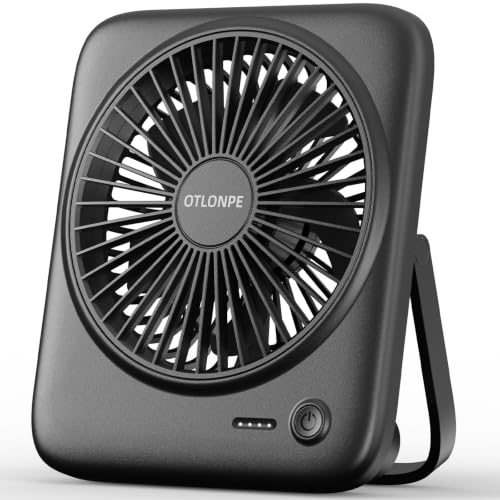
Anker Cordless USB Fan
The Anker Cordless USB Fan features a built-in rechargeable battery that provides hours of cooling on the go. It has a sturdy base and adjustable tilt. It’s perfect for camping, outdoor events, or when you’re away from a power source.
Pros
- Long battery life
- Powerful yet quiet motor
- Stable and well built
Cons
- Heavier than other portable fans
- Charging cable is short

SkyGenius Portable USB Fan
The SkyGenius Portable USB Fan is an affordable option that doesn’t compromise on performance. It has a compact footprint and a quiet motor. It can be powered by USB or by 4 AA batteries (not included) for portability.
Pros
- Very affordable
- Can run on batteries for portability
- Lightweight and easy to carry
Cons
- Airflow is not as strong as pricier models
- Batteries not included

Homasy USB Rechargeable Fan
The Homasy USB Rechargeable Fan is designed for quiet operation, making it perfect for sleeping. It features a built-in battery that can last up to 20 hours on low. The fan has a stylish design and a timer function for automatic shut-off.
Pros
- Very quiet motor
- Long battery life
- Timer and remote control (on some models)
Cons
- Remote control not included with all versions
- Slightly larger footprint

Lasko 3300 USB Fan
The Lasko 3300 USB Fan is a compact personal fan that attaches to your desk or laptop via USB. It features a simple tilt adjustment and two speed settings. It’s lightweight and ideal for travel or small workspaces.
Pros
- Extremely compact and portable
- Simple to use
- Affordable
Cons
- Only two speeds
- Airflow is moderate
Compared at a glance
| # | Model | Dimensions | Best for | Score | Price |
|---|---|---|---|---|---|
| 1 | OPOLAR USB Desk Fan | 6.3 x 5.5 x 8.7 inches | Desk use with strong airflow | 9.4 | Check price |
| 2 | VersionTECH USB Fan | 6.1 x 3.9 x 3.7 inches | Clip-on use for strollers or desks | 8.8 | Check price |
| 3 | Honeywell TurboForce Power Fan | 7.6 x 5.4 x 10.1 inches | Powerful airflow for larger spaces | 9.0 | Check price |
| 4 | Anker Cordless USB Fan | 6.5 x 6.5 x 10 inches | Portable use without wires | 9.2 | Check price |
| 5 | SkyGenius Portable USB Fan | 5.9 x 5.3 x 6.3 inches | Budget-friendly personal cooling | 8.6 | Check price |
| 6 | Homasy USB Rechargeable Fan | 6.3 x 5.5 x 8.7 inches | Bedside use with long battery life | 8.9 | Check price |
| 7 | Lasko 3300 USB Fan | 4.25 x 2.75 x 5.5 inches | Desk use with easy tilt and compact size | 8.5 | Check price |
Good to know
Can USB fans run on batteries?
Yes, some USB fans have built-in rechargeable batteries, allowing them to run without being plugged in. Others may require AA batteries. Check the product specifications to see if the fan has battery capability.
Are USB fans powerful enough to cool a room?
USB fans are designed for personal cooling, not for cooling entire rooms. They are best used when placed close to you, such as on a desk or bedside table. For larger spaces, you would need a more powerful fan.
How long can a USB fan run on a power bank?
The runtime depends on the fan’s power draw and the power bank’s capacity. A typical USB fan draws around 2.5 to 5 watts. With a 10,000mAh power bank, you might get anywhere from 5 to 10 hours of use, depending on the speed setting.
Are USB fans safe to use with laptops?
Yes, USB fans are safe to use with laptops as long as they draw less power than the USB port provides (usually 0.5A to 1.5A). Most USB fans are low-power devices and won’t overload your laptop’s USB port.
Can I leave a USB fan running overnight?
Yes, most USB fans are designed to run for extended periods. However, if you’re using a battery-powered fan, it will eventually run out of charge. For continuous use, plug it into a power source.
Do USB fans make a lot of noise?
Noise levels vary by model. Many USB fans are designed to be quiet, especially at lower speeds. Look for fans with brushless motors and check customer reviews for noise complaints.
Can USB fans be used with a phone charger?
Yes, you can plug a USB fan into any USB wall charger (like the one for your phone) to power it. Just make sure the charger provides enough current (usually 1A or higher) for optimal performance.
Are there USB fans with remote controls?
Some higher-end USB fans come with remote controls, allowing you to adjust speeds and timer settings from a distance. These are convenient for bedside use or when the fan is out of arm’s reach.
Our take
For most people, the OPOLAR USB Desk Fan is the best choice due to its powerful airflow and quiet operation. If you need portability, the Anker Cordless USB Fan offers exceptional battery life without sacrificing performance. For those on a tight budget, the SkyGenius Portable USB Fan provides adequate cooling at a bargain price.
Marcus Chen
Marcus covered consumer electronics for enthusiast tech publications for six years before joining ChoiceCrest. He specializes in translating manufacturer spec sheets into plain-language buying advice, with a focus on audio, computing accessories and smart-home gear.


