Which Universal Remote Fits Your Home Theater Setup
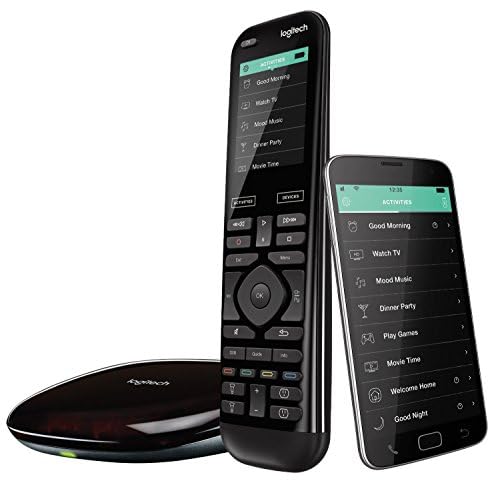
The SofaBaton X1S leads this comparison, pairing an IR hub with app-guided setup to reach devices without a clear line of sight. The SofaBaton U2 offers similar ease at a lower tier, while the GE 4-Device Universal Remote handles basic TV and soundbar control at minimal cost.
The SofaBaton X1S suits most mixed living rooms, since its hub reaches gear tucked behind cabinet doors. Owners report the companion app trims setup time compared to old code-list remotes. Households without hidden components can often save money with a line-of-sight clicker instead.
Setup complexity varies by household, so no single remote fits every shelf of gear. We compared device count, control method, app support, and macro features across seven current listings. Owner feedback and published specifications guided the picks below, not marketing copy.
How to choose
How many devices does a universal remote need to control? Device count decides which remote works for you. A TV paired with one soundbar rarely needs more than four slots, while a stack of streaming box, receiver, and cable box calls for eight to ten. Buy for the messiest shelf in the room, not the tidiest one.
Line of sight or hub control for gear behind cabinet doors? Standard infrared travels in a straight line, so components hidden behind cabinet doors stay unreachable. An IR hub or Wi-Fi blaster solves that by rebroadcasting the signal around the room. Open shelving rarely needs this extra step, and a plain line-of-sight remote works fine there.
Which setup style fits beginners versus AV enthusiasts? Code-entry remotes ask beginners to type in numbers from a manual, which feels tedious. App-guided models walk new owners through pairing step by step instead. Enthusiasts running niche streaming boxes or receivers often prefer a learning remote that copies commands directly from an existing clicker.
Do activity macros and smart-home routines matter for daily use? An activity button can power on a TV, switch inputs, and start a soundbar in one press. Wi-Fi models extend that further into voice assistants and automation schedules. Shoppers who only swap between two devices rarely need this, but multi-component households save real time with it.
Our top picks

SofaBaton X1S
An IR hub lets the X1S reach gear hidden inside cabinets, unlike remotes that need a clear line of sight. Setup runs through a companion app instead of manual code entry. Activity buttons launch a full routine, such as TV and soundbar together, with one press.
Pros
- Reaches devices behind cabinet doors
- App-based setup skips code hunting
- One-touch activity macros
Cons
- Costs more than basic clickers
- Hub needs its own outlet and spot

SofaBaton U2
The U2 controls up to eight devices without a separate hub, relying on standard infrared. A small OLED screen labels each mode so buttons stay easy to identify. App-guided pairing replaces the trial and error of typing in codes.
Pros
- App pairing instead of code guessing
- OLED screen labels each mode
- Covers eight devices at a lower tier
Cons
- Needs a clear line of sight
- No hub for gear behind doors

Logitech Harmony 665
Ten device slots and Logitech’s long-running compatibility database make the Harmony 665 suited to sprawling AV racks. Activity buttons chain several components into one startup sequence. Logitech discontinued the Harmony line, yet owner reviews still describe remaining stock as reliable.
Pros
- Largest device count in this group
- Deep compatibility database
- Chains multiple components per activity
Cons
- Line discontinued by Logitech
- Setup software feels dated

GE 4-Device Universal Remote
This GE remote covers four devices through manual code entry, with no app required. AA batteries power a layout close to a standard TV remote. Owners mainly use it to replace a lost or broken original remote.
Pros
- Low cost replacement option
- Familiar button layout
- Steady range for everyday use
Cons
- No app or macro support
- Codes require manual entry

Inteset INT-422 4-in-1
The INT-422 learns commands directly from other remotes, filling gaps that preprogrammed codes miss on streaming boxes and receivers. It targets media-center setups running Apple TV, Kodi, or dedicated AV components. Programming takes longer than app-based remotes but reaches devices generic clickers skip.
Pros
- Learns commands other remotes miss
- Strong support for streaming boxes
- Suited to AV receiver setups
Cons
- Programming takes patience
- Plain, utilitarian design
One For All Smart Control
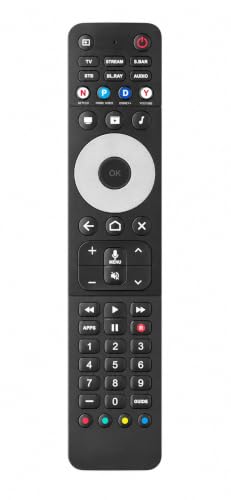
Guided setup walks new owners through pairing three devices without a manual. Buttons stay large and clearly labeled for quick recognition. No app or hub is involved, which keeps the learning curve low for a first universal remote.
Pros
- Guided setup suits first-time users
- Large, clearly labeled buttons
- Works right out of the box
Cons
- Covers only three devices
- Lacks activity macros

BroadLink RM4 Pro
Instead of a handheld clicker, the RM4 Pro turns a smartphone into the remote through Wi-Fi and an IR blaster. It links AV gear into smart-home routines and voice assistant commands. Households already using automation apps get the most value from this setup.
Pros
- Phone replaces a physical remote
- Fits into smart-home routines
- Adds voice assistant control
Cons
- No physical remote included
- Depends on Wi-Fi and phone app
Compared at a glance
| # | Model | Devices | Best for | Score | Price |
|---|---|---|---|---|---|
| 1 | SofaBaton X1S | Many via hub | Best overall | 9.4 | Check price |
| 2 | SofaBaton U2 | Up to 8 | Best value | 9.1 | Check price |
| 3 | Logitech Harmony 665 | Up to 10 | Best for large setups | 8.9 | Check price |
| 4 | GE 4-Device Universal Remote | Up to 4 | Best budget | 8.6 | Check price |
| 5 | Inteset INT-422 4-in-1 | 4-in-1 | Best for AV enthusiasts | 8.4 | Check price |
| 6 | One For All Smart Control | Up to 3 | Best for beginners | 8.2 | Check price |
| 7 | BroadLink RM4 Pro | Many via app | Best for smart-home control | 8.0 | Check price |
Common questions
What is the best universal remote overall?
The SofaBaton X1S ranks highest in this comparison. Its IR hub reaches devices behind cabinet doors, and the companion app replaces manual code entry. Activity buttons then run a full routine with one press.
How do I choose a universal remote for a hidden AV cabinet?
Look for a model with an IR hub or Wi-Fi blaster, since standard remotes need a clear line of sight. The SofaBaton X1S and BroadLink RM4 Pro both rebroadcast signals around closed doors.
Can one universal remote replace all my remotes?
Often yes, if it supports eight to ten devices and activity macros. A TV, soundbar, streaming box, and receiver can consolidate into one clicker. Very new or niche devices sometimes lack preset codes, so check compatibility first.
Are Logitech Harmony remotes still worth buying?
Logitech discontinued the Harmony line, but remaining stock like the Harmony 665 still works and draws favorable owner reviews. Newer app-based options may receive support longer, so weigh that against the larger device database.
What is an IR blaster hub and do I need one?
It is a small powered unit that receives a command and rebroadcasts infrared around a room. You need one only if components sit behind doors or in another spot, since open shelving works fine with standard line-of-sight control.
Can a smartphone work as a universal remote?
Yes, with a Wi-Fi IR blaster such as the BroadLink RM4 Pro. It turns a phone into the controller and adds smart-home routines, though you lose the tactile buttons of a physical remote.
Is a universal remote hard to set up?
Older code-entry models take longer, since you punch in numbers from a manual. App-guided remotes walk you through pairing instead, and owners consistently describe that process as faster and less frustrating.
What is the best universal remote for beginners?
The One For All Smart Control keeps setup simple, guiding new owners through pairing three devices with large, labeled buttons. It skips apps and hubs entirely, which lowers the learning curve for a first remote.
How do we compare universal remotes?
We compare published specifications, including device count, control method, and macro support, alongside what owners report after using each model. The ranking reflects specification comparisons and owner feedback, not marketing claims.
Our pick
The SofaBaton X1S remains the strongest all-around pick for mixed AV setups, thanks to its hub and app-based control. Shoppers without hidden gear get similar convenience from the SofaBaton U2 for less. For a single lost remote, the GE 4-Device model offers the fastest, cheapest fix.
Marcus Chen
Marcus covered consumer electronics for enthusiast tech publications for six years before joining ChoiceCrest. He specializes in translating manufacturer spec sheets into plain-language buying advice, with a focus on audio, computing accessories and smart-home gear.