Tablet Stands Compared for Desks, Beds and Counters
Lamicall Tablet Stand Holder covers most situations, taking 4.7 to 13 inch devices on a weighted aluminum base. Twelve South HoverBar Duo lifts an iPad to eye level for calls. OMOTON T1 handles reading and recipes at the low end of the range.
Lamicall Tablet Stand Holder is the safe default for a desk or a counter, holding a 12.9 inch iPad Pro in a case without creeping when you tap. Aluminum mass and silicone pads do that work. Fixed height is the tradeoff, so video calls still catch you from below.
Stands fail when buyers match the styling and ignore the load, because a large tablet levers a light plastic base over on first touch. We compared supported size ranges, base mass and grip, adjustment range and port clearance, then read owner feedback on wobble during typing and whether thick cases clear the cradle.
The top picks, ranked

Lamicall Tablet Stand Holder
A single aluminum hinge sets anything from near vertical to a shallow reading angle, and the weighted foot absorbs finger pressure on a 12.9 inch screen. Silicone pads sit on both the cradle and the underside, protecting finishes and gripping glass desks. Behind the cradle, a cutout keeps the charging port reachable while docked.
Pros
- Holds a 12.9 inch tablet in a case without creep
- Silicone contact points protect desk and device
- Cable routes behind the cradle instead of across it
Cons
- Screen height is fixed, so the neck angle stays down
- Cradle is wider than a phone needs

Twelve South HoverBar Duo
Two mounts arrive in one box: a weighted desk base and a clamp for shelf edges, bed frames or cabinet lips. An articulating metal arm raises an iPad to eye level, which is the only real fix for a camera aimed at your ceiling. Assembly runs a few minutes using the supplied key.
Pros
- Puts the front camera at actual eye level
- Clamp reaches shelves, counters and bed frames
- Cradle rotates between portrait and landscape
Cons
- Arm bounces on a desk that flexes
- Setup and adjustment take longer than a fixed stand

OMOTON T1 Tablet Stand
One folded aluminum bar carries two rubber lined grooves, and that is the whole product. Devices from 4 to 11 inches rest at a fixed reading angle suited to recipes, video and second screen duty. Nothing hinges, so nothing loosens over a year of daily propping.
Pros
- No moving joints to sag over time
- Rubber grooves grip cases without marking them
- Cheapest route to a stable metal stand
Cons
- Viewing angle cannot be changed at all
- Grooves stop short of a 12.9 inch tablet

UGREEN Foldable Tablet Stand
Twin hinges collapse this one to roughly the outline of a phone, thin enough for a laptop sleeve pocket. Opened out, it supports 4.7 to 12.9 inch devices from upright down to almost flat. Hotel desks and cafe tables are the target, and the lowest setting works as a sketching platform.
Pros
- Slips flat into a laptop bag pocket
- Angle range covers upright viewing and drawing
- Takes a 12.9 inch tablet despite folding small
Cons
- Lighter than a weighted base, so it shifts on wobbly tables
- Hinge tension drops with heavy daily folding
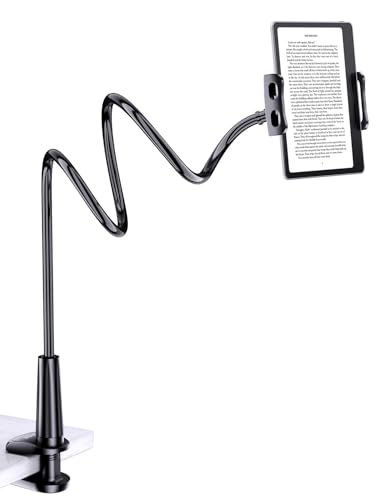
Tryone Gooseneck Tablet Holder
A long gooseneck clamps to a bed frame, headboard or desk edge and suspends the screen directly over the viewer. Watching video lying flat is the reason this format exists. Every tap sets off a short bounce, which suits playback and rules out typing or drawing.
Pros
- Holds a screen overhead, which no desk stand can do
- Clamp grips round and square frame tubing
- Leaves both hands completely free
Cons
- Screen swings for a second after each touch
- Cradle stops at 10.5 inches, so large iPads are out

Viozon Tablet Stand Holder
Clamping at the desk edge frees the surface below, which counts when a tablet shares space with a keyboard and a monitor. Its aluminum arm turns a full 360 degrees and swings the screen aside between tasks. Sprung cradle jaws take devices from about 7.9 to 13 inches.
Pros
- Uses no desk surface whatsoever
- Swings aside without unmounting the tablet
- Sprung jaws hold 13 inch screens securely
Cons
- Needs a desk edge with clearance underneath
- Repositioning the arm takes both hands

Nulaxy A4 Tablet Stand
A raised stem carries the cradle above counter clutter, keeping a recipe readable while bowls and boards fill the space below. Its broad base shrugs off knocks during prep. Aluminum wipes down after floury hands, where fabric or textured plastic holds the residue.
Pros
- Lifts the screen clear of splashes and clutter
- Wide base resists knocks during prep
- Metal surfaces wipe clean in seconds
Cons
- Taller profile catches a passing sleeve
- Cradle joint drifts under the heaviest tablets
The lineup, side by side
| # | Model | Supported sizes | Best for | Score | Price |
|---|---|---|---|---|---|
| 1 | Lamicall Tablet Stand Holder | 4.7 to 13 inch devices | Best overall | 9.4 | Check price |
| 2 | Twelve South HoverBar Duo | Weighted base or edge clamp | Best for video calls | 9.2 | Check price |
| 3 | OMOTON T1 Tablet Stand | 4 to 11 inch devices | Best budget | 9.0 | Check price |
| 4 | UGREEN Foldable Tablet Stand | 4.7 to 12.9 inch devices | Best for travel | 8.7 | Check price |
| 5 | Tryone Gooseneck Tablet Holder | Long flexible gooseneck | Best for bed | 8.5 | Check price |
| 6 | Viozon Tablet Stand Holder | Desk edge clamp | Best for crowded desks | 8.2 | Check price |
| 7 | Nulaxy A4 Tablet Stand | 4.7 to 13 inch devices | Best for kitchen counters | 8.0 | Check price |
What to look for
What to look for in a tablet stand Load and leverage decide this, not looks. A 12.9 inch iPad Pro in a keyboard case weighs several times a small tablet, and that mass sits high above the base. Light plastic tips as soon as a finger presses the top of the screen. Aim for a metal frame with a weighted or wide foot, or a clamp that borrows stability from the furniture. Read the stated size range rather than the photo, because plenty of cradles stop at 11 inches. Case thickness is the quiet failure: narrow grooves built around a bare tablet will not close on a rugged case.
Why viewing height matters more than tilt Angle adjustment is common, height adjustment is not, and that gap leaves most screens low with your neck bent. Recipes and second screen work tolerate it, since you glance down anyway. Video calls do not, because a low camera frames your chin and the ceiling. Articulating options such as Twelve South HoverBar Duo and the Viozon clamp arm raise the screen and solve both complaints together. Daily callers should treat height as the deciding spec and everything else as secondary.
Desk stands, gooseneck arms and clamps compared Three formats cover nearly every situation. Desktop stands stay steadiest and need no installation, but they eat surface space and hold the screen low. Gooseneck arms reach positions nothing else can, including straight overhead in bed, and pay for it with bounce after each tap. Clamps free the desk entirely and grip larger tablets well, provided the edge has clearance below. Settle the format against the room first, since the finest desk stand still solves nothing on a kitchen counter.
Choosing for the kitchen, the bedside or a bag Kitchens punish low cradles, where flour, water and mixing bowls all compete for the counter. Nulaxy A4 lifts the screen clear and cleans up afterwards. Bedside use inverts the problem, and only a gooseneck such as the Tryone puts a screen above someone lying flat. Frequent travellers should skip both for the UGREEN foldable, which flattens to phone size in a laptop sleeve. For a single stand that handles the desk and everything adjacent, Lamicall stays the default.
Frequently asked questions
Which tablet stand works with a 12.9 inch iPad Pro?
Lamicall, UGREEN Foldable, Viozon and Twelve South HoverBar Duo all cover that size. OMOTON T1 stops near 11 inches and the Tryone gooseneck at 10.5 inches.
Will a tablet stand work with the case still on?
Slim folio cases fit almost anywhere. Rugged cases need a groove around half an inch wide, so check the listed groove dimension before ordering if yours is bulky.
What is the best tablet stand for bed?
A gooseneck holder such as the Tryone, which clamps to the frame and suspends the screen overhead. No desk stand reaches that position at any tilt setting.
Can a tablet stand hold a phone as well?
Most can. Stands quoting a lower limit near 4 to 4.7 inches accept phones, though a tablet width cradle leaves a phone looking small and less secure in portrait.
How do I stop my tablet stand from tipping?
Pick a weighted metal base, keep the tilt closer to upright, and press nearer the middle of the screen than the top. Clamp mounts remove the failure mode entirely.
Are gooseneck tablet holders steady enough for typing?
No. Flexible arms rebound for a second after every tap, which video tolerates and text entry does not. Use a rigid desk stand or a clamp arm for input heavy work.
What tablet stand is best for following recipes?
Nulaxy A4, because its raised stem keeps the screen above bowls and splashes on a wide base. Aluminum also cleans up after sticky hands better than plastic or fabric.
Lamicall vs OMOTON: which tablet stand should I choose?
Lamicall takes up to 13 inches with an adjustable hinge and a weighted foot. OMOTON T1 is fixed angle and stops near 11 inches, with no joint that can ever loosen.
Do tablet stands block the charging port?
Better designs do not. Lamicall cuts an opening behind the cradle for a cable, while narrow groove stands can pinch a cable routed straight down from the port.
The bottom line
Lamicall Tablet Stand Holder is the stand to buy for a desk or counter, holding 13 inch screens steady and keeping the charging port usable. Anyone on daily video calls should pay more for Twelve South HoverBar Duo, since raising the camera to eye level is the one thing a fixed stand cannot do. Travellers who mostly work from hotel desks get better value from the UGREEN foldable.
Dana Whitfield
Dana spent eight years buying and merchandising for a regional kitchenware retailer before moving into editorial work. She has handled thousands of SKUs across cookware, small appliances and kitchen organization, and focuses on the practical differences that matter once a product is actually in daily use.


